🚀 *Gen AI Engineer (Production Focused)*
 👆 What is Haptic Feedback?
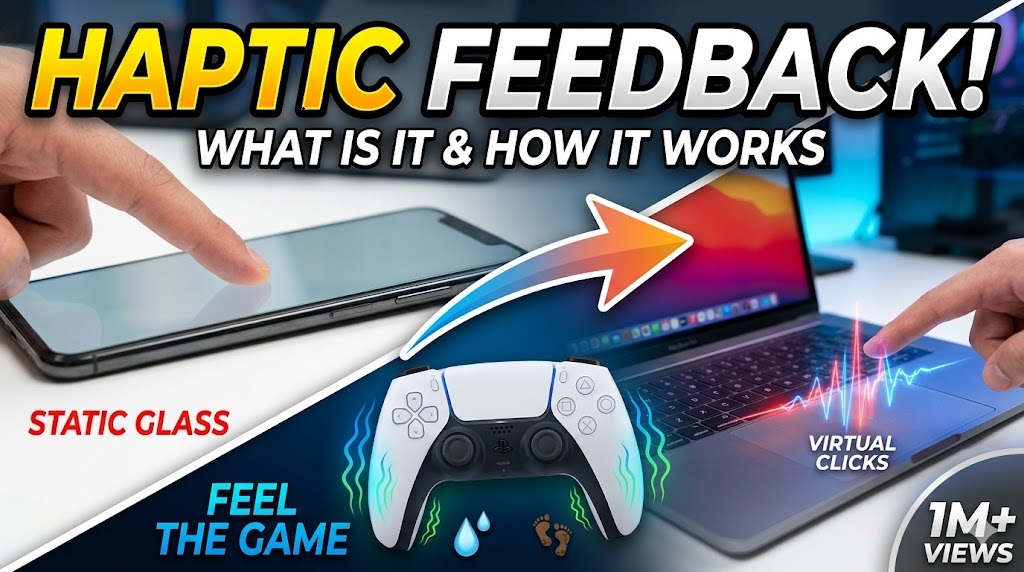
Haptic feedback is the use of touch to communicate with a user. Instead of relying only on sight 👁️ (displays) or sound 🔊 (alerts), a device uses physical forces, vibrations, or motions to give you a tactile response.
Think of it as digital touch ✨. When you interact with a screen or a controller, haptic feedback makes the flat glass or plastic feel alive by simulating the physical textures, clicks, or impacts of the real world 🌍.
📈 The Evolution: Old Vibration vs. Modern Haptics
Haptics have evolved dramatically over the last few years:
- 🧱 Traditional Vibration: Uses a simple, spinning weight inside a device. It’s binary — it is either entirely “on” or “off” 🔘. It creates a buzzy, uniform rumble (like a flip phone vibrating on a wooden table 📳).
- ⚡ Modern Haptics: Uses precise linear actuators (like Apple’s Taptic Engine 🍏 or the voice coils in advanced controllers 🎛️) that can fire off tiny, exact micro-vibrations. They can change frequency, intensity, and duration instantly, letting you feel a crisp “click,” a heavy thud, or a gentle wave 🌊.
🌟 Everyday Examples
🎮 1. Gaming: The PlayStation DualSense Controller
Gaming provides some of the most advanced examples of modern haptics. Instead of just rumbling generic texturing when you take damage 💥, the actuators inside the handles can mimic environmental textures 🌲.
- 🌧️ The Experience: When playing a modern game, walking through deep mud feels like a slow, heavy, sluggish resistance in your hands 🤲. If your character steps into a rainstorm, the controller creates tiny, scattered micro-pulses across the grips, perfectly mimicking the sensation of individual raindrops striking your hands 💧.
📱 2. Smartphones: Virtual Keyboards & Trackpads
If you type on a modern smartphone, you’ve experienced haptics ⌨️.
- 💥 The Sensation: Even though you are tapping a completely flat pane of glass, every letter you press gives a tiny, instantaneous “pop” or “click” beneath your thumb 👍.
- 🧠 The Illusion: It tricks your brain into thinking you are pressing a physical button down and watching it spring back up 🔘. Similarly, MacBook trackpads 💻 don’t actually move down when you click them; a haptic motor simply fires a downward pulse so precisely that your brain is entirely convinced the glass bent under your finger.
🚗 3. Automotive: Touchscreen Dashboards
Many modern cars use large touchscreens 🖥️ for climate ❄️ and radio 📻 control. To keep you from taking your eyes off the road 👀, the screen will emit a sharp, physical pulse when your finger successfully hits a virtual button, confirming your selection without forcing you to look down to verify ✅.
👆 Haptic Feedback అంటే ఏమిటి?
Haptic feedback అంటే యూజర్తో కమ్యూనికేట్ చేయడానికి touch (స్పర్శ) 👆 ని ఉపయోగించడం. కేవలం sight 👁️ (displays) లేదా sound 🔊 (alerts) మీద మాత్రమే ఆధారపడకుండా, ఒక డివైజ్ మీకు tactile response ఇవ్వడానికి physical forces, vibrations, లేదా motions ని ఉపయోగిస్తుంది.
దీన్ని మీరు ఒక digital touch ✨ లాగా అనుకోవచ్చు. మీరు ఒక screen లేదా controller తో interact అయినప్పుడు, ఈ haptic feedback అనేది real world లోని physical textures, clicks, లేదా impacts ని simulate చేస్తుంది 🌍. దీనివల్ల ఆ flat glass లేదా plastic కి ఒక ప్రాణం వచ్చినట్లు అనిపిస్తుంది.
📈 The Evolution: Old Vibration vs. Modern Haptics
గడిచిన కొన్ని సంవత్సరాలలో Haptics చాలా డ్రామాటిక్గా evolve అయ్యింది:
- 🧱 Traditional Vibration: ఇది డివైజ్ లోపల ఉండే ఒక simple, spinning weight ని ఉపయోగిస్తుంది. ఇది కేవలం “on” లేదా “off” 🔘 అనే binary పద్ధతిలో పనిచేస్తుంది. ఇది ఒక రకమైన buzzy, uniform rumble ని క్రియేట్ చేస్తుంది (ఒక పాత flip phone చెక్క టేబుల్ మీద వైబ్రేట్ అయినట్లు 📳).
- ⚡ Modern Haptics: ఇది precise linear actuators ని (Apple’s Taptic Engine 🍏 లేదా advanced controllers లో ఉండే voice coils 🎛️ లాంటివి) ఉపయోగిస్తుంది. ఇవి చాలా చిన్న, exact micro-vibrations ని ఇస్తాయి. ఇవి frequency, intensity, మరియు duration ని క్షణాల్లో మార్చగలవు. అందుకే మీకు ఒక crisp “click,” ఒక heavy thud, లేదా ఒక gentle wave 🌊 స్పష్టంగా తెలుస్తుంది.
🌟 Everyday Examples
🎮 1. Gaming: The PlayStation DualSense Controller
Gaming లో మనకు modern haptics కి సంబంధించిన అత్యంత advanced examples కనిపిస్తాయి. గేమ్ లో damage జరిగినప్పుడు కేవలం generic గా rumble అవ్వడమే కాకుండా 💥, handles లోపల ఉండే actuators చుట్టూ ఉండే environmental textures ని కూడా mimic చేయగలవు 🌲.
- 🌧️ The Experience: మీరు ఒక modern game ఆడుతున్నప్పుడు, క్యారెక్టర్ deep mud (దట్టమైన బురద) లో నడుస్తుంటే, మీ చేతుల్లో ఒక slow, heavy, sluggish resistance ఉన్నట్లు అనిపిస్తుంది 🤲. అదే మీ క్యారెక్టర్ rainstorm (వర్షం) లోకి వెళ్తే, controller grips లో చిన్న చిన్న micro-pulses వస్తాయి. అది మీ చేతుల మీద నిజంగానే వాన చినుకులు పడుతున్న sensation ని పర్ఫెక్ట్గా రీక్రియేట్ చేస్తుంది 💧.
📱 2. Smartphones: Virtual Keyboards & Trackpads
మీరు modern smartphone లో టైప్ చేస్తుంటే, కచ్చితంగా haptics ని ఎక్స్పీరియన్స్ చేసే ఉంటారు ⌨️.
- 💥 The Sensation: మీరు టచ్ చేసేది పూర్తిగా flat pane of glass అయినప్పటికీ, ప్రతి letter ని ప్రెస్ చేసినప్పుడు మీ thumb కింద ఒక చిన్న, instantaneous “pop” లేదా “click” అనిపిస్తుంది 👍.
- 🧠 The Illusion: మీరు నిజంగానే ఒక physical button ని కిందకి ప్రెస్ చేసి, అది మళ్ళీ పైకి వచ్చినట్లు మీ brain ని ఇది trick చేస్తుంది 🔘. అదేవిధంగా, MacBook trackpads 💻 ని మీరు క్లిక్ చేసినప్పుడు అవి నిజానికి కిందకి కదలవు; ఒక haptic motor కరెక్ట్ గా ఒక downward pulse ని ఇస్తుంది. దానితో ఆ glass కిందకి బెండ్ అయిందనే విషయాన్ని మీ brain పూర్తిగా నమ్ముతుంది.
🚗 3. Automotive: Touchscreen Dashboards
చాలా modern కార్లలో climate ❄️ మరియు radio 📻 control కోసం పెద్ద touchscreens 🖥️ వాడుతున్నారు. రోడ్డు మీద నుండి మీ దృష్టి పక్కకు మళ్లకుండా ఉండటం కోసం 👀, మీరు screen పైన ఒక virtual button ని కరెక్ట్ గా టచ్ చేయగానే, అది ఒక sharp, physical pulse ని ఇస్తుంది. దీనివల్ల మీరు కిందకి చూసి కన్ఫర్మ్ చేసుకోనవసరం లేకుండానే మీ selection సక్సెస్ అయిందని తెలిసిపోతుంది ✅.