🚀 *Gen AI Forward Deployed Engineer in Telugu*
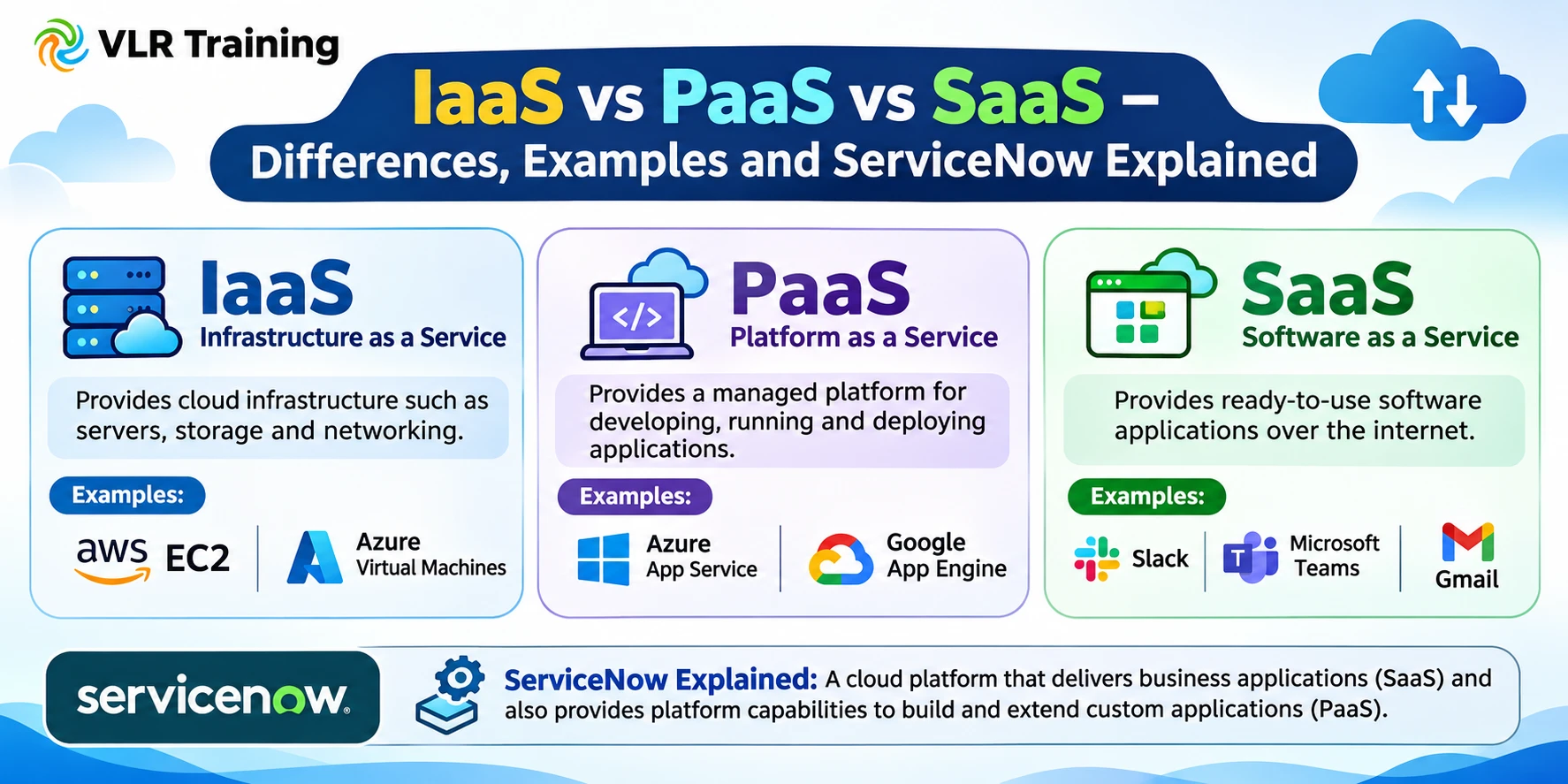
☁️ IaaS vs PaaS vs SaaS in Cloud Computing – अंतर, उदाहरण और ServiceNow की विस्तृत जानकारी
☁️ IaaS vs PaaS vs SaaS in Cloud Computing – Differences, Examples and ServiceNow Explained
🚀 2. Introduction
Cloud Computing has become an essential part of modern IT infrastructure. Organizations use cloud services to store data, host applications, manage servers, develop software, and automate business processes without maintaining all the physical infrastructure themselves.
There are three major Cloud Computing service models:
- 🖥️ IaaS – Infrastructure as a Service
- 🧑💻 PaaS – Platform as a Service
- 📱 SaaS – Software as a Service
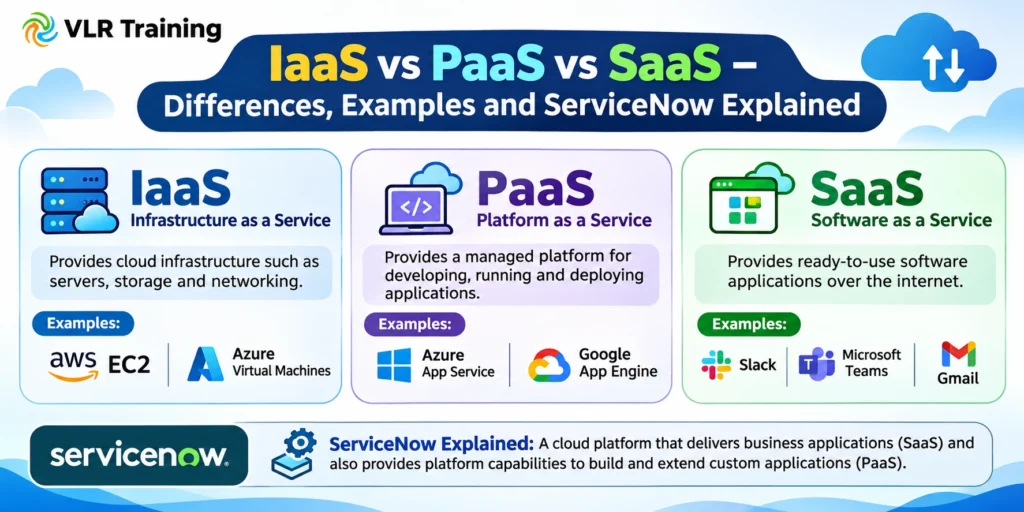
Each model provides different levels of control, flexibility, responsibility, and management.
For example, an organization might use AWS or Microsoft Azure to provision cloud infrastructure, a Platform as a Service to develop applications, and software applications such as Slack or Microsoft Teams to communicate with employees.
Understanding these models is particularly important for ServiceNow Administrators, Developers, IT professionals, and Cloud Computing beginners.
At VLR Training ServiceNow, understanding Cloud Computing fundamentals helps learners build a strong foundation before exploring ServiceNow Administration, Development, and Enterprise Workflow Automation.
📖 3. Overview of IaaS, PaaS and SaaS
IaaS, PaaS, and SaaS are three different ways of delivering computing resources and software applications through the internet.
The main difference between them is the level of responsibility shared between the Cloud Service Provider and the customer.
| Service Model | Full Form | Primary Purpose |
|---|---|---|
| 🖥️ IaaS | Infrastructure as a Service | Provides cloud infrastructure such as servers, storage, and networking |
| 🧑💻 PaaS | Platform as a Service | Provides an environment for developing and deploying applications |
| 📱 SaaS | Software as a Service | Provides ready-to-use software applications over the internet |
Let’s understand each model in detail.
🖥️ 4. What is IaaS (Infrastructure as a Service)?
IaaS stands for Infrastructure as a Service.
Infrastructure as a Service is a Cloud Computing model that provides virtualized computing resources over the internet.
Instead of purchasing physical servers and maintaining an on-premises data center, organizations can rent computing infrastructure from Cloud Service Providers.
🔹 4.1 Components of IaaS
The infrastructure generally includes:
- 🖥️ Virtual Machines and Servers
- 💾 Storage Resources
- 🌐 Networking Resources
- ⚙️ Virtualization
- 🚀 Processing Power
- 🔐 Firewalls and Other Infrastructure Services
🔹 4.2 How Does IaaS Work?
In the IaaS model, the Cloud Service Provider offers the underlying infrastructure, while the customer manages the operating system and the software installed on the virtual machine.
For example, an organization wants to host a web application.
Instead of purchasing a physical server, the organization can create a Virtual Machine using AWS or Microsoft Azure.
The organization can select:
- 🖥️ The type of Virtual Machine.
- ⚙️ CPU and Memory Capacity.
- 💾 Storage Capacity.
- 💻 Operating System.
- 🌐 Network Configuration.
- 🔐 Security Settings.
After creating the virtual machine, the organization is responsible for maintaining the guest operating system, installing applications, applying patches, and managing the workloads.
🔹 4.3 IaaS Architecture
IaaS provides computing infrastructure through cloud-based resources.
The customer can manage virtual machines, operating systems, applications, and workload configurations without managing the physical data center.
🔹 4.4 Responsibilities in IaaS
Responsibilities are divided between the Cloud Service Provider and the customer.
| Cloud Service Provider | Customer |
|---|---|
| Physical Servers | Guest Operating System |
| Data Center Facilities | Application Installation |
| Physical Networking | Operating System Updates |
| Physical Storage Infrastructure | Security Configuration |
| Virtualization Infrastructure | Application Maintenance |
| Host Infrastructure Security | Data and Workload Management |
Important: The customer does not have unrestricted control over the physical data center or hardware. Instead, the customer manages the Virtual Machine and its operating environment.
🔹 4.5 Examples of IaaS
1. Amazon Web Services (AWS)
AWS provides services such as Amazon EC2 (Elastic Compute Cloud), which allows customers to create and manage Virtual Machines in the cloud.
Customers can choose different instance types, operating systems, storage options, and networking configurations.
Example: An organization can create an EC2 instance, install Linux, configure the required software, and host a web application.
2. Microsoft Azure
Microsoft Azure provides Azure Virtual Machines, allowing organizations to create cloud-based virtual servers.
Customers can choose operating systems, CPU, memory, and storage configurations based on their requirements.
🔹 4.6 Advantages of IaaS
- ✅ Flexibility: Choose infrastructure according to business requirements.
- ✅ Scalability: Increase or decrease computing resources when required.
- ✅ Cost Optimization: Avoid purchasing and maintaining physical servers.
- ✅ Control: Manage the guest operating system and installed applications.
- ✅ Availability: Use cloud infrastructure designed to support resilient workloads.
🔹 4.7 Real-Time Industry Example of IaaS
Consider an e-commerce organization that wants to launch an online shopping website.
The organization needs servers to host its website and database.
Using IaaS:
- The organization creates a Virtual Machine in AWS.
- It selects an appropriate operating system such as Linux.
- It configures CPU, memory, and storage.
- It installs the required web server.
- Developers deploy the e-commerce application.
- The IT team maintains the operating system and application software.
This is a practical example of Infrastructure as a Service.
🧑💻 5. What is PaaS (Platform as a Service)?
PaaS stands for Platform as a Service.
Platform as a Service is a Cloud Computing model that provides a ready-made environment for developers to build, run, test, and manage applications.
In this model, developers can focus on application development instead of managing the underlying infrastructure.
The Cloud Service Provider manages most of the infrastructure-related responsibilities, including the operating system, runtime environment, and platform maintenance, depending on the service.
🔹 5.1 Activities Performed Using PaaS
Developers can concentrate on:
- 💻 Writing application code.
- ⚙️ Developing business logic.
- 💾 Managing application data.
- 🛠️ Creating application features.
- 🧪 Testing applications.
- 🚀 Deploying applications.
🔹 5.2 How Does PaaS Work?
Suppose a company wants to develop an Employee Management Application.
In a traditional infrastructure model, developers may need to coordinate server provisioning, operating system installation, runtime configuration, and database infrastructure.
With PaaS, the provider offers a managed development and deployment environment.
The process generally works as follows:
- Developers access the cloud-based development platform.
- They create an application using supported development tools.
- They develop application logic and functionalities.
- They connect the application to the required data services.
- They test the application.
- They deploy the application to the platform.
- The provider manages the underlying platform infrastructure.
This reduces infrastructure management responsibilities and allows developers to concentrate on application functionality.
🔹 5.3 Responsibilities in PaaS
| Cloud Service Provider | Customer |
|---|---|
| Physical Infrastructure | Application Development |
| Servers and Virtualization | Application Configuration |
| Operating System | Business Logic |
| Runtime Environment | Application Data |
| Platform Maintenance | Application Requirements |
| Infrastructure Updates | Application Testing |
The exact division of responsibility depends on the PaaS service. For example, database infrastructure may be managed by the provider, but customers still need to design their database structures and manage application data.
🔹 5.4 Examples of PaaS
1. Microsoft Azure App Service
Azure App Service provides a managed environment for building, deploying, and hosting web applications and APIs without managing the underlying Virtual Machines.
2. Google App Engine
Google App Engine provides a managed application hosting environment that helps developers build and deploy applications without managing traditional server infrastructure.
3. AWS Elastic Beanstalk
AWS Elastic Beanstalk helps developers deploy and manage applications while AWS handles much of the underlying infrastructure provisioning and platform management.
🔹 5.5 ServiceNow as a Platform for Application Development
ServiceNow is an important example when learning about enterprise application platforms and PaaS-like capabilities.
ServiceNow provides a cloud-based platform that organizations can use to create, customize, extend, and automate business applications.
Developers and administrators can use the platform to create applications without independently managing the underlying server infrastructure.
Important ServiceNow Application Development Capabilities
- 🛠️ Creating Custom Applications.
- 📋 Creating Tables and Managing Records.
- 📝 Configuring Forms and Lists.
- ⚙️ Developing Business Rules.
- 💻 Creating Client Scripts.
- 🔄 Automating Workflows.
- 🔐 Managing User Access and Roles.
- 🔗 Building Integrations with External Applications.
Real-Time Example: Employee Onboarding Application
An organization may develop an Employee Onboarding Application using ServiceNow.
The application can:
- Collect new employee information.
- Trigger approval processes.
- Assign tasks to HR and IT departments.
- Generate IT equipment requests.
- Send notifications automatically.
- Track the onboarding process.
ServiceNow provides application development tools and platform capabilities for these requirements.
📚 Reference: ServiceNow Application Development Documentation
🔹 5.6 Advantages of PaaS
- ✅ Reduced Infrastructure Management: Developers do not need to maintain the underlying operating systems and servers.
- ✅ Faster Development: Ready-made development environments help accelerate application development.
- ✅ Scalability: Cloud resources can support changing application requirements.
- ✅ Flexibility: Developers can customize application behavior.
- ✅ Simplified Maintenance: The Cloud Provider manages much of the underlying platform maintenance.
- ✅ Improved Productivity: Development teams can focus on business requirements instead of infrastructure administration.
🔹 5.7 Real-Time Industry Example of PaaS
Consider an organization that wants to develop an IT Service Management Application.
Using a platform such as ServiceNow:
- The organization uses its ServiceNow instance.
- The administrator creates a custom application or extends an existing application.
- Required tables and fields are configured.
- Forms and user interfaces are designed.
- Business Rules and scripts are configured where necessary.
- Flow automation is created for approvals and task assignments.
- The application is tested and deployed.
The organization can concentrate on its application requirements without independently purchasing and maintaining the underlying server infrastructure.
📱 6. What is SaaS (Software as a Service)?
SaaS stands for Software as a Service.
Software as a Service is a Cloud Computing model that allows users to access ready-to-use software applications over the internet.
In this model, the service provider hosts and maintains the software application and its underlying infrastructure.
Users do not need to install, configure, and maintain the entire application infrastructure themselves.
🔹 6.1 Ways to Access SaaS Applications
Users can access SaaS applications through:
- 🌐 Web Browsers.
- 💻 Desktop Applications.
- 📱 Mobile Applications.
- 🔗 Supported Application Interfaces.
🔹 6.2 How Does SaaS Work?
In SaaS, the software provider develops and maintains an application and makes it available to customers over the internet.
For example, when employees use Microsoft Teams to communicate with colleagues, they do not need to manage the servers, databases, or operating systems behind the application.
The process generally works as follows:
- A user registers for a SaaS application.
- The user logs in using authorized credentials.
- The application is accessed through the internet.
- The user performs the required activities.
- The provider manages software maintenance and updates.
- The user continues using the application according to the subscription or access arrangement.
🔹 6.3 Responsibilities in SaaS
| Cloud Service Provider | Customer |
|---|---|
| Application Hosting | User Management |
| Application Maintenance | Data Management |
| Software Updates | Access Configuration |
| Underlying Infrastructure | Application Usage |
| Platform Security | Secure Use of Credentials |
| Application Availability | Business-Level Configuration |
Customers still have responsibilities for data protection, access control, and secure application usage. SaaS does not eliminate all customer security responsibilities.
🔹 6.4 Examples of SaaS
1. Slack
Slack is a collaboration application that allows employees to communicate through channels, direct messages, and file sharing.
Users can access Slack without managing the underlying server infrastructure.
Important Features:
- 💬 Direct Messaging.
- 👥 Team Channels.
- 📁 File Sharing.
- 🔔 Notifications.
- 🤝 Team Collaboration.
2. Microsoft Teams
Microsoft Teams provides communication and collaboration capabilities, including:
- 🎥 Online Meetings.
- 💬 Team Conversations.
- 📁 File Sharing.
- 💭 Chat.
- 🤝 Collaboration Features.
Users can access these services using a browser, desktop application, or mobile application.
3. Gmail
Gmail is another example of SaaS. Users can send and receive emails without managing the email server infrastructure themselves.
🔹 6.5 Advantages of SaaS
- ✅ Easy Access: Access software from different locations using the internet.
- ✅ No Infrastructure Maintenance: Customers do not need to manage underlying servers.
- ✅ Automatic Updates: The provider manages application updates.
- ✅ Cost Efficiency: Organizations can avoid building and maintaining their own application infrastructure.
- ✅ Convenience: Users can start using the software with minimal technical setup.
- ✅ Centralized Management: Application administration and access management can be handled through the service.
🔹 6.6 Limitations of SaaS
- ⚠️ Customers usually cannot directly modify the provider’s application source code.
- ⚠️ Customization may be limited to the features and extension options supported by the provider.
- ⚠️ Internet connectivity is generally required.
- ⚠️ Customers depend on the service provider for application maintenance and availability.
- ⚠️ Data privacy and vendor dependency must be considered.
Important: Not having direct source-code access does not mean that every SaaS application is completely uncustomizable. Many SaaS products support configuration, integrations, APIs, and other extension mechanisms.
🔹 6.7 Real-Time Industry Example of SaaS
Consider a company with 500 employees that wants to implement an online collaboration solution.
Instead of creating its own communication software and maintaining dedicated servers, the company subscribes to Microsoft Teams.
- The company creates user accounts.
- Employees log in to Microsoft Teams.
- Teams and channels are created.
- Employees communicate through chat and meetings.
- Files are shared through supported collaboration features.
- Microsoft manages the underlying application infrastructure and software maintenance.
This is a practical example of Software as a Service.
📊 7. Difference Between IaaS, PaaS and SaaS
The following table explains the major differences between the three Cloud Computing service models.
| Comparison | IaaS | PaaS | SaaS |
|---|---|---|---|
| Full Form | Infrastructure as a Service | Platform as a Service | Software as a Service |
| Main Purpose | Provides infrastructure | Provides application development platform | Provides ready-to-use software |
| Primary Users | IT Administrators and Infrastructure Teams | Developers | End Users and Business Teams |
| Server Management | Customer manages Virtual Machines | Provider manages underlying infrastructure | Provider manages infrastructure |
| OS Management | Customer | Provider | Provider |
| Application Development | Customer manages application development | Supported and facilitated by platform | Application is generally provider-developed |
| Maintenance | Shared Responsibility | Primarily Provider for underlying platform | Primarily Provider |
| Flexibility | High Infrastructure Control | Application-Level Flexibility | Limited to Supported Configuration |
| Examples | AWS EC2, Azure Virtual Machines | Azure App Service, Google App Engine | Slack, Gmail, Microsoft Teams |
| Main Advantage | Infrastructure Control | Faster Application Development | Ready-to-Use Software |
🔹 7.1 Understanding the Difference Through a Simple Example
Imagine you want to build and operate a restaurant.
The three cloud models can be understood through this comparison.
🖥️ IaaS – Infrastructure as a Service
You rent an empty restaurant space.
You arrange the kitchen equipment, hire staff, manage the kitchen, and prepare the food.
You have substantial control but also many responsibilities.
🧑💻 PaaS – Platform as a Service
You rent a fully equipped restaurant kitchen.
The building, kitchen equipment, and basic facilities are already maintained.
You concentrate on preparing food and managing your business operations.
📱 SaaS – Software as a Service
You order food from an existing restaurant.
You do not manage the building, kitchen, equipment, or cooking process. You simply use the finished service.
This analogy helps beginners understand the difference in responsibilities and control.
🔄 8. How Do IaaS, PaaS and SaaS Work Together?
These three cloud service models are not necessarily independent. Organizations often use a combination of them.
For example, consider a software company developing and delivering an online shopping application.
The company might use:
🖥️ IaaS
To provision Virtual Machines, networking, and storage for specific application workloads.
🧑💻 PaaS
To develop and deploy application components using managed development and runtime services.
📱 SaaS
To use ready-made applications for email communication, team collaboration, and customer relationship management.
This combination allows organizations to balance infrastructure control, development flexibility, and ease of use.
🏢 9. Real-Time IT Industry Use Cases
Let’s understand where these models are used in real-world IT environments.
| Business Requirement | Suitable Model | Example |
|---|---|---|
| Hosting an organization’s virtual server | IaaS | AWS EC2 |
| Hosting a custom web application without managing VMs | PaaS | Azure App Service |
| Developing and deploying cloud applications | PaaS | Google App Engine |
| Employee Communication | SaaS | Microsoft Teams |
| Team Collaboration | SaaS | Slack |
| Hosting a custom website on a virtual machine | IaaS | Azure Virtual Machines |
| Managing IT Service Workflows | SaaS application with platform development capabilities | ServiceNow |
🔹 Scenario 1: E-Commerce Application
An e-commerce company needs:
- 🖥️ Servers to host its website.
- 🧑💻 A development environment for application development.
- 💬 Collaboration software for employees.
A possible solution is to use IaaS for virtual servers, PaaS for application development, and SaaS for employee collaboration.
🔹 Scenario 2: IT Service Management
An IT organization wants to manage employee IT issues.
It implements ServiceNow to manage:
- 📌 Incident Management.
- 🔍 Problem Management.
- 🔄 Change Management.
- 🛒 Service Catalog.
- 👨💼 Employee Service Requests.
- ⚙️ Automated Approvals.
Employees access the applications as cloud services, while administrators and developers configure and extend the platform according to business requirements.
This illustrates why ServiceNow is useful to understand when studying both SaaS and PaaS concepts.
At VLR Training ServiceNow, these industry scenarios help learners connect Cloud Computing concepts with practical Enterprise IT operations.
🔍 10. Technical Clarifications
A few important technical distinctions should be understood when learning these cloud service models.
10.1 Does IaaS Provide Complete Control of the Server?
IaaS provides customers with significant control over their Virtual Machines, but not complete control over the physical server.
The Cloud Provider remains responsible for the physical infrastructure, host environment, and virtualization layer.
Customers generally manage the guest operating system, installed applications, and workload configuration.
10.2 Is AWS Only an IaaS Provider?
No.
AWS provides services across several cloud computing models.
For example:
- Amazon EC2: Commonly classified as IaaS.
- AWS Elastic Beanstalk: Provides PaaS-like application deployment capabilities.
- Amazon RDS: Offers managed database services.
The cloud provider name alone does not determine the service model. The particular service being used determines the responsibility model.
10.3 Is Microsoft Azure Only an IaaS Provider?
No.
Microsoft Azure provides IaaS, PaaS, and SaaS services.
Examples include:
- Azure Virtual Machines: IaaS.
- Azure App Service: PaaS.
- Microsoft 365: SaaS.
10.4 Is ServiceNow PaaS or SaaS?
This distinction is important.
ServiceNow provides cloud-based business applications as well as a platform for creating and extending applications.
For example:
- When an organization uses ServiceNow ITSM to manage incidents, problems, and changes, it consumes software delivered as a cloud service (SaaS).
- When developers use ServiceNow’s application development capabilities to build custom applications, they are using PaaS-like platform capabilities.
Therefore, ServiceNow should not be described as exclusively PaaS or exclusively SaaS without considering the specific product and usage context.
The official ServiceNow Application Development Documentation describes the platform’s application-building capabilities.
⭐ 11. Advantages of Understanding Cloud Service Models
Understanding IaaS, PaaS, and SaaS provides several benefits to IT professionals.
🖥️ For Cloud Engineers
- Understand infrastructure management.
- Identify Virtual Machine requirements.
- Understand cloud resource responsibilities.
💻 For Application Developers
- Select appropriate application development environments.
- Reduce infrastructure management overhead.
- Focus on application development and deployment.
⚙️ For ServiceNow Administrators
- Understand the cloud platform model.
- Learn how cloud applications are delivered.
- Understand the responsibilities of platform providers and customers.
🧑💻 For ServiceNow Developers
- Understand how enterprise applications are developed and extended.
- Learn the difference between consuming ready-made applications and building custom applications.
- Understand the benefits of cloud-based application platforms.
🧠 12. Important Points to Remember
| Term | Important Point |
|---|---|
| 🖥️ IaaS | Provides cloud infrastructure such as servers, storage, and networking |
| 🧑💻 PaaS | Provides a managed environment for application development and deployment |
| 📱 SaaS | Provides ready-to-use software applications over the internet |
| AWS EC2 | Example of IaaS |
| Azure Virtual Machines | Example of IaaS |
| Azure App Service | Example of PaaS |
| Google App Engine | Example of PaaS |
| Slack | Example of SaaS |
| Microsoft Teams | Example of SaaS |
| ServiceNow | Provides SaaS applications and PaaS-like application development capabilities |
🎯 Remember These Simple Concepts
- 🖥️ IaaS = Infrastructure
- 🧑💻 PaaS = Platform
- 📱 SaaS = Software
The major difference is how much infrastructure and software management responsibility belongs to the customer and how much is handled by the service provider.
📝 13. Summary
IaaS, PaaS, and SaaS are the three major Cloud Computing service models.
🖥️ Infrastructure as a Service (IaaS)
Provides virtualized infrastructure, including servers, storage, and networking. Customers manage the operating systems and applications running on that infrastructure.
Examples: AWS EC2 and Azure Virtual Machines.
🧑💻 Platform as a Service (PaaS)
Provides a managed environment for developing, running, and deploying applications. Developers can focus on application functionality instead of managing the underlying infrastructure.
Examples: Azure App Service and Google App Engine.
📱 Software as a Service (SaaS)
Provides ready-to-use software applications over the internet. The service provider manages the application and its underlying infrastructure.
Examples: Slack, Gmail, and Microsoft Teams.
ServiceNow is especially relevant because it combines cloud-delivered business applications with application development and workflow automation capabilities.
For anyone learning Cloud Computing, ITSM, or ServiceNow, understanding these three models is an important foundation.
❓ 14. Frequently Asked Questions (FAQs)
1. What is IaaS in Cloud Computing?
IaaS stands for Infrastructure as a Service. It provides virtualized computing resources such as servers, storage, and networking over the internet. Customers manage the guest operating system and applications.
2. What is PaaS in Cloud Computing?
PaaS stands for Platform as a Service. It provides a managed environment for developers to build, test, deploy, and manage applications without independently managing the underlying infrastructure.
3. What is SaaS in Cloud Computing?
SaaS stands for Software as a Service. It allows users to access ready-to-use software applications over the internet without managing the underlying application infrastructure.
4. What is the difference between IaaS and PaaS?
IaaS provides infrastructure such as Virtual Machines, storage, and networking. PaaS provides a managed application development environment where developers can concentrate on application development.
5. What is the difference between PaaS and SaaS?
PaaS is primarily designed for developers to build and deploy applications. SaaS provides completed software applications that end users can access and use.
6. Is AWS IaaS or PaaS?
AWS provides multiple cloud service models. Amazon EC2 is an example of IaaS, while AWS Elastic Beanstalk provides PaaS-like application deployment capabilities.
7. Is Microsoft Azure IaaS or PaaS?
Microsoft Azure provides both IaaS and PaaS services, along with other cloud services. Azure Virtual Machines is an IaaS example, and Azure App Service is a PaaS example.
8. Is ServiceNow IaaS, PaaS, or SaaS?
ServiceNow provides cloud-delivered SaaS applications and platform capabilities that support application development and customization. Its classification depends on the functionality being discussed.
9. Which cloud service model is best for developers?
PaaS is generally suitable for developers who want to build and deploy applications without managing servers and operating systems. However, IaaS may be preferable when developers require greater infrastructure-level control.
10. Which cloud service model is easiest for end users?
SaaS is generally the easiest model for end users because the provider manages the application infrastructure and users can access ready-to-use software.
11. Do SaaS applications allow customization?
Yes. Many SaaS applications provide configuration options, APIs, integrations, and extension capabilities. However, customers generally do not control or directly modify the provider’s underlying application source code.
12. Can an organization use IaaS, PaaS, and SaaS together?
Yes. Organizations frequently combine all three models according to their business and technical requirements.
13. Who manages operating system updates in IaaS?
In a typical IaaS Virtual Machine arrangement, the customer is responsible for managing the guest operating system, including updates and security patches. The provider manages the underlying host infrastructure.
14. Why is PaaS useful?
PaaS reduces infrastructure management responsibilities, accelerates application development, and allows developers to focus on business logic and application functionality.
15. Why should ServiceNow professionals understand these models?
Understanding these models helps ServiceNow professionals understand cloud-based software delivery, platform capabilities, application development responsibilities, and how enterprise cloud solutions operate.
🔗 15. Reference URLs
Explore the following official resources to learn more about Cloud Computing service models and application development.
1. Microsoft Azure – IaaS vs PaaS vs SaaS
https://azure.microsoft.com/en-us/resources/cloud-computing-dictionary/what-are-iaas-paas-and-saas
2. AWS – Shared Responsibility Model
https://aws.amazon.com/compliance/shared-responsibility-model
3. ServiceNow – Building Applications
https://www.servicenow.com/docs/r/application-development/build-applications.html
🎓 VLR Training – Learn Cloud Computing, ServiceNow Administration and ServiceNow Development with practical industry-oriented concepts.
☁️ IaaS vs PaaS vs SaaS in Cloud Computing – తేడాలు, ఉదాహరణలు మరియు ServiceNow వివరణ
🚀 2. Introduction (పరిచయం)
ప్రస్తుత IT రంగంలో Cloud Computing చాలా ముఖ్యమైన పాత్ర పోషిస్తోంది. సంస్థలు తమ Data ను Store చేయడానికి, Applications ను Host చేయడానికి, Servers ను Manage చేయడానికి, Software ను Develop చేయడానికి మరియు Business Processes ను Automate చేయడానికి Cloud Services ను ఉపయోగిస్తున్నాయి.
గతంలో సంస్థలు తమ అవసరాల కోసం Physical Servers, Storage Devices, Networking Equipment మరియు Data Centers ను స్వయంగా ఏర్పాటు చేసుకోవాల్సి వచ్చేది. కానీ Cloud Computing అందుబాటులోకి వచ్చిన తర్వాత ఈ Infrastructure మొత్తాన్ని స్వయంగా నిర్వహించాల్సిన అవసరం తగ్గింది.
Cloud Computing లో ప్రధానంగా మూడు Service Models ఉన్నాయి.
- 🖥️ IaaS – Infrastructure as a Service
- 🧑💻 PaaS – Platform as a Service
- 📱 SaaS – Software as a Service
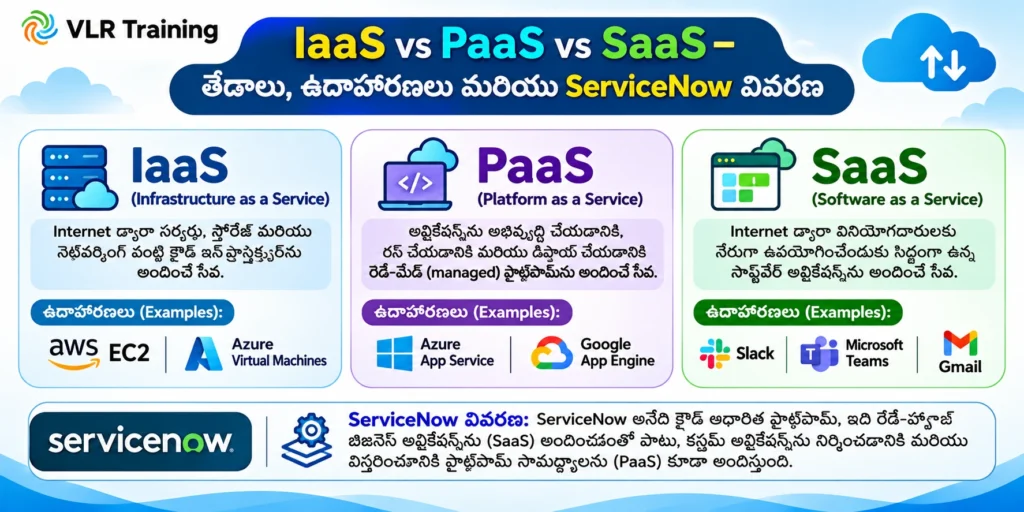
ఈ మూడు Models వేర్వేరు స్థాయిలలో Control, Flexibility, Responsibility మరియు Management సౌకర్యాలను అందిస్తాయి.
ఉదాహరణకు, ఒక సంస్థ Cloud Infrastructure కోసం AWS లేదా Microsoft Azure ను ఉపయోగించవచ్చు. Applications Develop చేయడానికి PaaS Platform ను ఉపయోగించవచ్చు. Employees మధ్య Communication కోసం Slack లేదా Microsoft Teams వంటి SaaS Applications ను ఉపయోగించవచ్చు.
ServiceNow Administrators, Developers, IT Professionals మరియు Cloud Computing నేర్చుకునే Beginners ఈ మూడు Models మధ్య తేడాలను అర్థం చేసుకోవడం చాలా ముఖ్యం.
VLR Training ServiceNow లో ServiceNow Administration, Development మరియు Enterprise Workflow Automation నేర్చుకోవడానికి ముందుగా Cloud Computing Fundamentals గురించి తెలుసుకోవడం ఉపయోగకరంగా ఉంటుంది.
📖 3. Overview of IaaS, PaaS and SaaS
IaaS, PaaS మరియు SaaS అనేవి Internet ద్వారా Computing Resources మరియు Software Applications ను అందించే మూడు ముఖ్యమైన Cloud Computing Service Models.
ఈ మూడు Models మధ్య ప్రధానమైన తేడా ఏమిటంటే, Cloud Service Provider మరియు Customer మధ్య Infrastructure మరియు Software Management బాధ్యతలు ఎలా విభజించబడతాయనేది.
| Service Model | Full Form | ముఖ్యమైన ఉపయోగం |
|---|---|---|
| 🖥️ IaaS | Infrastructure as a Service | Servers, Storage, Networking వంటి Cloud Infrastructure ను అందిస్తుంది. |
| 🧑💻 PaaS | Platform as a Service | Applications Develop చేయడానికి మరియు Deploy చేయడానికి Platform ను అందిస్తుంది. |
| 📱 SaaS | Software as a Service | Internet ద్వారా Ready-to-Use Software Applications ను అందిస్తుంది. |
ఇప్పుడు ఒక్కొక్క Service Model గురించి వివరంగా తెలుసుకుందాం.
🖥️ 4. What is IaaS (Infrastructure as a Service)?
IaaS అంటే Infrastructure as a Service.
Infrastructure as a Service అనేది Cloud Computing Model. ఇది Internet ద్వారా Virtualized Computing Resources ను అందిస్తుంది.
సాధారణంగా ఒక సంస్థకు Servers అవసరమైనప్పుడు Physical Servers కొనుగోలు చేసి, వాటిని తమ Office లేదా Data Center లో ఏర్పాటు చేసుకోవాల్సి వచ్చేది.
కానీ IaaS ఉపయోగించడం ద్వారా Physical Servers కొనుగోలు చేయాల్సిన అవసరం లేకుండా Cloud Service Providers నుంచి అవసరమైన Computing Infrastructure ను Rent లేదా Subscription పద్ధతిలో పొందవచ్చు.
🔹 4.1 Components of IaaS
IaaS ద్వారా సాధారణంగా అందించే Infrastructure Components:
- 🖥️ Virtual Machines and Servers: Cloud లో Virtual Servers ను Create చేసుకోవచ్చు.
- 💾 Storage Resources: Data మరియు Files ను Store చేయవచ్చు.
- 🌐 Networking Resources: Network Configuration మరియు Connectivity ను ఏర్పాటు చేసుకోవచ్చు.
- ⚙️ Virtualization: Physical Hardware పైన Multiple Virtual Machines ను Run చేయవచ్చు.
- 🚀 Processing Power: అవసరమైన CPU మరియు Memory Resources ను Select చేసుకోవచ్చు.
- 🔐 Firewalls and Security Services: Infrastructure కు అవసరమైన Security Configurations ను ఏర్పాటు చేసుకోవచ్చు.
🔹 4.2 How Does IaaS Work? (IaaS ఎలా పనిచేస్తుంది?)
IaaS Model లో Cloud Service Provider మీకు అవసరమైన Underlying Infrastructure ను అందిస్తుంది.
అయితే Virtual Machine లో ఉన్న Guest Operating System మరియు అందులో Install చేసిన Applications ను Customer నిర్వహించాల్సి ఉంటుంది.
ఉదాహరణకు, ఒక సంస్థ తన Website ను Host చేయాలనుకుంటుంది.
దానికోసం Physical Server కొనుగోలు చేయకుండా AWS లేదా Microsoft Azure ద్వారా ఒక Virtual Machine ను Create చేసుకోవచ్చు.
Virtual Machine Create చేసేటప్పుడు సంస్థ ఈ క్రింది అంశాలను Select చేసుకోవచ్చు.
- 🖥️ Virtual Machine Type: ఏ రకమైన Virtual Machine కావాలో ఎంచుకోవచ్చు.
- ⚙️ CPU and Memory: అవసరమైన CPU మరియు RAM Capacity ను Select చేసుకోవచ్చు.
- 💾 Storage Capacity: ఎంత Storage అవసరమో నిర్ణయించుకోవచ్చు.
- 💻 Operating System: Windows లేదా Linux వంటి Operating System ను Select చేసుకోవచ్చు.
- 🌐 Network Configuration: అవసరమైన Network Settings ను Configure చేయవచ్చు.
- 🔐 Security Settings: Security Rules మరియు Firewall Settings ను Configure చేయవచ్చు.
Virtual Machine Create చేసిన తర్వాత Customer ఆ Virtual Machine లో Operating System Maintenance, Software Installation, Security Patching మరియు Application Management వంటి పనులను నిర్వహించాలి.
🔹 4.3 IaaS Architecture
IaaS ద్వారా Cloud-Based Computing Infrastructure అందించబడుతుంది.
Customer కు Virtual Machines, Operating Systems, Applications మరియు Workload Configurations పై Management Control ఉంటుంది.
అయితే Physical Data Center మరియు Hardware Management బాధ్యతలు Cloud Service Provider వద్ద ఉంటాయి.
🔹 4.4 Responsibilities in IaaS
IaaS లో Cloud Service Provider మరియు Customer మధ్య బాధ్యతలు ఈ విధంగా విభజించబడతాయి.
| Cloud Service Provider | Customer |
|---|---|
| Physical Servers | Guest Operating System |
| Data Center Facilities | Application Installation |
| Physical Networking | Operating System Updates |
| Physical Storage Infrastructure | Security Configuration |
| Virtualization Infrastructure | Application Maintenance |
| Host Infrastructure Security | Data and Workload Management |
ముఖ్యమైన విషయం: IaaS లో Customer కు Physical Server పై పూర్తి Control ఉండదు. Customer కు ప్రధానంగా Virtual Machine మరియు Guest Operating System పైన Control ఉంటుంది. Physical Infrastructure ను Cloud Provider నిర్వహిస్తుంది.
🔹 4.5 Examples of IaaS (IaaS ఉదాహరణలు)
1. Amazon Web Services (AWS)
AWS అనేది ప్రముఖ Cloud Computing Platform.
AWS లో Amazon EC2 (Elastic Compute Cloud) అనే Service ద్వారా Virtual Machines ను Create చేసి Manage చేయవచ్చు.
Customers తమ అవసరాలకు అనుగుణంగా ఈ క్రింది వాటిని Select చేసుకోవచ్చు.
- Instance Types
- Operating Systems
- Storage Options
- CPU and Memory
- Network Configurations
Example: ఒక సంస్థ AWS లో EC2 Instance Create చేసి, అందులో Linux Operating System Install చేసి, అవసరమైన Software Configure చేసి, తన Website ను Host చేయవచ్చు.
2. Microsoft Azure
Microsoft Azure కూడా ఒక ప్రముఖ Cloud Computing Platform.
Azure లో Azure Virtual Machines అనే Service ద్వారా Cloud-Based Virtual Servers ను Create చేసుకోవచ్చు.
దీనిలో Customers తమ అవసరాలకు అనుగుణంగా Operating System, CPU, Memory మరియు Storage Configurations ను Select చేసుకోవచ్చు.
🔹 4.6 Advantages of IaaS (IaaS ప్రయోజనాలు)
- ✅ Flexibility: Business Requirements కు అనుగుణంగా Infrastructure ను Select చేసుకోవచ్చు.
- ✅ Scalability: అవసరమైనప్పుడు Computing Resources ను పెంచుకోవచ్చు లేదా తగ్గించుకోవచ్చు.
- ✅ Cost Optimization: Physical Servers కొనుగోలు చేయడం మరియు నిర్వహించడం వంటి ఖర్చులను తగ్గించవచ్చు.
- ✅ Control: Guest Operating System మరియు Installed Applications ను Manage చేయవచ్చు.
- ✅ Availability: Reliable మరియు Resilient Cloud Infrastructure ను ఉపయోగించుకోవచ్చు.
🔹 4.7 Real-Time Industry Example of IaaS
ఒక E-Commerce కంపెనీ కొత్త Online Shopping Website ను ప్రారంభించాలనుకుందాం.
ఈ Website ను Host చేయడానికి ఆ కంపెనీకి Servers అవసరం.
IaaS ఉపయోగించి ఈ విధంగా పనిచేయవచ్చు.
- ఆ సంస్థ AWS లో ఒక Virtual Machine ను Create చేస్తుంది.
- Linux వంటి Operating System ను Select చేస్తుంది.
- CPU, Memory మరియు Storage ను Configure చేస్తుంది.
- అవసరమైన Web Server Software ను Install చేస్తుంది.
- Developers E-Commerce Application ను Deploy చేస్తారు.
- IT Team Operating System మరియు Application Software ను Maintain చేస్తుంది.
ఈ విధంగా Cloud Infrastructure ను ఉపయోగించడం Infrastructure as a Service కు మంచి ఉదాహరణ.
🧑💻 5. What is PaaS (Platform as a Service)?
PaaS అంటే Platform as a Service.
Platform as a Service అనేది Cloud Computing Model. ఇది Developers కు Applications Build చేయడానికి, Run చేయడానికి, Test చేయడానికి మరియు Manage చేయడానికి అవసరమైన Ready-Made Development Environment ను అందిస్తుంది.
ఈ Model లో Developers Infrastructure Management కంటే Application Development పై ఎక్కువగా దృష్టి పెట్టవచ్చు.
Cloud Service Provider సాధారణంగా Operating System, Runtime Environment మరియు Platform Maintenance వంటి Infrastructure సంబంధిత బాధ్యతలను నిర్వహిస్తుంది.
🔹 5.1 Activities Performed Using PaaS
PaaS ఉపయోగించడం ద్వారా Developers ఈ క్రింది పనులపై దృష్టి పెట్టవచ్చు.
- 💻 Application Code రాయడం.
- ⚙️ Business Logic Develop చేయడం.
- 💾 Application Data ను Manage చేయడం.
- 🛠️ Application Features Create చేయడం.
- 🧪 Applications ను Test చేయడం.
- 🚀 Applications ను Deploy చేయడం.
🔹 5.2 How Does PaaS Work? (PaaS ఎలా పనిచేస్తుంది?)
ఒక సంస్థ Employee Management Application ను Develop చేయాలనుకుందాం.
Traditional Infrastructure Model లో Developers లేదా IT Team ముందుగా Server Provisioning, Operating System Installation, Runtime Configuration మరియు Database Infrastructure వంటి పనులను నిర్వహించాల్సి ఉంటుంది.
కానీ PaaS ఉపయోగించినప్పుడు Cloud Provider ముందుగానే Managed Development మరియు Deployment Environment ను అందిస్తుంది.
PaaS Working Process:
- Developers Cloud-Based Development Platform ను Access చేస్తారు.
- అందుబాటులో ఉన్న Development Tools ఉపయోగించి Application Create చేస్తారు.
- Application Logic మరియు Functionalities ను Develop చేస్తారు.
- అవసరమైన Data Services తో Application ను Connect చేస్తారు.
- Application ను Test చేస్తారు.
- Application ను Platform పై Deploy చేస్తారు.
- Underlying Platform Infrastructure ను Provider Manage చేస్తుంది.
దీనివల్ల Developers Infrastructure Management గురించి ఎక్కువగా ఆలోచించాల్సిన అవసరం తగ్గుతుంది.
🔹 5.3 Responsibilities in PaaS
| Cloud Service Provider | Customer |
|---|---|
| Physical Infrastructure | Application Development |
| Servers and Virtualization | Application Configuration |
| Operating System | Business Logic |
| Runtime Environment | Application Data |
| Platform Maintenance | Application Requirements |
| Infrastructure Updates | Application Testing |
PaaS లో బాధ్యతల విభజన ప్రతి Service ఆధారంగా మారవచ్చు.
ఉదాహరణకు, Database Infrastructure ను Provider Manage చేసినప్పటికీ, Customer Database Structure Design చేయడం మరియు Application Data ను Manage చేయడం వంటి పనులు చేయాల్సి ఉంటుంది.
🔹 5.4 Examples of PaaS (PaaS ఉదాహరణలు)
1. Microsoft Azure App Service
Azure App Service అనేది Web Applications మరియు APIs ను Build, Deploy మరియు Host చేయడానికి ఉపయోగించే Managed Platform.
దీనిలో Underlying Virtual Machines ను Customer స్వయంగా Manage చేయాల్సిన అవసరం ఉండదు.
2. Google App Engine
Google App Engine అనేది Developers కు Applications Build మరియు Deploy చేయడానికి సహాయపడే Managed Application Hosting Environment.
దీని ద్వారా Traditional Server Infrastructure ను స్వయంగా Manage చేయకుండా Applications ను Deploy చేయవచ్చు.
3. AWS Elastic Beanstalk
AWS Elastic Beanstalk అనేది Applications ను Deploy మరియు Manage చేయడానికి సహాయపడుతుంది.
దీనిలో AWS చాలా వరకు Underlying Infrastructure Provisioning మరియు Platform Management బాధ్యతలను నిర్వహిస్తుంది.
🔹 5.5 ServiceNow as a Platform for Application Development
ServiceNow అనేది Enterprise Application Platforms మరియు PaaS-Like Capabilities గురించి నేర్చుకునేటప్పుడు తెలుసుకోవాల్సిన ముఖ్యమైన Platform.
ServiceNow ఒక Cloud-Based Platform. దీని ద్వారా Organizations తమ Business Requirements కు అనుగుణంగా Applications ను Create, Customize, Extend మరియు Automate చేయవచ్చు.
ServiceNow Developers మరియు Administrators Underlying Server Infrastructure ను స్వయంగా Manage చేయకుండా Applications ను Develop చేయవచ్చు.
Important ServiceNow Application Development Capabilities
ServiceNow లో ముఖ్యమైన Application Development Features:
- 🛠️ Creating Custom Applications: కొత్త Business Applications ను Create చేయవచ్చు.
- 📋 Creating Tables: అవసరమైన Tables మరియు Fields ను Create చేయవచ్చు.
- 📝 Configuring Forms and Lists: User Interface లో Forms మరియు Lists ను Configure చేయవచ్చు.
- ⚙️ Business Rules: Server-Side Business Logic ను Implement చేయవచ్చు.
- 💻 Client Scripts: Client-Side Behaviour ను Control చేయవచ్చు.
- 🔄 Workflow Automation: Business Processes ను Automate చేయవచ్చు.
- 🔐 User Access Management: Users, Roles మరియు Permissions ను Manage చేయవచ్చు.
- 🔗 Integrations: External Applications తో Integrations ఏర్పాటు చేయవచ్చు.
Real-Time Example: Employee Onboarding Application
ఒక సంస్థ కొత్తగా Join అయిన Employees కోసం Employee Onboarding Application ను ServiceNow లో Develop చేయాలనుకుందాం.
ఈ Application ద్వారా:
- కొత్త Employee Information ను Collect చేయవచ్చు.
- Approval Processes ను Trigger చేయవచ్చు.
- HR మరియు IT Departments కు Tasks Assign చేయవచ్చు.
- IT Equipment Requests ను Generate చేయవచ్చు.
- Automatic Notifications పంపవచ్చు.
- Employee Onboarding Process ను Track చేయవచ్చు.
ఈ విధంగా ServiceNow Application Development Tools మరియు Platform Capabilities ను అందిస్తుంది.
📚 Reference: ServiceNow Application Development Documentation
🔹 5.6 Advantages of PaaS (PaaS ప్రయోజనాలు)
- ✅ Reduced Infrastructure Management: Developers Operating Systems మరియు Servers ను స్వయంగా Maintain చేయాల్సిన అవసరం తగ్గుతుంది.
- ✅ Faster Development: Ready-Made Development Environments ద్వారా Application Development వేగవంతమవుతుంది.
- ✅ Scalability: మారుతున్న Business Requirements కు అనుగుణంగా Cloud Resources ను ఉపయోగించుకోవచ్చు.
- ✅ Flexibility: Application Behaviour ను అవసరానికి అనుగుణంగా Customize చేయవచ్చు.
- ✅ Simplified Maintenance: Underlying Platform Maintenance లో ఎక్కువ భాగాన్ని Cloud Provider నిర్వహిస్తుంది.
- ✅ Improved Productivity: Developers Infrastructure కంటే Application Functionality పై దృష్టి పెట్టగలరు.
🔹 5.7 Real-Time Industry Example of PaaS
ఒక సంస్థ IT Service Management Application ను Develop చేయాలనుకుందాం.
ServiceNow ఉపయోగించి ఈ క్రింది విధంగా Application ను Develop చేయవచ్చు.
- సంస్థ తన ServiceNow Instance ను ఉపయోగిస్తుంది.
- Administrator కొత్త Custom Application ను Create చేస్తారు లేదా Existing Application ను Extend చేస్తారు.
- అవసరమైన Tables మరియు Fields ను Configure చేస్తారు.
- Forms మరియు User Interfaces ను Design చేస్తారు.
- అవసరమైన చోట Business Rules మరియు Scripts ను Configure చేస్తారు.
- Approvals మరియు Task Assignments కోసం Workflow Automation ను Create చేస్తారు.
- Application ను Test చేసి Deploy చేస్తారు.
ఈ విధంగా Underlying Server Infrastructure ను స్వయంగా కొనుగోలు చేసి Maintain చేయాల్సిన అవసరం లేకుండా Application Requirements పై దృష్టి పెట్టవచ్చు.
📱 6. What is SaaS (Software as a Service)?
SaaS అంటే Software as a Service.
Software as a Service అనేది Cloud Computing Model. ఇది Internet ద్వారా Ready-to-Use Software Applications ను ఉపయోగించుకునే సౌకర్యాన్ని అందిస్తుంది.
ఈ Model లో Software Provider Application ను Host చేసి, దాని Maintenance మరియు Underlying Infrastructure ను Manage చేస్తుంది.
Users స్వయంగా మొత్తం Application Infrastructure ను Install, Configure మరియు Maintain చేయాల్సిన అవసరం ఉండదు.
🔹 6.1 Ways to Access SaaS Applications
Users వివిధ మార్గాల ద్వారా SaaS Applications ను Access చేయవచ్చు.
- 🌐 Web Browsers.
- 💻 Desktop Applications.
- 📱 Mobile Applications.
- 🔗 Supported Application Interfaces.
🔹 6.2 How Does SaaS Work? (SaaS ఎలా పనిచేస్తుంది?)
SaaS Model లో Software Provider Application ను Develop చేసి, Maintain చేసి, Internet ద్వారా Customers కు అందుబాటులో ఉంచుతుంది.
ఉదాహరణకు, ఒక సంస్థలో Employees తమ Colleagues తో Communication కోసం Microsoft Teams ఉపయోగిస్తున్నారని అనుకుందాం.
వారు ఆ Application వెనుక పనిచేసే Servers, Databases లేదా Operating Systems ను స్వయంగా Manage చేయాల్సిన అవసరం ఉండదు.
SaaS Working Process:
- User ఒక SaaS Application కోసం Register అవుతారు.
- Authorized Credentials ఉపయోగించి Login అవుతారు.
- Internet ద్వారా Application ను Access చేస్తారు.
- అవసరమైన Activities ను Perform చేస్తారు.
- Software Maintenance మరియు Updates ను Provider నిర్వహిస్తుంది.
- Subscription లేదా Access Arrangement ప్రకారం User Application ను ఉపయోగిస్తారు.
🔹 6.3 Responsibilities in SaaS
| Cloud Service Provider | Customer |
|---|---|
| Application Hosting | User Management |
| Application Maintenance | Data Management |
| Software Updates | Access Configuration |
| Underlying Infrastructure | Application Usage |
| Platform Security | Secure Use of Credentials |
| Application Availability | Business-Level Configuration |
Customers కూడా Data Protection, Access Control మరియు Secure Application Usage వంటి బాధ్యతలను నిర్వహించాలి.
SaaS ఉపయోగించడం వల్ల Customer యొక్క అన్ని Security Responsibilities తొలగిపోవు.
🔹 6.4 Examples of SaaS (SaaS ఉదాహరణలు)
1. Slack
Slack అనేది Team Collaboration మరియు Communication కోసం ఉపయోగించే Software Application.
దీని ద్వారా Employees Channels, Direct Messages మరియు File Sharing ఉపయోగించి ఒకరితో ఒకరు Communication చేసుకోవచ్చు.
Important Features:
- 💬 Direct Messaging.
- 👥 Team Channels.
- 📁 File Sharing.
- 🔔 Notifications.
- 🤝 Team Collaboration.
Users Underlying Server Infrastructure ను Manage చేయకుండా Slack ను ఉపయోగించవచ్చు.
2. Microsoft Teams
Microsoft Teams అనేది Communication మరియు Collaboration కోసం ఉపయోగించే ప్రముఖ Application.
Important Features:
- 🎥 Online Meetings.
- 💬 Team Conversations.
- 📁 File Sharing.
- 💭 Chat.
- 🤝 Collaboration Features.
Users Web Browser, Desktop Application లేదా Mobile Application ద్వారా Microsoft Teams ను Access చేయవచ్చు.
3. Gmail
Gmail కూడా SaaS కు ఒక ఉదాహరణ.
Users Email Servers ను స్వయంగా Manage చేయకుండా Emails పంపవచ్చు మరియు Receive చేయవచ్చు.
🔹 6.5 Advantages of SaaS (SaaS ప్రయోజనాలు)
- ✅ Easy Access: Internet ద్వారా వివిధ ప్రదేశాల నుంచి Software ను Access చేయవచ్చు.
- ✅ No Infrastructure Maintenance: Underlying Servers ను Customer స్వయంగా Manage చేయాల్సిన అవసరం ఉండదు.
- ✅ Automatic Updates: Application Updates ను Provider నిర్వహిస్తారు.
- ✅ Cost Efficiency: సొంత Application Infrastructure ను Build చేసి Maintain చేయాల్సిన ఖర్చు తగ్గుతుంది.
- ✅ Convenience: తక్కువ Technical Setup తో Software ను ఉపయోగించడం ప్రారంభించవచ్చు.
- ✅ Centralized Management: Application Administration మరియు Access Management ను Centralized గా నిర్వహించవచ్చు.
🔹 6.6 Limitations of SaaS (SaaS పరిమితులు)
- ⚠️ Customers సాధారణంగా Provider యొక్క Application Source Code ను నేరుగా Modify చేయలేరు.
- ⚠️ Customization అనేది Provider అందించే Features మరియు Extension Options పై ఆధారపడి ఉంటుంది.
- ⚠️ సాధారణంగా Internet Connectivity అవసరం ఉంటుంది.
- ⚠️ Application Maintenance మరియు Availability కోసం Service Provider పై ఆధారపడాల్సి ఉంటుంది.
- ⚠️ Data Privacy మరియు Vendor Dependency వంటి అంశాలను పరిగణనలోకి తీసుకోవాలి.
ముఖ్యమైన విషయం: SaaS Application లో Source Code Access లేకపోవడం అంటే ఆ Application ను అసలు Customize చేయలేమని కాదు. చాలా SaaS Applications Configuration Options, APIs, Integrations మరియు ఇతర Extension Mechanisms ను అందిస్తాయి.
🔹 6.7 Real-Time Industry Example of SaaS
ఒక సంస్థలో 500 మంది Employees ఉన్నారని అనుకుందాం.
ఆ సంస్థ తన Employees కోసం Online Collaboration Solution ను అమలు చేయాలనుకుంటోంది.
సొంత Communication Software Develop చేసి, Dedicated Servers ను Maintain చేయడానికి బదులుగా Microsoft Teams Subscription ను తీసుకుంటుంది.
ఈ ప్రక్రియ ఇలా ఉంటుంది.
- సంస్థ Employees కోసం User Accounts Create చేస్తుంది.
- Employees Microsoft Teams లో Login అవుతారు.
- Teams మరియు Channels Create చేస్తారు.
- Employees Chat మరియు Meetings ద్వారా Communication చేసుకుంటారు.
- Collaboration Features ద్వారా Files Share చేసుకుంటారు.
- Microsoft Underlying Application Infrastructure మరియు Software Maintenance ను నిర్వహిస్తుంది.
ఇది Software as a Service కు ఒక మంచి Real-Time Example.
📊 7. Difference Between IaaS, PaaS and SaaS
IaaS, PaaS మరియు SaaS మధ్య ప్రధానమైన తేడాలను క్రింది Table లో చూడవచ్చు.
| Comparison | IaaS | PaaS | SaaS |
|---|---|---|---|
| Full Form | Infrastructure as a Service | Platform as a Service | Software as a Service |
| Main Purpose | Infrastructure అందిస్తుంది | Application Development Platform అందిస్తుంది | Ready-to-Use Software అందిస్తుంది |
| Primary Users | IT Administrators మరియు Infrastructure Teams | Developers | End Users మరియు Business Teams |
| Server Management | Customer Virtual Machines ను Manage చేస్తారు | Provider Underlying Infrastructure ను Manage చేస్తారు | Provider Infrastructure ను Manage చేస్తారు |
| OS Management | Customer | Provider | Provider |
| Application Development | Customer Application Development ను Manage చేస్తారు | Platform ద్వారా Development సాధ్యమవుతుంది | సాధారణంగా Provider Application ను Develop చేస్తారు |
| Maintenance | Shared Responsibility | Underlying Platform కు ప్రధానంగా Provider | ప్రధానంగా Provider |
| Flexibility | ఎక్కువ Infrastructure Control | Application-Level Flexibility | Supported Configuration పై ఆధారపడి ఉంటుంది |
| Examples | AWS EC2, Azure Virtual Machines | Azure App Service, Google App Engine | Slack, Gmail, Microsoft Teams |
| Main Advantage | Infrastructure పై Control | Faster Application Development | Ready-to-Use Software |
🔹 7.1 Understanding the Difference Through a Simple Example
IaaS, PaaS మరియు SaaS మధ్య తేడాను ఒక Restaurant Example ద్వారా సులభంగా అర్థం చేసుకోవచ్చు.
🖥️ IaaS – Infrastructure as a Service
మీరు ఒక Empty Restaurant Space ను Rent కు తీసుకున్నారని అనుకుందాం.
ఆ Restaurant లో అవసరమైన Kitchen Equipment ను మీరు ఏర్పాటు చేసుకోవాలి. Staff ను Hire చేసుకోవాలి. Kitchen ను Manage చేయాలి. Food ను Prepare చేయాలి.
ఇక్కడ మీకు ఎక్కువ Control ఉంటుంది. అదే సమయంలో బాధ్యతలు కూడా ఎక్కువగా ఉంటాయి.
ఇదే IaaS Concept.
🧑💻 PaaS – Platform as a Service
మీరు ఇప్పటికే Kitchen Equipment మరియు Basic Facilities ఉన్న Fully Equipped Restaurant Kitchen ను Rent కు తీసుకున్నారని అనుకుందాం.
Building, Kitchen Equipment మరియు Basic Facilities ఇప్పటికే సిద్ధంగా ఉంటాయి.
మీరు Food Preparation మరియు Business Operations పై మాత్రమే దృష్టి పెట్టవచ్చు.
ఇదే PaaS Concept.
📱 SaaS – Software as a Service
మీరు ఇప్పటికే ఉన్న Restaurant కు వెళ్లి Food Order చేశారని అనుకుందాం.
Restaurant Building, Kitchen, Equipment లేదా Cooking Process ను మీరు Manage చేయాల్సిన అవసరం లేదు.
మీరు తయారైన Food ను మాత్రమే ఉపయోగిస్తారు.
ఇదే SaaS Concept.
ఈ Restaurant Example ద్వారా మూడు Cloud Service Models మధ్య ఉన్న Responsibilities మరియు Control తేడాలను సులభంగా అర్థం చేసుకోవచ్చు.
🔄 8. How Do IaaS, PaaS and SaaS Work Together?
IaaS, PaaS మరియు SaaS అనేవి తప్పనిసరిగా వేర్వేరుగా మాత్రమే ఉపయోగించాల్సిన Services కావు.
చాలా Organizations తమ Business మరియు Technical Requirements ఆధారంగా ఈ మూడు Models ను కలిపి ఉపయోగిస్తాయి.
ఉదాహరణకు, ఒక Software Company Online Shopping Application ను Develop చేసి, Customers కు అందించాలనుకుందాం.
ఆ సంస్థ ఈ మూడు Models ను ఉపయోగించవచ్చు.
🖥️ IaaS
Virtual Machines, Networking మరియు Storage వంటి Infrastructure Resources ను Provision చేయడానికి IaaS ను ఉపయోగించవచ్చు.
🧑💻 PaaS
Managed Development మరియు Runtime Services ఉపయోగించి Application Components ను Develop మరియు Deploy చేయడానికి PaaS ను ఉపయోగించవచ్చు.
📱 SaaS
Email Communication, Team Collaboration మరియు Customer Relationship Management వంటి అవసరాల కోసం Ready-to-Use Applications ను SaaS ద్వారా ఉపయోగించవచ్చు.
ఈ విధంగా Organizations Infrastructure Control, Development Flexibility మరియు Ease of Use మధ్య సమతుల్యతను సాధించవచ్చు.
🏢 9. Real-Time IT Industry Use Cases
Real-Time IT Industry లో ఈ మూడు Service Models ఎక్కడ మరియు ఎలా ఉపయోగిస్తారో తెలుసుకుందాం.
| Business Requirement | Suitable Model | Example |
|---|---|---|
| Organization యొక్క Virtual Server ను Host చేయడం | IaaS | AWS EC2 |
| Virtual Machines Manage చేయకుండా Web Application Host చేయడం | PaaS | Azure App Service |
| Cloud Applications Develop మరియు Deploy చేయడం | PaaS | Google App Engine |
| Employee Communication | SaaS | Microsoft Teams |
| Team Collaboration | SaaS | Slack |
| Virtual Machine పై Website Host చేయడం | IaaS | Azure Virtual Machines |
| IT Service Workflows నిర్వహించడం | SaaS Application మరియు Platform Development Capabilities | ServiceNow |
🔹 Scenario 1: E-Commerce Application
ఒక E-Commerce కంపెనీకి ఈ క్రింది అవసరాలు ఉన్నాయని అనుకుందాం.
- 🖥️ Website ను Host చేయడానికి Servers.
- 🧑💻 Application Development కోసం Development Environment.
- 💬 Employees కోసం Collaboration Software.
ఈ అవసరాలను తీర్చడానికి:
- Virtual Servers కోసం IaaS ఉపయోగించవచ్చు.
- Application Development కోసం PaaS ఉపయోగించవచ్చు.
- Employee Collaboration కోసం SaaS ఉపయోగించవచ్చు.
🔹 Scenario 2: IT Service Management
ఒక IT Organization తన Employees ఎదుర్కొంటున్న IT Issues ను Manage చేయాలనుకుందాం.
దీనికోసం ఆ సంస్థ ServiceNow ను Implement చేస్తుంది.
ServiceNow ఉపయోగించి ఈ క్రింది Activities ను Manage చేయవచ్చు.
- 📌 Incident Management: Employees Report చేసే IT Issues ను Manage చేయడం.
- 🔍 Problem Management: Repeated Incidents కు కారణమైన Root Causes ను గుర్తించడం.
- 🔄 Change Management: IT Infrastructure లో చేసే Changes ను Control చేయడం.
- 🛒 Service Catalog: Employees నుంచి Service Requests ను స్వీకరించడం.
- 👨💼 Employee Service Requests: Employee అవసరాలకు సంబంధించిన Requests ను Manage చేయడం.
- ⚙️ Automated Approvals: Approvals మరియు Business Processes ను Automate చేయడం.
Employees Cloud Services ద్వారా Applications ను Access చేస్తారు. Administrators మరియు Developers తమ Business Requirements కు అనుగుణంగా Platform ను Configure చేసి Extend చేస్తారు.
VLR Training ServiceNow లో ఇటువంటి Industry Scenarios నేర్చుకోవడం ద్వారా Cloud Computing Concepts ను Practical Enterprise IT Operations తో అనుసంధానం చేసుకోవచ్చు.
🔍 10. Technical Clarifications
IaaS, PaaS మరియు SaaS గురించి తెలుసుకునేటప్పుడు కొన్ని ముఖ్యమైన Technical Differences ను అర్థం చేసుకోవాలి.
10.1 Does IaaS Provide Complete Control of the Server?
IaaS ద్వారా Customers కు Virtual Machines పై ఎక్కువ Control లభిస్తుంది. కానీ Physical Server పై పూర్తి Control ఉండదు.
Cloud Provider ఈ క్రింది అంశాలకు బాధ్యత వహిస్తుంది.
- Physical Infrastructure.
- Host Environment.
- Virtualization Layer.
Customers సాధారణంగా ఈ క్రింది అంశాలను Manage చేస్తారు.
- Guest Operating System.
- Installed Applications.
- Workload Configuration.
10.2 Is AWS Only an IaaS Provider?
లేదు.
AWS అనేది IaaS మాత్రమే కాదు. ఇది వివిధ రకాల Cloud Service Models కు సంబంధించిన Services ను అందిస్తుంది.
ఉదాహరణలు:
- Amazon EC2: సాధారణంగా IaaS గా పరిగణిస్తారు.
- AWS Elastic Beanstalk: PaaS తరహా Application Deployment Capabilities ను అందిస్తుంది.
- Amazon RDS: Managed Database Services ను అందిస్తుంది.
కాబట్టి ఒక Cloud Provider పేరు ఆధారంగా మాత్రమే Service Model ను నిర్ణయించకూడదు. ఆ Provider అందించే నిర్దిష్ట Service ఆధారంగా దాని Model ను అర్థం చేసుకోవాలి.
10.3 Is Microsoft Azure Only an IaaS Provider?
లేదు.
Microsoft Azure అనేది IaaS, PaaS మరియు SaaS Services తో పాటు ఇతర Cloud Services ను కూడా అందిస్తుంది.
ఉదాహరణలు:
- Azure Virtual Machines: IaaS.
- Azure App Service: PaaS.
- Microsoft 365: SaaS.
10.4 Is ServiceNow PaaS or SaaS?
ఇది చాలా ముఖ్యమైన అంశం.
ServiceNow Cloud-Based Business Applications ను అందించడంతో పాటు Applications ను Create మరియు Extend చేయడానికి Platform Capabilities ను కూడా అందిస్తుంది.
ఉదాహరణకు:
SaaS Usage:
ఒక సంస్థ ServiceNow ITSM ఉపయోగించి Incidents, Problems మరియు Changes ను Manage చేస్తున్నప్పుడు, Cloud Service ద్వారా అందించబడుతున్న Software Application ను ఉపయోగిస్తున్నట్లే.
PaaS-Like Usage:
Developers ServiceNow Application Development Capabilities ఉపయోగించి Custom Applications ను Build చేస్తున్నప్పుడు, Platform Development Capabilities ను ఉపయోగిస్తున్నట్లే.
అందువల్ల ServiceNow ను కేవలం PaaS లేదా కేవలం SaaS అని మాత్రమే చెప్పడం సరైనది కాదు. మనం ఏ Product లేదా Functionality గురించి మాట్లాడుతున్నామో దానిపై Classification ఆధారపడి ఉంటుంది.
📚 మరింత సమాచారం కోసం ServiceNow Application Development Documentation చూడండి.
⭐ 11. Advantages of Understanding Cloud Service Models
IaaS, PaaS మరియు SaaS గురించి తెలుసుకోవడం IT Professionals కు అనేక ప్రయోజనాలను అందిస్తుంది.
🖥️ For Cloud Engineers
- Infrastructure Management గురించి అవగాహన పెరుగుతుంది.
- Virtual Machine Requirements ను గుర్తించగలరు.
- Cloud Resource Responsibilities ను అర్థం చేసుకోగలరు.
💻 For Application Developers
- సరైన Application Development Environment ను Select చేసుకోవచ్చు.
- Infrastructure Management పనులను తగ్గించుకోవచ్చు.
- Application Development మరియు Deployment పై దృష్టి పెట్టవచ్చు.
⚙️ For ServiceNow Administrators
- Cloud Platform Model గురించి అవగాహన పెరుగుతుంది.
- Cloud Applications ఎలా అందించబడతాయో తెలుసుకోవచ్చు.
- Platform Provider మరియు Customer మధ్య ఉన్న Responsibilities ను అర్థం చేసుకోవచ్చు.
🧑💻 For ServiceNow Developers
- Enterprise Applications ఎలా Develop మరియు Extend చేస్తారో తెలుసుకోవచ్చు.
- Ready-Made Applications ఉపయోగించడం మరియు Custom Applications Build చేయడం మధ్య తేడాను అర్థం చేసుకోవచ్చు.
- Cloud-Based Application Platforms యొక్క ప్రయోజనాలను తెలుసుకోవచ్చు.
🧠 12. Important Points to Remember
IaaS, PaaS మరియు SaaS గురించి గుర్తుంచుకోవాల్సిన ముఖ్యమైన అంశాలు:
| Term | Important Point |
|---|---|
| 🖥️ IaaS | Servers, Storage మరియు Networking వంటి Cloud Infrastructure ను అందిస్తుంది. |
| 🧑💻 PaaS | Application Development మరియు Deployment కోసం Managed Environment ను అందిస్తుంది. |
| 📱 SaaS | Internet ద్వారా Ready-to-Use Software Applications ను అందిస్తుంది. |
| AWS EC2 | IaaS కు ఉదాహరణ. |
| Azure Virtual Machines | IaaS కు ఉదాహరణ. |
| Azure App Service | PaaS కు ఉదాహరణ. |
| Google App Engine | PaaS కు ఉదాహరణ. |
| Slack | SaaS కు ఉదాహరణ. |
| Microsoft Teams | SaaS కు ఉదాహరణ. |
| ServiceNow | SaaS Applications మరియు PaaS-Like Application Development Capabilities ను అందిస్తుంది. |
🎯 ఈ మూడు Concepts ను సులభంగా గుర్తుంచుకోండి
- 🖥️ IaaS = Infrastructure
- 🧑💻 PaaS = Platform
- 📱 SaaS = Software
ఈ మూడు Models మధ్య ప్రధానమైన తేడా ఏమిటంటే, Infrastructure మరియు Software Management బాధ్యతల్లో Customer ఎంతవరకు భాగస్వామిగా ఉంటారు, Cloud Service Provider ఎంతవరకు బాధ్యత వహిస్తారు అనేదే.
📝 13. Summary (సారాంశం)
IaaS, PaaS మరియు SaaS అనేవి Cloud Computing లోని మూడు ముఖ్యమైన Service Models.
🖥️ Infrastructure as a Service (IaaS)
IaaS అనేది Servers, Storage మరియు Networking వంటి Virtualized Infrastructure ను అందిస్తుంది.
ఈ Infrastructure పైన ఉన్న Operating Systems మరియు Applications ను Customer Manage చేయాలి.
Examples: AWS EC2 మరియు Azure Virtual Machines.
🧑💻 Platform as a Service (PaaS)
PaaS అనేది Applications ను Develop, Run మరియు Deploy చేయడానికి Managed Environment ను అందిస్తుంది.
Developers Underlying Infrastructure Management గురించి ఆలోచించకుండా Application Functionalities పై దృష్టి పెట్టవచ్చు.
Examples: Azure App Service మరియు Google App Engine.
📱 Software as a Service (SaaS)
SaaS అనేది Internet ద్వారా Ready-to-Use Software Applications ను అందిస్తుంది.
ఈ Applications మరియు వాటి Underlying Infrastructure Maintenance ను Service Provider నిర్వహిస్తుంది.
Examples: Slack, Gmail మరియు Microsoft Teams.
ServiceNow కూడా Cloud Computing లో ఒక ముఖ్యమైన Platform. ఎందుకంటే ఇది Cloud-Delivered Business Applications తో పాటు Application Development మరియు Workflow Automation Capabilities ను అందిస్తుంది.
Cloud Computing, ITSM లేదా ServiceNow నేర్చుకునే ప్రతి ఒక్కరికీ ఈ మూడు Service Models గురించి తెలుసుకోవడం చాలా ముఖ్యమైన Foundation.
❓ 14. Frequently Asked Questions (FAQs)
1. What is IaaS in Cloud Computing?
IaaS అంటే Infrastructure as a Service. ఇది Internet ద్వారా Servers, Storage మరియు Networking వంటి Virtualized Computing Resources ను అందిస్తుంది. Customers Guest Operating System మరియు Applications ను Manage చేస్తారు.
2. What is PaaS in Cloud Computing?
PaaS అంటే Platform as a Service. ఇది Developers కు Applications ను Build, Test, Deploy మరియు Manage చేయడానికి Managed Environment ను అందిస్తుంది. దీని ద్వారా Underlying Infrastructure ను స్వయంగా Manage చేయాల్సిన అవసరం తగ్గుతుంది.
3. What is SaaS in Cloud Computing?
SaaS అంటే Software as a Service. ఇది Internet ద్వారా Ready-to-Use Software Applications ను ఉపయోగించుకునే సౌకర్యాన్ని అందిస్తుంది.
4. What is the difference between IaaS and PaaS?
IaaS Servers, Virtual Machines, Storage మరియు Networking వంటి Infrastructure ను అందిస్తుంది.
PaaS అనేది Application Development కోసం Managed Platform ను అందిస్తుంది. Developers ప్రధానంగా Application Development పై దృష్టి పెట్టవచ్చు.
5. What is the difference between PaaS and SaaS?
PaaS ప్రధానంగా Developers Applications ను Build మరియు Deploy చేయడానికి ఉపయోగపడుతుంది.
SaaS అనేది End Users ఉపయోగించడానికి సిద్ధంగా ఉన్న Software Applications ను అందిస్తుంది.
6. Is AWS IaaS or PaaS?
AWS వివిధ Cloud Service Models కు సంబంధించిన Services ను అందిస్తుంది.
Amazon EC2 అనేది IaaS కు ఉదాహరణ. AWS Elastic Beanstalk అనేది PaaS తరహా Application Deployment Capabilities ను అందిస్తుంది.
7. Is Microsoft Azure IaaS or PaaS?
Microsoft Azure IaaS మరియు PaaS Services తో పాటు ఇతర Cloud Services ను కూడా అందిస్తుంది.
- Azure Virtual Machines – IaaS.
- Azure App Service – PaaS.
8. Is ServiceNow IaaS, PaaS, or SaaS?
ServiceNow Cloud-Delivered SaaS Applications తో పాటు Application Development మరియు Customization కు సంబంధించిన Platform Capabilities ను అందిస్తుంది.
కాబట్టి ఉపయోగిస్తున్న Functionality ఆధారంగా ServiceNow ను SaaS లేదా PaaS-Like Platform Capabilities పరంగా అర్థం చేసుకోవాలి.
9. Which cloud service model is best for developers?
Servers మరియు Operating Systems ను Manage చేయకుండా Applications Develop మరియు Deploy చేయాలనుకునే Developers కు PaaS సాధారణంగా ఉపయోగకరంగా ఉంటుంది.
అయితే ఎక్కువ Infrastructure-Level Control అవసరమైనప్పుడు IaaS ను ఉపయోగించవచ్చు.
10. Which cloud service model is easiest for end users?
SaaS అనేది End Users కు సాధారణంగా సులభమైన Model. ఎందుకంటే Provider Application Infrastructure ను Manage చేస్తుంది. Users నేరుగా Ready-to-Use Software ను Access చేయవచ్చు.
11. Do SaaS applications allow customization?
అవును.
చాలా SaaS Applications Configuration Options, APIs, Integrations మరియు Extension Capabilities ను అందిస్తాయి.
అయితే Customers సాధారణంగా Provider యొక్క Underlying Application Source Code ను నేరుగా Modify చేయలేరు.
12. Can an organization use IaaS, PaaS, and SaaS together?
అవును.
Organizations తమ Business మరియు Technical Requirements ఆధారంగా ఈ మూడు Models ను కలిపి ఉపయోగించవచ్చు.
13. Who manages operating system updates in IaaS?
సాధారణ IaaS Virtual Machine Model లో Guest Operating System Updates మరియు Security Patches నిర్వహించే బాధ్యత Customer పై ఉంటుంది.
Underlying Host Infrastructure ను Cloud Provider నిర్వహిస్తుంది.
14. Why is PaaS useful?
PaaS Infrastructure Management బాధ్యతలను తగ్గిస్తుంది. Application Development వేగాన్ని పెంచుతుంది. Developers Business Logic మరియు Application Functionality పై దృష్టి పెట్టడానికి సహాయపడుతుంది.
15. Why should ServiceNow professionals understand these models?
ఈ మూడు Models గురించి తెలుసుకోవడం ద్వారా ServiceNow Professionals కు Cloud-Based Software Delivery, Platform Capabilities, Application Development Responsibilities మరియు Enterprise Cloud Solutions ఎలా పనిచేస్తాయో అర్థమవుతుంది.
🔗 15. Reference URLs
Cloud Computing Service Models మరియు Application Development గురించి మరింత సమాచారం కోసం క్రింది Official Resources ను సందర్శించండి.
1. Microsoft Azure – IaaS vs PaaS vs SaaS
https://azure.microsoft.com/en-us/resources/cloud-computing-dictionary/what-are-iaas-paas-and-saas
2. AWS – Shared Responsibility Model
https://aws.amazon.com/compliance/shared-responsibility-model
3. ServiceNow – Building Applications
https://www.servicenow.com/docs/r/application-development/build-applications.html
🎓 VLR Training – Cloud Computing, ServiceNow Administration మరియు ServiceNow Development ను Practical Industry-Oriented Concepts తో నేర్చుకోండి.
🚀 2. Introduction (परिचय)
आज के IT Industry में Cloud Computing बहुत महत्वपूर्ण भूमिका निभा रही है। Organizations Cloud Services का उपयोग Data Store करने, Applications Host करने, Servers Manage करने, Software Develop करने और Business Processes को Automate करने के लिए करती हैं।
पहले Organizations को अपनी आवश्यकताओं के लिए Physical Servers, Storage Devices, Networking Equipment और Data Centers स्थापित करने पड़ते थे। लेकिन Cloud Computing के आने के बाद इन सभी Infrastructure Resources को स्वयं खरीदने और Maintain करने की आवश्यकता कम हो गई है।
Cloud Computing में मुख्य रूप से तीन Service Models होते हैं।
- 🖥️ IaaS – Infrastructure as a Service
- 🧑💻 PaaS – Platform as a Service
- 📱 SaaS – Software as a Service
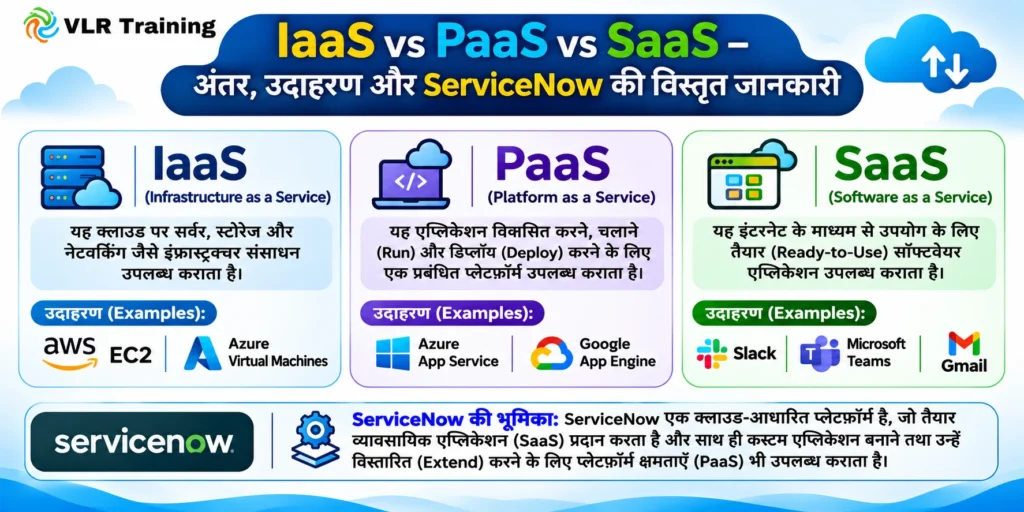
ये तीनों Models अलग-अलग स्तर पर Control, Flexibility, Responsibility और Management सुविधाएँ प्रदान करते हैं।
उदाहरण के लिए, कोई Organization Cloud Infrastructure के लिए AWS या Microsoft Azure का उपयोग कर सकती है। Applications Develop करने के लिए PaaS Platform का उपयोग कर सकती है और Employees के बीच Communication के लिए Slack या Microsoft Teams जैसे SaaS Applications का उपयोग कर सकती है।
ServiceNow Administrators, Developers, IT Professionals और Cloud Computing सीखने वाले Beginners के लिए इन तीनों Models के बीच अंतर समझना बहुत महत्वपूर्ण है।
VLR Training ServiceNow में ServiceNow Administration, Development और Enterprise Workflow Automation सीखने से पहले Cloud Computing Fundamentals को समझना उपयोगी होता है।
📖 3. Overview of IaaS, PaaS and SaaS
IaaS, PaaS और SaaS तीन अलग-अलग Cloud Computing Service Models हैं, जो Internet के माध्यम से Computing Resources और Software Applications उपलब्ध कराते हैं।
इन तीनों Models के बीच मुख्य अंतर यह है कि Cloud Service Provider और Customer के बीच Infrastructure तथा Software Management की जिम्मेदारियाँ किस प्रकार विभाजित होती हैं।
| Service Model | Full Form | मुख्य उद्देश्य |
|---|---|---|
| 🖥️ IaaS | Infrastructure as a Service | Servers, Storage और Networking जैसे Cloud Infrastructure उपलब्ध कराता है। |
| 🧑💻 PaaS | Platform as a Service | Applications Develop और Deploy करने के लिए Platform उपलब्ध कराता है। |
| 📱 SaaS | Software as a Service | Internet के माध्यम से Ready-to-Use Software Applications उपलब्ध कराता है। |
आइए अब प्रत्येक Service Model को विस्तार से समझते हैं।
🖥️ 4. What is IaaS (Infrastructure as a Service)?
IaaS का पूरा नाम Infrastructure as a Service है।
Infrastructure as a Service एक Cloud Computing Model है, जो Internet के माध्यम से Virtualized Computing Resources उपलब्ध कराता है।
पहले किसी Organization को Servers की आवश्यकता होने पर Physical Servers खरीदने पड़ते थे और उन्हें अपने Office या Data Center में स्थापित करना पड़ता था।
लेकिन IaaS का उपयोग करके Physical Servers खरीदने की आवश्यकता नहीं होती। Organizations Cloud Service Providers से अपनी आवश्यकतानुसार Computing Infrastructure Rent या Subscription के आधार पर प्राप्त कर सकती हैं।
🔹 4.1 Components of IaaS
IaaS के माध्यम से सामान्यतः निम्नलिखित Infrastructure Components उपलब्ध होते हैं:
- 🖥️ Virtual Machines and Servers: Cloud में Virtual Servers Create कर सकते हैं।
- 💾 Storage Resources: Data और Files को Store कर सकते हैं।
- 🌐 Networking Resources: Network Configuration और Connectivity स्थापित कर सकते हैं।
- ⚙️ Virtualization: Physical Hardware पर Multiple Virtual Machines Run कर सकते हैं।
- 🚀 Processing Power: आवश्यकतानुसार CPU और Memory Resources Select कर सकते हैं।
- 🔐 Firewalls and Security Services: Infrastructure के लिए आवश्यक Security Configurations स्थापित कर सकते हैं।
🔹 4.2 How Does IaaS Work? (IaaS कैसे काम करता है?)
IaaS Model में Cloud Service Provider आपको आवश्यक Underlying Infrastructure उपलब्ध कराता है।
हालाँकि, Virtual Machine में मौजूद Guest Operating System और उसमें Install किए गए Applications को Customer को Manage करना पड़ता है।
उदाहरण के लिए, कोई Organization अपनी Website Host करना चाहती है।
इसके लिए Physical Server खरीदने के बजाय AWS या Microsoft Azure के माध्यम से एक Virtual Machine Create कर सकती है।
Virtual Machine Create करते समय Organization निम्नलिखित विकल्प Select कर सकती है:
- 🖥️ Virtual Machine Type: किस प्रकार की Virtual Machine चाहिए, यह चुन सकते हैं।
- ⚙️ CPU and Memory: आवश्यक CPU और RAM Capacity Select कर सकते हैं।
- 💾 Storage Capacity: कितनी Storage की आवश्यकता है, यह निर्धारित कर सकते हैं।
- 💻 Operating System: Windows या Linux जैसे Operating System को Select कर सकते हैं।
- 🌐 Network Configuration: आवश्यक Network Settings Configure कर सकते हैं।
- 🔐 Security Settings: Security Rules और Firewall Settings Configure कर सकते हैं।
Virtual Machine Create करने के बाद Customer को Operating System Maintenance, Software Installation, Security Patching और Application Management जैसी गतिविधियाँ करनी होती हैं।
🔹 4.3 IaaS Architecture
IaaS के माध्यम से Cloud-Based Computing Infrastructure उपलब्ध कराया जाता है।
Customer को Virtual Machines, Operating Systems, Applications और Workload Configurations को Manage करने का अधिकार मिलता है।
हालाँकि, Physical Data Center और Hardware Management की जिम्मेदारी Cloud Service Provider की होती है।
🔹 4.4 Responsibilities in IaaS
IaaS में Cloud Service Provider और Customer के बीच जिम्मेदारियाँ इस प्रकार विभाजित होती हैं:
| Cloud Service Provider | Customer |
|---|---|
| Physical Servers | Guest Operating System |
| Data Center Facilities | Application Installation |
| Physical Networking | Operating System Updates |
| Physical Storage Infrastructure | Security Configuration |
| Virtualization Infrastructure | Application Maintenance |
| Host Infrastructure Security | Data and Workload Management |
महत्वपूर्ण बात: IaaS में Customer को Physical Server पर पूरा Control नहीं मिलता। Customer को मुख्य रूप से Virtual Machine और Guest Operating System पर Control मिलता है। Physical Infrastructure का Management Cloud Provider करता है।
🔹 4.5 Examples of IaaS (IaaS के उदाहरण)
1. Amazon Web Services (AWS)
AWS एक लोकप्रिय Cloud Computing Platform है।
AWS में Amazon EC2 (Elastic Compute Cloud) नामक Service के माध्यम से Virtual Machines Create और Manage कर सकते हैं।
Customers अपनी आवश्यकतानुसार निम्नलिखित विकल्प Select कर सकते हैं:
- Instance Types
- Operating Systems
- Storage Options
- CPU and Memory
- Network Configurations
Example: कोई Organization AWS में EC2 Instance Create करके उसमें Linux Operating System Install कर सकती है, आवश्यक Software Configure कर सकती है और अपनी Website Host कर सकती है।
2. Microsoft Azure
Microsoft Azure भी एक लोकप्रिय Cloud Computing Platform है।
Azure में Azure Virtual Machines नामक Service के माध्यम से Cloud-Based Virtual Servers Create कर सकते हैं।
Customers अपनी आवश्यकताओं के अनुसार Operating System, CPU, Memory और Storage Configurations Select कर सकते हैं।
🔹 4.6 Advantages of IaaS (IaaS के फायदे)
- ✅ Flexibility: Business Requirements के अनुसार Infrastructure Select कर सकते हैं।
- ✅ Scalability: आवश्यकता पड़ने पर Computing Resources बढ़ा या घटा सकते हैं।
- ✅ Cost Optimization: Physical Servers खरीदने और Maintain करने का खर्च कम कर सकते हैं।
- ✅ Control: Guest Operating System और Installed Applications को Manage कर सकते हैं।
- ✅ Availability: Reliable और Resilient Cloud Infrastructure का उपयोग कर सकते हैं।
🔹 4.7 Real-Time Industry Example of IaaS
मान लीजिए कि कोई E-Commerce Company एक नई Online Shopping Website शुरू करना चाहती है।
इस Website को Host करने के लिए कंपनी को Servers की आवश्यकता होगी।
IaaS का उपयोग करके यह प्रक्रिया निम्नलिखित तरीके से पूरी की जा सकती है:
- कंपनी AWS में एक Virtual Machine Create करती है।
- Linux जैसा Operating System Select करती है।
- CPU, Memory और Storage Configure करती है।
- आवश्यक Web Server Software Install करती है।
- Developers E-Commerce Application Deploy करते हैं।
- IT Team Operating System और Application Software को Maintain करती है।
इस प्रकार Cloud Infrastructure का उपयोग करना Infrastructure as a Service का एक अच्छा उदाहरण है।
🧑💻 5. What is PaaS (Platform as a Service)?
PaaS का पूरा नाम Platform as a Service है।
Platform as a Service एक Cloud Computing Model है, जो Developers को Applications Build, Run, Test और Manage करने के लिए Ready-Made Environment उपलब्ध कराता है।
इस Model में Developers Infrastructure Management के बजाय Application Development पर अधिक ध्यान दे सकते हैं।
Cloud Service Provider सामान्यतः Operating System, Runtime Environment और Platform Maintenance जैसी Infrastructure संबंधित जिम्मेदारियों को Manage करता है।
🔹 5.1 Activities Performed Using PaaS
PaaS का उपयोग करके Developers निम्नलिखित गतिविधियों पर ध्यान केंद्रित कर सकते हैं:
- 💻 Application Code लिखना।
- ⚙️ Business Logic Develop करना।
- 💾 Application Data Manage करना।
- 🛠️ Application Features Create करना।
- 🧪 Applications को Test करना।
- 🚀 Applications को Deploy करना।
🔹 5.2 How Does PaaS Work? (PaaS कैसे काम करता है?)
मान लीजिए कि कोई Organization Employee Management Application Develop करना चाहती है।
Traditional Infrastructure Model में Developers या IT Team को पहले Server Provisioning, Operating System Installation, Runtime Configuration और Database Infrastructure जैसी गतिविधियाँ करनी पड़ सकती हैं।
लेकिन PaaS का उपयोग करने पर Cloud Provider पहले से ही Managed Development और Deployment Environment उपलब्ध कराता है।
PaaS Working Process:
- Developers Cloud-Based Development Platform को Access करते हैं।
- उपलब्ध Development Tools का उपयोग करके Application Create करते हैं।
- Application Logic और Functionalities Develop करते हैं।
- Application को आवश्यक Data Services के साथ Connect करते हैं।
- Application को Test करते हैं।
- Application को Platform पर Deploy करते हैं।
- Provider Underlying Platform Infrastructure को Manage करता है।
इससे Developers को Infrastructure Management के बारे में अधिक चिंता करने की आवश्यकता नहीं रहती।
🔹 5.3 Responsibilities in PaaS
| Cloud Service Provider | Customer |
|---|---|
| Physical Infrastructure | Application Development |
| Servers and Virtualization | Application Configuration |
| Operating System | Business Logic |
| Runtime Environment | Application Data |
| Platform Maintenance | Application Requirements |
| Infrastructure Updates | Application Testing |
PaaS में जिम्मेदारियों का विभाजन प्रत्येक Service के अनुसार अलग हो सकता है।
उदाहरण के लिए, Database Infrastructure को Provider Manage कर सकता है, लेकिन Customer को Database Structure Design करना और Application Data Manage करना पड़ सकता है।
🔹 5.4 Examples of PaaS (PaaS के उदाहरण)
1. Microsoft Azure App Service
Azure App Service एक Managed Platform है, जिसका उपयोग Web Applications और APIs को Build, Deploy और Host करने के लिए किया जाता है।
इसमें Underlying Virtual Machines को Customer द्वारा स्वयं Manage करने की आवश्यकता नहीं होती।
2. Google App Engine
Google App Engine एक Managed Application Hosting Environment है।
यह Developers को Traditional Server Infrastructure को स्वयं Manage किए बिना Applications Build और Deploy करने में सहायता करता है।
3. AWS Elastic Beanstalk
AWS Elastic Beanstalk Applications को Deploy और Manage करने में सहायता करता है।
इसमें AWS अधिकांश Underlying Infrastructure Provisioning और Platform Management की जिम्मेदारियाँ संभालता है।
🔹 5.5 ServiceNow as a Platform for Application Development
ServiceNow एक महत्वपूर्ण Platform है, जिसे Enterprise Application Platforms और PaaS-Like Capabilities को समझते समय जानना आवश्यक है।
ServiceNow एक Cloud-Based Platform है। इसके माध्यम से Organizations अपनी Business Requirements के अनुसार Applications Create, Customize, Extend और Automate कर सकती हैं।
ServiceNow Developers और Administrators Underlying Server Infrastructure को स्वयं Manage किए बिना Applications Develop कर सकते हैं।
Important ServiceNow Application Development Capabilities
ServiceNow में प्रमुख Application Development Features निम्नलिखित हैं:
- 🛠️ Creating Custom Applications: नए Business Applications Create कर सकते हैं।
- 📋 Creating Tables: आवश्यक Tables और Fields Create कर सकते हैं।
- 📝 Configuring Forms and Lists: User Interface में Forms और Lists Configure कर सकते हैं।
- ⚙️ Business Rules: Server-Side Business Logic Implement कर सकते हैं।
- 💻 Client Scripts: Client-Side Behaviour को Control कर सकते हैं।
- 🔄 Workflow Automation: Business Processes को Automate कर सकते हैं।
- 🔐 User Access Management: Users, Roles और Permissions Manage कर सकते हैं।
- 🔗 Integrations: External Applications के साथ Integrations स्थापित कर सकते हैं।
Real-Time Example: Employee Onboarding Application
मान लीजिए कि कोई Organization नए Employees के लिए ServiceNow में Employee Onboarding Application Develop करना चाहती है।
इस Application के माध्यम से:
- नए Employee की Information Collect कर सकते हैं।
- Approval Processes Trigger कर सकते हैं।
- HR और IT Departments को Tasks Assign कर सकते हैं।
- IT Equipment Requests Generate कर सकते हैं।
- Automatic Notifications भेज सकते हैं।
- Employee Onboarding Process को Track कर सकते हैं।
इस प्रकार ServiceNow Application Development Tools और Platform Capabilities उपलब्ध कराता है।
📚 Reference: ServiceNow Application Development Documentation
🔹 5.6 Advantages of PaaS (PaaS के फायदे)
- ✅ Reduced Infrastructure Management: Developers को Operating Systems और Servers स्वयं Maintain करने की आवश्यकता कम हो जाती है।
- ✅ Faster Development: Ready-Made Development Environments के माध्यम से Application Development तेज होता है।
- ✅ Scalability: बदलती Business Requirements के अनुसार Cloud Resources का उपयोग कर सकते हैं।
- ✅ Flexibility: Application Behaviour को आवश्यकतानुसार Customize कर सकते हैं।
- ✅ Simplified Maintenance: Underlying Platform Maintenance का अधिकांश हिस्सा Cloud Provider Manage करता है।
- ✅ Improved Productivity: Developers Infrastructure के बजाय Application Functionality पर ध्यान दे सकते हैं।
🔹 5.7 Real-Time Industry Example of PaaS
मान लीजिए कि कोई Organization एक IT Service Management Application Develop करना चाहती है।
ServiceNow का उपयोग करके Application को निम्नलिखित तरीके से Develop किया जा सकता है:
- Organization अपने ServiceNow Instance का उपयोग करती है।
- Administrator एक नया Custom Application Create करते हैं या Existing Application को Extend करते हैं।
- आवश्यक Tables और Fields Configure करते हैं।
- Forms और User Interfaces Design करते हैं।
- आवश्यकता के अनुसार Business Rules और Scripts Configure करते हैं।
- Approvals और Task Assignments के लिए Workflow Automation Create करते हैं।
- Application को Test करके Deploy करते हैं।
इस प्रकार Underlying Server Infrastructure को स्वयं खरीदने और Maintain करने के बजाय Application Requirements पर ध्यान केंद्रित किया जा सकता है।
📱 6. What is SaaS (Software as a Service)?
SaaS का पूरा नाम Software as a Service है।
Software as a Service एक Cloud Computing Model है, जो Internet के माध्यम से Ready-to-Use Software Applications का उपयोग करने की सुविधा प्रदान करता है।
इस Model में Software Provider Application को Host करता है और उसकी Maintenance तथा Underlying Infrastructure को Manage करता है।
Users को पूरे Application Infrastructure को स्वयं Install, Configure और Maintain करने की आवश्यकता नहीं होती।
🔹 6.1 Ways to Access SaaS Applications
Users विभिन्न माध्यमों से SaaS Applications को Access कर सकते हैं:
- 🌐 Web Browsers.
- 💻 Desktop Applications.
- 📱 Mobile Applications.
- 🔗 Supported Application Interfaces.
🔹 6.2 How Does SaaS Work? (SaaS कैसे काम करता है?)
SaaS Model में Software Provider Application को Develop और Maintain करके Internet के माध्यम से Customers के लिए उपलब्ध कराता है।
उदाहरण के लिए, मान लीजिए कि किसी Organization के Employees अपने Colleagues के साथ Communication करने के लिए Microsoft Teams का उपयोग करते हैं।
उन्हें Application के पीछे काम करने वाले Servers, Databases या Operating Systems को स्वयं Manage करने की आवश्यकता नहीं होती।
SaaS Working Process:
- User किसी SaaS Application के लिए Register करता है।
- Authorized Credentials का उपयोग करके Login करता है।
- Internet के माध्यम से Application Access करता है।
- आवश्यक Activities Perform करता है।
- Software Maintenance और Updates Provider Manage करता है।
- User Subscription या Access Arrangement के अनुसार Application का उपयोग करता रहता है।
🔹 6.3 Responsibilities in SaaS
| Cloud Service Provider | Customer |
|---|---|
| Application Hosting | User Management |
| Application Maintenance | Data Management |
| Software Updates | Access Configuration |
| Underlying Infrastructure | Application Usage |
| Platform Security | Secure Use of Credentials |
| Application Availability | Business-Level Configuration |
Customers की भी Data Protection, Access Control और Secure Application Usage जैसी जिम्मेदारियाँ होती हैं।
SaaS का उपयोग करने से Customer की सभी Security Responsibilities समाप्त नहीं होतीं।
🔹 6.4 Examples of SaaS (SaaS के उदाहरण)
1. Slack
Slack एक लोकप्रिय Team Collaboration और Communication Application है।
इसके माध्यम से Employees Channels, Direct Messages और File Sharing का उपयोग करके एक-दूसरे के साथ Communication कर सकते हैं।
Important Features:
- 💬 Direct Messaging.
- 👥 Team Channels.
- 📁 File Sharing.
- 🔔 Notifications.
- 🤝 Team Collaboration.
Users Underlying Server Infrastructure को Manage किए बिना Slack का उपयोग कर सकते हैं।
2. Microsoft Teams
Microsoft Teams एक लोकप्रिय Communication और Collaboration Application है।
Important Features:
- 🎥 Online Meetings.
- 💬 Team Conversations.
- 📁 File Sharing.
- 💭 Chat.
- 🤝 Collaboration Features.
Users Web Browser, Desktop Application या Mobile Application के माध्यम से Microsoft Teams Access कर सकते हैं।
3. Gmail
Gmail भी SaaS का एक उदाहरण है।
Users Email Servers को स्वयं Manage किए बिना Emails भेज सकते हैं और Receive कर सकते हैं।
🔹 6.5 Advantages of SaaS (SaaS के फायदे)
- ✅ Easy Access: Internet के माध्यम से अलग-अलग स्थानों से Software Access कर सकते हैं।
- ✅ No Infrastructure Maintenance: Customers को Underlying Servers स्वयं Manage करने की आवश्यकता नहीं होती।
- ✅ Automatic Updates: Application Updates Provider Manage करता है।
- ✅ Cost Efficiency: अपना Application Infrastructure Build और Maintain करने का खर्च कम होता है।
- ✅ Convenience: कम Technical Setup के साथ Software का उपयोग शुरू कर सकते हैं।
- ✅ Centralized Management: Application Administration और Access Management को Centralized तरीके से Manage कर सकते हैं।
🔹 6.6 Limitations of SaaS (SaaS की सीमाएँ)
- ⚠️ Customers सामान्यतः Provider के Application Source Code को सीधे Modify नहीं कर सकते।
- ⚠️ Customization, Provider द्वारा उपलब्ध Features और Extension Options पर निर्भर करता है।
- ⚠️ सामान्यतः Internet Connectivity आवश्यक होती है।
- ⚠️ Application Maintenance और Availability के लिए Service Provider पर निर्भर रहना पड़ता है।
- ⚠️ Data Privacy और Vendor Dependency जैसे पहलुओं पर विचार करना आवश्यक है।
महत्वपूर्ण बात: SaaS Application में Source Code Access नहीं होने का अर्थ यह नहीं है कि Application को बिल्कुल Customize नहीं किया जा सकता। कई SaaS Applications Configuration Options, APIs, Integrations और अन्य Extension Mechanisms उपलब्ध कराते हैं।
🔹 6.7 Real-Time Industry Example of SaaS
मान लीजिए कि किसी Organization में 500 Employees हैं।
वह Organization अपने Employees के लिए Online Collaboration Solution लागू करना चाहती है।
अपना Communication Software Develop करने और Dedicated Servers Maintain करने के बजाय वह Microsoft Teams Subscription लेती है।
यह प्रक्रिया निम्नलिखित तरीके से होती है:
- Organization Employees के लिए User Accounts Create करती है।
- Employees Microsoft Teams में Login करते हैं।
- Teams और Channels Create किए जाते हैं।
- Employees Chat और Meetings के माध्यम से Communication करते हैं।
- Collaboration Features के माध्यम से Files Share करते हैं।
- Microsoft Underlying Application Infrastructure और Software Maintenance Manage करता है।
यह Software as a Service का एक अच्छा Real-Time Example है।
📊 7. Difference Between IaaS, PaaS and SaaS
IaaS, PaaS और SaaS के बीच मुख्य अंतर निम्नलिखित Table में देख सकते हैं।
| Comparison | IaaS | PaaS | SaaS |
|---|---|---|---|
| Full Form | Infrastructure as a Service | Platform as a Service | Software as a Service |
| Main Purpose | Infrastructure उपलब्ध कराता है | Application Development Platform उपलब्ध कराता है | Ready-to-Use Software उपलब्ध कराता है |
| Primary Users | IT Administrators और Infrastructure Teams | Developers | End Users और Business Teams |
| Server Management | Customer Virtual Machines Manage करता है | Provider Underlying Infrastructure Manage करता है | Provider Infrastructure Manage करता है |
| OS Management | Customer | Provider | Provider |
| Application Development | Customer Application Development Manage करता है | Platform के माध्यम से Development संभव होता है | सामान्यतः Provider Application Develop करता है |
| Maintenance | Shared Responsibility | Underlying Platform के लिए मुख्य रूप से Provider | मुख्य रूप से Provider |
| Flexibility | High Infrastructure Control | Application-Level Flexibility | Supported Configuration पर निर्भर |
| Examples | AWS EC2, Azure Virtual Machines | Azure App Service, Google App Engine | Slack, Gmail, Microsoft Teams |
| Main Advantage | Infrastructure पर Control | Faster Application Development | Ready-to-Use Software |
🔹 7.1 Understanding the Difference Through a Simple Example
IaaS, PaaS और SaaS के बीच अंतर को एक Restaurant Example के माध्यम से आसानी से समझ सकते हैं।
🖥️ IaaS – Infrastructure as a Service
मान लीजिए कि आपने एक खाली Restaurant Space Rent पर लिया है।
आपको Restaurant में आवश्यक Kitchen Equipment लगाना होगा। Staff को Hire करना होगा। Kitchen Manage करना होगा और Food Prepare करना होगा।
यहाँ आपको अधिक Control मिलता है। लेकिन जिम्मेदारियाँ भी अधिक होती हैं।
यही IaaS Concept है।
🧑💻 PaaS – Platform as a Service
मान लीजिए कि आपने एक Fully Equipped Restaurant Kitchen Rent पर लिया है।
Building, Kitchen Equipment और Basic Facilities पहले से उपलब्ध हैं।
आप केवल Food Preparation और Business Operations पर ध्यान दे सकते हैं।
यही PaaS Concept है।
📱 SaaS – Software as a Service
मान लीजिए कि आप पहले से मौजूद किसी Restaurant में जाकर Food Order करते हैं।
आपको Restaurant Building, Kitchen, Equipment या Cooking Process Manage करने की आवश्यकता नहीं होती।
आप केवल तैयार Food का उपयोग करते हैं।
यही SaaS Concept है।
इस Restaurant Example से तीनों Cloud Service Models के बीच Responsibilities और Control के अंतर को आसानी से समझ सकते हैं।
🔄 8. How Do IaaS, PaaS and SaaS Work Together?
IaaS, PaaS और SaaS को हमेशा अलग-अलग ही उपयोग करना आवश्यक नहीं है।
कई Organizations अपनी Business और Technical Requirements के अनुसार इन तीनों Models को एक साथ उपयोग करती हैं।
उदाहरण के लिए, मान लीजिए कि कोई Software Company Online Shopping Application Develop करके Customers को उपलब्ध कराना चाहती है।
वह Company निम्नलिखित तीनों Models का उपयोग कर सकती है।
🖥️ IaaS
Virtual Machines, Networking और Storage जैसे Infrastructure Resources Provision करने के लिए IaaS का उपयोग कर सकती है।
🧑💻 PaaS
Managed Development और Runtime Services का उपयोग करके Application Components को Develop और Deploy करने के लिए PaaS का उपयोग कर सकती है।
📱 SaaS
Email Communication, Team Collaboration और Customer Relationship Management जैसी आवश्यकताओं के लिए Ready-to-Use Applications का उपयोग SaaS के माध्यम से कर सकती है।
इस प्रकार Organizations Infrastructure Control, Development Flexibility और Ease of Use के बीच संतुलन बना सकती हैं।
🏢 9. Real-Time IT Industry Use Cases
Real-Time IT Industry में इन तीनों Service Models का उपयोग कहाँ और कैसे किया जाता है, इसे समझते हैं।
| Business Requirement | Suitable Model | Example |
|---|---|---|
| Organization के Virtual Server को Host करना | IaaS | AWS EC2 |
| Virtual Machines Manage किए बिना Web Application Host करना | PaaS | Azure App Service |
| Cloud Applications Develop और Deploy करना | PaaS | Google App Engine |
| Employee Communication | SaaS | Microsoft Teams |
| Team Collaboration | SaaS | Slack |
| Virtual Machine पर Website Host करना | IaaS | Azure Virtual Machines |
| IT Service Workflows Manage करना | SaaS Application और Platform Development Capabilities | ServiceNow |
🔹 Scenario 1: E-Commerce Application
एक E-Commerce Company को निम्नलिखित आवश्यकताएँ हैं:
- 🖥️ Website Host करने के लिए Servers.
- 🧑💻 Application Development के लिए Development Environment.
- 💬 Employees के लिए Collaboration Software.
इन आवश्यकताओं को पूरा करने के लिए:
- Virtual Servers के लिए IaaS का उपयोग किया जा सकता है।
- Application Development के लिए PaaS का उपयोग किया जा सकता है।
- Employee Collaboration के लिए SaaS का उपयोग किया जा सकता है।
🔹 Scenario 2: IT Service Management
मान लीजिए कि कोई IT Organization अपने Employees द्वारा सामना की जाने वाली IT Issues को Manage करना चाहती है।
इसके लिए वह ServiceNow Implement करती है।
ServiceNow का उपयोग करके निम्नलिखित Activities Manage कर सकती है:
- 📌 Incident Management: Employees द्वारा Report की गई IT Issues को Manage करना।
- 🔍 Problem Management: बार-बार होने वाले Incidents के Root Causes को पहचानना।
- 🔄 Change Management: IT Infrastructure में होने वाले Changes को Control करना।
- 🛒 Service Catalog: Employees से Service Requests प्राप्त करना।
- 👨💼 Employee Service Requests: Employees की आवश्यकताओं से संबंधित Requests Manage करना।
- ⚙️ Automated Approvals: Approvals और Business Processes को Automate करना।
Employees Cloud Services के माध्यम से Applications Access करते हैं। Administrators और Developers अपनी Business Requirements के अनुसार Platform को Configure और Extend करते हैं।
VLR Training ServiceNow में ऐसे Industry Scenarios सीखने से Cloud Computing Concepts को Practical Enterprise IT Operations के साथ जोड़कर समझने में सहायता मिलती है।
🔍 10. Technical Clarifications
IaaS, PaaS और SaaS के बारे में सीखते समय कुछ महत्वपूर्ण Technical Differences को समझना आवश्यक है।
10.1 Does IaaS Provide Complete Control of the Server?
IaaS के माध्यम से Customers को Virtual Machines पर अधिक Control मिलता है, लेकिन Physical Server पर पूरा Control नहीं मिलता।
Cloud Provider निम्नलिखित के लिए जिम्मेदार होता है:
- Physical Infrastructure.
- Host Environment.
- Virtualization Layer.
Customers सामान्यतः निम्नलिखित को Manage करते हैं:
- Guest Operating System.
- Installed Applications.
- Workload Configuration.
10.2 Is AWS Only an IaaS Provider?
नहीं।
AWS केवल IaaS तक सीमित नहीं है। यह विभिन्न Cloud Service Models से संबंधित Services उपलब्ध कराता है।
उदाहरण:
- Amazon EC2: सामान्यतः IaaS के रूप में Classified किया जाता है।
- AWS Elastic Beanstalk: PaaS जैसी Application Deployment Capabilities उपलब्ध कराता है।
- Amazon RDS: Managed Database Services उपलब्ध कराता है।
इसलिए केवल Cloud Provider के नाम के आधार पर Service Model निर्धारित नहीं करना चाहिए। Provider द्वारा दी जाने वाली Specific Service के आधार पर उसके Model को समझना चाहिए।
10.3 Is Microsoft Azure Only an IaaS Provider?
नहीं।
Microsoft Azure IaaS और PaaS के साथ-साथ अन्य Cloud Services भी उपलब्ध कराता है।
उदाहरण:
- Azure Virtual Machines: IaaS.
- Azure App Service: PaaS.
- Microsoft 365: SaaS.
10.4 Is ServiceNow PaaS or SaaS?
यह एक बहुत महत्वपूर्ण विषय है।
ServiceNow Cloud-Based Business Applications उपलब्ध कराने के साथ-साथ Applications Create और Extend करने के लिए Platform Capabilities भी प्रदान करता है।
उदाहरण के लिए:
SaaS Usage:
जब कोई Organization ServiceNow ITSM का उपयोग करके Incidents, Problems और Changes Manage करती है, तब वह Cloud Service के माध्यम से उपलब्ध कराए गए Software Application का उपयोग कर रही होती है।
PaaS-Like Usage:
जब Developers ServiceNow Application Development Capabilities का उपयोग करके Custom Applications Build करते हैं, तब वे Platform Development Capabilities का उपयोग कर रहे होते हैं।
इसलिए ServiceNow को केवल PaaS या केवल SaaS कहना सही नहीं है। यह इस बात पर निर्भर करता है कि हम किस Product या Functionality के बारे में बात कर रहे हैं।
📚 अधिक जानकारी के लिए ServiceNow Application Development Documentation देखें।
⭐ 11. Advantages of Understanding Cloud Service Models
IaaS, PaaS और SaaS के बारे में समझना IT Professionals के लिए कई फायदे प्रदान करता है।
🖥️ For Cloud Engineers
- Infrastructure Management की जानकारी प्राप्त होती है।
- Virtual Machine Requirements को पहचान सकते हैं।
- Cloud Resource Responsibilities को समझ सकते हैं।
💻 For Application Developers
- सही Application Development Environment Select कर सकते हैं।
- Infrastructure Management के काम को कम कर सकते हैं।
- Application Development और Deployment पर ध्यान दे सकते हैं।
⚙️ For ServiceNow Administrators
- Cloud Platform Model के बारे में समझ विकसित होती है।
- Cloud Applications कैसे उपलब्ध कराए जाते हैं, यह जान सकते हैं।
- Platform Provider और Customer के बीच Responsibilities को समझ सकते हैं।
🧑💻 For ServiceNow Developers
- Enterprise Applications कैसे Develop और Extend किए जाते हैं, यह समझ सकते हैं।
- Ready-Made Applications का उपयोग करने और Custom Applications Build करने के बीच अंतर जान सकते हैं।
- Cloud-Based Application Platforms के फायदे समझ सकते हैं।
🧠 12. Important Points to Remember
IaaS, PaaS और SaaS के बारे में याद रखने योग्य महत्वपूर्ण बातें:
| Term | Important Point |
|---|---|
| 🖥️ IaaS | Servers, Storage और Networking जैसे Cloud Infrastructure उपलब्ध कराता है। |
| 🧑💻 PaaS | Application Development और Deployment के लिए Managed Environment उपलब्ध कराता है। |
| 📱 SaaS | Internet के माध्यम से Ready-to-Use Software Applications उपलब्ध कराता है। |
| AWS EC2 | IaaS का उदाहरण। |
| Azure Virtual Machines | IaaS का उदाहरण। |
| Azure App Service | PaaS का उदाहरण। |
| Google App Engine | PaaS का उदाहरण। |
| Slack | SaaS का उदाहरण। |
| Microsoft Teams | SaaS का उदाहरण। |
| ServiceNow | SaaS Applications और PaaS-Like Application Development Capabilities उपलब्ध कराता है। |
🎯 इन तीनों Concepts को आसानी से याद रखें
- 🖥️ IaaS = Infrastructure
- 🧑💻 PaaS = Platform
- 📱 SaaS = Software
इन तीनों Models के बीच मुख्य अंतर यह है कि Infrastructure और Software Management की जिम्मेदारियों में Customer कितना भाग लेता है और Cloud Service Provider कितना जिम्मेदार होता है।
📝 13. Summary (सारांश)
IaaS, PaaS और SaaS Cloud Computing के तीन महत्वपूर्ण Service Models हैं।
🖥️ Infrastructure as a Service (IaaS)
IaaS Servers, Storage और Networking सहित Virtualized Infrastructure उपलब्ध कराता है।
इस Infrastructure पर मौजूद Operating Systems और Applications को Customer Manage करता है।
Examples: AWS EC2 और Azure Virtual Machines.
🧑💻 Platform as a Service (PaaS)
PaaS Applications को Develop, Run और Deploy करने के लिए Managed Environment उपलब्ध कराता है।
Developers Underlying Infrastructure Management की चिंता किए बिना Application Functionalities पर ध्यान केंद्रित कर सकते हैं।
Examples: Azure App Service और Google App Engine.
📱 Software as a Service (SaaS)
SaaS Internet के माध्यम से Ready-to-Use Software Applications उपलब्ध कराता है।
इन Applications और उनके Underlying Infrastructure की Maintenance Service Provider द्वारा की जाती है।
Examples: Slack, Gmail और Microsoft Teams.
ServiceNow भी Cloud Computing का एक महत्वपूर्ण Platform है, क्योंकि यह Cloud-Delivered Business Applications के साथ Application Development और Workflow Automation Capabilities उपलब्ध कराता है।
Cloud Computing, ITSM या ServiceNow सीखने वाले प्रत्येक व्यक्ति के लिए इन तीनों Service Models को समझना एक महत्वपूर्ण Foundation है।
❓ 14. Frequently Asked Questions (FAQs)
1. What is IaaS in Cloud Computing?
IaaS का पूरा नाम Infrastructure as a Service है। यह Internet के माध्यम से Servers, Storage और Networking जैसे Virtualized Computing Resources उपलब्ध कराता है। Customers Guest Operating System और Applications को Manage करते हैं।
2. What is PaaS in Cloud Computing?
PaaS का पूरा नाम Platform as a Service है। यह Developers को Applications Build, Test, Deploy और Manage करने के लिए Managed Environment उपलब्ध कराता है। इससे Underlying Infrastructure को स्वयं Manage करने की आवश्यकता कम हो जाती है।
3. What is SaaS in Cloud Computing?
SaaS का पूरा नाम Software as a Service है। यह Internet के माध्यम से Ready-to-Use Software Applications का उपयोग करने की सुविधा प्रदान करता है।
4. What is the difference between IaaS and PaaS?
IaaS Servers, Virtual Machines, Storage और Networking जैसे Infrastructure उपलब्ध कराता है।
PaaS Application Development के लिए Managed Platform उपलब्ध कराता है। Developers मुख्य रूप से Application Development पर ध्यान केंद्रित कर सकते हैं।
5. What is the difference between PaaS and SaaS?
PaaS का उपयोग मुख्य रूप से Developers द्वारा Applications Build और Deploy करने के लिए किया जाता है।
SaaS End Users को उपयोग के लिए तैयार Software Applications उपलब्ध कराता है।
6. Is AWS IaaS or PaaS?
AWS विभिन्न Cloud Service Models से संबंधित Services उपलब्ध कराता है।
Amazon EC2, IaaS का उदाहरण है। AWS Elastic Beanstalk, PaaS जैसी Application Deployment Capabilities उपलब्ध कराता है।
7. Is Microsoft Azure IaaS or PaaS?
Microsoft Azure IaaS और PaaS Services के साथ अन्य Cloud Services भी उपलब्ध कराता है।
- Azure Virtual Machines – IaaS.
- Azure App Service – PaaS.
8. Is ServiceNow IaaS, PaaS, or SaaS?
ServiceNow Cloud-Delivered SaaS Applications के साथ Application Development और Customization से संबंधित Platform Capabilities भी उपलब्ध कराता है।
इसलिए उपयोग की जा रही Functionality के अनुसार ServiceNow को SaaS या PaaS-Like Platform Capabilities के रूप में समझना चाहिए।
9. Which cloud service model is best for developers?
जो Developers Servers और Operating Systems Manage किए बिना Applications Develop और Deploy करना चाहते हैं, उनके लिए PaaS सामान्यतः उपयोगी होता है।
हालाँकि, जब अधिक Infrastructure-Level Control की आवश्यकता होती है, तब IaaS का उपयोग किया जा सकता है।
10. Which cloud service model is easiest for end users?
SaaS सामान्यतः End Users के लिए सबसे आसान Model है। क्योंकि Provider Application Infrastructure को Manage करता है और Users सीधे Ready-to-Use Software Access कर सकते हैं।
11. Do SaaS applications allow customization?
हाँ।
कई SaaS Applications Configuration Options, APIs, Integrations और Extension Capabilities उपलब्ध कराते हैं।
हालाँकि, Customers सामान्यतः Provider के Underlying Application Source Code को सीधे Modify नहीं कर सकते।
12. Can an organization use IaaS, PaaS, and SaaS together?
हाँ।
Organizations अपनी Business और Technical Requirements के अनुसार इन तीनों Models को एक साथ उपयोग कर सकती हैं।
13. Who manages operating system updates in IaaS?
सामान्य IaaS Virtual Machine Model में Guest Operating System Updates और Security Patches Manage करने की जिम्मेदारी Customer की होती है।
Underlying Host Infrastructure को Cloud Provider Manage करता है।
14. Why is PaaS useful?
PaaS Infrastructure Management की जिम्मेदारियों को कम करता है, Application Development की गति बढ़ाता है और Developers को Business Logic तथा Application Functionality पर ध्यान केंद्रित करने में सहायता करता है।
15. Why should ServiceNow professionals understand these models?
इन Models को समझने से ServiceNow Professionals को Cloud-Based Software Delivery, Platform Capabilities, Application Development Responsibilities और Enterprise Cloud Solutions के काम करने के तरीके की जानकारी मिलती है।
🔗 15. Reference URLs
Cloud Computing Service Models और Application Development के बारे में अधिक जानकारी प्राप्त करने के लिए निम्नलिखित Official Resources देखें।
1. Microsoft Azure – IaaS vs PaaS vs SaaS
https://azure.microsoft.com/en-us/resources/cloud-computing-dictionary/what-are-iaas-paas-and-saas
2. AWS – Shared Responsibility Model
https://aws.amazon.com/compliance/shared-responsibility-model
3. ServiceNow – Building Applications
https://www.servicenow.com/docs/r/application-development/build-applications.html
🎓 VLR Training – Cloud Computing, ServiceNow Administration और ServiceNow Development को Practical Industry-Oriented Concepts के साथ सीखें।