🚀 *Gen AI Engineer (Production Focused)*
 📱 What is a Progressive Web App (PWA)?
🌐 A Progressive Web App (PWA) is a type of application software delivered through the web, built using common web technologies such as HTML, CSS, and JavaScript. It is designed to work on any platform that uses a standards-compliant browser, including both desktop 💻 and mobile 📱 devices.
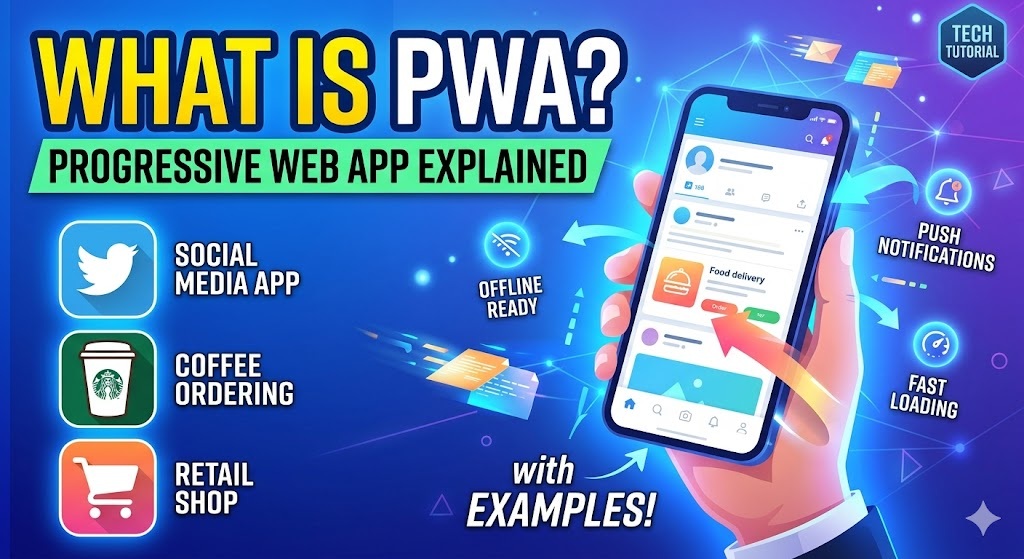
💡 In simple terms, a PWA is a website that looks, feels, and behaves like a native mobile or desktop application. It bridges the gap 🤝 between the broad reach of the web and the rich user experience of native apps.
✨ Key Features of a PWA
- 📥 Installable: Users can add the app to their home screen or desktop directly from their browser without visiting an app store (like Google Play or Apple App Store).
- 🔌 Offline Functionality: Thanks to advanced caching, PWAs can load instantly and work even when there is a weak or completely absent internet connection.
- 🔔 Push Notifications: Like native apps, PWAs can send push notifications to re-engage users.
- ⚡ Responsive and Fast: They automatically adapt to different screen sizes (mobile, tablet, desktop) and load incredibly quickly because they cache key assets.
- 🔒 Secure: PWAs must be served over HTTPS to ensure data security and user privacy.
🧱 Core Components of a PWA
To turn a standard website into a PWA, three main technological components are required:
- 📄 Web App Manifest: A simple JSON file that provides information about the application (such as its name, author, icons, theme colors, and start URL). This is what allows the browser to understand that the website can be installed as an app.
- ⚙️ Service Workers: A JavaScript file that runs in the background, separate from the web page. It acts as a proxy between the browser, the network, and the device cache, enabling offline capabilities, background sync, and push notifications.
- 🛡️ HTTPS: Secure hosting is mandatory to protect user data and ensure the integrity of the application.
☕ Real-World Example: Starbucks PWA
A prime example of a successful PWA is the Starbucks ordering web app.
🛠️ How it Works
If you visit the Starbucks ordering website on your smartphone browser, you will notice that it doesn’t behave like a traditional website.
- 📲 Installation: The browser prompts you with an “Add to Home Screen” option. Once clicked, a Starbucks icon appears on your phone alongside your other native apps.
- 🎨 Look and Feel: When opened from the home screen, the browser address bar disappears. It runs in full-screen mode, complete with smooth animations and transitions that mimic an iOS or Android app.
- ✈️ Offline Capability: If you lose your internet connection while underground or in a dead zone, the app doesn’t crash or display a “No Internet” error. The PWA allows you to still browse the menu, customize your drink orders, and view your shopping cart. Once your connection is restored, the app automatically syncs the data and processes your order.
- 🚀 Performance: The Starbucks PWA is 99.8% smaller in download size than their native iOS app, meaning it installs instantly and uses minimal data and storage.
🎬 ## HeyGen AI Video Transcript (Telugu + English Mix)
🎬 Scene 1: Introduction
- 🖼️ Visual: Avatar in a modern, professional studio setting. A sleek text slide appears next to the avatar with the title: “Progressive Web App (PWA) అంటే ఏమిటి?”
- 🗣️ Audio (Avatar Script):
“మీ ఫోన్లో ఏదైనా వెబ్సైట్ ఓపెన్ చేసినప్పుడు, అది బ్రౌజర్ లాగా కాకుండా చాలా స్మూత్గా, ఫాస్ట్గా ఒక మొబైల్ యాప్ లాగా అనిపించిందా? 📱 అయితే మీరు వాడుతోంది ఒక Progressive Web App, అంటే PWA కావచ్చు. సింపుల్గా చెప్పాలంటే, PWA అనేది ఒక website. 🌐 కానీ ఇది చూడటానికి మరియు వాడటానికి ఒక native mobile లేదా desktop application లాగే ఉంటుంది. 💻 ఇది web యొక్క broad reach కి మరియు native apps యొక్క rich user experience కి మధ్య ఉన్న gap ని పర్ఫెక్ట్గా bridge చేస్తుంది. 🤝”
🚀 Scene 2: Key Features
- 🖼️ Visual: Clean graphical icons appear one by one on screen corresponding to each point: An Install icon 📥, an Offline cloud icon ☁️, a Notification bell 🔔, and a Lock/Shield icon 🛡️.
- 🗣️ Audio (Avatar Script):
“అసలు PWA యొక్క Key Features ఏంటో చూద్దాం. 👀 మొదటిది, Installable 📥. Google Play లేదా Apple App Store కి వెళ్ళకుండానే, యూజర్లు ఈ app ని నేరుగా తమ browser నుండి home screen కి యాడ్ చేసుకోవచ్చు. రెండోది, Offline Functionality 🔌. Advanced caching వల్ల, ఇంటర్నెట్ కనెక్షన్ చాలా weak గా ఉన్నా లేదా అస్సలు లేకపోయినా కూడా ఇవి వర్క్ అవుతాయి. అలాగే, ఇవి native apps లాగే Push Notifications 🔔 పంపగలవు, అన్ని screen sizes కి తగినట్లుగా Responsive అండ్ ఫాస్ట్ ⚡ గా ఉంటాయి, మరియు డేటా సెక్యూరిటీ కోసం తప్పనిసరిగా HTTPS 🔒 ద్వారానే రన్ అవుతాయి.”
🧱 Scene 3: Core Components
- 🖼️ Visual: A 3D block diagram or graphic appearing on screen with three layers labeled: Web App Manifest 📄, Service Workers ⚙️, and HTTPS 🛡️.
- 🗣️ Audio (Avatar Script):
“ఒక ordinary website ని PWA గా మార్చడానికి, మూడు ముఖ్యమైన technological components అవసరం. ⚙️ ఒకటి, Web App Manifest 📄 — ఇది ఒక simple JSON file, ఇది యాప్ నేమ్, ఐకాన్స్, మరియు థీమ్ కలర్స్ వంటి వివరాలను బ్రౌజర్కి అందిస్తుంది. రెండు, Service Workers 🛠️ — ఇది background లో రన్ అయ్యే ఒక JavaScript file. ఇది బ్రౌజర్ మరియు నెట్వర్క్ మధ్య ఒక proxy లాగా పనిచేస్తూ offline capabilities ని మరియు పుష్ నోటిఫికేషన్లను ఎనేబుల్ చేస్తుంది. మూడు, HTTPS 🔒 — యూజర్ డేటాని ప్రొటెక్ట్ చేయడానికి secure hosting చాలా mandatory.”
☕ Scene 4: Real-World Example (Starbucks)
- 🖼️ Visual: A smartphone mockup animation appears on screen showing the Starbucks PWA loading seamlessly and running in full-screen mode. 📱
- 🗣️ Audio (Avatar Script):
“దీనికి ఒక బెస్ట్ రియల్-వరల్డ్ ఎగ్జాంపుల్… Starbucks ordering web app. ☕ మీరు మీ స్మార్ట్ఫోన్ బ్రౌజర్లో ఈ సైట్ విజిట్ చేస్తే, అది నార్మల్ వెబ్సైట్ లాగా కాకుండా డిఫరెంట్గా పనిచేస్తుంది. బ్రౌజర్ మీకు ‘Add to Home Screen’ ఆప్షన్ చూపిస్తుంది. 📲 క్లిక్ చేయగానే అది మీ ఫోన్ హోమ్ స్క్రీన్పై యాప్లా సేవ్ అవుతుంది. దీన్ని ఓపెన్ చేసినప్పుడు అడ్రస్ బార్ మాయమైపోతుంది. ఇది smooth animations మరియు transitions తో full-screen mode లో రన్ అవుతుంది, అచ్చం ఒక iOS లేదా Android app లాగే అనిపిస్తుంది. ✨ ఒకవేళ సిగ్నల్ లేని dead zone లోకి వెళ్ళినా యాప్ క్రాష్ అవ్వదు ✈️; మీరు మెనూ బ్రౌజ్ చేయవచ్చు, కార్ట్ చూసుకోవచ్చు. మళ్ళీ ఇంటర్నెట్ రాగానే డేటా ఆటోమేటిక్గా సింక్ అయి ఆర్డర్ ప్రాసెస్ అవుతుంది. 🔄”
🎯 Scene 5: Conclusion
- 🖼️ Visual: Camera zooms back to a focused shot of the avatar. A final text overlay highlights: “99.8% Smaller Size. Fast & Efficient.” 📊
- 🗣️ Audio (Avatar Script):
“అన్నిటికంటే క్రేజీ部署 పార్ట్ ఏంటంటే… 🤯 ఈ Starbucks PWA డౌన్లోడ్ సైజ్, వారి native iOS app తో పోలిస్తే తొంభై తొమ్మిది పాయింట్ ఎనిమిది శాతం (99.8%) చిన్నది! దీనివల్ల ఇది ఇన్స్టంట్గా ఇన్స్టాల్ అవుతుంది, ఫోన్ స్టోరేజ్ మరియు డేటాని అస్సలు తీసుకోదు. 📉 వెబ్ యొక్క ఈజీ యాక్సెస్, యాప్ యొక్క పవర్… రెండూ కలిపితేనే ఈ Progressive Web Apps! 🔥”