🚀 *Gen AI Engineer (Production Focused)*
 ☁️ SaaS stands for Software as a Service.
It is a cloud computing model where you access and use software over the internet, rather than downloading, installing, and maintaining it on your own computer or local servers.
Instead of buying a one-time license for a program, you typically “rent” it by paying a recurring subscription fee (monthly or annually). The company that makes the software handles all the heavy lifting behind the scenes, including hosting the application, securing the data, and rolling out updates.
🚗 A Simple Analogy
- 🛒 Traditional Software: Think of this like buying a car. You pay a large upfront cost, and you are entirely responsible for its maintenance, repairs, and security. If the engine breaks, you have to fix it.
- 🚕 SaaS: This is like using a ride-sharing app (like Uber). You don’t own the car, and you don’t have to worry about changing the oil or fixing flat tires. You simply pay a fee to use the service to get where you need to go, while the company handles all the vehicle maintenance.
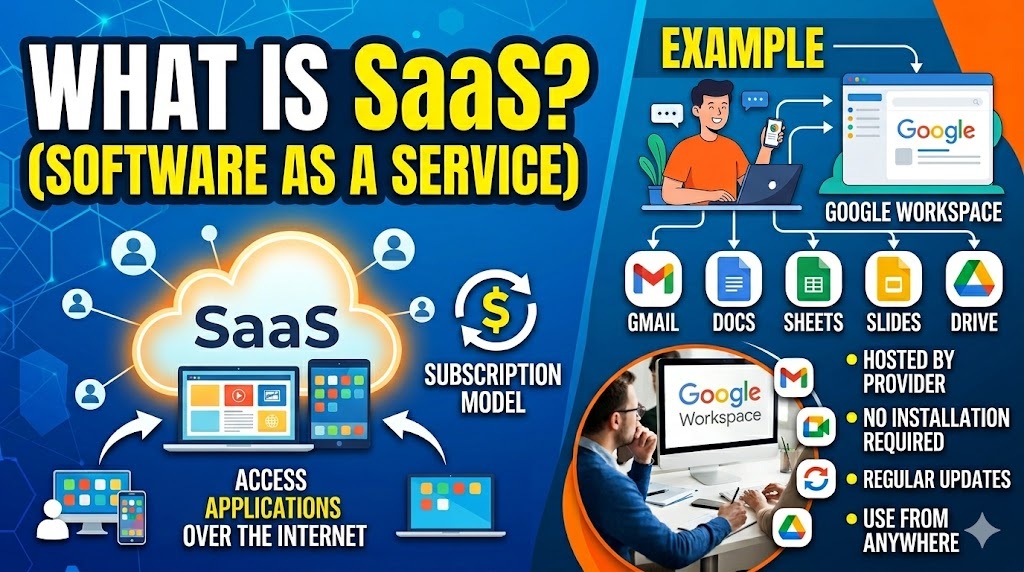
🔑 Key Characteristics of SaaS
- ☁️ Cloud-Based: The software lives on the provider’s servers, not on your hard drive.
- 🌍 Accessible Anywhere: You can usually access the software from any device (laptop, phone, tablet) as long as you have an internet connection and a web browser.
- 🔄 Automatic Updates: You never have to download “Version 2.0.” The provider updates the software centrally, so you always see the latest version when you log in.
- 💳 Subscription Model: You pay continuously (usually per user, per month) rather than a single, large upfront purchasing fee.
📱 Everyday Examples of SaaS
You likely use SaaS applications every day without realizing it. Here are a few common examples:
- 📝 Google Workspace (Docs, Sheets, Gmail): You don’t install a word processor on your computer; you simply open your browser, go to Google Docs, and start typing. Google hosts the software and saves your files in the cloud.
- 🍿 Netflix: You pay a monthly subscription to stream movies and shows. You aren’t downloading the video player software or the movies to your hard drive; Netflix hosts everything on their end.
- 📹 Zoom: While there is a desktop app, the core service is hosted in the cloud. You subscribe to host longer meetings, and Zoom handles the server infrastructure required to connect video feeds globally.
- 💼 Salesforce: In the business world, Salesforce is a massive SaaS platform used by sales teams to track customer relationships. Entire global companies run on it without having to install a single physical server in their offices.
☁️ SaaS అంటే Software as a Service.
ఇది ఒక cloud computing మోడల్, ఇక్కడ మీరు సాఫ్ట్వేర్ను మీ సొంత computer లేదా local servers లో download, install మరియు maintain చేయాల్సిన అవసరం లేకుండా, internet ద్వారా యాక్సెస్ చేసి వాడుకోవచ్చు.
ఒక ప్రోగ్రామ్ కోసం ఒకేసారి license కొనే బదులు, మీరు recurring subscription fee (నెలవారీ లేదా వార్షిక) చెల్లించి దానిని “rent” (అద్దెకు) తీసుకుంటారు. Software తయారు చేసే కంపెనీ తెరవెనుక ఉన్న heavy lifting అంతా చూసుకుంటుంది, అనగా application ను host చేయడం, data ను secure చేయడం మరియు updates ఇవ్వడం లాంటివి.
🚗 ఒక Simple Analogy (చిన్న ఉదాహరణ)
- 🛒 Traditional Software: దీన్ని సొంతంగా కారు కొనడం లాగా ఆలోచించండి. మీరు పెద్ద upfront cost చెల్లిస్తారు మరియు దాని maintenance, repairs, మరియు security కి మీరే పూర్తిగా బాధ్యత వహించాలి. ఇంజిన్ పాడైతే, మీరే బాగు చేయించుకోవాలి.
- 🚕 SaaS: ఇది ఒక ride-sharing app (Uber లాంటివి) వాడటం లాంటిది. మీకు కారు సొంతం కాదు, oil మార్చడం లేదా flat tires బాగుచేయడం గురించి మీరు ఆందోళన చెందాల్సిన అవసరం లేదు. మీరు వెళ్లాల్సిన చోటికి వెళ్లడానికి ఆ service వాడుకున్నందుకు కేవలం కొంత ఫీజు చెల్లిస్తారు, బండి maintenance అంతా ఆ కంపెనీయే చూసుకుంటుంది.
🔑 SaaS యొక్క Key Characteristics (ముఖ్య లక్షణాలు)
- ☁️ Cloud-Based: Software అనేది provider యొక్క servers లో ఉంటుంది, మీ hard drive లో కాదు.
- 🌍 Accessible Anywhere: మీకు internet connection మరియు web browser ఉన్నంత కాలం మీరు ఏ device (laptop, phone, tablet) నుండైనా సాఫ్ట్వేర్ను యాక్సెస్ చేయవచ్చు.
- 🔄 Automatic Updates: మీరు ఎప్పుడూ “Version 2.0” ని download చేసుకోవాల్సిన అవసరం లేదు. Provider సెంట్రల్ గా software ను update చేస్తారు, కాబట్టి మీరు log in అయినప్పుడు ఎల్లప్పుడూ latest version చూస్తారు.
- 💳 Subscription Model: ఒకేసారి పెద్ద మొత్తం చెల్లించి కొనడానికి బదులు, మీరు (సాధారణంగా ఒక్కో user కి, నెలకు) continuous గా చెల్లిస్తారు.
📱 SaaS యొక్క Everyday Examples (నిత్య జీవిత ఉదాహరణలు)
మీకు తెలియకుండానే మీరు ప్రతిరోజూ SaaS applications ను వాడుతూ ఉండొచ్చు. ఇక్కడ కొన్ని common ఉదాహరణలు ఉన్నాయి:
- 📝 Google Workspace (Docs, Sheets, Gmail): మీ కంప్యూటర్ లో మీరు ఎలాంటి word processor ను install చేయరు; కేవలం మీ browser ఓపెన్ చేసి, Google Docs కి వెళ్లి typing స్టార్ట్ చేస్తారు. Google ఆ సాఫ్ట్వేర్ను host చేస్తుంది మరియు మీ ఫైల్స్ అన్నీ cloud లో save చేస్తుంది.
- 🍿 Netflix: Movies మరియు shows స్ట్రీమ్ చేయడానికి మీరు monthly subscription చెల్లిస్తారు. మీరు video player సాఫ్ట్వేర్ను గాని సినిమాలను గాని మీ hard drive లోకి download చేయరు; అంతా Netflix తమ ఎండ్ లో host చేస్తుంది.
- 📹 Zoom: దీనికి desktop app ఉన్నప్పటికీ, ప్రధాన service అంతా cloud లోనే host చేయబడుతుంది. ఎక్కువ సేపు meetings host చేయడానికి మీరు subscribe చేసుకుంటారు, మరియు ప్రపంచవ్యాప్తంగా video feeds ని కనెక్ట్ చేయడానికి అవసరమైన server infrastructure ని Zoom హ్యాండిల్ చేస్తుంది.
- 💼 Salesforce: Business వరల్డ్ లో, customer relationships ను track చేయడానికి sales teams ఉపయోగించే ఒక పెద్ద SaaS ప్లాట్ఫారమ్ Salesforce. ఆఫీసుల్లో ఒక్క ఫিজికల్ సర్వర్ను కూడా install చేయాల్సిన అవసరం లేకుండా గ్లోబల్ కంపెనీలు మొత్తం దీనిపైనే నడుస్తాయి.