🚀 *Gen AI Engineer (Production Focused)*
 ☁️ What is PaaS?
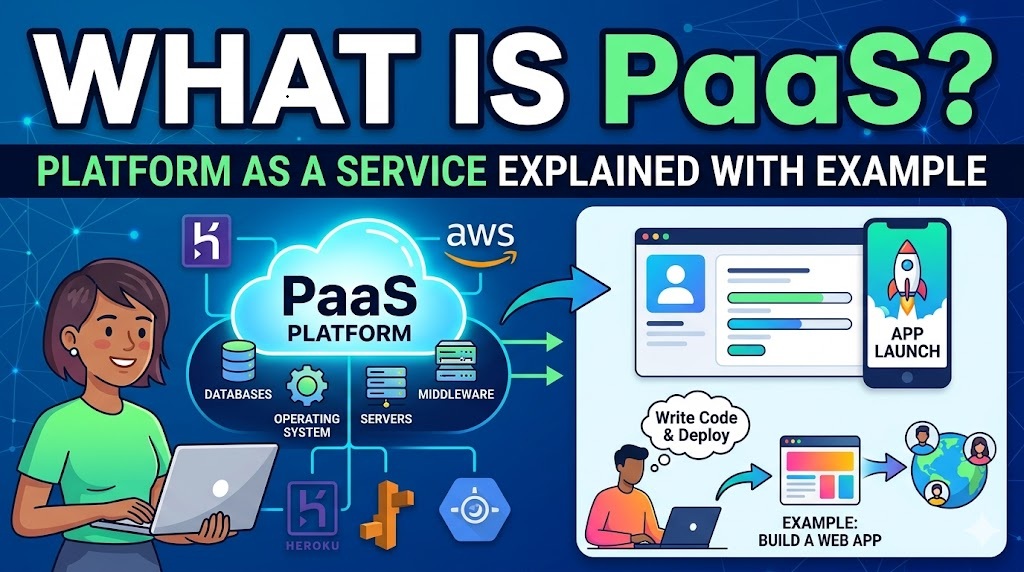
PaaS (Platform as a Service) is a cloud computing model where a provider gives you a complete, ready-to-use environment for developing, running, and managing applications over the internet.
🛑 The Old Way: Instead of buying servers, installing operating systems, configuring databases, and setting up network security just to build an app, a PaaS provider handles all that underlying infrastructure for you.
👨💻 The PaaS Way: As a developer, you only have to focus on writing your code and managing your data.
⚖️ How It Compares
To fully understand PaaS, it helps to see where it sits between the other two major cloud computing models:
- 🏗️ IaaS (Infrastructure as a Service): You rent the bare digital hardware (servers, storage, networking) but have to install and manage the operating system, middleware, and development tools yourself.
- 🚀 PaaS (Platform as a Service): The provider manages the hardware, OS, database management systems, and runtime environment. You just bring your application code.
- 📦 SaaS (Software as a Service): The provider manages absolutely everything, delivering a finished, ready-to-use application to the end user (like Gmail, Salesforce, or Netflix).
📊 Explore this interactive matrix to see exactly how management responsibilities shift between you and the vendor depending on the model you choose.
🌍 Real-World Examples
Let’s say you want to build a new web application for your business.
- ❌ Without PaaS: You would need to rent a virtual server, install Linux, set up a web server like Nginx, install a database like PostgreSQL, configure security firewalls, and manually figure out how to add more servers if your app gets popular.
- ✅ With PaaS: You write your app code (e.g., in Python, Ruby, or Node.js) and push it to a PaaS provider. The provider automatically provisions the server, connects the database, handles the security patching, and scales the computing power up or down instantly based on web traffic.
⭐ Popular PaaS platforms include:
- 🌐 Google App Engine: Lets developers build highly scalable applications on a fully managed serverless platform without worrying about the backend servers.
- 💜 Heroku: A pioneer in PaaS, wildly popular for deploying web apps quickly with simple code pushes.
- ☁️ AWS Elastic Beanstalk: Amazon’s service for deploying and scaling web applications and services developed with Java, .NET, PHP, Node.js, and more.
☁️ PaaS అంటే ఏమిటి? (What is PaaS?)
PaaS (Platform as a Service) అనేది ఒక cloud computing model. ఇందులో internet ద్వారా applications ని develop, run, మరియు manage చేయడానికి provider మీకు ఒక complete, ready-to-use environment ని ఇస్తారు.
🛑 పాత పద్ధతి: ఒక app ని build చేయడానికి servers కొనడం, operating systems install చేయడం, databases configure చేయడం, మరియు network security ని set up చేయడం లాంటివి కాకుండా, ఈ underlying infrastructure అంతా PaaS provider చూసుకుంటారు.
👨💻 PaaS పద్ధతి: ఒక developer గా, మీరు కేవలం మీ code రాయడం మరియు మీ data ని manage చేసుకోవడం పై focus పెడితే చాలు.
⚖️ ఇతర Models తో పోలిక (How It Compares)
PaaS ని పూర్తిగా అర్థం చేసుకోవాలంటే, మిగతా రెండు major cloud computing models మధ్య ఇది ఎక్కడ ఉంటుందో చూడాలి:
- 🏗️ IaaS (Infrastructure as a Service): మీరు కేవలం digital hardware (servers, storage, networking) ని rent కి తీసుకుంటారు. కానీ operating system, middleware, మరియు development tools ని మీరే స్వయంగా install చేసి manage చేసుకోవాలి.
- 🚀 PaaS (Platform as a Service): ఇందులో hardware, OS, database management systems, మరియు runtime environment ని provider manage చేస్తారు. మీరు కేవలం మీ application code ని ఇస్తే చాలు.
- 📦 SaaS (Software as a Service): ఇందులో provider అన్నీ వాళ్లే manage చేసి, end user కి ఒక finished, ready-to-use application (ఉదాహరణకు Gmail, Salesforce, లేదా Netflix లాగా) ఇస్తారు.
📊 మీరు ఎంచుకునే model బట్టి మీ మధ్య మరియు vendor మధ్య management responsibilities ఎలా మారతాయో చూడటానికి ఈ interactive matrix ని explore చేయండి.
🌍 నిజజీవిత ఉదాహరణలు (Real-World Examples)
మీ business కోసం ఒక కొత్త web application build చేయాలి అనుకుందాం.
- ❌ PaaS లేకుండా (Without PaaS): మీరు ఒక virtual server ని rent కి తీసుకొని, Linux install చేసి, Nginx లాంటి web server ని set up చేసి, PostgreSQL లాంటి database install చేయాలి. అలాగే security firewalls configure చేసి, మీ app popular అయితే మరిన్ని servers ని ఎలా add చేయాలో manually చూసుకోవాలి.
- ✅ PaaS తో (With PaaS): మీరు మీ app code (e.g., Python, Ruby, లేదా Node.js లో) రాసి ఒక PaaS provider కి push చేస్తారు. ఆ provider ఆటోమేటిక్ గా server ని provision చేసి, database ని connect చేసి, security patching ని handle చేస్తారు. అంతేకాకుండా web traffic బట్టి computing power ని instantly scale up లేదా scale down చేస్తారు.
⭐ పాపులర్ అయిన కొన్ని PaaS platforms:
- 🌐 Google App Engine: Backend servers గురించి tension పడకుండా, fully managed serverless platform మీద highly scalable applications ని build చేయడానికి developers కి ఇది ఉపయోగపడుతుంది.
- 💜 Heroku: ఇది PaaS లో ఒక pioneer, simple code pushes తో web apps ని త్వరగా deploy చేయడానికి ఇది చాలా popular.
- ☁️ AWS Elastic Beanstalk: Java, .NET, PHP, Node.js, మొదలైన వాటితో develop చేసిన web applications మరియు services ని deploy చేసి scale చేయడానికి ఇది Amazon వాళ్ళ service.