🚀 *Gen AI Engineer (Production Focused)*
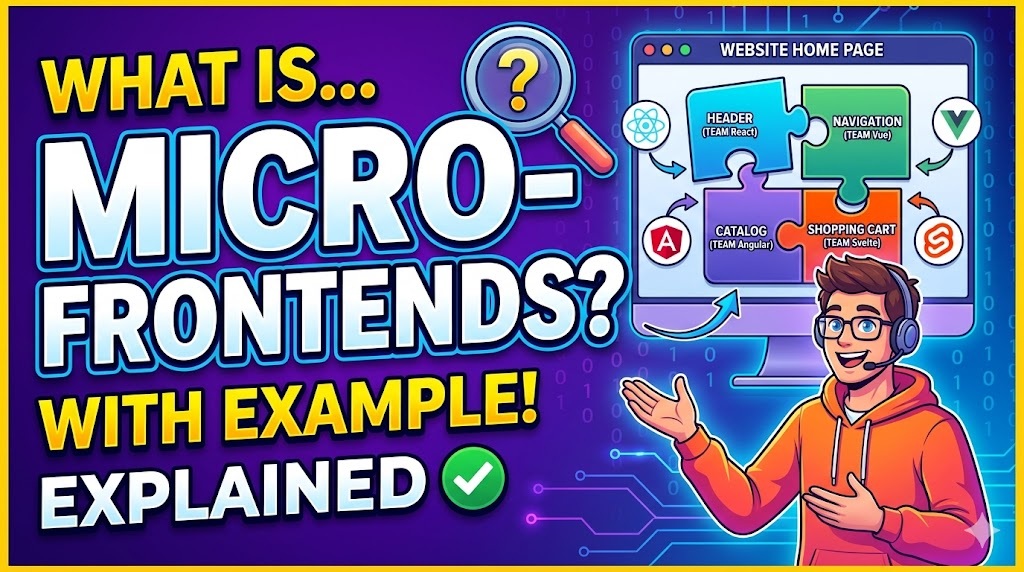
 🧩 Micro-frontends are an architectural style where a single web application is split into smaller, independent, and manageable pieces.
Think of it as taking the concept of microservices ⚙️ (which are used on the backend) and applying it to the frontend 🖥️. Instead of building one massive, monolithic frontend codebase that does everything, you build several smaller frontend applications that work together to appear as a single cohesive website to the user ✨.
Here is a breakdown of how it works and a practical example to make it clear.
🏗️ The Problem with the Monolith
In a traditional monolithic frontend, the entire user interface—routing, state management, UI components, and business logic—is bundled into one giant repository 📦.
- 📈 As the application grows, the codebase becomes incredibly complex.
- 🤼 Multiple teams working on the same codebase constantly step on each other’s toes, leading to merge conflicts and slowed development.
- 💥 If one team breaks a small feature, the entire website might fail to deploy.
💡 The Micro-frontend Solution
Micro-frontends solve this by dividing the application by business domain 🏢. Each smaller frontend is owned by a single, cross-functional team (from database to user interface) 🧑💻. These independent pieces are then stitched together by a “Container” or “Shell” application 🖼️.
🛒 An Example: An E-Commerce Website
Imagine you are building a large online store like Amazon 🏪. If you used a micro-frontend architecture, you wouldn’t build “one E-commerce app.” Instead, you would divide the site into specific domains, each owned by a different team:
- 🔍 Team Catalog: Builds the product search, filtering, and product detail pages. (They might choose to build their piece in React).
- 💳 Team Checkout: Builds the shopping cart, payment processing, and shipping forms. (They might build their piece in Vue.js).
- 👤 Team Account: Builds the user profile, order history, and settings. (They might use Angular or just vanilla JavaScript).
- 🪟 The Container (Shell): A lightweight parent application that loads the header, footer, and decides which micro-frontend to display based on the URL (e.g., if the user goes to
/cart, the shell loads Team Checkout’s code).
To the customer browsing the site, it looks and feels perfectly seamless 🪄. They click a product, add it to their cart, and check out without ever knowing they just transitioned between three completely separate frontend applications.
⚖️ The Trade-offs
Like any architectural choice, micro-frontends come with distinct pros and cons:
| ✅ Benefits | ⚠️ Challenges |
| 🚀 Independent Deployments: Team Checkout can release an update to the cart without waiting for Team Catalog to finish their new search feature. | 🏗️ Complexity: Setting up the container shell, routing, and deployment pipelines is significantly harder than a standard app. |
| 🛠️ Technology Agnostic: Different teams can theoretically use different frameworks (though standardizing is usually recommended for consistency). | 🐢 Performance Risks: If not carefully managed, users might end up downloading multiple copies of the same framework (e.g., React loaded twice), slowing down the site. |
| 🛡️ Fault Isolation: If the product recommendation widget crashes, it doesn’t take down the checkout process. | 🎨 Inconsistent UI: Teams must work hard to share a central design system so the app doesn’t look disjointed. |
| 👥 Scalable Teams: You can add more developers to the company without them tripping over each other in the same codebase. | 🔄 State Management: Passing data (like “is the user logged in?”) between independent applications can be tricky. |
🧩 మైక్రో-ఫ్రంటెండ్స్ (Micro-frontends) అనేది ఒక సింగిల్ వెబ్ అప్లికేషన్ను చిన్న, స్వతంత్ర మరియు నిర్వహించదగిన భాగాలుగా విభజించే ఒక ఆర్కిటెక్చరల్ శైలి.
బ్యాకెండ్లో ఉపయోగించే మైక్రోసర్వీసెస్ ⚙️ (microservices) కాన్సెప్ట్ను ఫ్రంటెండ్కు 🖥️ వర్తింపజేయడంగా దీన్ని భావించండి. అన్ని పనులూ చేసే ఒకే పెద్ద, మోనోలిథిక్ (monolithic) ఫ్రంటెండ్ కోడ్బేస్ను నిర్మించడానికి బదులుగా, వినియోగదారునికి ఒకే వెబ్సైట్లా కనిపించేలా కలిసి పనిచేసే పలు చిన్న ఫ్రంటెండ్ అప్లికేషన్లను మీరు నిర్మిస్తారు ✨.
ఇది ఎలా పనిచేస్తుందో మరియు దీన్ని స్పష్టంగా అర్థం చేసుకోవడానికి ఒక ఆచరణాత్మక ఉదాహరణ ఇక్కడ వివరించబడింది.
🏗️ మోనోలిథ్తో ఉన్న సమస్య (The Problem with the Monolith)
సాంప్రదాయ మోనోలిథిక్ ఫ్రంటెండ్లో, మొత్తం యూజర్ ఇంటర్ఫేస్—రౌటింగ్, స్టేట్ మేనేజ్మెంట్, UI కాంపోనెంట్లు మరియు బిజినెస్ లాజిక్—అన్నీ ఒకే పెద్ద రిపోజిటరీలో కలిపి ఉంటాయి 📦.
- 📈 అప్లికేషన్ పరిమాణం పెరిగేకొద్దీ, కోడ్బేస్ చాలా సంక్లిష్టంగా మారుతుంది.
- 🤼 ఒకే కోడ్బేస్పై పనిచేసే బహుళ బృందాలు ఒకరి పనులకు మరొకరు అడ్డురావడం వల్ల మెర్జ్ కాన్ఫ్లిక్ట్లు (merge conflicts) ఏర్పడి, డెవలప్మెంట్ నెమ్మదిస్తుంది.
- 💥 ఒక బృందం చిన్న ఫీచర్ను పాడుచేసినా, మొత్తం వెబ్సైట్ డిప్లాయ్ (deploy) కావడంలో విఫలం కావచ్చు.
💡 మైక్రో-ఫ్రంటెండ్ పరిష్కారం (The Micro-frontend Solution)
అప్లికేషన్ను బిజినెస్ డొమైన్ల ఆధారంగా విభజించడం ద్వారా మైక్రో-ఫ్రంటెండ్స్ ఈ సమస్యను పరిష్కరిస్తాయి 🏢. ప్రతి చిన్న ఫ్రంటెండ్ను ఒకే క్రాస్-ఫంక్షనల్ బృందం (డేటాబేస్ నుండి యూజర్ ఇంటర్ఫేస్ వరకు) నిర్వహిస్తుంది 🧑💻. ఈ స్వతంత్ర భాగాలను “కంటైనర్ (Container)” లేదా “షెల్ (Shell)” అప్లికేషన్ ద్వారా ఒకటిగా కలుపుతారు 🖼️.
🛒 ఒక ఉదాహరణ: ఈ-కామర్స్ వెబ్సైట్
మీరు అమెజాన్ లాంటి ఒక పెద్ద ఆన్లైన్ స్టోర్ను నిర్మిస్తున్నారని ఊహించుకోండి 🏪. మీరు మైక్రో-ఫ్రంటెండ్ ఆర్కిటెక్చర్ను ఉపయోగిస్తే, మీరు “ఒకే ఈ-కామర్స్ యాప్”ని నిర్మించరు. దానికి బదులుగా, మీరు సైట్ను నిర్దిష్ట డొమైన్లుగా విభజిస్తారు, ఒక్కో డొమైన్ ఒక్కో బృందం ఆధీనంలో ఉంటుంది:
- 🔍 టీమ్ కేటలాగ్ (Team Catalog): ప్రోడక్ట్ సెర్చ్, ఫిల్టరింగ్ మరియు ప్రోడక్ట్ వివరాల పేజీలను నిర్మిస్తుంది. (వారు తమ భాగాన్ని React లో నిర్మించుకోవచ్చు).
- 💳 టీమ్ చెక్అవుట్ (Team Checkout): షాపింగ్ కార్ట్, పేమెంట్ ప్రాసెసింగ్ మరియు షిప్పింగ్ ఫారమ్లను నిర్మిస్తుంది. (వారు తమ భాగాన్ని Vue.js లో నిర్మించుకోవచ్చు).
- 👤 టీమ్ అకౌంట్ (Team Account): యూజర్ ప్రొఫైల్, ఆర్డర్ హిస్టరీ మరియు సెట్టింగ్లను నిర్మిస్తుంది. (వారు Angular లేదా సాధారణ JavaScript ను ఉపయోగించవచ్చు).
- 🪟 కంటైనర్ లేదా షెల్ (The Container / Shell): హెడర్, ఫూటర్ను లోడ్ చేసే ఒక తేలికపాటి మాతృ (parent) అప్లికేషన్. URL ఆధారంగా ఏ మైక్రో-ఫ్రంటెండ్ను ప్రదర్శించాలో ఇది నిర్ణయిస్తుంది (ఉదాహరణకు, వినియోగదారుడు
/cartకు వెళితే, షెల్ ‘టీమ్ చెక్అవుట్’ కోడ్ను లోడ్ చేస్తుంది).
సైట్ను బ్రౌజ్ చేసే కస్టమర్కు ఇది ఎంతో సజావుగా ఉన్నట్లు అనిపిస్తుంది 🪄. వారు ఒక ప్రోడక్ట్పై క్లిక్ చేసి, కార్ట్కి జోడించి, చెక్అవుట్ చేస్తారు; ఈ క్రమంలో వారు మూడు వేర్వేరు ఫ్రంటెండ్ అప్లికేషన్ల మధ్య మారినట్లు వారికి ఏమాత్రం తెలియదు.
⚖️ లాభనష్టాలు (The Trade-offs)
ఏదైనా ఆర్కిటెక్చరల్ ఎంపిక మాదిరిగానే, మైక్రో-ఫ్రంటెండ్స్ కూడా నిర్దిష్ట ప్రయోజనాలు మరియు సవాళ్లను కలిగి ఉంటాయి:
| ✅ ప్రయోజనాలు (Benefits) | ⚠️ సవాళ్లు (Challenges) |
| 🚀 స్వతంత్ర డిప్లాయ్మెంట్స్ (Independent Deployments): టీమ్ కేటలాగ్ తమ కొత్త సెర్చ్ ఫీచర్ను పూర్తి చేసే వరకు వేచి ఉండకుండా, టీమ్ చెక్అవుట్ కార్ట్కి సంబంధించిన అప్డేట్ను విడుదల చేయవచ్చు. | 🏗️ సంక్లిష్టత (Complexity): కంటైనర్ షెల్, రౌటింగ్ మరియు డిప్లాయ్మెంట్ పైప్లైన్లను సెటప్ చేయడం సాధారణ యాప్ కంటే చాలా కష్టం. |
| 🛠️ టెక్నాలజీ అజ్ఞోస్టిక్ (Technology Agnostic): వేర్వేరు బృందాలు వేర్వేరు ఫ్రేమ్వర్క్లను ఉపయోగించవచ్చు (అయితే స్థిరత్వం కోసం ప్రామాణీకరించడం సాధారణంగా సిఫార్సు చేయబడుతుంది). | 🐢 పనితీరు రిస్క్లు (Performance Risks): సరిగ్గా నిర్వహించకపోతే, వినియోగదారులు ఒకే ఫ్రేమ్వర్క్ యొక్క బహుళ కాపీలను డౌన్లోడ్ చేసుకునే అవకాశం ఉంది (ఉదాహరణకు, React రెండుసార్లు లోడ్ అవ్వడం), దీనివల్ల సైట్ నెమ్మదిస్తుంది. |
| 🛡️ ఫాల్ట్ ఐసోలేషన్ (Fault Isolation): ప్రోడక్ట్ రికమండేషన్ విడ్జెట్ క్రాష్ అయినా, అది చెక్అవుట్ ప్రాసెస్ను నిలిపివేయదు. | 🎨 అస్థిరమైన UI (Inconsistent UI): యాప్ అస్తవ్యస్తంగా కనిపించకుండా ఉండటానికి బృందాలు సెంట్రల్ డిజైన్ సిస్టమ్ను పంచుకోవడానికి తీవ్రంగా కృషి చేయాలి. |
| 👥 స్కేలబుల్ టీమ్స్ (Scalable Teams): ఒకే కోడ్బేస్లో ఒకరికొకరు అడ్డురాకుండా కంపెనీకి మరింత మంది డెవలపర్లను సులభంగా జోడించవచ్చు. | 🔄 స్టేట్ మేనేజ్మెంట్ (State Management): స్వతంత్ర అప్లికేషన్ల మధ్య డేటాను పంపడం (“యూజర్ లాగిన్ అయ్యారా?” వంటివి) కష్టంగా ఉంటుంది. |