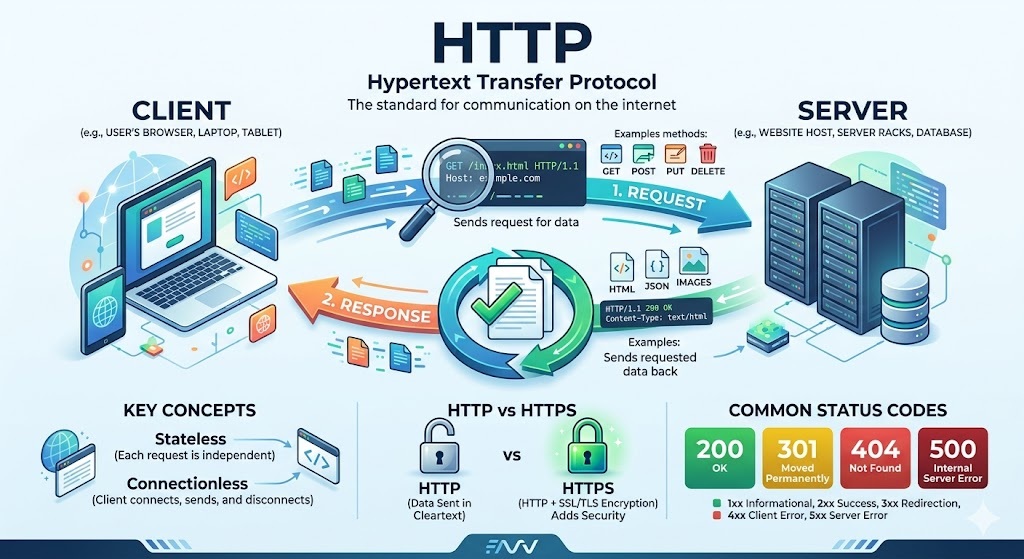
HTTP, which stands for HyperText Transfer Protocol, is the foundational language of the internet. It is the underlying set of rules that dictates how data—such as text, images, and video—is formatted and transmitted across the web.
Whenever you open a web browser and type in a website address, you are using HTTP to ask a server to send that website to your screen.
The Core Concept: Request and Response
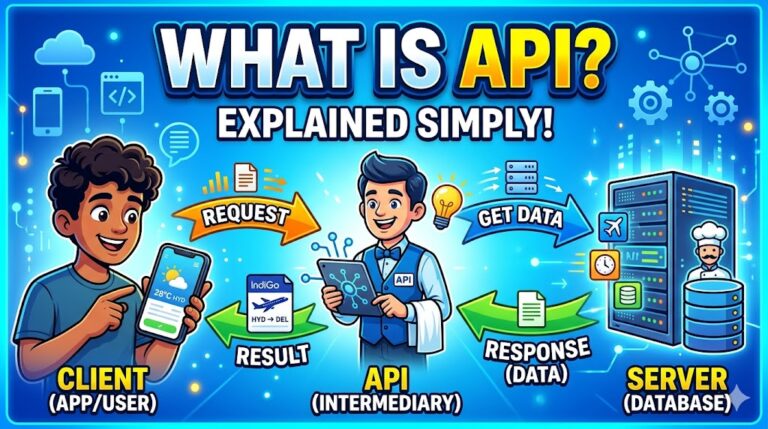
HTTP operates on a simple “Client-Server” model.
- The Client (Your Browser): You click a link, and your browser sends an HTTP Request to the server that hosts the website.
- The Server (The Website’s Computer): The server receives the request, processes it, and sends back an HTTP Response, which contains the data your browser needs to display the page.
Common HTTP Methods (The “Verbs”)
When the client sends a request, it uses a specific “method” to tell the server what action it wants to perform. Here are the most common ones:
- GET: “Please give me this data.” (e.g., loading a webpage, watching a video).
- POST: “Here is some new data I want you to save.” (e.g., submitting a login form, posting a comment).
- PUT / PATCH: “Please update this existing data.” (e.g., editing your profile information).
- DELETE: “Please remove this data.” (e.g., deleting an email).
HTTP Status Codes (The “Results”)
When the server replies, it includes a three-digit status code so the browser knows if the request was successful or if something went wrong.
- 200-level (Success): Everything worked perfectly. (e.g., 200 OK)
- 300-level (Redirection): The content has moved, and you are being sent somewhere else. (e.g., 301 Moved Permanently)
- 400-level (Client Error): You made a mistake in your request. (e.g., 404 Not Found – you clicked a dead link).
- 500-level (Server Error): The server is broken or overwhelmed. (e.g., 500 Internal Server Error).
Real-World Examples
Example 1: Loading a Webpage (A GET Request)
Imagine you type www.example.com/cats into your browser.
What your browser sends (The Request):
HTTP
GET /cats HTTP/1.1
Host: www.example.com
User-Agent: Mozilla Firefox/120.0
Accept-Language: en-US
Translation: “Hello server at example.com. I am a Firefox browser, and I speak English. Please GET me the page located at /cats using HTTP version 1.1.”
What the server sends back (The Response):
HTTP
HTTP/1.1 200 OK
Content-Type: text/html
Content-Length: 1048

<!DOCTYPE html>
<html>
<head><title>Cats</title></head>
<body>Here are some pictures of cats...</body>
</html>
Translation: “Message received! The status is 200 OK. Here is the HTML file you asked for, and it is 1048 bytes long.”
Example 2: Logging In (A POST Request)
Imagine you are typing your username and password into a login screen.
What your browser sends (The Request):
HTTP
POST /login HTTP/1.1
Host: www.example.com
Content-Type: application/x-www-form-urlencoded

username=myuser&password=mypassword123
Translation: “Hello server. Please take this private data (my username and password) and process it using the POST method at the /login endpoint.”
What the server sends back (The Response):
HTTP
HTTP/1.1 302 Found
Location: /dashboard
Set-Cookie: session_id=abc987xyz
Translation: “Credentials accepted! I am setting a secure ‘cookie’ on your browser so I remember you are logged in, and I am redirecting you (302 Found) to your account /dashboard.”
HTTP అనగా HyperText Transfer Protocol. ఇది ఇంటర్నెట్ కి ఒక ప్రాథమిక భాష లాంటిది. వెబ్లో టెక్స్ట్, చిత్రాలు మరియు వీడియోల వంటి డేటా ఎలా ఫార్మాట్ చేయబడాలో మరియు ఒక చోట నుండి ఇంకో చోటకి ఎలా ప్రసారం చేయబడాలో ఇది నిర్దేశిస్తుంది.
మీరు వెబ్ బ్రౌజర్ని తెరిచి, ఏదైనా వెబ్సైట్ అడ్రస్ను టైప్ చేసిన ప్రతిసారీ, ఆ వెబ్సైట్ను మీ స్క్రీన్పైకి పంపమని సర్వర్ని అడగడానికి మీరు HTTPని ఉపయోగిస్తున్నారు.
ప్రాథమిక భావన: రిక్వెస్ట్ (అభ్యర్థన) మరియు రెస్పాన్స్ (ప్రతిస్పందన)
HTTP ఒక సాధారణ “క్లయింట్-సర్వర్” మోడల్పై పనిచేస్తుంది.
- క్లయింట్ (మీ బ్రౌజర్): మీరు ఒక లింక్పై క్లిక్ చేసినప్పుడు, మీ బ్రౌజర్ ఆ వెబ్సైట్ను హోస్ట్ చేసే సర్వర్కు HTTP రిక్వెస్ట్ (అభ్యర్థన) పంపుతుంది.
- సర్వర్ (వెబ్సైట్ ఉన్న కంప్యూటర్): సర్వర్ ఆ అభ్యర్థనను స్వీకరించి, ప్రాసెస్ చేసి, తిరిగి ఒక HTTP రెస్పాన్స్ (ప్రతిస్పందన) పంపుతుంది. ఇందులో మీ బ్రౌజర్ ఆ పేజీని ప్రదర్శించడానికి అవసరమైన డేటా ఉంటుంది.
సాధారణ HTTP పద్ధతులు (“క్రియలు” లాంటివి)
క్లయింట్ ఒక అభ్యర్థనను పంపినప్పుడు, అది సర్వర్తో ఏ పని చేయాలనుకుంటుందో చెప్పడానికి ఒక నిర్దిష్ట “పద్ధతి” (method) ని ఉపయోగిస్తుంది. వాటిలో ముఖ్యమైనవి:
- GET: “దయచేసి నాకు ఈ డేటాను ఇవ్వండి.” (ఉదాహరణకు: వెబ్పేజీని లోడ్ చేయడం, వీడియో చూడటం).
- POST: “నేను సేవ్ చేయాలనుకుంటున్న కొత్త డేటా ఇక్కడ ఉంది.” (ఉదాహరణకు: లాగిన్ ఫారమ్ను సమర్పించడం, కామెంట్ పోస్ట్ చేయడం).
- PUT / PATCH: “దయచేసి ఇప్పటికే ఉన్న ఈ డేటాను అప్డేట్ చేయండి.” (ఉదాహరణకు: మీ ప్రొఫైల్ సమాచారాన్ని సవరించడం).
- DELETE: “దయచేసి ఈ డేటాను తీసివేయండి.” (ఉదాహరణకు: ఇమెయిల్ను డిలీట్ చేయడం).
HTTP స్టేటస్ కోడ్లు (“ఫలితాలు”)
సర్వర్ రిప్లై ఇచ్చినప్పుడు, అది మూడు అంకెల స్టేటస్ కోడ్ను జత చేస్తుంది. దీని ద్వారా మీ అభ్యర్థన విజయవంతమైందా లేదా ఏదైనా తప్పు జరిగిందా అని బ్రౌజర్ తెలుసుకుంటుంది.
- 200-స్థాయి (విజయం): అంతా సవ్యంగా జరిగింది. (ఉదాహరణకు: 200 OK)
- 300-స్థాయి (రీడైరెక్షన్): కంటెంట్ వేరే చోటికి మార్చబడింది, మిమ్మల్ని అక్కడికి పంపుతున్నాము. (ఉదాహరణకు: 301 Moved Permanently)
- 400-స్థాయి (క్లయింట్ లోపం): మీ అభ్యర్థనలో తప్పు ఉంది. (ఉదాహరణకు: 404 Not Found – మీరు లేని లింక్ను క్లిక్ చేశారు).
- 500-స్థాయి (సర్వర్ లోపం): సర్వర్ పాడైంది లేదా బిజీగా ఉంది. (ఉదాహరణకు: 500 Internal Server Error).
వాస్తవ ప్రపంచ ఉదాహరణలు
ఉదాహరణ 1: వెబ్పేజీని లోడ్ చేయడం (ఒక GET రిక్వెస్ట్)
మీరు మీ బ్రౌజర్లో [www.example.com/cats](https://www.example.com/cats) అని టైప్ చేశారని ఊహించుకోండి.
మీ బ్రౌజర్ పంపేది (రిక్వెస్ట్):
HTTP
GET /cats HTTP/1.1
Host: www.example.com
User-Agent: Mozilla Firefox/120.0
Accept-Language: en-US
అనువాదం: “హలో example.com సర్వర్. నేను Firefox బ్రౌజర్ని, నేను ఇంగ్లీష్ మాట్లాడతాను. దయచేసి HTTP వెర్షన్ 1.1ని ఉపయోగించి /cats వద్ద ఉన్న పేజీని నాకు GET చేయండి.”
సర్వర్ తిరిగి పంపేది (రెస్పాన్స్):
HTTP
HTTP/1.1 200 OK
Content-Type: text/html
Content-Length: 1048

<!DOCTYPE html>
<html>
<head><title>Cats</title></head>
<body>Here are some pictures of cats...</body>
</html>
అనువాదం: “సందేశం అందింది! స్టేటస్ 200 OK. మీరు అడిగిన HTML ఫైల్ ఇక్కడ ఉంది, దీని సైజు 1048 బైట్లు.”
ఉదాహరణ 2: లాగిన్ అవ్వడం (ఒక POST రిక్వెస్ట్)
మీరు లాగిన్ స్క్రీన్లో మీ యూజర్నేమ్ మరియు పాస్వర్డ్ టైప్ చేస్తున్నారని ఊహించుకోండి.
మీ బ్రౌజర్ పంపేది (రిక్వెస్ట్):
HTTP
POST /login HTTP/1.1
Host: www.example.com
Content-Type: application/x-www-form-urlencoded

username=myuser&password=mypassword123
అనువాదం: “హలో సర్వర్. దయచేసి ఈ ప్రైవేట్ డేటాను (నా యూజర్నేమ్ మరియు పాస్వర్డ్) తీసుకుని, /login ఎండ్పాయింట్ వద్ద POST పద్ధతిని ఉపయోగించి దాన్ని ప్రాసెస్ చేయండి.”
సర్వర్ తిరిగి పంపేది (రెస్పాన్స్):
HTTP
HTTP/1.1 302 Found
Location: /dashboard
Set-Cookie: session_id=abc987xyz
అనువాదం: “మీ వివరాలు అంగీకరించబడ్డాయి! మీరు లాగిన్ అయ్యారని గుర్తుంచుకోవడానికి నేను మీ బ్రౌజర్లో ఒక సురక్షితమైన ‘కుకీ’ని (cookie) సెట్ చేస్తున్నాను మరియు నేను మిమ్మల్ని మీ ఖాతాలోని /dashboard కి పంపుతున్నాను (302 Found).”
Class Notes: HTTP and Web Communication Basics
1. Introduction to HTTP
- HTTP (Hypertext Transfer Protocol): An application layer protocol that allows web-based applications to communicate. It is considered the backbone of the internet.
- Core Responsibilities: Loading web pages, submitting forms, and handling APIs.
- Underlying Network: Uses the TCP/IP protocol suite.
- TCP (Transmission Control Protocol): Responsible for collecting and assembling data packets.
- IP (Internet Protocol): Ensures data packets are delivered to the correct destination.
- Stateless Nature: HTTP is a stateless protocol, meaning every transaction is completely independent.
- State Management: Even though HTTP is stateless, state can still be handled using cookies, local storage, and other state management procedures.
2. HTTP vs. HTTPS
- Standard HTTP: Exchanges all information in clear text. This makes data visible to everyone and highly vulnerable to attacks or interception by hackers.
- HTTPS (Hypertext Transfer Protocol Secure): Created to solve the security vulnerabilities of HTTP.
- Encrypts data during exchange over the internet.
- Converts clear text into an unreadable format that cannot be intercepted and understood by malicious individuals.
3. SSL and TLS (Securing HTTP)
To upgrade an HTTP request to an HTTPS request, specific security standards are used:
- SSL (Secure Socket Layer):
- Uses a public key encryption method to secure data.
- Authenticates the integrity of the request and response.
- Uses a small certificate to identify and authenticate a website.
- TLS (Transport Layer Security):
- The modern successor to SSL.
- Follows the same primary guidelines: authenticates server requests and encrypts sent data.
- Modern Web Standards: Implementing SSL/TLS is now the standard for the web. Browsers (like Google Chrome) will actively throw warning messages to protect users if a website is not secured by these protocols.
4. HTTP Message Structure (Requests & Responses)
Every HTTP request and response is built using the same core structural components:
- Start Line (or Status Line for responses): Describes the action to be performed (e.g.,
GETspecific information from a URL using HTTP 1.1). - Headers: Crucial for passing additional information between clients and servers. Can include:
- The expected response format (e.g., JSON, XML, HTML).
- Authentication credentials to access protected data.
- Empty Line: Acts as a separator between the headers and the body.
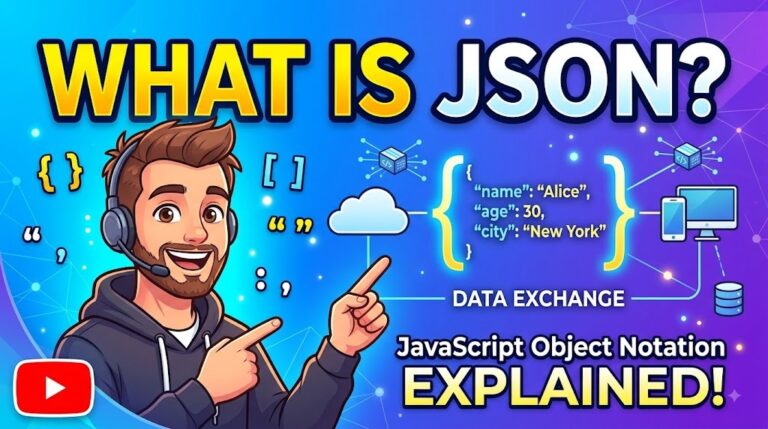
- Body: The actual data payload of the request or response (e.g., JSON data elements, HTML code).
5. HTTP Status Codes
Status codes are 3-digit numbers issued by the server in response to a client’s request to explain the outcome:
- 100s (Informational): The request was received, continuing process.
- 200s (Success): The client-server communication was successful.
- 300s (Redirection): The client must take additional action to complete the request.
- 400s (Client Error): Something was incorrect on the client’s side (e.g., requesting a URL that does not exist).
- 500s (Server Error): The server is down, broken, or not working correctly.
6. Real-World API Communication Example
- Action: Navigating to
[https://www.vlrtraining.com](https://www.vlrtraining.com). - Request Method:
GET(fetching/receiving data). - Status Code Received:
200(Success). - Headers: Contain metadata about the request and response.
- Body: Contains the complete HTML code required to render the web page in the browser.
–
In computer networking and HTTP (web) terminology, ‘Stateless’ means “having no memory of the past.”
Let’s understand this in detail:
When you (the client or web browser) send a request to a server, the server provides a response. As soon as that task is completed, the server completely forgets about you. If you immediately send another request, the server treats you as a brand new person; it does not recognize you as “the person who just visited.”
This means that every single request is considered an independent transaction, with no connection to previous requests.
To easily understand this, let’s look at a real-life example:
🍔 A Restaurant Example (Real-life Example):
1. Stateful (Remembers the past):
You go to a restaurant and tell the waiter, “I want a chicken biryani.” A little later, you call the waiter again and say, “Bring a Thums Up with that.” Because the waiter remembers you already ordered biryani, he simply adds the Thums Up to your existing order and gives you a combined bill.
2. Stateless (Like HTTP, does not remember):
Here, the waiter (our server) has severe amnesia.
- You: “I want a biryani.” (Request 1)
- Waiter: Brings the biryani. (Response 1)
- You: (Calling him again) “Bring a Thums Up and add it to the bill for what you brought earlier.” (Request 2)
- Waiter: “Who are you? What did I give you earlier? I don’t remember anything!”
This is exactly what happens in HTTP. Therefore, in a stateless system, you must provide complete information every single time. This means you would have to tell the waiter, “My table number is 5, I have a token, I took a biryani earlier, please add a Thums Up to that.”
🛒 Technical Example (Online Shopping – Amazon/Flipkart):
Imagine you are shopping on Amazon.
- You “Add to Cart” a shirt. (The server adds it to your cart, and then forgets you).
- Afterwards, you go to another page and “Add to Cart” a pair of pants.
Question: If the server has amnesia (Stateless), when you add the pants, how does it know that you previously added a shirt? How do both items appear in your cart?
Answer: Cookies and Tokens
Even though HTTP is stateless, our browser acts smartly. The first time you log in, the server gives your browser something like a small ID card (this is called a Cookie or Session ID).
When you order the pants the second time, your browser doesn’t just ask for “pants”. It sends your identity along with the request: “Here is my ID card (Cookie/Token), my ID is 12345, add these pants to my cart.” Then the server looks at that ID, recognizes your account, and adds the pants.
What are the advantages of being ‘Stateless’?
- Less burden on the server: Millions of people use a website globally. If the server had to remember the data of every single person in its memory, the servers would crash. Being stateless saves the server from this struggle.
- Speed and Scalability: For example, Amazon has hundreds of servers. Even if your first request goes to one server and your second request goes to a completely different server, there is no problem, because you are sending your full information (via Cookie) with every single request.
–
State Management is the process of maintaining and tracking user data (the “state”) across multiple independent requests in a stateless environment like the web.
Since HTTP is naturally “stateless” (it forgets who you are the moment a request is finished), web developers must use State Management techniques to build modern, interactive websites. “State” simply means any data that needs to be remembered at a specific point in time—such as your login status, the items in your shopping cart, or your preferred language settings.
🎟️ A Real-Life Example: The Theme Park
Imagine a theme park where the ride operators have zero memory (Stateless).
Without State Management:
You pay for an all-day pass at the front gate. You walk up to the roller coaster, but the operator doesn’t let you on because they don’t know you paid. You have to go back to the front gate, bring the cashier with you, and prove you paid. You would have to do this for every single ride.
With State Management (The Wristband):
When you pay at the front gate, they give you a neon wristband. Now, when you go to the roller coaster, you simply show the wristband. The operator still has zero memory, but the wristband proves your “state” (that you are a paying customer). You can ride as many rides as you want by just showing the wristband.
💻 How it Works on the Web (Technical Example)
Let’s look at how State Management works when you log into a website like Netflix:
- The Initial Request: You enter your username and password and click “Log In.”
- Creating the State: The server checks your password. It is correct. To ensure it doesn’t forget you on the very next click, the server creates a unique, encrypted ID for you (the “wristband”).
- Storing the State: The server sends this ID back to your browser and tells your browser to hold onto it. The browser stores this in a place called a Cookie or Local Storage.
- Using the State: When you click on a movie to watch, your browser automatically attaches that Cookie to your request. The server looks at the Cookie, realizes you are an authenticated user, and starts playing the movie instead of asking you to log in again.
Common Tools for State Management
- Cookies: Small text files stored on your browser, automatically sent to the server with every request. Used primarily for login sessions and tracking.
- Local Storage / Session Storage: Storage within your browser that can hold larger amounts of data (like user preferences or dark mode settings) without sending it to the server every time.
- Tokens (like JWT – JSON Web Tokens): Secure, encrypted strings used often in modern APIs and mobile apps to prove user identity.
- Server-Side Sessions: The server stores your data in its own database (like a shopping cart) and just gives your browser a small reference key to access it.
–
1. HTTP పరిచయం
- HTTP (హైపర్టెక్స్ట్ ట్రాన్స్ఫర్ ప్రోటోకాల్): వెబ్-ఆధారిత అప్లికేషన్లు కమ్యూనికేట్ చేసుకోవడానికి అనుమతించే ఒక అప్లికేషన్ లేయర్ ప్రోటోకాల్. ఇది ఇంటర్నెట్కు వెన్నెముకగా పరిగణించబడుతుంది.
- ప్రధాన బాధ్యతలు: వెబ్ పేజీలను లోడ్ చేయడం, ఫారమ్లను సమర్పించడం మరియు APIలను నిర్వహించడం.
- అంతర్లీన నెట్వర్క్ (Underlying Network): ఇది TCP/IP ప్రోటోకాల్ సూట్ను ఉపయోగిస్తుంది.
- TCP (ట్రాన్స్మిషన్ కంట్రోల్ ప్రోటోకాల్): డేటా ప్యాకెట్లను సేకరించడానికి మరియు సమీకరించడానికి బాధ్యత వహిస్తుంది.
- IP (ఇంటర్నెట్ ప్రోటోకాల్): డేటా ప్యాకెట్లు సరైన గమ్యస్థానానికి చేరేలా నిర్ధారిస్తుంది.
- స్టేట్లెస్ స్వభావం (Stateless Nature): HTTP అనేది స్టేట్లెస్ ప్రోటోకాల్, అంటే ప్రతి లావాదేవీ పూర్తిగా స్వతంత్రంగా ఉంటుంది.
- స్టేట్ మేనేజ్మెంట్: HTTP స్టేట్లెస్ అయినప్పటికీ, కుకీలు (cookies), లోకల్ స్టోరేజ్ (local storage) మరియు ఇతర స్టేట్ మేనేజ్మెంట్ పద్ధతులను ఉపయోగించి స్టేట్ను నిర్వహించవచ్చు.
2. HTTP మరియు HTTPS మధ్య తేడా
- ప్రామాణిక HTTP (Standard HTTP): సమాచారాన్ని క్లియర్ టెక్స్ట్లో (చదవగలిగే విధంగా) పంపుతుంది. దీనివల్ల డేటా అందరికీ కనిపిస్తుంది మరియు హ్యాకర్ల దాడులకు సులభంగా గురయ్యే ప్రమాదం ఉంది.
- HTTPS (హైపర్టెక్స్ట్ ట్రాన్స్ఫర్ ప్రోటోకాల్ సెక్యూర్): HTTP లోని భద్రతా లోపాలను పరిష్కరించడానికి ఇది సృష్టించబడింది.
- ఇంటర్నెట్ ద్వారా సమాచారాన్ని పంచుకునేటప్పుడు డేటాను ఎన్క్రిప్ట్ (encrypt) చేస్తుంది.
- క్లియర్ టెక్స్ట్ను, ఎవరూ చదవలేని మరియు అర్థం చేసుకోలేని విధంగా మారుస్తుంది.
3. SSL మరియు TLS (HTTPకి భద్రత కల్పించడం)
HTTP రిక్వెస్ట్ను HTTPS రిక్వెస్ట్గా మార్చడానికి నిర్దిష్ట భద్రతా ప్రమాణాలు ఉపయోగించబడతాయి:
- SSL (సెక్యూర్ సాకెట్ లేయర్ – Secure Socket Layer):
- డేటాను సురక్షితంగా ఉంచడానికి పబ్లిక్ కీ (public key) ఎన్క్రిప్షన్ పద్ధతిని ఉపయోగిస్తుంది.
- రిక్వెస్ట్ మరియు రెస్పాన్స్ యొక్క సమగ్రతను ప్రామాణీకరిస్తుంది (authenticates).
- వెబ్సైట్ను గుర్తించడానికి మరియు ప్రామాణీకరించడానికి ఒక చిన్న సర్టిఫికేట్ను ఉపయోగిస్తుంది.
- TLS (ట్రాన్స్పోర్ట్ లేయర్ సెక్యూరిటీ – Transport Layer Security):
- ఇది SSLకి ఆధునిక వారసుడు (successor).
- ఇది కూడా ప్రధానంగా సర్వర్ రిక్వెస్ట్లను ప్రామాణీకరించడం మరియు పంపిన డేటాను ఎన్క్రిప్ట్ చేయడం అనే మార్గదర్శకాలను అనుసరిస్తుంది.
- ఆధునిక వెబ్ ప్రమాణాలు: SSL/TLSను అమలు చేయడం ఇప్పుడు వెబ్కు ప్రమాణంగా మారింది. ఒకవేళ వెబ్సైట్ సురక్షితంగా లేకుంటే, వినియోగదారులను రక్షించడానికి గూగుల్ క్రోమ్ (Google Chrome) లాంటి బ్రౌజర్లు హెచ్చరిక సందేశాలను చూపిస్తాయి.
4. HTTP మెసేజ్ నిర్మాణం (రిక్వెస్ట్లు & రెస్పాన్స్లు)
ప్రతి HTTP రిక్వెస్ట్ మరియు రెస్పాన్స్ కింది నాలుగు ప్రధాన భాగాలతో నిర్మించబడుతుంది:
- స్టార్ట్ లైన్ (లేదా రెస్పాన్స్ కోసం స్టేటస్ లైన్): ఏ చర్య తీసుకోవాలో ఇది వివరిస్తుంది (ఉదాహరణకు, HTTP 1.1 ఉపయోగించి నిర్దిష్ట URL నుండి సమాచారాన్ని
GETచేయడం). - హెడర్లు (Headers): క్లయింట్లు మరియు సర్వర్ల మధ్య అదనపు సమాచారాన్ని పంపడానికి ఇవి చాలా ముఖ్యమైనవి. వీటిలో ఇవి ఉండవచ్చు:
- ఆశించిన ప్రతిస్పందన ఫార్మాట్ (ఉదా: JSON, XML, HTML).
- రక్షించబడిన డేటాను యాక్సెస్ చేయడానికి ఆథెంటికేషన్ వివరాలు.
- ఖాళీ లైన్ (Empty Line): హెడర్లు మరియు బాడీ మధ్య విభాజకంగా పనిచేస్తుంది.
- బాడీ (Body): రిక్వెస్ట్ లేదా రెస్పాన్స్ యొక్క అసలు డేటా ఇందులో ఉంటుంది (ఉదా: JSON డేటా లేదా HTML కోడ్).
5. HTTP స్టేటస్ కోడ్లు
క్లయింట్ రిక్వెస్ట్కు ప్రతిస్పందనగా, ఫలితాన్ని వివరించడానికి సర్వర్ జారీ చేసే 3-అంకెల సంఖ్యలే ఈ స్టేటస్ కోడ్లు:
- 100s (సమాచారం): రిక్వెస్ట్ స్వీకరించబడింది, ప్రక్రియ కొనసాగుతోంది.
- 200s (విజయం): క్లయింట్-సర్వర్ కమ్యూనికేషన్ విజయవంతమైంది.
- 300s (దారి మళ్లింపు – Redirection): రిక్వెస్ట్ను పూర్తి చేయడానికి క్లయింట్ మరింత చర్య తీసుకోవాలి.
- 400s (క్లయింట్ ఎర్రర్): క్లయింట్ వైపు ఏదో తప్పు జరిగింది (ఉదా: ఉనికిలో లేని URLను అడగడం).
- 500s (సర్వర్ ఎర్రర్): సర్వర్ డౌన్ అయింది లేదా సరిగ్గా పనిచేయడం లేదు.
6. రియల్-వరల్డ్ API కమ్యూనికేషన్ ఉదాహరణ
- చర్య (Action):
[https://www.vlrtraining.com](https://www.vlrtraining.com)కు వెళ్లడం. - రిక్వెస్ట్ మెథడ్:
GET(డేటాను పొందడం/స్వీకరించడం). - పొందిన స్టేటస్ కోడ్:
200(విజయం). - హెడర్లు: రిక్వెస్ట్ మరియు రెస్పాన్స్ గురించిన అదనపు సమాచారం (metadata) కలిగి ఉంటాయి.
- బాడీ: బ్రౌజర్లో వెబ్ పేజీని ప్రదర్శించడానికి అవసరమైన పూర్తి HTML కోడ్ను కలిగి ఉంటుంది.
కంప్యూటర్ నెట్వర్కింగ్ మరియు HTTP (వెబ్) పరిభాషలో ‘స్టేట్లెస్’ (Stateless) అంటే “గతాన్ని గుర్తుపెట్టుకోకపోవడం”.
దీనిని ఇంకా వివరంగా అర్థం చేసుకుందాం:
మీరు (క్లయింట్ లేదా వెబ్ బ్రౌజర్) ఒక సర్వర్కి ఒక రిక్వెస్ట్ పంపినప్పుడు, సర్వర్ దానికి రెస్పాన్స్ (సమాధానం) ఇస్తుంది. ఆ పని పూర్తవ్వగానే, సర్వర్ మీ గురించి పూర్తిగా మర్చిపోతుంది. మీరు వెంటనే మరొక రిక్వెస్ట్ పంపితే, సర్వర్ మిమ్మల్ని ఒక కొత్త వ్యక్తిగా చూస్తుంది తప్ప, “ఓహో, ఇందాక వచ్చిన వ్యక్తినే కదా” అని గుర్తుపట్టదు.
అంటే, ప్రతి ఒక్క రిక్వెస్ట్ ఒకదానికొకటి సంబంధం లేని ఒక స్వతంత్ర లావాదేవీగా (Independent Transaction) పరిగణించబడుతుంది.
దీనిని సులభంగా అర్థం చేసుకోవడానికి ఒక నిజ జీవిత ఉదాహరణ చూద్దాం:
🍔 ఒక రెస్టారెంట్ ఉదాహరణ (Real-life Example):
1. స్టేట్ఫుల్ (Stateful – గతాన్ని గుర్తుపెట్టుకునేది):
మీరు ఒక రెస్టారెంట్కు వెళ్లి “నాకు ఒక చికెన్ బిర్యానీ కావాలి” అని వెయిటర్కు చెప్పారు. కాసేపటి తర్వాత మళ్లీ వెయిటర్ను పిలిచి, “దానికి ఒక థమ్స్ అప్ (Thums Up) కూడా తీసుకురండి” అని చెప్తారు. వెయిటర్కు మీరు ఇదివరకే బిర్యానీ ఆర్డర్ చేశారని గుర్తుంటుంది కాబట్టి, ఆ బిర్యానీకి థమ్స్ అప్ జత చేసి మీకు బిల్లు ఇస్తాడు.
2. స్టేట్లెస్ (Stateless – HTTP లాగా గుర్తుపెట్టుకోనిది):
ఇక్కడ వెయిటర్కు (అదే మన సర్వర్) తీవ్రమైన మతిమరుపు ఉంటుంది.
- మీరు: “నాకు ఒక బిర్యానీ కావాలి.” (రిక్వెస్ట్ 1)
- వెయిటర్: బిర్యానీ తెచ్చి ఇచ్చాడు. (రెస్పాన్స్ 1)
- మీరు: (మళ్లీ పిలిచి) “ఒక థమ్స్ అప్ తీసుకురండి, ఇంతకు ముందు తెచ్చిన దానికి కలిపి బిల్లు ఇవ్వండి.” (రిక్వెస్ట్ 2)
- వెయిటర్: “నువ్వు ఎవరు? ఇంతకుముందు నేను నీకు ఏం ఇచ్చాను? నాకేం గుర్తులేదు!” అంటాడు.
ఇదే HTTPలో జరిగేది. కాబట్టి స్టేట్లెస్ పద్ధతిలో మీరు ప్రతిసారీ పూర్తి సమాచారం ఇవ్వాల్సి ఉంటుంది. అంటే మీరు వెయిటర్తో, “నా టేబుల్ నెంబర్ 5, నా దగ్గర ఒక టోకెన్ ఉంది, నేను ఇంతకుముందు బిర్యానీ తీసుకున్నాను, దానికి ఇప్పుడు థమ్స్ అప్ యాడ్ చేయండి” అని మొత్తం కథ చెప్పాలి.
🛒 టెక్నికల్ ఉదాహరణ (ఆన్లైన్ షాపింగ్ – Amazon/Flipkart):
మీరు అమెజాన్ లో షాపింగ్ చేస్తున్నారని అనుకుందాం.
- మీరు ఒక షర్ట్ ను “Add to Cart” చేశారు. (సర్వర్ దాన్ని మీ కార్ట్లో వేసి, మిమ్మల్ని మర్చిపోతుంది).
- ఆ తర్వాత మీరు ఇంకో పేజీకి వెళ్లి ఒక ప్యాంట్ ను “Add to Cart” చేశారు.
ప్రశ్న: సర్వర్కు మతిమరుపు (Stateless) ఉంటే, మీరు ప్యాంట్ యాడ్ చేసినప్పుడు, అంతకుముందు షర్ట్ యాడ్ చేశారనే విషయం దానికి ఎలా తెలుస్తుంది? మీ కార్ట్లో రెండు వస్తువులు ఎలా కనిపిస్తాయి?
సమాధానం: కుకీలు మరియు టోకెన్లు (Cookies & Tokens)
HTTP స్టేట్లెస్ అయినప్పటికీ, మన బ్రౌజర్ తెలివిగా వ్యవహరిస్తుంది. మొదటిసారి మీరు లాగిన్ అయినప్పుడు సర్వర్ మీ బ్రౌజర్కు ఒక చిన్న ఐడీ కార్డ్ లాంటిది ఇస్తుంది (దాన్నే కుకీ లేదా సెషన్ ఐడీ అంటారు).
మీరు రెండవసారి ప్యాంట్ ఆర్డర్ చేసినప్పుడు, మీ బ్రౌజర్ కేవలం “ప్యాంట్ కావాలి” అని అడగదు. “ఇదిగో నా ఐడీ కార్డ్ (Cookie/Token), నా ఐడీ 12345, నా కార్ట్లో ప్యాంట్ కూడా యాడ్ చెయ్” అని రిక్వెస్ట్తో పాటు మీ గుర్తింపును కూడా పంపుతుంది. అప్పుడు సర్వర్ ఆ ఐడీని చూసి మీ ఖాతాను గుర్తించి ప్యాంట్ను యాడ్ చేస్తుంది.
అసలు ఈ ‘స్టేట్లెస్’ వల్ల లాభం ఏమిటి?
- సర్వర్పై భారం తక్కువ: ప్రపంచవ్యాప్తంగా లక్షలాది మంది వెబ్సైట్ను వాడుతుంటారు. ప్రతి ఒక్కరి డేటాను సర్వర్ తన మెమరీలో గుర్తుపెట్టుకోవాలంటే సర్వర్లు క్రాష్ అవుతాయి. స్టేట్లెస్ వల్ల సర్వర్కు ఆ కష్టం తప్పుతుంది.
- స్పీడ్ మరియు స్కేలబిలిటీ (Scalability): ఉదాహరణకు, అమెజాన్కు వందల కొద్దీ సర్వర్లు ఉంటాయి. మీ మొదటి రిక్వెస్ట్ ఒక సర్వర్కు, రెండవ రిక్వెస్ట్ వేరొక సర్వర్కు వెళ్లినా ఎలాంటి ఇబ్బంది ఉండదు, ఎందుకంటే మీరు ప్రతి రిక్వెస్ట్లోనూ మీ పూర్తి సమాచారాన్ని (Cookie ద్వారా) పంపుతున్నారు.
స్టేట్ మేనేజ్మెంట్ (State Management) అంటే వెబ్ లాంటి స్టేట్లెస్ వాతావరణంలో, వినియోగదారుల డేటాను (“స్టేట్”) ఒక రిక్వెస్ట్ నుండి మరొక రిక్వెస్ట్కు గుర్తుపెట్టుకోవడం మరియు నిర్వహించడం.
HTTP అనేది సహజంగా “స్టేట్లెస్” (stateless) అంటే ఒక రిక్వెస్ట్ పూర్తి కాగానే అది మీ గురించి పూర్తిగా మర్చిపోతుంది. కాబట్టి ఆధునిక మరియు ఇంటరాక్టివ్ వెబ్సైట్లను నిర్మించడానికి డెవలపర్లు స్టేట్ మేనేజ్మెంట్ పద్ధతులను ఉపయోగించాల్సి ఉంటుంది. ఇక్కడ “స్టేట్” అంటే నిర్దిష్ట సమయంలో గుర్తుపెట్టుకోవాల్సిన ఏదైనా డేటా — అంటే మీ లాగిన్ స్టేటస్, షాపింగ్ కార్ట్లోని వస్తువులు లేదా మీరు ఎంచుకున్న భాష (language settings) లాంటివి అన్నమాట.
🎟️ ఒక రియల్-లైఫ్ ఉదాహరణ: థీమ్ పార్క్
ఒక థీమ్ పార్క్ (Theme Park) ఊహించుకోండి. అక్కడ రైడ్లు నడిపే ఆపరేటర్లకు అస్సలు జ్ఞాపకశక్తి లేదు (Stateless).
స్టేట్ మేనేజ్మెంట్ లేకపోతే:
మీరు మెయిన్ గేట్ దగ్గర రోజంతా వాడుకునే పాస్ కోసం డబ్బులు కట్టారు. ఆ తర్వాత రోలర్ కోస్టర్ దగ్గరకు వెళ్లారు, కానీ ఆపరేటర్ మిమ్మల్ని అనుమతించడు ఎందుకంటే మీరు డబ్బులు కట్టారని అతనికి తెలియదు (గుర్తులేదు). మళ్లీ మీరు గేట్ దగ్గరకు వెళ్లి, డబ్బులు తీసుకున్న వ్యక్తిని తీసుకొచ్చి మీరు డబ్బులు కట్టారని నిరూపించుకోవాలి. మీరు ఎక్కే ప్రతి రైడ్కు ఇలానే చేయాల్సి వస్తుంది.
స్టేట్ మేనేజ్మెంట్ ఉంటే (రిస్ట్బ్యాండ్):
మీరు గేట్ దగ్గర డబ్బులు కట్టినప్పుడు, వారు మీకు చేతికి ఒక కలర్ బ్యాండ్ (Wristband) కడతారు. ఇప్పుడు మీరు రోలర్ కోస్టర్ దగ్గరకు వెళ్ళినప్పుడు, కేవలం ఆ బ్యాండ్ చూపిస్తే సరిపోతుంది. ఆపరేటర్కు ఇప్పటికీ జ్ఞాపకశక్తి లేదు, కానీ ఆ బ్యాండ్ మీ “స్టేట్” ను నిరూపిస్తుంది (అంటే మీరు డబ్బులు చెల్లించిన కస్టమర్ అని). ఆ బ్యాండ్ చూపించి మీరు ఎన్ని రైడ్లైనా ఎంజాయ్ చేయవచ్చు.
💻 వెబ్లో ఇది ఎలా పనిచేస్తుంది (టెక్నికల్ ఉదాహరణ)
మీరు Netflix లాంటి వెబ్సైట్లో లాగిన్ అయినప్పుడు స్టేట్ మేనేజ్మెంట్ ఎలా పనిచేస్తుందో చూద్దాం:
- మొదటి రిక్వెస్ట్ (The Initial Request): మీరు మీ యూజర్ నేమ్, పాస్వర్డ్ ఎంటర్ చేసి “లాగిన్” పై క్లిక్ చేస్తారు.
- స్టేట్ను క్రియేట్ చేయడం (Creating the State): సర్వర్ మీ పాస్వర్డ్ను చెక్ చేస్తుంది. అది కరెక్టే అని తెలుసుకుంటుంది. తదుపరి క్లిక్లోనే సర్వర్ మిమ్మల్ని మర్చిపోకుండా ఉండటానికి, సర్వర్ మీకంటూ ఒక ప్రత్యేకమైన, ఎన్క్రిప్ట్ చేయబడిన ఐడీని క్రియేట్ చేస్తుంది (ఇదే మన థీమ్ పార్క్ ఉదాహరణలోని రిస్ట్బ్యాండ్).
- స్టేట్ను స్టోర్ చేయడం (Storing the State): సర్వర్ ఆ ఐడీని తిరిగి మీ బ్రౌజర్కు పంపి, దానిని జాగ్రత్తగా దాచుకోమని చెబుతుంది. బ్రౌజర్ ఆ ఐడీని కుకీ (Cookie) లేదా లోకల్ స్టోరేజ్ (Local Storage) అనే ప్రదేశంలో భద్రపరుస్తుంది.
- స్టేట్ను ఉపయోగించడం (Using the State): మీరు ఒక సినిమా చూడటానికి క్లిక్ చేసినప్పుడు, మీ బ్రౌజర్ ఆటోమేటిక్గా ఆ కుకీని (ఐడీని) మీ రిక్వెస్ట్కు జతచేసి పంపుతుంది. సర్వర్ ఆ కుకీని చూసి, మీరు అసలైన యూజర్ అని గుర్తించి, మిమ్మల్ని మళ్లీ లాగిన్ అడగకుండా డైరెక్ట్గా సినిమాను ప్లే చేస్తుంది.
స్టేట్ మేనేజ్మెంట్ కోసం ఉపయోగించే సాధారణ టూల్స్
- కుకీలు (Cookies): ఇవి మీ బ్రౌజర్లో స్టోర్ అయ్యే చిన్న టెక్స్ట్ ఫైల్స్. ప్రతి రిక్వెస్ట్తో పాటు ఆటోమేటిక్గా సర్వర్కు పంపబడతాయి. వీటిని ప్రధానంగా లాగిన్ సెషన్స్ మరియు ట్రాకింగ్ కోసం ఉపయోగిస్తారు.
- లోకల్ స్టోరేజ్ / సెషన్ స్టోరేజ్ (Local Storage / Session Storage): ఇవి మీ బ్రౌజర్లోనే ఎక్కువ డేటాను (ఉదాహరణకు, డార్క్ మోడ్ సెట్టింగ్స్) భద్రపరచడానికి ఉపయోగపడతాయి. ఇవి ప్రతిసారీ సర్వర్కు వెళ్లవు.
- టోకెన్లు (Tokens – ఉదా: JWT – JSON Web Tokens): వినియోగదారుని గుర్తింపును నిరూపించడానికి ఆధునిక APIలు మరియు మొబైల్ యాప్లలో ఉపయోగించే సురక్షితమైన, ఎన్క్రిప్ట్ చేయబడిన స్ట్రింగ్స్ (strings).
- సర్వర్-సైడ్ సెషన్స్ (Server-Side Sessions): సర్వర్ తన సొంత డేటాబేస్లో మీ డేటాను (షాపింగ్ కార్ట్ లాంటివి) స్టోర్ చేస్తుంది మరియు దానిని యాక్సెస్ చేయడానికి మీ బ్రౌజర్కు కేవలం ఒక చిన్న రిఫరెన్స్ కీని (reference key) మాత్రమే ఇస్తుంది.