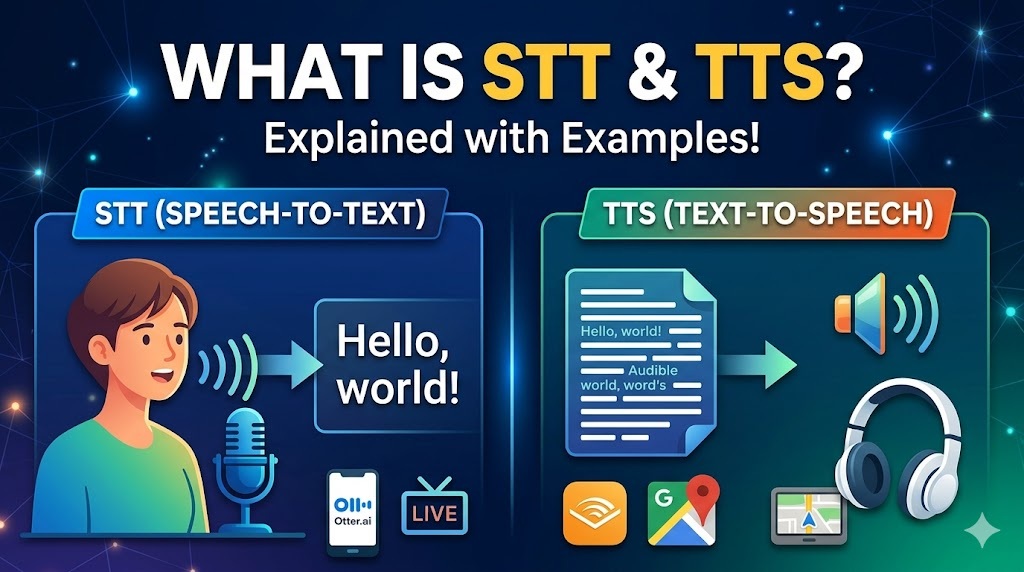
🗣️ STT (Speech-to-Text) and 🔊 TTS (Text-to-Speech) are opposite technologies that bridge the gap between spoken language and written text.
Here is a breakdown of how each works, along with everyday examples.
🎙️ STT: Speech-to-Text
STT (often called Automatic Speech Recognition, or ASR) is a technology that “listens” to spoken audio and converts it into readable text. It analyzes the sound waves of a human voice, breaks them down into individual sounds (phonemes), and matches them to words in a dictionary.
- 📥 Input: Spoken audio.
- 📤 Output: Written text.
🌍 Real-World Examples of STT
- 📱 Voice Typing/Dictation: Tapping the microphone icon on your smartphone keyboard to speak a text message instead of typing it.
- 📺 Live Captions: Turning on auto-generated subtitles during a YouTube video or a Zoom/Google Meet call.
- 🤖 Voice Assistants (Phase 1): When you say “Hey Siri, set a timer,” the assistant uses STT to transcribe your audio command into text it can understand and process.
🔊 TTS: Text-to-Speech
TTS (often called Speech Synthesis) is the reverse process. It takes written text and converts it into simulated human speech. Modern TTS uses artificial intelligence to analyze the text, predict the correct pronunciation and intonation, and generate natural-sounding audio.
- 📥 Input: Written text.
- 📤 Output: Spoken audio.
🌍 Real-World Examples of TTS
- 🗺️ GPS Navigation: Google Maps or Waze reading out directions like, “In 500 feet, turn left.”
- 👓 Accessibility Tools: Screen readers that read web pages or documents aloud for users with visual impairments.
- 🤳 Social Media Voiceovers: The automated voices used to narrate TikTok or Instagram Reels based on the text typed by the creator.
📊 Summary Comparison
| ⚙️ Feature | 🎙️ Speech-to-Text (STT) | 🔊 Text-to-Speech (TTS) |
| 🎯 Action | Transcribing | Reading aloud |
| 🔄 Flow | Audio ➡️ Text | Text ➡️ Audio |
| 💡 Core Purpose | Data entry, transcription, command recognition | Accessibility, hands-free consumption, automated announcements |
| 📲 Example App | Otter.ai (transcribing a meeting) | Audible (listening to a book) |
🎬 ఇక్కడ HeyGen AI అవతార్ కోసం తయారుచేయబడిన వీడియో స్క్రిప్ట్ (ట్రాన్స్క్రిప్ట్) ఉంది. ఇది వీడియో ప్రెజెంటేషన్ కోసం సహజంగా, మాట్లాడే శైలిలో ఉండేలా రూపొందించబడింది.
🎬 [Scene 1: Introduction]
🙏 నమస్కారం! మన మాటలను ఫోన్ 📱 ఎలా అర్థం చేసుకుంటుందో, లేదా GPS యాప్ 🗺️ మనకు దారిని ఎలా చదివి వినిపిస్తుందో మీరు ఎప్పుడైనా ఆలోచించారా? ఇదంతా 🎙️ STT మరియు 🔊 TTS అనే రెండు టెక్నాలజీల వల్ల సాధ్యమవుతుంది. ఇవి మాట్లాడే భాషకు మరియు వ్రాసే టెక్స్ట్కు మధ్య ఉన్న అంతరాన్ని పూరిస్తాయి. ఇవి ఎలా పనిచేస్తాయో ఇప్పుడు వివరంగా చూద్దాం.
🎙️ [Scene 2: STT Explanation]
ముందుగా, STT అంటే స్పీచ్-టు-టెక్స్ట్ (Speech-to-Text) గురించి తెలుసుకుందాం. దీనిని ఆటోమేటిక్ స్పీచ్ రికగ్నిషన్ అని కూడా అంటారు.
ఈ సాంకేతికత మనం మాట్లాడే ఆడియోను “విని” 👂, చదవగలిగే టెక్స్ట్గా 📝 మారుస్తుంది. దీని ఇన్పుట్ మాట్లాడే ఆడియో అయితే, అవుట్పుట్ వ్రాసిన టెక్స్ట్.
మనం దీన్ని రోజూ వాడుతూనే ఉంటాం. ఉదాహరణకు, కీబోర్డ్పై మైక్రోఫోన్ 🎤 నొక్కి వాయిస్ ద్వారా మెసేజ్ టైప్ చేయడం, YouTube మరియు Zoom కాల్స్లో వచ్చే లైవ్ క్యాప్షన్స్ 📺, అలాగే “హే సిరి, టైమర్ సెట్ చేయి” ⏱️ అని చెప్పినప్పుడు మన మాటలను ఫోన్ అర్థం చేసుకోవడానికి వాడే టెక్నాలజీ అంతా ఈ STT నే.
🔊 [Scene 3: TTS Explanation]
ఇక రెండవది, TTS లేదా టెక్స్ట్-టు-స్పీచ్ (Text-to-Speech). ఇది STT కి పూర్తిగా వ్యతిరేకమైన ప్రక్రియ. ఇది వ్రాసిన టెక్స్ట్ను 📝 తీసుకుని, దానిని కృత్రిమ మానవ ప్రసంగంగా, అంటే మాటలుగా 🗣️ మారుస్తుంది. ఆధునిక TTS సరైన ఉచ్చారణ కోసం ఆర్టిఫిషియల్ ఇంటెలిజెన్స్ను 🧠 ఉపయోగిస్తుంది. ఇందులో ఇన్పుట్ వ్రాసిన టెక్స్ట్ అయితే, అవుట్పుట్ మాట్లాడే ఆడియో.
Google Maps లో “500 అడుగుల తర్వాత ఎడమవైపుకు తిరగండి” 🗺️ అని మనకు వినిపించే వాయిస్, దృష్టి లోపం ఉన్నవారి కోసం పేజీలను చదివి వినిపించే స్క్రీన్ రీడర్లు 👓, మరియు TikTok లేదా Instagram రీల్స్లో 🤳 మనం వినే ఆటోమేటెడ్ వాయిస్లు అన్నీ ఈ TTS టెక్నాలజీ ద్వారానే పనిచేస్తాయి.
📊 [Scene 4: Summary]
వీటి మధ్య తేడాను ఒక్క మాటలో చెప్పాలంటే:
- 🎙️ STT అనేది ఆడియోను టెక్స్ట్గా మారుస్తుంది (Audio ➡️ Text). దీని ప్రధాన ఉద్దేశ్యం కమాండ్ గుర్తింపు మరియు ట్రాన్స్క్రిప్షన్. ఉదాహరణకు, మీటింగ్ను టెక్స్ట్గా మార్చే Otter.ai 📝.
- 🔊 TTS అనేది టెక్స్ట్ను ఆడియోగా మారుస్తుంది (Text ➡️ Audio). దీని ప్రధాన ఉద్దేశ్యం యాక్సెసిబిలిటీ మరియు చేతులతో పనిలేకుండా చదివి వినిపించడం. ఉదాహరణకు పుస్తకాలను వినడానికి వాడే Audible యాప్ 🎧.
ఈ రెండు వ్యతిరేక ప్రక్రియలు కలిసి మన డిజిటల్ అనుభవాన్ని ✨ మరింత సులభతరం చేస్తున్నాయి!