🚀 *Gen AI Engineer (Production Focused)*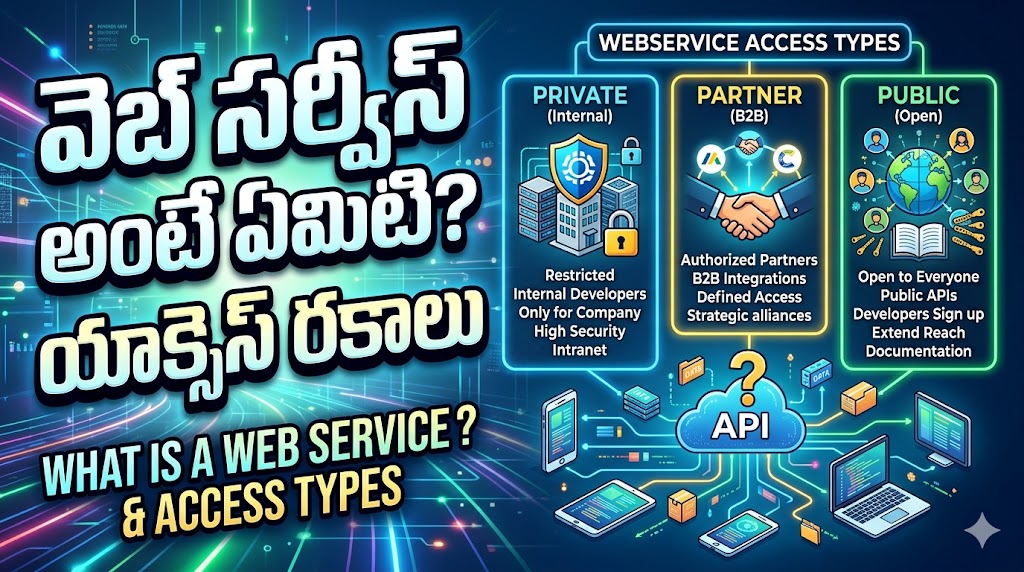
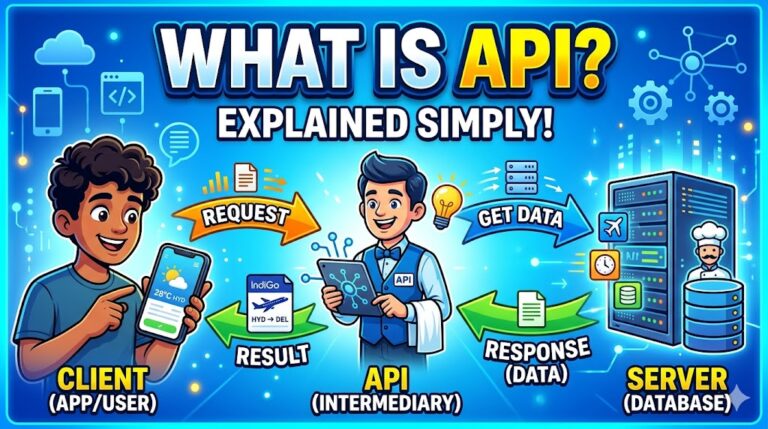
A web service is essentially a translator and a messenger that allows two different pieces of software to communicate with each other over the internet, regardless of what programming language they are written in or what operating system they are running on.
Think of it like a waiter in a restaurant. You (the client application) speak English, and the kitchen (the server or database) speaks French. You give your order to the waiter (the web service). The waiter translates your order, takes it to the kitchen, waits for the food (the data), and brings it back to your table in a way you can consume.
How It Works
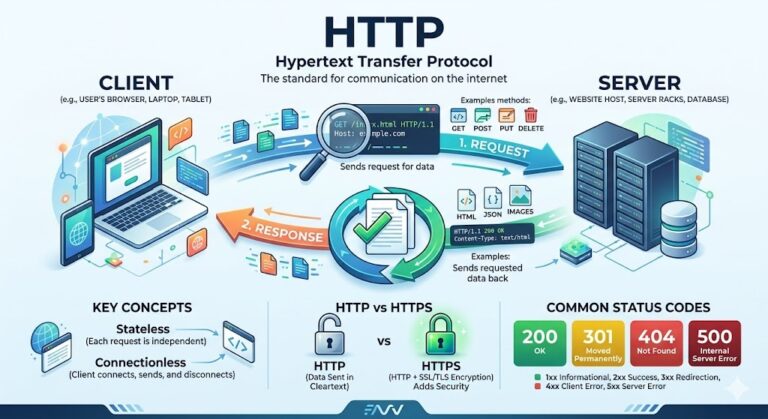
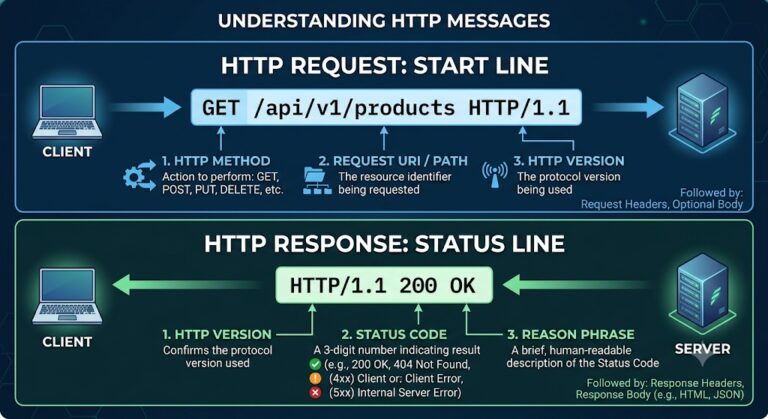
- The Request: Application A (the client) sends a request over the internet using standard protocols (usually HTTP, the same protocol your web browser uses).
- The Processing: The Web Service receives the request, processes it, and interacts with Application B (the server/database) to get the required information.
- The Response: The Web Service sends the data back to Application A in a standardized, machine-readable format—most commonly JSON (JavaScript Object Notation) or XML (eXtensible Markup Language).
Real-World Examples
Web services operate behind the scenes of almost everything you do online. Here are a few practical examples:
- Weather Applications: The weather app on your phone doesn’t have its own meteorologists or radars. Instead, when you open the app, it makes a call to a third-party web service (like the National Weather Service or OpenWeatherMap API). The web service replies with raw data (e.g.,
{"temperature": 72, "conditions": "sunny"}), and your app turns that raw data into a nice visual graphic. - Flight Aggregators: When you use a site like Expedia or Kayak to search for a flight, the website does not have direct access to the private databases of Delta, United, and American Airlines. Instead, Expedia’s software sends a request via web services to each airline’s system asking, “What flights do you have from New York to London on Friday?” The airlines’ web services respond with the times and prices, and Expedia aggregates them onto your screen.
- Online Payments: If you buy a pair of shoes from an independent online store, that store doesn’t actually process your credit card. When you click “Checkout,” the store uses a web service to securely send your payment details to a payment gateway like Stripe or PayPal. Stripe processes the payment with the bank and sends a simple “Approved” or “Declined” message back to the store via the web service.
The Two Main Types of Web Services
While there are several architectures, the vast majority of modern web services fall into one of two categories:
SOAP (Simple Object Access Protocol): An older, more rigid, and highly standardized approach. It exclusively uses XML for formatting and requires a lot of strict rules. It is heavier and slower than REST, but it is often still used in enterprise-level financial and telecommunication systems because of its built-in security and reliability features.
REST (Representational State Transfer): The most popular modern approach. It is lightweight, fast, and almost always uses JSON to transmit data. It relies on standard web commands like GET (retrieve data), POST (create data), and DELETE (remove data).
వెబ్ సర్వీస్ (Web Service) అనేది ఇంటర్నెట్ ద్వారా రెండు వేర్వేరు సాఫ్ట్వేర్లు ఒకదానితో ఒకటి మాట్లాడుకోవడానికి (కమ్యూనికేట్ చేయడానికి) అనుమతించే ఒక అనువాదకుడు (translator) మరియు సందేశహరుడు (messenger) లాంటిది. ఆ సాఫ్ట్వేర్లు ఏ ప్రోగ్రామింగ్ భాషలో రాయబడినవి లేదా ఏ ఆపరేటింగ్ సిస్టమ్పై పనిచేస్తున్నాయి అనేది ఇక్కడ ముఖ్యం కాదు.
దీనిని ఒక రెస్టారెంట్లోని వెయిటర్ లాగా ఊహించుకోండి. మీకు (క్లయింట్ అప్లికేషన్) ఇంగ్లీష్ మాత్రమే వచ్చు, వంటగదిలో (సర్వర్ లేదా డేటాబేస్) వాళ్ళకు ఫ్రెంచ్ మాత్రమే వచ్చు. మీరు మీ ఆర్డర్ను వెయిటర్కు (వెబ్ సర్వీస్) ఇస్తారు. ఆ వెయిటర్ మీ ఆర్డర్ను అనువదించి, వంటగదికి తీసుకెళ్లి, ఆహారం (డేటా) సిద్ధమయ్యే వరకు వేచి ఉండి, దానిని మీరు తినగలిగే పద్ధతిలో మీ టేబుల్ వద్దకు తీసుకువస్తాడు.
ఇది ఎలా పనిచేస్తుంది
- రిక్వెస్ట్ (The Request): అప్లికేషన్ A (క్లయింట్) స్టాండర్డ్ ప్రోటోకాల్స్ ఉపయోగించి (సాధారణంగా మీ వెబ్ బ్రౌజర్ ఉపయోగించే HTTP) ఇంటర్నెట్ ద్వారా ఒక అభ్యర్థనను (request) పంపుతుంది.
- ప్రాసెసింగ్ (The Processing): వెబ్ సర్వీస్ ఆ అభ్యర్థనను స్వీకరించి, దాన్ని ప్రాసెస్ చేసి, అవసరమైన సమాచారాన్ని పొందడానికి అప్లికేషన్ B (సర్వర్/డేటాబేస్) తో ఇంటరాక్ట్ అవుతుంది.
- రెస్పాన్స్ (The Response): వెబ్ సర్వీస్ ఆ డేటాను తిరిగి అప్లికేషన్ A కి మెషిన్ చదవగలిగే ఫార్మాట్లో పంపుతుంది—సాధారణంగా JSON (JavaScript Object Notation) లేదా XML (eXtensible Markup Language) రూపంలో.
రియల్-వరల్డ్ ఉదాహరణలు
వెబ్ సర్వీసెస్ మీరు ఆన్లైన్లో చేసే దాదాపు ప్రతి పని వెనుక పనిచేస్తూ ఉంటాయి. ఇక్కడ కొన్ని ఉదాహరణలు ఉన్నాయి:
- వాతావరణ యాప్లు (Weather Applications): మీ ఫోన్లోని వాతావరణ యాప్కు సొంతగా వాతావరణ శాఖ లేదా రాడార్లు ఉండవు. మీరు యాప్ను తెరిచినప్పుడు, అది థర్డ్-పార్టీ వెబ్ సర్వీస్కు (National Weather Service లేదా OpenWeatherMap API వంటివి) కాల్ చేస్తుంది. అప్పుడు ఆ వెబ్ సర్వీస్ ముడి డేటాతో (ఉదాహరణకు,
{"temperature": 72, "conditions": "sunny"}) స్పందిస్తుంది, మరియు మీ యాప్ ఆ డేటాను అందమైన గ్రాఫిక్ రూపంలో మీకు చూపిస్తుంది. - ఫ్లైట్ అగ్రిగేటర్లు (Flight Aggregators): మీరు ఫ్లైట్ కోసం వెతకడానికి Expedia లేదా MakeMyTrip లాంటి వెబ్సైట్లను ఉపయోగించినప్పుడు, ఆ వెబ్సైట్లకు ఎయిర్లైన్స్ (Indigo, Air India మొదలైనవి) ప్రైవేట్ డేటాబేస్ల యాక్సెస్ ఉండదు. దానికి బదులుగా, ఆ వెబ్సైట్ సాఫ్ట్వేర్ వెబ్ సర్వీసెస్ ద్వారా ప్రతి ఎయిర్లైన్ సిస్టమ్కు “శుక్రవారం హైదరాబాద్ నుండి ఢిల్లీకి ఏ ఫ్లైట్స్ ఉన్నాయి?” అని అభ్యర్థన పంపుతుంది. ఎయిర్లైన్స్ వెబ్ సర్వీసెస్ సమయాలు మరియు ధరలతో స్పందిస్తాయి, అప్పుడు ఆ వెబ్సైట్ ఆ వివరాలన్నింటినీ సేకరించి మీకు స్క్రీన్పై చూపిస్తుంది.
- ఆన్లైన్ చెల్లింపులు (Online Payments): మీరు ఒక ఆన్లైన్ స్టోర్ నుండి బూట్లు కొంటే, ఆ స్టోర్ స్వయంగా మీ క్రెడిట్ కార్డ్ వివరాలను ప్రాసెస్ చేయదు. మీరు “చెక్అవుట్” క్లిక్ చేసినప్పుడు, ఆ స్టోర్ మీ పేమెంట్ వివరాలను సురక్షితంగా Stripe లేదా PayPal లాంటి పేమెంట్ గేట్వేకి పంపడానికి వెబ్ సర్వీస్ను ఉపయోగిస్తుంది. వారు బ్యాంక్తో పేమెంట్ను ప్రాసెస్ చేసి, కేవలం “Approved (ఆమోదించబడింది)” లేదా “Declined (తిరస్కరించబడింది)” అనే మెసేజ్ను వెబ్ సర్వీస్ ద్వారా తిరిగి ఆ స్టోర్కు పంపుతారు.
వెబ్ సర్వీసెస్లో ప్రధానంగా రెండు రకాలు
చాలా రకాల ఆర్కిటెక్చర్స్ ఉన్నప్పటికీ, ఆధునిక వెబ్ సర్వీసెస్ ప్రధానంగా రెండు వర్గాలలో ఒకదానికి చెందుతాయి:
- REST (Representational State Transfer): ఇది అత్యంత ప్రజాదరణ పొందిన ఆధునిక పద్ధతి. ఇది చాలా తేలికైనది, వేగవంతమైనది మరియు డేటాను పంపడానికి సాధారణంగా JSON ను ఉపయోగిస్తుంది. ఇది GET (డేటాను పొందడం), POST (కొత్త డేటాను పంపడం) మరియు DELETE (డేటాను తొలగించడం) వంటి ప్రామాణిక వెబ్ కమాండ్లపై ఆధారపడి ఉంటుంది.
- SOAP (Simple Object Access Protocol): ఇది పాతది, మరింత కఠినమైనది మరియు అత్యంత ప్రామాణీకరించబడిన పద్ధతి. ఇది ఫార్మాటింగ్ కోసం కేవలం XML ను ఉపయోగిస్తుంది మరియు దీనికి చాలా కఠినమైన నియమాలు ఉంటాయి. ఇది REST కంటే భారీగా మరియు నెమ్మదిగా ఉన్నప్పటికీ, అంతర్నిర్మిత భద్రత (security) మరియు విశ్వసనీయత (reliability) ఫీచర్ల కారణంగా ఇది ఇప్పటికీ బ్యాంకింగ్ మరియు టెలికమ్యూనికేషన్స్ వంటి పెద్ద స్థాయి సిస్టమ్స్లో ఉపయోగించబడుతుంది.
Here is the breakdown of APIs by access level:
1. Public APIs (Open APIs)
These APIs are open and available for use by any external developer or business. They are designed to be easily accessible to encourage wide adoption and innovation.
- Access Level: Fully open to the public.
- Security: Usually requires minimal authentication, such as registering for a free API key. Some are completely open with no authentication needed at all.
- Purpose: To share data publicly, build brand awareness, or generate revenue (e.g., charging developers based on the number of API calls they make).
- Examples: The Google Maps API (allowing a real estate website to show map locations), the OpenWeather API, or the X (formerly Twitter) API.
2. Private APIs (Internal APIs)
These APIs are hidden from the outside world and are used exclusively within a single company or organization.
- Access Level: Strictly internal. Only the company’s own developers and internal systems can use them.
- Security: Highly secure, relying on internal company networks and strict employee authentication.
- Purpose: To streamline internal operations, improve efficiency, and allow different software systems within the same company to communicate (e.g., connecting the HR database to the payroll software).
- Examples: A hospital’s internal API that connects patient records to the billing department, or a retail company’s API connecting their inventory system to their employee point-of-sale tablets.
3. Partner APIs
These sit somewhere between Public and Private APIs. They are shared outside of the company, but only with specifically chosen business partners.
- Access Level: Restricted. You cannot just sign up online; access requires a formal business agreement or partnership.
- Security: Extremely high. Because sensitive business or user data is often exchanged, these require strong authentication, authorization, and secure network connections.
- Purpose: To facilitate deep software integration between two allied companies, enabling joint services or data sharing.
- Examples: An airline sharing a Partner API with a specific travel agency so the agency can directly book seats, or a bank providing a Partner API to a specific financial tracking app (like Mint or YNAB) to securely sync user transactions.
4. Composite APIs
While the first three are categorized by who can access them, a Composite API is defined by how it functions. It combines multiple different data or service requests into a single API call. Instead of a client application making several separate trips to the server to gather different pieces of information, it makes one request, and the Composite API does all the heavy lifting behind the scenes.
Real-World Example: Consider a shopping app like Amazon. When you click on a pair of headphones, the app needs to load several different things:
- The product details (name, price, description).
- The customer reviews.
- The “Customers who bought this also bought” recommendations.
- Your current shopping cart status.
The Analogy: Imagine going to a fast-food drive-thru. If you had to order using standard APIs, you would place one order for a burger, wait for it, place a second order for fries, wait for it, and place a third order for a drink. A Composite API is like ordering the “Combo Meal.” You make one single request, and the kitchen coordinates putting the burger, fries, and drink into one bag for you.
Purpose: To reduce the number of API calls between the client and the server. This drastically speeds up application performance, reduces server load, and minimizes data usage (which is especially important for mobile apps on slower cellular networks).
యాక్సెస్ స్థాయిని (access level) బట్టి API ల వర్గీకరణ ఇక్కడ ఇవ్వబడింది:
1. పబ్లిక్ API లు (Open APIs / పబ్లిక్ ఏపీఐలు)
ఈ API లు ఏ బయటి డెవలపర్ లేదా వ్యాపార సంస్థకైనా ఉపయోగించడానికి అందుబాటులో ఉంటాయి. విస్తృతమైన వినియోగాన్ని మరియు ఆవిష్కరణలను (innovations) ప్రోత్సహించడానికి వీలుగా వీటిని సులభంగా యాక్సెస్ చేసేలా రూపొందించారు.
- యాక్సెస్ స్థాయి (Access Level): ప్రజలందరికీ పూర్తిగా అందుబాటులో ఉంటుంది.
- భద్రత (Security): సాధారణంగా ఉచిత API కీ కోసం నమోదు చేసుకోవడం లాంటి కనీస ధృవీకరణ (authentication) అవసరం ఉంటుంది. కొన్ని ఎలాంటి ధృవీకరణ అవసరం లేకుండా పూర్తిగా ఓపెన్గా ఉంటాయి.
- ఉద్దేశ్యం (Purpose): డేటాను పబ్లిక్గా షేర్ చేయడం, బ్రాండ్ గుర్తింపును పెంచడం లేదా ఆదాయాన్ని సమకూర్చుకోవడం (ఉదాహరణకు, డెవలపర్లు చేసే API కాల్ల సంఖ్యను బట్టి ఛార్జ్ చేయడం) కోసం ఉపయోగిస్తారు.
- ఉదాహరణలు (Examples): Google Maps API (రియల్ ఎస్టేట్ వెబ్సైట్లో మ్యాప్ లొకేషన్లను చూపించడానికి అనుమతిస్తుంది), OpenWeather API లేదా X (గతంలో Twitter) API.
2. ప్రైవేట్ API లు (Internal APIs / ఇంటర్నల్ ఏపీఐలు)
ఈ API లు బయటి ప్రపంచానికి కనిపించవు మరియు కేవలం ఒకే కంపెనీ లేదా సంస్థలో మాత్రమే ప్రత్యేకంగా ఉపయోగించబడతాయి.
- యాక్సెస్ స్థాయి (Access Level): ఖచ్చితంగా ఇంటర్నల్. ఆ కంపెనీకి చెందిన సొంత డెవలపర్లు మరియు అంతర్గత సిస్టమ్స్ మాత్రమే వీటిని ఉపయోగించగలవు.
- భద్రత (Security): కంపెనీ ఇంటర్నల్ నెట్వర్క్లు మరియు కఠినమైన ఉద్యోగి ధృవీకరణ ఆధారంగా ఇవి అత్యంత సురక్షితంగా ఉంటాయి.
- ఉద్దేశ్యం (Purpose): అంతర్గత కార్యకలాపాలను క్రమబద్ధీకరించడానికి, సామర్థ్యాన్ని మెరుగుపరచడానికి మరియు ఒకే కంపెనీలోని వివిధ సాఫ్ట్వేర్ సిస్టమ్స్ ఒకదానితో ఒకటి మాట్లాడుకోవడానికి (ఉదా: HR డేటాబేస్ను పేరోల్ సాఫ్ట్వేర్కు అనుసంధానించడం).
- ఉదాహరణలు (Examples): రోగుల రికార్డులను బిల్లింగ్ విభాగానికి కనెక్ట్ చేసే ఆసుపత్రి ఇంటర్నల్ API, లేదా ఇన్వెంటరీ సిస్టమ్ను ఉద్యోగుల పాయింట్-ఆఫ్-సేల్ (POS) టాబ్లెట్లకు కనెక్ట్ చేసే రిటైల్ కంపెనీ API.
3. పార్ట్నర్ API లు (Partner APIs)
ఇవి పబ్లిక్ మరియు ప్రైవేట్ API ల మధ్యస్థంగా ఉంటాయి. ఇవి కంపెనీ వెలుపల భాగస్వామ్యం చేయబడతాయి, కానీ ప్రత్యేకంగా ఎంచుకున్న వ్యాపార భాగస్వాములతో (business partners) మాత్రమే.
- యాక్సెస్ స్థాయి (Access Level): పరిమితం చేయబడింది (Restricted). మీరు ఆన్లైన్లో ఊరికే సైన్ అప్ చేయలేరు; యాక్సెస్ పొందడానికి అధికారిక వ్యాపార ఒప్పందం లేదా భాగస్వామ్యం అవసరం.
- భద్రత (Security): అత్యంత ఎక్కువ. సున్నితమైన వ్యాపార లేదా యూజర్ డేటా మార్పిడి జరుగుతుంది కాబట్టి, వీటికి బలమైన అథెంటికేషన్, ఆథరైజేషన్ మరియు సురక్షిత నెట్వర్క్ కనెక్షన్లు అవసరం.
- ఉద్దేశ్యం (Purpose): రెండు మిత్ర కంపెనీల మధ్య లోతైన సాఫ్ట్వేర్ ఇంటిగ్రేషన్ను సులభతరం చేయడానికి, ఉమ్మడి సేవలు లేదా డేటా షేరింగ్ను సాధ్యం చేయడానికి.
- ఉదాహరణలు (Examples): ఒక ట్రావెల్ ఏజెన్సీ నేరుగా సీట్లు బుక్ చేసుకునేందుకు ఎయిర్లైన్ వారితో పంచుకునే పార్ట్నర్ API, లేదా యూజర్ల లావాదేవీలను సురక్షితంగా సింక్ చేయడానికి ఒక బ్యాంక్ ఫైనాన్షియల్ ట్రాకింగ్ యాప్కు (Mint లేదా YNAB లాంటివి) అందించే పార్ట్నర్ API.
4. కాంపోజిట్ API లు (Composite APIs)
కాంపోజిట్ API అనేది బహుళ డేటా లేదా సర్వీస్ రిక్వెస్ట్లను ఒకే API కాల్గా కలుపుతుంది. ఒక క్లయింట్ అప్లికేషన్ వేర్వేరు సమాచారాన్ని సేకరించడానికి సర్వర్కు అనేక సార్లు వేర్వేరు అభ్యర్థనలు పంపే బదులు, ఇది ఒకే అభ్యర్థన చేస్తుంది, మరియు కాంపోజిట్ API తెరవెనుక ఆ కష్టమైన పనులన్నింటినీ పూర్తి చేస్తుంది.
- పోలిక (The Analogy): మీరు ఒక ఫాస్ట్-ఫుడ్ డ్రైవ్-త్రూకు వెళ్లారని ఊహించుకోండి. మీరు స్టాండర్డ్ API లను ఉపయోగించి ఆర్డర్ చేయవలసి వస్తే, బర్గర్ కోసం ఒక ఆర్డర్ చేసి వేచి చూస్తారు, తర్వాత ఫ్రైస్ కోసం రెండవ ఆర్డర్ చేసి వేచి చూస్తారు, మరియు కూల్ డ్రింక్ కోసం మూడవ ఆర్డర్ ఇస్తారు. అదే కాంపోజిట్ API అనేది “కాంబో మీల్” (Combo Meal) ఆర్డర్ చేయడం లాంటిది. మీరు ఒకే ఒక్క ఆర్డర్ ఇస్తారు, అప్పుడు వంటగదిలోని వాళ్ళు బర్గర్, ఫ్రైస్, డ్రింక్ అన్నీ కలిపి ఒకే బ్యాగ్లో వేసి మీకు ఇస్తారు.
- ఉద్దేశ్యం (Purpose): క్లయింట్ మరియు సర్వర్ మధ్య API కాల్ల సంఖ్యను తగ్గించడం. ఇది అప్లికేషన్ పనితీరును వేగవంతం చేస్తుంది, సర్వర్ లోడ్ను తగ్గిస్తుంది మరియు డేటా వినియోగాన్ని తగ్గిస్తుంది (నెమ్మదిగా ఉండే మొబైల్ నెట్వర్క్లలో పనిచేసే యాప్లకు ఇది చాలా ముఖ్యం).
- రియల్-వరల్డ్ ఉదాహరణ (Real-World Example): Amazon లాంటి షాపింగ్ యాప్ను తీసుకోండి. మీరు ఒక జత హెడ్ఫోన్స్పై క్లిక్ చేసినప్పుడు, ఆ యాప్ అనేక విభిన్న విషయాలను లోడ్ చేయాలి:
- ఉత్పత్తి వివరాలు (పేరు, ధర, వివరణ).
- కస్టమర్ రివ్యూలు.
- “దీన్ని కొన్నవారు ఇంకా ఏమేం కొన్నారు” అనే సిఫార్సులు.
- మీ షాపింగ్ కార్ట్ ప్రస్తుత స్థితి.
A Public API (also known as an Open API) is an application programming interface made publicly available to any external software developer, business, or user.
Unlike private APIs (which are locked behind internal company firewalls) or partner APIs (which require strict, formal business contracts), public APIs are designed specifically to be shared with the outside world. The primary goal of a public API is to encourage third-party developers to build new applications, tools, or integrations around the company’s existing data or services.
Key Characteristics of Public APIs
- Ease of Access: They are designed with a low barrier to entry. A developer can usually go to a company’s developer portal, sign up, and start using the API within minutes.
- Authentication: While they are “public,” they are rarely a free-for-all. Most require the developer to register for an API Key (a unique string of text). This key allows the provider to track who is making requests and ensure no single user is overloading the system.
- Usage Limits and Pricing: Public APIs often operate on a “freemium” model. A developer might be allowed to make 1,000 API calls per month for free, but if their app becomes popular and they need to make 100,000 calls, they will have to pay a subscription fee.
- Standardization: Because they are meant for a wide audience, they are usually highly documented and rely on standard protocols (like REST) and formats (like JSON) so that anyone can understand how to use them.
Real-World Examples
Here are two detailed examples of how Public APIs function in the real world:
1. The OpenWeather API
OpenWeather is a service that collects meteorological data from global weather stations, radars, and satellites. They offer a Public API so that anyone can access this data.
- The Scenario: An independent developer decides to build a new hiking app. They want the app to show the current weather conditions for the trail the user is viewing.
- The API at Work: The developer signs up for a free OpenWeather API key. In their app’s code, they set up a request that says: “OpenWeather, here is my API key. Please give me the current weather data for the GPS coordinates of this hiking trail.”
- The Result: The OpenWeather API instantly returns a JSON file containing the temperature, humidity, and wind speed. The developer’s app reads this data and displays a nice “75°F and Sunny” icon on the user’s screen. OpenWeather benefits by getting brand exposure and potential future subscription revenue if the hiking app becomes highly successful.
2. The Google Maps API
Google has mapped the entire globe, which requires billions of dollars in infrastructure. Instead of keeping this mapping technology strictly inside the Google Maps app, Google offers it as a Public API.
- The Scenario: A new real estate startup, “Zillow,” is building a website. When a homebuyer searches for a house in Seattle, the startup wants to show exactly where those houses are on an interactive map. Building a global satellite map from scratch is impossible for a startup.
- The API at Work: The startup integrates the Google Maps Public API into their website. When a user searches for Seattle, the startup’s website sends the addresses of the available houses to the Google Maps API.
- The Result: The API returns a fully functional, interactive map fragment with red pins dropped on the exact locations of the houses. The homebuyer gets a great visual experience, the real estate site saves millions of dollars in development costs, and Google charges the real estate site a small fraction of a cent for every map they load.
పబ్లిక్ API (ఓపెన్ API / Public API) అనేది బయటి సాఫ్ట్వేర్ డెవలపర్లు, వ్యాపార సంస్థలు లేదా వినియోగదారులందరికీ అందుబాటులో ఉంచబడే ఒక అప్లికేషన్ ప్రోగ్రామింగ్ ఇంటర్ఫేస్ (API).
కంపెనీ ఇంటర్నల్ ఫైర్వాల్స్ వెనుక దాగి ఉండే ప్రైవేట్ API లు లేదా కఠినమైన వ్యాపార ఒప్పందాలు అవసరమయ్యే పార్ట్నర్ API ల వలె కాకుండా, పబ్లిక్ API లు ప్రత్యేకంగా బయటి ప్రపంచంతో పంచుకోవడానికి రూపొందించబడ్డాయి. కంపెనీకి చెందిన ప్రస్తుత డేటా లేదా సేవల ఆధారంగా కొత్త అప్లికేషన్లు, టూల్స్ లేదా ఇంటిగ్రేషన్లను రూపొందించేలా థర్డ్-పార్టీ డెవలపర్లను ప్రోత్సహించడమే పబ్లిక్ API యొక్క ముఖ్య ఉద్దేశ్యం.
పబ్లిక్ API ల ముఖ్య లక్షణాలు (Key Characteristics)
- సులభంగా యాక్సెస్ చేయడం (Ease of Access): వీటిని ఉపయోగించడం చాలా సులభం. సాధారణంగా డెవలపర్లు ఆ కంపెనీ డెవలపర్ పోర్టల్కు వెళ్లి, సైన్ అప్ చేసి, నిమిషాల్లోనే API ని ఉపయోగించడం ప్రారంభించవచ్చు.
- ధృవీకరణ (Authentication): ఇవి “పబ్లిక్” అయినప్పటికీ, వీటిని ఎవరైనా ఇష్టం వచ్చినట్లు వాడేయడానికి వీల్లేదు. చాలా వరకు డెవలపర్ ఒక API కీ (API Key) (ఒక ప్రత్యేకమైన టెక్స్ట్ స్ట్రింగ్) కోసం నమోదు చేసుకోవాలి. ఈ కీ ద్వారా డేటాను ఎవరు అడుగుతున్నారు మరియు ఒకే యూజర్ సిస్టమ్పై ఎక్కువ భారం (overload) వేయడం లేదు కదా అని ప్రొవైడర్ ట్రాక్ చేయగలుగుతారు.
- వాడకపు పరిమితులు మరియు ధరలు (Usage Limits and Pricing): పబ్లిక్ API లు తరచుగా “ఫ్రీమియం (Freemium)” మోడల్లో పనిచేస్తాయి. అంటే ఒక డెవలపర్ నెలకు 1,000 API కాల్స్ ఉచితంగా చేయొచ్చు, కానీ వారి యాప్ పాపులర్ అయి లక్ష కాల్స్ చేయాల్సి వస్తే, వారు దానికి కొంత రుసుము (subscription fee) చెల్లించాల్సి ఉంటుంది.
- ప్రామాణీకరణ (Standardization): ఇవి విస్తృతమైన ప్రేక్షకుల కోసం ఉద్దేశించబడినవి కాబట్టి, వీటిని ఎవరైనా సులభంగా అర్థం చేసుకునేలా స్టాండర్డ్ ప్రోటోకాల్స్ (REST వంటివి) మరియు ఫార్మాట్లపై (JSON వంటివి) ఆధారపడి క్లియర్ డాక్యుమెంటేషన్తో ఉంటాయి.
రియల్-వరల్డ్ ఉదాహరణలు (Real-World Examples)
నిజ జీవితంలో పబ్లిక్ API లు ఎలా పనిచేస్తాయో తెలిపే రెండు ఉదాహరణలు ఇక్కడ ఉన్నాయి:
1. OpenWeather API (వాతావరణ API)
ఓపెన్ వెదర్ (OpenWeather) అనేది ప్రపంచవ్యాప్తంగా ఉన్న వాతావరణ కేంద్రాలు, రాడార్లు మరియు ఉపగ్రహాల నుండి వాతావరణ సమాచారాన్ని సేకరించే ఒక సర్వీస్. ఈ డేటాను ఎవరైనా ఉపయోగించుకోవడానికి వీలుగా వారు పబ్లిక్ API ని అందిస్తారు.
- సన్నివేశం (The Scenario): ఒక డెవలపర్ కొత్తగా ఒక హైకింగ్ (hiking) యాప్ను తయారు చేయాలనుకున్నాడు. యూజర్ వెళ్ళే ప్రదేశంలో ప్రస్తుత వాతావరణం ఎలా ఉందో ఆ యాప్లో చూపించాలనుకున్నాడు.
- API ఎలా పనిచేస్తుంది (The API at Work): డెవలపర్ ఉచిత OpenWeather API కీ కోసం సైన్ అప్ చేస్తాడు. తన యాప్ కోడ్లో, “ఓపెన్ వెదర్, ఇది నా API కీ. దయచేసి ఈ ప్రదేశం (GPS కోఆర్డినేట్స్) యొక్క ప్రస్తుత వాతావరణ వివరాలను నాకు ఇవ్వండి” అని అభ్యర్థన (request) పంపుతాడు.
- ఫలితం (The Result): OpenWeather API తక్షణమే ఉష్ణోగ్రత, తేమ మరియు గాలి వేగం వంటి వివరాలతో కూడిన ఒక JSON ఫైల్ను తిరిగి ఇస్తుంది. డెవలపర్ యాప్ ఆ డేటాను చదివి, యూజర్ స్క్రీన్పై “24°C మరియు ఎండగా ఉంది (Sunny)” అని ఒక అందమైన ఐకాన్తో చూపిస్తుంది. ఈ హైకింగ్ యాప్ పాపులర్ అయితే, వాడకం పెరిగినందుకు OpenWeather కు భవిష్యత్తులో డబ్బులు వచ్చే అవకాశం ఉంటుంది మరియు వాళ్ళ బ్రాండ్ పేరు కూడా పెరుగుతుంది.
2. Google Maps API (గూగుల్ మ్యాప్స్ API)
గూగుల్ ప్రపంచం మొత్తాన్ని మ్యాపింగ్ చేసింది, దీనికోసం వాళ్ళు వేల కోట్ల రూపాయలు ఖర్చు చేశారు. ఈ మ్యాపింగ్ టెక్నాలజీని కేవలం తమ గూగుల్ మ్యాప్స్ యాప్కే పరిమితం చేయకుండా, దాన్ని డెవలపర్ల కోసం పబ్లిక్ API గా కూడా అందిస్తున్నారు.
- సన్నివేశం (The Scenario): ఒక కొత్త రియల్ ఎస్టేట్ వెబ్సైట్ ఒకటి తయారవుతోంది. ఎవరైనా హైదరాబాద్లో ఇల్లు కొనడానికి వెతుకుతున్నప్పుడు, ఆ ఇళ్లు మ్యాప్లో కచ్చితంగా ఎక్కడున్నాయో చూపించాలనుకుంటున్నారు. ఒక కొత్త కంపెనీ గూగుల్ లాగా సొంతంగా ప్రపంచ మ్యాప్ను తయారు చేయడం అసాధ్యం.
- API ఎలా పనిచేస్తుంది (The API at Work): ఆ కొత్త కంపెనీ Google Maps పబ్లిక్ API ని తమ వెబ్సైట్లో కలుపుకుంటుంది. యూజర్ హైదరాబాద్లోని ఇళ్ల కోసం వెతికినప్పుడు, ఆ వెబ్సైట్ ఆ ఇళ్ల అడ్రస్లను Google Maps API కి పంపుతుంది.
- ఫలితం (The Result): అప్పుడు గూగుల్ API ఆ ఇళ్ల కచ్చితమైన ప్రదేశాల్లో ఎర్రటి పిన్స్ (red pins) ఉంచిన ఒక ఇంటరాక్టివ్ మ్యాప్ను (Interactive Map) ఆ వెబ్సైట్కు పంపుతుంది. దీనివల్ల ఇల్లు కొనేవారికి మంచి అనుభవం దొరుకుతుంది, రియల్ ఎస్టేట్ సైట్కు కోట్లాది రూపాయల మ్యాపింగ్ ఖర్చు ఆదా అవుతుంది, మరియు ఆ రియల్ ఎస్టేట్ సైట్ మ్యాప్ను లోడ్ చేసిన ప్రతిసారీ గూగుల్ వాళ్ళ దగ్గర నుండి కొద్దిపాటి డబ్బు వసూలు చేస్తుంది.
A Private API (often called an Internal API) is an application programming interface that is completely hidden from the outside world. It is designed to be used exclusively by the developers, applications, and internal systems within a single company or organization.
Unlike public APIs, which are designed to attract third-party developers, private APIs are strictly for in-house use. The primary goal of a private API is to streamline operations, connect different departments, and allow a company’s various software systems to communicate with one another securely and efficiently.
Key Characteristics of Private APIs
- Strictly Controlled Access: You will not find a public signup page or developer portal for a private API. They are accessible only on the company’s internal network (intranet) or via secure Virtual Private Networks (VPNs).
- High Security: Because these APIs often handle highly sensitive company data, trade secrets, or employee information, they are heavily fortified. They rely on strict internal authentication methods (like Single Sign-On or internal authorization tokens).
- System Integration: Large companies rarely use just one piece of software. They have different software for HR, accounting, inventory, and customer support. Private APIs act as the secure bridges that allow these isolated systems to share data.
- Internal Documentation: The documentation on how to use the API is kept privately on internal company wikis or developer hubs.
Real-World Examples
Here are two detailed examples of how Private APIs function behind the scenes in a business:
1. The Retail Inventory & Point-of-Sale (POS) System
Imagine a large retail clothing company that has both a massive online e-commerce website and hundreds of physical stores across the country. They need a way to ensure their inventory numbers are always accurate.
- The Scenario: A customer walks into a physical store in Hyderabad and buys the very last medium-sized blue shirt in stock. At the exact same time, someone on the company’s website is looking at that identical shirt.
- The API at Work: When the cashier scans the shirt’s barcode at the checkout register, the Point-of-Sale (POS) software immediately sends a request via a Private API to the company’s central inventory database located at their headquarters. The request says, “Store #42 just sold item X. Deduct one from the total inventory.”
- The Result: The central database updates instantly. Because the company’s website is also connected to this same Private API, the website immediately changes the item’s status to “Out of Stock,” preventing the online shopper from buying an item that no longer exists. The public never sees the API; they just experience a seamless shopping process.
2. Corporate HR and IT Automation
When a new employee is hired at a large corporation, several different departments need to take action. HR needs their tax information, IT needs to set up their computer and email, and Security needs to issue a building badge.
- The Scenario: An HR manager enters the new hire’s details (name, job title, department, start date) into the company’s human resources software (like Workday). In the past, HR would have to manually email the IT department to set up the employee’s accounts.
- The API at Work: To automate this, the company’s engineers build a Private API. Now, as soon as the HR manager clicks “Save” on the new hire’s profile, the HR software automatically makes an internal API call to the IT department’s automated provisioning system. The API securely transmits: “New employee: John Doe. Department: Marketing. Please create accounts.”
- The Result: Without any human intervention from IT, the system automatically generates John’s company email address, sets up his Slack account, and adds him to the marketing department’s mailing list. Sensitive employee data is transferred instantly and securely, entirely within the company’s private walls.
ప్రైవేట్ API (ఇంటర్నల్ API / Private API) అనేది బయటి ప్రపంచానికి ఏమాత్రం కనిపించకుండా దాగి ఉండే ఒక అప్లికేషన్ ప్రోగ్రామింగ్ ఇంటర్ఫేస్. ఇది కేవలం ఒకే కంపెనీ లేదా సంస్థలోని డెవలపర్లు, అప్లికేషన్లు మరియు అంతర్గత సిస్టమ్స్ (internal systems) మాత్రమే ప్రత్యేకంగా ఉపయోగించడానికి రూపొందించబడింది.
థర్డ్-పార్టీ డెవలపర్లను ఆకర్షించడానికి రూపొందించే పబ్లిక్ API ల వలె కాకుండా, ప్రైవేట్ API లు కేవలం కంపెనీ సొంత (in-house) అవసరాల కోసమే ఉంటాయి. అంతర్గత కార్యకలాపాలను సులభతరం చేయడం, వివిధ విభాగాలను అనుసంధానించడం మరియు కంపెనీలోని వివిధ సాఫ్ట్వేర్ సిస్టమ్స్ అత్యంత సురక్షితంగా మరియు వేగంగా ఒకదానితో ఒకటి మాట్లాడుకునేలా చేయడమే ప్రైవేట్ API ల ముఖ్య ఉద్దేశ్యం.
ప్రైవేట్ API ల ముఖ్య లక్షణాలు (Key Characteristics)
- కచ్చితమైన యాక్సెస్ నియంత్రణ (Strictly Controlled Access): ప్రైవేట్ API కి సంబంధించి మీకు ఎలాంటి పబ్లిక్ సైన్-అప్ పేజీ లేదా డెవలపర్ పోర్టల్ బయట ఎక్కడా కనిపించదు. వీటిని కేవలం కంపెనీ ఇంటర్నల్ నెట్వర్క్ (ఇంట్రానెట్) లేదా సురక్షితమైన వర్చువల్ ప్రైవేట్ నెట్వర్క్ల (VPNs) ద్వారా మాత్రమే యాక్సెస్ చేయగలం.
- అధిక భద్రత (High Security): ఈ API లు అత్యంత సున్నితమైన కంపెనీ డేటా, వ్యాపార రహస్యాలు లేదా ఉద్యోగుల సమాచారాన్ని మార్పిడి చేస్తాయి కాబట్టి, ఇవి చాలా సురక్షితంగా ఉంటాయి. ఇవి సింగిల్ సైన్-ఆన్ (SSO) లేదా ఇంటర్నల్ ఆథరైజేషన్ టోకెన్ల వంటి కఠినమైన అంతర్గత భద్రతా పద్ధతులపై ఆధారపడతాయి.
- సిస్టమ్ ఇంటిగ్రేషన్ (System Integration): పెద్ద కంపెనీలు తమ వ్యాపారం కోసం కేవలం ఒకే సాఫ్ట్వేర్ను ఉపయోగించవు. వారికి HR, అకౌంటింగ్, ఇన్వెంటరీ మరియు కస్టమర్ సపోర్ట్ కోసం వేర్వేరు సాఫ్ట్వేర్లు ఉంటాయి. ఒకదానికొకటి సంబంధం లేని ఈ సిస్టమ్స్ మధ్య డేటాను సురక్షితంగా పంచుకోవడానికి ప్రైవేట్ API లు వంతెనల్లా (secure bridges) పనిచేస్తాయి.
- అంతర్గత డాక్యుమెంటేషన్ (Internal Documentation): ఈ API ని ఎలా వాడాలో తెలిపే డాక్యుమెంటేషన్ కేవలం ఆ కంపెనీకి చెందిన ఇంటర్నల్ వికీలు (wikis) లేదా డెవలపర్ హబ్లలో మాత్రమే రహస్యంగా ఉంచబడుతుంది.
రియల్-వరల్డ్ ఉదాహరణలు (Real-World Examples)
ఒక వ్యాపార సంస్థ తెరవెనుక ప్రైవేట్ API లు ఎలా పనిచేస్తాయో తెలిపే రెండు ఉదాహరణలు ఇక్కడ ఉన్నాయి:
1. రిటైల్ ఇన్వెంటరీ మరియు పాయింట్-ఆఫ్-సేల్ (POS) సిస్టమ్
ఒక పెద్ద బట్టల వ్యాపార సంస్థను ఊహించుకోండి. వారికి ఒక పెద్ద ఆన్లైన్ ఈ-కామర్స్ వెబ్సైట్ మరియు దేశవ్యాప్తంగా వందలాది ఫిజికల్ స్టోర్స్ ఉన్నాయి. తమ దగ్గర ఎంత స్టాక్ ఉందనే లెక్కలు ఎప్పటికప్పుడు కచ్చితంగా ఉండేలా చూసుకోవాల్సిన అవసరం ఆ కంపెనీకి ఉంది.
- సన్నివేశం (The Scenario): హైదరాబాద్లోని ఒక ఫిజికల్ స్టోర్లోకి ఒక కస్టమర్ వచ్చి, అక్కడున్న చివరి మీడియం సైజ్ బ్లూ షర్ట్ను కొన్నాడు. సరిగ్గా అదే సమయంలో, ఆ కంపెనీ వెబ్సైట్లో వేరొకరు అదే షర్ట్ కోసం చూస్తున్నారు.
- API ఎలా పనిచేస్తుంది (The API at Work): కస్టమర్ డబ్బులు చెల్లించే కౌంటర్ (బిల్లింగ్) దగ్గర క్యాషియర్ ఆ షర్ట్ బార్కోడ్ను స్కాన్ చేసిన వెంటనే, అక్కడి పాయింట్-ఆఫ్-సేల్ (POS) సాఫ్ట్వేర్ ప్రైవేట్ API ద్వారా కంపెనీ ప్రధాన కార్యాలయంలో ఉండే సెంట్రల్ ఇన్వెంటరీ డేటాబేస్కు ఒక రిక్వెస్ట్ పంపుతుంది. ఆ రిక్వెస్ట్ “స్టోర్ #42 లో X వస్తువు అమ్ముడైంది. మొత్తం స్టాక్ నుండి ఒక దాన్ని తగ్గించండి” అని చెబుతుంది.
- ఫలితం (The Result): ఆ సెంట్రల్ డేటాబేస్ తక్షణమే అప్డేట్ అవుతుంది. కంపెనీ వెబ్సైట్ కూడా ఇదే ప్రైవేట్ API కి కనెక్ట్ అయి ఉంటుంది కాబట్టి, వెబ్సైట్ వెంటనే ఆ వస్తువు స్టేటస్ను “Out of Stock (స్టాక్ లేదు)” గా మారుస్తుంది. దీనివల్ల ఆన్లైన్లో కొనే వ్యక్తి లేని వస్తువును ఆర్డర్ చేయకుండా ఆపగలుగుతుంది. బయటి వ్యక్తులకు ఈ API అసలు కనిపించదు; వారు కేవలం ఎలాంటి అంతరాయం లేని షాపింగ్ అనుభూతిని మాత్రమే పొందుతారు.
2. కార్పొరేట్ HR మరియు IT ఆటోమేషన్
ఒక పెద్ద కార్పొరేట్ కంపెనీలో కొత్త ఉద్యోగి చేరినప్పుడు, అనేక వేర్వేరు విభాగాలు కొన్ని పనులు చేయాల్సి ఉంటుంది. HR విభాగానికి వారి పన్ను వివరాలు కావాలి, IT విభాగానికి వారి కంప్యూటర్ మరియు ఈమెయిల్ సెటప్ చేయాలి, మరియు సెక్యూరిటీ విభాగానికి ఆఫీస్ బిల్డింగ్ పాస్ ఇవ్వాలి.
- సన్నివేశం (The Scenario): ఒక HR మేనేజర్ కొత్తగా చేరిన ఉద్యోగి వివరాలను (పేరు, జాబ్ రోల్, డిపార్ట్మెంట్, జాయిన్ అయ్యే తేదీ) కంపెనీకి చెందిన HR సాఫ్ట్వేర్లో (Workday లాంటివి) ఎంటర్ చేస్తాడు. గతంలో, ఉద్యోగి అకౌంట్లను క్రియేట్ చేయమని HR విభాగం వారు IT విభాగానికి మాన్యువల్గా ఈమెయిల్ చేయాల్సి వచ్చేది.
- API ఎలా పనిచేస్తుంది (The API at Work): ఈ ప్రక్రియను ఆటోమేట్ చేయడానికి, కంపెనీ ఇంజనీర్లు ఒక ప్రైవేట్ API ని తయారు చేస్తారు. ఇప్పుడు, HR మేనేజర్ ఆ కొత్త ఉద్యోగి ప్రొఫైల్లో “Save” క్లిక్ చేసిన వెంటనే, ఆ HR సాఫ్ట్వేర్ ఆటోమేటిక్గా IT డిపార్ట్మెంట్ వాడే ఆటోమేటెడ్ సిస్టమ్కు ఒక ఇంటర్నల్ API కాల్ చేస్తుంది. ఆ API సురక్షితంగా ఈ సమాచారాన్ని పంపుతుంది: “కొత్త ఉద్యోగి: జాన్ డో. డిపార్ట్మెంట్: మార్కెటింగ్. దయచేసి అకౌంట్స్ క్రియేట్ చేయండి.”
- ఫలితం (The Result): IT విభాగం నుండి ఏ మనిషి ప్రమేయం లేకుండానే, ఆ సిస్టమ్ ఆటోమేటిక్గా జాన్ కు కంపెనీ ఈమెయిల్ ఐడీని క్రియేట్ చేస్తుంది, అతని స్లాక్ (Slack) అకౌంట్ను సెటప్ చేస్తుంది మరియు మార్కెటింగ్ డిపార్ట్మెంట్ మెయిలింగ్ లిస్ట్లో అతనిని చేరుస్తుంది. అత్యంత గోప్యంగా ఉండాల్సిన ఉద్యోగి డేటా క్షణాల్లో, సురక్షితంగా, పూర్తిగా ఆ కంపెనీ నాలుగు గోడల మధ్యే బదిలీ అవుతుంది.
A Partner API is an application programming interface that sits right in the middle between a Public API and a Private API. It is shared outside of a company’s internal network, but only with specifically chosen, officially authorized business partners.
Unlike Public APIs, where any developer can sign up online and get started in minutes, Partner APIs require formal business contracts, strategic alliances, and strict onboarding processes. The primary goal is to facilitate deep software integration between two allied companies so they can share data securely and create a better, unified experience for their shared customers.
Key Characteristics of Partner APIs
- Restricted Access: There is no public portal to simply download the API key. Access is granted only after a B2B (business-to-business) agreement is signed.
- Extremely High Security: Because these APIs often transfer highly sensitive customer data, financial records, or proprietary business logic, they require advanced security protocols. They often use strict authorization frameworks (like OAuth 2.0) and mutual authentication processes.
- Mutual Benefit: Both companies involved usually have a shared revenue model or a strategic reason to integrate. The API is a tool to generate more business for both sides.
- Dedicated Support: Because the partner relationship is valuable, the company providing the API usually offers dedicated technical support and direct communication channels to the partner using it.
Real-World Examples
Here are three detailed examples of how Partner APIs function to connect businesses:
1. Travel: Airlines and Online Travel Agencies (OTAs)
While you can search for flights on Google Flights using public data, actually booking a ticket through a third-party site requires a much deeper connection.
- The Scenario: A travel aggregator website like Expedia wants to allow customers to not just search for Delta Airlines flights, but actually select a seat, pay for the ticket, and receive a boarding pass without ever leaving the Expedia website.
- The API at Work: Delta Airlines grants Expedia access to its Partner API. When you book the ticket on Expedia, Expedia’s servers use this highly secure API to talk directly to Delta’s internal reservation system. It securely passes your payment information, passport details, and seat selection.
- The Result: Delta’s system confirms the booking and sends the e-ticket back through the API to Expedia. Expedia gets a commission for the sale, Delta sells another seat, and the user gets a seamless booking experience.
2. Finance: Banks and Budgeting Apps
In the past, if you wanted to use a personal finance or budgeting app (like YNAB, Mint, or a tax software like TurboTax), you had to literally give the app your bank username and password so it could log in and scrape your data. This was highly insecure.
- The Scenario: A major bank (like Chase or Bank of America) wants to allow its customers to safely use a popular third-party budgeting app, but without forcing customers to hand over their bank passwords to a third party.
- The API at Work: The bank establishes a formal agreement with the budgeting app and grants them access to a secure Partner API. When a user connects the app to their bank, they are redirected to the bank’s own website to log in. The bank then issues a secure, encrypted “token” to the budgeting app via the Partner API.
- The Result: The budgeting app can now use the Partner API and the token to request a “read-only” list of the user’s recent transactions. The app gets the data it needs to build your budget, the bank ensures its systems remain impenetrable, and the user never has to share their actual password.
3. Hospitality: Restaurant Point-of-Sale (POS) and Food Delivery Apps
When a restaurant signs up for multiple delivery platforms (UberEats, DoorDash, Zomato), managing orders can become a nightmare if the staff has to monitor three different tablets and manually type the orders into the kitchen’s cash register.
- The Scenario: A restaurant uses a modern, cloud-based cash register and kitchen display system (like Toast or Square). They want delivery orders from UberEats to go straight to the kitchen just like an order taken by a waiter.
- The API at Work: The POS company (Toast) and the delivery company (UberEats) sign a strategic partnership. UberEats is granted access to Toast’s Partner API. Now, when a customer orders a pizza on the UberEats app, UberEats translates that order and sends it securely through the Partner API directly into the restaurant’s Toast POS system.
- The Result: A ticket prints automatically in the kitchen with the exact UberEats order. The restaurant staff saves time and avoids manual entry errors, the POS company provides a highly requested feature to its clients, and the delivery app ensures a faster, more accurate delivery for its users.
పార్ట్నర్ API (Partner API) అనేది పబ్లిక్ API మరియు ప్రైవేట్ API కి మధ్యస్థంగా ఉండే ఒక అప్లికేషన్ ప్రోగ్రామింగ్ ఇంటర్ఫేస్. ఇది కంపెనీ అంతర్గత నెట్వర్క్ వెలుపల పంచుకోబడుతుంది, కానీ ప్రత్యేకంగా ఎంపిక చేయబడిన, అధికారిక వ్యాపార భాగస్వాములతో (authorized business partners) మాత్రమే.
ఏ డెవలపర్ అయినా ఆన్లైన్లో సైన్ అప్ చేసి నిమిషాల్లో ఉపయోగించగలిగే పబ్లిక్ API ల వలె కాకుండా, పార్ట్నర్ API లకు అధికారిక వ్యాపార ఒప్పందాలు (business contracts), వ్యూహాత్మక పొత్తులు (strategic alliances) మరియు కఠినమైన ఆన్బోర్డింగ్ ప్రక్రియలు అవసరం. రెండు మిత్ర కంపెనీల మధ్య లోతైన సాఫ్ట్వేర్ ఇంటిగ్రేషన్ను సులభతరం చేయడం దీని ప్రధాన ఉద్దేశ్యం, తద్వారా వారు డేటాను సురక్షితంగా పంచుకోవచ్చు మరియు వారి ఉమ్మడి కస్టమర్లకు ఒకే విధమైన, మెరుగైన అనుభవాన్ని అందించవచ్చు.
పార్ట్నర్ API ల ముఖ్య లక్షణాలు (Key Characteristics)
- పరిమిత యాక్సెస్ (Restricted Access): API కీని నేరుగా డౌన్లోడ్ చేసుకోవడానికి పబ్లిక్ పోర్టల్ ఏమీ ఉండదు. B2B (బిజినెస్-టు-బిజినెస్) ఒప్పందం కుదిరిన తర్వాత మాత్రమే దీనికి యాక్సెస్ లభిస్తుంది.
- అత్యంత అధిక భద్రత (Extremely High Security): ఈ API లు తరచుగా అత్యంత సున్నితమైన కస్టమర్ డేటా, ఆర్థిక లావాదేవీల రికార్డులు లేదా రహస్య వ్యాపార లాజిక్ను బదిలీ చేస్తాయి కాబట్టి, వీటికి అత్యుత్తమ భద్రతా ప్రోటోకాల్స్ అవసరం. ఇవి కఠినమైన ఆథరైజేషన్ ఫ్రేమ్వర్క్లు (OAuth 2.0 వంటివి) మరియు మ్యూచువల్ అథెంటికేషన్ పద్ధతులను ఉపయోగిస్తాయి.
- పరస్పర ప్రయోజనం (Mutual Benefit): ఇందులో పాల్గొనే రెండు కంపెనీలు సాధారణంగా ఆదాయాన్ని పంచుకునే మోడల్ (shared revenue model) లేదా కలిసి పనిచేయడానికి ఒక వ్యూహాత్మక కారణాన్ని కలిగి ఉంటాయి. ఈ API అనేది రెండు వైపులా ఎక్కువ వ్యాపారాన్ని రూపొందించడానికి ఉపయోగపడే ఒక సాధనం.
- ప్రత్యేక సపోర్ట్ (Dedicated Support): ఈ భాగస్వామ్య సంబంధం చాలా విలువైనది కాబట్టి, API ని అందించే కంపెనీ దాన్ని ఉపయోగించే తమ పార్ట్నర్కు ప్రత్యేకమైన టెక్నికల్ సపోర్ట్ మరియు డైరెక్ట్ కమ్యూనికేషన్ ఛానెల్లను అందిస్తుంది.
రియల్-వరల్డ్ ఉదాహరణలు (Real-World Examples)
వ్యాపారాలను కనెక్ట్ చేయడానికి పార్ట్నర్ API లు ఎలా పనిచేస్తాయో తెలిపే మూడు ఉదాహరణలు ఇక్కడ ఉన్నాయి:
1. ప్రయాణం: విమానయాన సంస్థలు మరియు ఆన్లైన్ ట్రావెల్ ఏజెన్సీలు (OTAs)
మీరు పబ్లిక్ డేటాను ఉపయోగించి Google Flights లో విమానాల కోసం వెతకవచ్చు, కానీ ఒక థర్డ్-పార్టీ వెబ్సైట్ ద్వారా నిజంగా టిక్కెట్ను బుక్ చేయడానికి మరింత లోతైన కనెక్షన్ అవసరం.
- సన్నివేశం (The Scenario): Expedia లాంటి ట్రావెల్ అగ్రిగేటర్ వెబ్సైట్, తమ కస్టమర్లు కేవలం Delta Airlines విమానాల కోసం వెతకడమే కాకుండా, సీటును ఎంచుకోవడానికి, టిక్కెట్ కోసం డబ్బు చెల్లించడానికి మరియు Expedia వెబ్సైట్ నుండి బయటకు వెళ్లకుండానే బోర్డింగ్ పాస్ పొందేలా చేయాలనుకుంటుంది.
- API ఎలా పనిచేస్తుంది (The API at Work): Delta Airlines తమ పార్ట్నర్ API కి యాక్సెస్ను Expedia కి ఇస్తుంది. మీరు Expedia లో టిక్కెట్ను బుక్ చేసినప్పుడు, Expedia సర్వర్లు ఈ అత్యంత సురక్షితమైన API ని ఉపయోగించి నేరుగా Delta కంపెనీకి చెందిన ఇంటర్నల్ రిజర్వేషన్ సిస్టమ్తో మాట్లాడతాయి. ఇది మీ పేమెంట్ సమాచారాన్ని, పాస్పోర్ట్ వివరాలను మరియు మీరు ఎంచుకున్న సీటు వివరాలను సురక్షితంగా పంపుతుంది.
- ఫలితం (The Result): Delta సిస్టమ్ బుకింగ్ను కన్ఫర్మ్ చేసి, ఈ-టికెట్ను (e-ticket) API ద్వారా తిరిగి Expedia కి పంపుతుంది. ఈ అమ్మకానికి Expedia కు కమీషన్ వస్తుంది, Delta ఇంకో సీటు అమ్ముకుంటుంది, మరియు కస్టమర్కు ఎలాంటి ఇబ్బంది లేని బుకింగ్ అనుభవం దొరుకుతుంది.
2. ఫైనాన్స్: బ్యాంకులు మరియు బడ్జెటింగ్ యాప్లు
గతంలో, మీరు పర్సనల్ ఫైనాన్స్ లేదా బడ్జెటింగ్ యాప్ను (YNAB, Mint లాంటివి) ఉపయోగించాలనుకుంటే, ఆ యాప్ మీ డేటాను సేకరించడానికి వీలుగా దానికి మీ బ్యాంక్ యూజర్నేమ్ మరియు పాస్వర్డ్ ఇవ్వాల్సి వచ్చేది. ఇది భద్రత పరంగా చాలా ప్రమాదకరం.
- సన్నివేశం (The Scenario): ఒక పెద్ద బ్యాంక్ తమ కస్టమర్లు థర్డ్-పార్టీ బడ్జెటింగ్ యాప్ను సురక్షితంగా వాడుకునేలా చేయాలనుకుంటుంది, కానీ కస్టమర్లు తమ బ్యాంక్ పాస్వర్డ్లను ఆ థర్డ్-పార్టీ యాప్కు ఇవ్వాల్సిన అవసరం లేకుండా చేయాలనుకుంటుంది.
- API ఎలా పనిచేస్తుంది (The API at Work): ఆ బ్యాంక్ బడ్జెటింగ్ యాప్తో అధికారిక ఒప్పందం కుదుర్చుకుని, వారికి సురక్షితమైన పార్ట్నర్ API కి యాక్సెస్ ఇస్తుంది. కస్టమర్ తన బ్యాంక్ను యాప్కి కనెక్ట్ చేసినప్పుడు, వారు లాగిన్ అవ్వడానికి బ్యాంక్ సొంత వెబ్సైట్కు మళ్లించబడతారు (redirected). అప్పుడు బ్యాంక్ ఒక సురక్షితమైన, ఎన్క్రిప్టెడ్ “టోకెన్ (token)” ను పార్ట్నర్ API ద్వారా బడ్జెటింగ్ యాప్కు జారీ చేస్తుంది.
- ఫలితం (The Result): బడ్జెటింగ్ యాప్ ఇప్పుడు పార్ట్నర్ API మరియు ఆ టోకెన్ను ఉపయోగించి యూజర్ చేసిన తాజా లావాదేవీల (recent transactions) “రీడ్-ఓన్లీ (read-only)” జాబితాను అడుగుతుంది. మీ బడ్జెట్ను లెక్కించడానికి యాప్కు అవసరమైన డేటా దొరుకుతుంది, బ్యాంక్ తమ సిస్టమ్స్ సురక్షితంగా ఉండేలా చూసుకుంటుంది, మరియు కస్టమర్ తన అసలు పాస్వర్డ్ను ఎవరితోనూ పంచుకోవాల్సిన అవసరం ఉండదు.
3. హాస్పిటాలిటీ: రెస్టారెంట్ పాయింట్-ఆఫ్-సేల్ (POS) మరియు ఫుడ్ డెలివరీ యాప్లు
ఒక రెస్టారెంట్ బహుళ డెలివరీ ప్లాట్ఫారమ్లలో (UberEats, DoorDash, Zomato) రిజిస్టర్ అయినప్పుడు, సిబ్బంది మూడు వేర్వేరు టాబ్లెట్లను చూస్తూ, ఆ ఆర్డర్లను మళ్లీ వంటగదిలోని సిస్టమ్లో మాన్యువల్గా టైప్ చేయాలంటే అది చాలా కష్టంతో కూడుకున్న పని.
- సన్నివేశం (The Scenario): ఒక రెస్టారెంట్ ఆధునిక, క్లౌడ్-ఆధారిత క్యాష్ రిజిస్టర్ మరియు కిచెన్ డిస్ప్లే సిస్టమ్ను (Toast లేదా Square లాంటివి) ఉపయోగిస్తుంది. UberEats నుండి వచ్చే డెలివరీ ఆర్డర్లు కూడా రెస్టారెంట్ వెయిటర్ తీసుకున్న ఆర్డర్ లాగానే నేరుగా వంటగదికి వెళ్లాలని వారు కోరుకుంటారు.
- API ఎలా పనిచేస్తుంది (The API at Work): POS సాఫ్ట్వేర్ కంపెనీ (Toast) మరియు డెలివరీ కంపెనీ (UberEats) ఒక వ్యూహాత్మక భాగస్వామ్య ఒప్పందం చేసుకుంటాయి. UberEats కు Toast యొక్క పార్ట్నర్ API కి యాక్సెస్ లభిస్తుంది. ఇప్పుడు, ఒక కస్టమర్ UberEats యాప్లో పిజ్జా ఆర్డర్ చేసినప్పుడు, UberEats ఆ ఆర్డర్ను పార్ట్నర్ API ద్వారా నేరుగా రెస్టారెంట్ POS సిస్టమ్కు సురక్షితంగా పంపుతుంది.
- ఫలితం (The Result): వంటగదిలో కచ్చితమైన UberEats ఆర్డర్తో ఒక టికెట్ ఆటోమేటిక్గా ప్రింట్ అవుతుంది. దీనివల్ల రెస్టారెంట్ సిబ్బందికి సమయం ఆదా అవుతుంది మరియు మాన్యువల్గా ఎంటర్ చేసేటప్పుడు జరిగే తప్పులు తగ్గుతాయి, POS కంపెనీ తమ క్లయింట్లకు అత్యంత అవసరమైన ఫీచర్ను అందిస్తుంది, మరియు డెలివరీ యాప్ తమ యూజర్లకు మరింత వేగవంతమైన, కచ్చితమైన డెలివరీని అందిస్తుంది.
While Public, Private, and Partner APIs are categorized by who has permission to access them, a Composite API is categorized by how it functions architecturally.
A Composite API is a design approach that bundles multiple individual API requests into a single, unified API call. Instead of a client application (like a mobile app or a web browser) making multiple round-trips to a server to fetch different pieces of related data, it makes one single request. The Composite API server then does the heavy lifting: it orchestrates the various internal requests, gathers all the necessary data, and sends it back to the client in one neat package.
Key Characteristics and Benefits of Composite APIs
- Reduced “Chattiness”: In standard API architecture, an app might need to make 5 separate requests to build one screen. This is called a “chatty” interface. Composite APIs eliminate this by requiring only one request.
- Faster Performance: Every time an app sends a request over the internet, there is a delay (latency). By reducing the number of round-trips over the network from 5 to 1, the application loads significantly faster for the end-user.
- Lower Battery and Data Usage: Because mobile devices aren’t constantly opening and closing network connections to fetch data, Composite APIs save battery life and reduce mobile data consumption.
- Simplified Client Code: The developers building the mobile app or frontend website don’t have to write complex logic to handle multiple independent server responses. The Composite API hands them exactly what they need, already formatted.
Real-World Examples
Here are three detailed examples of how Composite APIs are used to speed up modern applications:
1. E-Commerce: The Product Details Page
When you shop on an app like Amazon or Flipkart, a single product page contains a massive amount of information pulled from entirely different databases.
- The Scenario: You tap on a pair of running shoes to view the product page.
- Without a Composite API: Your phone would have to make several separate calls:
- Call the Product Catalog API for the name, price, and images.
- Call the Inventory API to see if your size is in stock.
- Call the Review API to get the star rating and user comments.
- Call the Recommendation API for “Customers who bought this also bought…”
- The Composite API at Work: Instead, your phone makes one call to a Composite API endpoint (e.g.,
/composite/product-page?id=123). The server receives this, internally fetches the catalog, inventory, reviews, and recommendations at lightning speed over the company’s internal network, bundles them into a single JSON response, and sends it to your phone. The page loads instantly.
2. Social Media: Loading a User Profile
Social media platforms rely heavily on microservices (where every specific feature has its own separate database and API). Loading a profile requires stitching these services together.
- The Scenario: You click on a friend’s profile on a platform like Instagram or X (Twitter).
- Without a Composite API: The app would need to request:
- The User API (for their profile picture, bio, and follower count).
- The Content API (to load their most recent posts or photos).
- The Graph/Relationship API (to check if you are already following them so the app can display a “Following” or “Follow” button).
- The Composite API at Work: The app sends a single request for the user’s profile. The Composite API acts as an orchestrator. It knows that to build a profile, it needs data from the User, Content, and Relationship services. It gathers all three pieces of data behind the scenes and returns one single data package. Your phone only has to process one response, making the app feel incredibly fast and responsive.
3. Travel & Hospitality: The “Trip Dashboard”
Travel apps often need to aggregate data from both internal systems and external third-party systems to give a user a complete overview of their upcoming plans.
The Composite API at Work: The app makes one call to the /composite/trip-dashboard endpoint. The server handles all the complex routing. It talks to the flight database, the hotel database, and the external weather API. If the weather API fails, the Composite API is smart enough to just bundle the flight and hotel data, attach a note saying “Weather currently unavailable,” and send it to your phone. You get your crucial travel info immediately without the app crashing.
The Scenario: You open your airline or travel booking app a few days before a vacation to check your itinerary. The app has a “Trip Dashboard” screen.
Without a Composite API: The app has to pull your flight status, pull your hotel booking details, and maybe hit a public weather API to show you the forecast for your destination. If one of those individual API calls fails (e.g., the weather API is down), the app might freeze or crash while waiting for it.
పబ్లిక్, ప్రైవేట్ మరియు పార్ట్నర్ API లను ఎవరు యాక్సెస్ చేయగలరు అనేదాని ఆధారంగా వర్గీకరిస్తే, కాంపోజిట్ API (Composite API) అనేది అది ఎలా పనిచేస్తుంది (దాని ఆర్కిటెక్చర్) అనేదాని ఆధారంగా వర్గీకరించబడుతుంది.
కాంపోజిట్ API అనేది బహుళ (విభిన్న) API రిక్వెస్ట్లను ఒకే, ఏకీకృత API కాల్గా కలిపే ఒక విధానం. క్లయింట్ అప్లికేషన్ (మొబైల్ యాప్ లేదా వెబ్ బ్రౌజర్ లాంటివి) ఒకదానికొకటి సంబంధం ఉన్న వేర్వేరు సమాచారాన్ని సేకరించడానికి సర్వర్కు అనేకసార్లు వెళ్లడానికి బదులుగా, ఇది ఒకే ఒక రిక్వెస్ట్ చేస్తుంది. అప్పుడు కాంపోజిట్ API సర్వర్ ఆ కష్టమైన పనినంతా చేస్తుంది: ఇది వివిధ ఇంటర్నల్ రిక్వెస్ట్లను కోఆర్డినేట్ చేసి, అవసరమైన డేటా అంతా సేకరించి, దాన్ని ఒకే ప్యాకేజీగా తిరిగి క్లయింట్కు పంపుతుంది.
కాంపోజిట్ API ల ముఖ్య లక్షణాలు మరియు ప్రయోజనాలు (Key Characteristics and Benefits)
- “చాటీనెస్ (Chattiness)” తగ్గింపు: సాధారణ API ఆర్కిటెక్చర్లో, ఒక స్క్రీన్ను లోడ్ చేయడానికి యాప్ 5 వేర్వేరు రిక్వెస్ట్లు చేయాల్సి రావచ్చు. దీనినే “చాటీ” ఇంటర్ఫేస్ అంటారు. కాంపోజిట్ API లు కేవలం ఒకే రిక్వెస్ట్ను కోరడం ద్వారా ఈ సమస్యను తొలగిస్తాయి.
- వేగవంతమైన పనితీరు (Faster Performance): ఇంటర్నెట్ ద్వారా యాప్ రిక్వెస్ట్ పంపిన ప్రతిసారీ కొంత జాప్యం (latency) ఉంటుంది. నెట్వర్క్ ద్వారా జరిగే రౌండ్-ట్రిప్లను 5 నుండి 1 కి తగ్గించడం ద్వారా, యూజర్కు అప్లికేషన్ చాలా వేగంగా లోడ్ అవుతుంది.
- తక్కువ బ్యాటరీ మరియు డేటా వినియోగం (Lower Battery and Data Usage): డేటాను పొందడానికి మొబైల్ పరికరాలు నెట్వర్క్ కనెక్షన్లను నిరంతరం తెరవడం మరియు మూసివేయడం చేయవు కాబట్టి, కాంపోజిట్ API లు బ్యాటరీ జీవితాన్ని ఆదా చేస్తాయి మరియు మొబైల్ డేటా వినియోగాన్ని తగ్గిస్తాయి.
- సులభమైన క్లయింట్ కోడ్ (Simplified Client Code): మొబైల్ యాప్ లేదా వెబ్సైట్ను రూపొందించే డెవలపర్లు బహుళ సర్వర్ రెస్పాన్స్లను హ్యాండిల్ చేయడానికి సంక్లిష్టమైన లాజిక్ రాయాల్సిన అవసరం లేదు. కాంపోజిట్ API వారికి కావాల్సిన దాన్ని, చక్కగా ఫార్మాట్ చేసి మరీ ఇస్తుంది.
రియల్-వరల్డ్ ఉదాహరణలు (Real-World Examples)
ఆధునిక అప్లికేషన్లను వేగవంతం చేయడానికి కాంపోజిట్ API లను ఎలా ఉపయోగిస్తారో తెలిపే మూడు ఉదాహరణలు ఇక్కడ ఉన్నాయి:
1. ఈ-కామర్స్: ప్రొడక్ట్ డీటెయిల్స్ పేజీ (E-Commerce: The Product Details Page)
మీరు Amazon లేదా Flipkart లాంటి యాప్లో షాపింగ్ చేస్తున్నప్పుడు, ఒక ప్రొడక్ట్ పేజీలో పూర్తిగా భిన్నమైన డేటాబేస్ల నుండి సేకరించిన భారీ సమాచారం ఉంటుంది.
- సన్నివేశం (The Scenario): మీరు ప్రొడక్ట్ పేజీని చూడటానికి ఒక జత రన్నింగ్ షూస్పై క్లిక్ చేశారు.
- కాంపోజిట్ API లేకపోతే (Without a Composite API): మీ ఫోన్ అనేక వేర్వేరు కాల్స్ చేయాల్సి ఉంటుంది:
- పేరు, ధర మరియు చిత్రాల కోసం ప్రొడక్ట్ కేటలాగ్ (Product Catalog) API కి కాల్ చేయాలి.
- మీ సైజ్ స్టాక్లో ఉందో లేదో చూడటానికి ఇన్వెంటరీ (Inventory) API కి కాల్ చేయాలి.
- స్టార్ రేటింగ్ మరియు కస్టమర్ కామెంట్స్ కోసం రివ్యూ (Review) API కి కాల్ చేయాలి.
- “దీన్ని కొన్నవారు ఇంకా ఏమేం కొన్నారు…” అనే సిఫార్సుల కోసం రికమండేషన్ (Recommendation) API కి కాల్ చేయాలి.
- కాంపోజిట్ API ఎలా పనిచేస్తుంది (The Composite API at Work): దీనికి బదులుగా, మీ ఫోన్ కాంపోజిట్ API ఎండ్పాయింట్కు ఒకే ఒక కాల్ చేస్తుంది (ఉదాహరణకు,
/composite/product-page?id=123). సర్వర్ దీనిని స్వీకరించి, అంతర్గతంగా కేటలాగ్, ఇన్వెంటరీ, రివ్యూలు మరియు సిఫార్సులను కంపెనీ ఇంటర్నల్ నెట్వర్క్ ద్వారా కళ్లు మూసి తెరిచేలోపు సేకరించి, వాటన్నింటినీ ఒకే JSON రెస్పాన్స్గా కలిపి, మీ ఫోన్కు పంపుతుంది. ఆ పేజీ తక్షణమే లోడ్ అవుతుంది.
2. సోషల్ మీడియా: యూజర్ ప్రొఫైల్ను లోడ్ చేయడం (Social Media: Loading a User Profile)
సోషల్ మీడియా ప్లాట్ఫారమ్లు మైక్రోసర్వీసెస్పై (Microservices) ఎక్కువగా ఆధారపడతాయి (ఇక్కడ ప్రతి ఫీచర్కు దాని స్వంత డేటాబేస్ మరియు API ఉంటాయి). ఒక ప్రొఫైల్ను లోడ్ చేయడానికి ఈ సర్వీసులన్నింటినీ కలపాల్సి ఉంటుంది.
- సన్నివేశం (The Scenario): మీరు Instagram లేదా X (Twitter) లాంటి ప్లాట్ఫారమ్లో స్నేహితుని ప్రొఫైల్పై క్లిక్ చేశారు.
- కాంపోజిట్ API లేకపోతే (Without a Composite API): యాప్ వీటన్నింటిని అభ్యర్థించాల్సి ఉంటుంది:
- యూజర్ API (వారి ప్రొఫైల్ పిక్చర్, బయో మరియు ఫాలోవర్ల సంఖ్య కోసం).
- కంటెంట్ API (వారి తాజా పోస్ట్లు లేదా ఫోటోలను లోడ్ చేయడానికి).
- రిలేషన్షిప్ API (మీరు ఇప్పటికే వారిని ఫాలో అవుతున్నారో లేదో చెక్ చేయడానికి, తద్వారా యాప్ “Following” లేదా “Follow” బటన్ను చూపగలదు).
- కాంపోజిట్ API ఎలా పనిచేస్తుంది (The Composite API at Work): యాప్ యూజర్ ప్రొఫైల్ కోసం ఒకే ఒక్క రిక్వెస్ట్ పంపుతుంది. కాంపోజిట్ API ఇక్కడ సమన్వయకర్తగా (orchestrator) పనిచేస్తుంది. ప్రొఫైల్ను రూపొందించడానికి యూజర్, కంటెంట్ మరియు రిలేషన్షిప్ సర్వీసుల నుండి డేటా అవసరమని దానికి తెలుసు. అది తెరవెనుక ఈ మూడు డేటాలను సేకరించి ఒకే డేటా ప్యాకేజీగా అందిస్తుంది. మీ ఫోన్ కేవలం ఒకే రెస్పాన్స్ను ప్రాసెస్ చేయాల్సి ఉంటుంది, దీనివల్ల యాప్ చాలా వేగంగా పనిచేస్తున్నట్లు అనిపిస్తుంది.
3. ట్రావెల్ మరియు హాస్పిటాలిటీ: “ట్రిప్ డాష్బోర్డ్” (Travel & Hospitality: The “Trip Dashboard”)
యూజర్కు వారి రాబోయే ప్లాన్ల గురించి పూర్తి సమాచారాన్ని అందించడానికి ట్రావెల్ యాప్లు తరచుగా అంతర్గత సిస్టమ్లు మరియు బాహ్య థర్డ్-పార్టీ సిస్టమ్ల నుండి డేటాను సేకరించాల్సి ఉంటుంది.
కాంపోజిట్ API ఎలా పనిచేస్తుంది (The Composite API at Work): యాప్ /composite/trip-dashboard ఎండ్పాయింట్కు ఒకే కాల్ చేస్తుంది. ఆ సంక్లిష్టమైన రూటింగ్ మొత్తాన్ని సర్వరే హ్యాండిల్ చేస్తుంది. అది ఫ్లైట్ డేటాబేస్, హోటల్ డేటాబేస్ మరియు బయటి వాతావరణ API తో మాట్లాడుతుంది. వాతావరణ API విఫలమైతే, కాంపోజిట్ API తన తెలివితో కేవలం ఫ్లైట్ మరియు హోటల్ డేటాను కలిపి, “ప్రస్తుతం వాతావరణ వివరాలు అందుబాటులో లేవు” అనే ఒక నోట్ను జోడించి మీ ఫోన్కు పంపుతుంది. యాప్ క్రాష్ అయ్యే ప్రమాదం లేకుండా మీకు కావాల్సిన ముఖ్యమైన ప్రయాణ సమాచారం తక్షణమే అందుతుంది.
సన్నివేశం (The Scenario): మీరు వెకేషన్కి వెళ్లే కొద్ది రోజుల ముందు మీ ప్రయాణ వివరాలను చెక్ చేయడానికి మీ ఎయిర్లైన్ లేదా ట్రావెల్ బుకింగ్ యాప్ను తెరుస్తారు. ఆ యాప్లో “ట్రిప్ డాష్బోర్డ్ (Trip Dashboard)” స్క్రీన్ ఉంటుంది.
కాంపోజిట్ API లేకపోతే (Without a Composite API): యాప్ మీ ఫ్లైట్ స్టేటస్ను లాగాలి, మీ హోటల్ బుకింగ్ వివరాలను లాగాలి, మరియు మీరు వెళ్లే ప్రదేశంలో వాతావరణం ఎలా ఉందో చూపించడానికి పబ్లిక్ వాతావరణ API కి కాల్ చేయాలి. ఆ వ్యక్తిగత API కాల్స్లో ఏ ఒక్కటి విఫలమైనా (ఉదాహరణకు, వాతావరణ API పనిచేయకపోతే), దానికోసం వేచి చూస్తూ యాప్ ఆగిపోవచ్చు (freeze) లేదా క్రాష్ (crash) అవ్వొచ్చు.