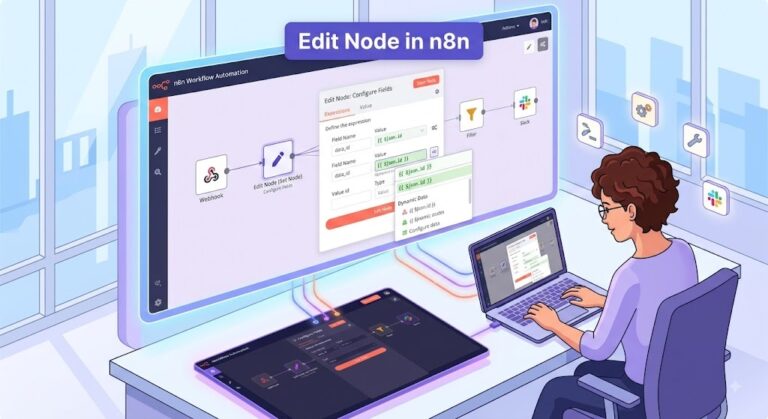
n8n is an advanced, fair-code workflow automation tool that helps connect different apps and APIs to automate tasks without manual intervention. It bridges the gap between no-code simplicity and code-level control, allowing users to build complex logic using a visual, drag-and-drop node interface.
Think of it as a highly customizable alternative to tools like Zapier or Make.com, but with deep developer-friendly features and native capabilities for orchestrating AI agents.
How It Works
At its core, n8n operates on three fundamental building blocks:
- Triggers: The event that starts the workflow. This could be receiving an email, a specific time of day (Cron job), a webhook from an external application, or a new record in a database.
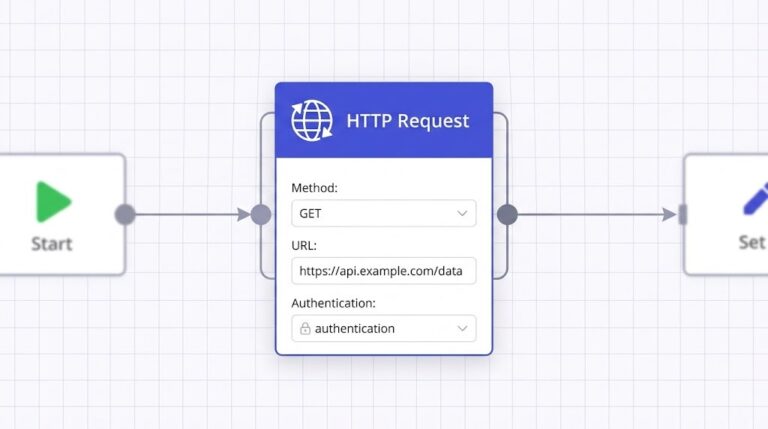
- Nodes: Individual steps or actions in the workflow. A node might connect to a specific app (like Slack or Salesforce), perform a data transformation, or interact with an AI model.
- Connections: The lines connecting the nodes. They dictate the flow of data. n8n allows for advanced data manipulation, meaning you can split paths (if/then logic), merge data streams, and loop through lists of items.
Key Features That Set n8n Apart
- Self-Hosting & Data Privacy: Unlike purely cloud-based automations, n8n can be self-hosted on your own infrastructure (AWS, Docker, Kubernetes). This is massive for companies dealing with sensitive information (like healthcare or finance) who cannot let their data run through a third-party server.
- Code Meets No-Code: While you can build entirely visually, n8n won’t box you in. You can write custom JavaScript or Python directly inside a “Code node” to manipulate complex data payloads exactly how you need to.
- AI-Native Orchestration: n8n features built-in advanced AI nodes (integrating with OpenAI, LangChain, Hugging Face, etc.). You can build multi-agent systems, attach long-term memory buffers, and give your AI tools to browse the web or query your databases.
- Error Handling: You can build robust error paths, such as configuring a workflow to pause, retry, or send an alert to a Slack channel if an API endpoint unexpectedly goes down.
Practical Examples of n8n Workflows
Here are a few ways teams use n8n in the real world:
1. The Autonomous Customer Support Agent
Instead of a simple “If this, then that” flow, n8n can host an intelligent chat agent.
- Trigger: A customer submits a question via a website chat widget.
- Action 1: The text is passed to an AI node (like OpenAI) which reads the intent.
- Action 2: If the AI needs context, an internal node queries your company’s documentation (using Retrieval-Augmented Generation or RAG).
- Action 3: The AI formulates a natural response and sends it back to the chat. If the customer is angry (sentiment analysis), the workflow branches and escalates the ticket to a human agent in Slack.
2. CRM and Onboarding Synchronization
n8n is frequently used to eliminate manual data entry across different platforms.
- Trigger: A sales representative marks a deal as “Won” in HubSpot or Salesforce.
- Action 1: n8n automatically generates a customized contract using Google Docs or a PDF generator.
- Action 2: It creates a new project board in Asana or Trello for the fulfillment team.
- Action 3: An onboarding email sequence is triggered for the new client, and an announcement is pushed to the company’s “Wins” channel in Slack.
3. The Automated Meeting Summarizer
Perfect for remote teams looking to capture knowledge efficiently.
- Trigger: A Zoom or Google Meet call concludes and the recording is saved.
- Action 1: n8n grabs the audio file and sends it to a transcription API (like Whisper).
- Action 2: The raw transcript is passed to an AI node instructed to extract the core summary and bullet out action items.
- Action 3: The finalized summary is logged into a Notion database and emailed to all meeting participants.
n8n అనేది ఒక advanced workflow automation tool. ఇది different apps మరియు API లను connect చేసి, manual గా ఏమి చేయకుండా tasks ని automate చేస్తుంది. ఇది no-code simplicity కి మరియు code-level control కి మధ్య ఉన్న gap ని bridge చేస్తుంది. ఇందులో ఉన్న visual, drag-and-drop node interface ద్వారా మీరు complex logic ని build చేయవచ్చు.
Zapier లేదా Make.com లాంటి tools కి ఇది ఒక గొప్ప alternative, కానీ ఇందులో developers కి పనికొచ్చే features మరియు AI agents ని handle చేసే native capabilities ఎక్కువగా ఉంటాయి.
ఇది ఎలా పని చేస్తుంది (How It Works)
ముఖ్యంగా ఇది మూడు fundamental building blocks మీద ఆధారపడి పని చేస్తుంది:
- Triggers: Workflow ని start చేసే event. అంటే ఒక email రావడం, ఒక specific time (Cron job), external app నుంచి webhook రావడం, లేదా database లో కొత్త record రావడం లాంటి వాటితో ఇది start అవుతుంది.
- Nodes: Workflow లో ఉండే individual steps లేదా actions. ఒక node ఒక app కి (Slack లేదా Salesforce లాంటివి) connect అవ్వొచ్చు, data ని change చేయొచ్చు, లేదా ఒక AI model తో interact అవ్వొచ్చు.
- Connections: Nodes ని connect చేసే lines. ఇవి data ఎక్కడి నుంచి ఎక్కడికి వెళ్ళాలి అని decide చేస్తాయి. ఇందులో if/then logic వాడొచ్చు, data streams ని merge చేయొచ్చు లేదా list of items ని loop చేయొచ్చు.
ముఖ్యమైన లక్షణాలు (Key Features)
- Self-Hosting & Data Privacy: Cloud లో మాత్రమే కాకుండా, n8n ని మీ own infrastructure లో (AWS, Docker, Kubernetes) host చేసుకోవచ్చు. Sensitive data (healthcare, finance) handle చేసే companies కి ఇది చాలా useful, ఎందుకంటే వారి data third-party servers కి వెళ్ళదు.
- Code Meets No-Code: మీరు మొత్తం visual గా build చేయొచ్చు, కానీ కావాలి అంటే “Code node” లో direct గా JavaScript లేదా Python code రాసి, complex data ని మీ ఇష్టం వచ్చినట్టు manipulate చేసుకోవచ్చు.
- AI-Native Orchestration: ఇందులో built-in advanced AI nodes ఉంటాయి (OpenAI, LangChain, Hugging Face లాంటి వాటితో). మీరు multi-agent systems ని build చేయొచ్చు, AI tools కి web browse చేసే options లేదా మీ database ని query చేసే access ఇవ్వొచ్చు.
- Error Handling: ఒక API పని చేయకపోతే, workflow ని pause చేయడం, retry చేయడం, లేదా Slack కి ఒక alert పంపడం లాంటి robust error paths ని easy గా create చేయొచ్చు.
Real-world ఉదాహరణలు (Practical Examples)
Teams n8n ని వాడుకునే కొన్ని విధానాలు:
1. The Autonomous Customer Support Agent
Simple “If this, then that” లాగానే కాకుండా, n8n ఒక intelligent chat agent లాగా కూడా పని చేస్తుంది.
- Trigger: Customer మీ website chat widget లో ఒక question అడుగుతాడు.
- Action 1: ఆ text ఒక AI node (like OpenAI) కి వెళ్తుంది, అది customer కి ఏం కావాలి అని అర్ధం చేసుకుంటుంది.
- Action 2: AI కి ఇంకా information కావాలి అంటే, మీ company internal docs నుంచి వెతుకుతుంది (RAG ద్వారా).
- Action 3: AI natural గా ఒక response తయారు చేసి chat కి పంపిస్తుంది. ఒక వేళ customer కోపంగా ఉంటే (sentiment analysis), ఆ chat ని direct గా ఒక human agent కి Slack లో escalate చేస్తుంది.
2. CRM and Onboarding Synchronization
Different platforms మధ్య manual data entry లేకుండా చేయడానికి n8n ని బాగా వాడుతారు.
- Trigger: ఒక sales representative HubSpot లేదా Salesforce లో ఒక deal ని “Won” అని mark చేస్తాడు.
- Action 1: n8n automatically Google Docs లేదా PDF generator ద్వారా ఒక customized contract ని తయారు చేస్తుంది.
- Action 2: Fulfillment team కోసం Asana లేదా Trello లో ఒక కొత్త project board create చేస్తుంది.
- Action 3: కొత్త client కి onboarding email sequence start అవుతుంది, మరియు Slack “Wins” channel లో ఒక announcement వెళ్తుంది.
3. The Automated Meeting Summarizer
Knowledge ని capture చేయడానికి remote teams కి ఇది చాలా useful.
- Trigger: Zoom లేదా Google Meet call అయిపోయిన తరువాత recording save అవుతుంది.
- Action 1: n8n ఆ audio file ని తీసుకుని transcription API (Whisper లాంటి వాటికి) పంపిస్తుంది.
- Action 2: ఆ raw transcript ని AI node కి పంపిస్తుంది, AI అందులో ఉన్న important points ని, action items ని summary లాగా తయారు చేస్తుంది.
- Action 3: ఆ final summary Notion database లో save అవుతుంది మరియు meeting లో ఉన్న వాళ్ళందరికీ email లో వెళ్లిపోతుంది.
n8n was founded in 2019 to bridge the gap between simple, no-code automation tools (like Zapier) and highly technical, code-heavy enterprise platforms. By utilizing a “fair-code” model, the company allowed developers to self-host the software while building a powerful, community-driven ecosystem.
Here are the key milestones in the company’s history:
Founding & Initial Release
October 2019
Founded in Berlin by Jan Oberhauser, n8n was officially published on GitHub. The goal was to offer a transparent, self-hostable workflow automation platform with a visual node-based editor.
Seed Funding
March 2020
Raised $1.5 million in a seed round co-led by Sequoia Capital and firstminute capital to scale the underlying framework.
Series A Funding
April 2021
Secured a $12 million Series A led by Felicis Ventures. By this point, the developer community actively using the platform had grown to approximately 16,000.
Sustainable Use License
March 2022
Formally adopted the Sustainable Use License (SUL), solidifying its unique “fair-code” approach—a middle ground between purely permissive open-source software and closed proprietary SaaS.
The AI Inflection Point
October 2023
Launched native LangChain nodes, becoming one of the first workflow tools to treat AI primitives (like agents, long-term memory, and retrievers) as native components. This pivot toward AI orchestration rapidly accelerated adoption.
Series B Funding
March 2025
Closed a $60 million Series B round led by Highland Europe. The company reported that its annual recurring revenue grew 5x year-over-year, with 75% of workflows on the platform incorporating AI integrations.
సాధారణ no-code automation tools (Zapier లాంటివి) మరియు highly technical, code-heavy enterprise platforms మధ్య ఉన్న అంతరాన్ని (gap) తొలగించడానికి 2019లో n8n స్థాపించబడింది. “Fair-code” మోడల్ను ఉపయోగించడం ద్వారా, ఈ కంపెనీ డెవలపర్లు సాఫ్ట్వేర్ను self-host చేసుకోవడానికి అనుమతించింది, అదే సమయంలో ఒక శక్తివంతమైన, community-driven ఎకోసిస్టమ్ను నిర్మించింది.
కంపెనీ చరిత్రలో ముఖ్యమైన ఘట్టాలు (key milestones) ఇక్కడ ఉన్నాయి:
స్థాపన & ప్రారంభ విడుదల (Founding & Initial Release)
October 2019
జనవరి ఒబెర్హౌసెర్ (Jan Oberhauser) ద్వారా బెర్లిన్లో స్థాపించబడిన n8n, అధికారికంగా GitHubలో పబ్లిష్ చేయబడింది. Visual node-based ఎడిటర్తో పారదర్శకమైన (transparent), self-hostable workflow automation ప్లాట్ఫారమ్ను అందించడం దీని ప్రధాన లక్ష్యం.
సీడ్ ఫండింగ్ (Seed Funding)
March 2020
అంతర్లీన ఫ్రేమ్వర్క్ను (underlying framework) స్కేల్ చేయడానికి Sequoia Capital మరియు firstminute capital నేతృత్వంలో సీడ్ రౌండ్లో $1.5 మిలియన్ల ఫండింగ్ సేకరించింది.
సిరీస్ A ఫండింగ్ (Series A Funding)
April 2021
Felicis Ventures నేతృత్వంలో $12 మిలియన్ల సిరీస్ A ఫండింగ్ సాధించింది. ఈ సమయానికి, ప్లాట్ఫారమ్ను యాక్టివ్గా ఉపయోగిస్తున్న డెవలపర్ కమ్యూనిటీ సుమారు 16,000 కు పెరిగింది.
సస్టైనబుల్ యూజ్ లైసెన్స్ (Sustainable Use License)
March 2022
సస్టైనబుల్ యూజ్ లైసెన్స్ (SUL) ను అధికారికంగా స్వీకరించింది. ఇది పూర్తిగా ఓపెన్-సోర్స్ మరియు పూర్తిగా ప్రైవేట్ SaaS కి మధ్యన ఒక ప్రత్యేకమైన “fair-code” విధానాన్ని పటిష్టం చేసింది.
AI ఇన్ఫ్లెక్షన్ పాయింట్ (The AI Inflection Point)
October 2023
స్థానిక (native) LangChain నోడ్స్ను లాంచ్ చేసింది. AI ప్రిమిటివ్స్ను (agents, long-term memory, మరియు retrievers) నేటివ్ కాంపోనెంట్స్గా చూసిన మొట్టమొదటి వర్క్ఫ్లో టూల్స్లో ఇది ఒకటి. AI ఆర్కెస్ట్రేషన్ వైపు మళ్లడం వల్ల దీని వాడకం వేగంగా పెరిగింది.
సిరీస్ B ఫండింగ్ (Series B Funding)
March 2025
Highland Europe నేతృత్వంలో $60 మిలియన్ల సిరీస్ B రౌండ్ను పూర్తి చేసింది. కంపెనీ వార్షిక రాబడి (ARR) సంవత్సరానికి 5 రెట్లు పెరిగిందని, ప్లాట్ఫారమ్లోని 75% వర్క్ఫ్లోలు AI ఇంటిగ్రేషన్లను ఉపయోగిస్తున్నాయని కంపెనీ నివేదించింది.
సిరీస్ C & యూనికార్న్ హోదా (Series C & Unicorn Status)
October 2025
Accel, Nvidia యొక్క NVentures, Sequoia మరియు ఇతరుల భాగస్వామ్యంతో సిరీస్ C రౌండ్లో $180 మిలియన్లను సేకరించింది. ఈ భారీ ఫండింగ్ n8n వ్యాల్యుయేషన్ను $2.5 బిలియన్లకు చేర్చింది.
SAP స్ట్రాటజిక్ ఇన్వెస్ట్మెంట్ (Strategic SAP Investment)
May 2026
SAP నుండి సిరీస్ C ఎక్స్టెన్షన్ ఇన్వెస్ట్మెంట్ను ప్రకటించింది. తమ AI ప్లాట్ఫారమ్ను ఎంటర్ప్రైజ్ సిస్టమ్స్లో మరింతగా పొందుపరచాలని యోచిస్తున్నందున, ఈ ఫండింగ్ కంపెనీ వ్యాల్యుయేషన్ను $5.2 బిలియన్లకు పెంచింది.
Series C & Unicorn Status
October 2025
Raised $180 million in a Series C round led by Accel, with participation from Nvidia’s NVentures, Sequoia, and others. This major round brought n8n’s valuation to $2.5 billion.
Strategic SAP Investment
May 2026
Announced a strategic Series C extension investment from SAP. This pushed the company’s valuation to $5.2 billion as they plan to further embed their AI platform into enterprise systems.
సాధారణ no-code automation tools (Zapier లాంటివి) మరియు highly technical, code-heavy enterprise platforms మధ్య ఉన్న అంతరాన్ని (gap) తొలగించడానికి 2019లో n8n స్థాపించబడింది. “Fair-code” మోడల్ను ఉపయోగించడం ద్వారా, ఈ కంపెనీ డెవలపర్లు సాఫ్ట్వేర్ను self-host చేసుకోవడానికి అనుమతించింది, అదే సమయంలో ఒక శక్తివంతమైన, community-driven ఎకోసిస్టమ్ను నిర్మించింది.
కంపెనీ చరిత్రలో ముఖ్యమైన ఘట్టాలు (key milestones) ఇక్కడ ఉన్నాయి:
స్థాపన & ప్రారంభ విడుదల (Founding & Initial Release)
October 2019
జనవరి ఒబెర్హౌసెర్ (Jan Oberhauser) ద్వారా బెర్లిన్లో స్థాపించబడిన n8n, అధికారికంగా GitHubలో పబ్లిష్ చేయబడింది. Visual node-based ఎడిటర్తో పారదర్శకమైన (transparent), self-hostable workflow automation ప్లాట్ఫారమ్ను అందించడం దీని ప్రధాన లక్ష్యం.
సీడ్ ఫండింగ్ (Seed Funding)
March 2020
అంతర్లీన ఫ్రేమ్వర్క్ను (underlying framework) స్కేల్ చేయడానికి Sequoia Capital మరియు firstminute capital నేతృత్వంలో సీడ్ రౌండ్లో $1.5 మిలియన్ల ఫండింగ్ సేకరించింది.
సిరీస్ A ఫండింగ్ (Series A Funding)
April 2021
Felicis Ventures నేతృత్వంలో $12 మిలియన్ల సిరీస్ A ఫండింగ్ సాధించింది. ఈ సమయానికి, ప్లాట్ఫారమ్ను యాక్టివ్గా ఉపయోగిస్తున్న డెవలపర్ కమ్యూనిటీ సుమారు 16,000 కు పెరిగింది.
సస్టైనబుల్ యూజ్ లైసెన్స్ (Sustainable Use License)
March 2022
సస్టైనబుల్ యూజ్ లైసెన్స్ (SUL) ను అధికారికంగా స్వీకరించింది. ఇది పూర్తిగా ఓపెన్-సోర్స్ మరియు పూర్తిగా ప్రైవేట్ SaaS కి మధ్యన ఒక ప్రత్యేకమైన “fair-code” విధానాన్ని పటిష్టం చేసింది.
AI ఇన్ఫ్లెక్షన్ పాయింట్ (The AI Inflection Point)
October 2023
స్థానిక (native) LangChain నోడ్స్ను లాంచ్ చేసింది. AI ప్రిమిటివ్స్ను (agents, long-term memory, మరియు retrievers) నేటివ్ కాంపోనెంట్స్గా చూసిన మొట్టమొదటి వర్క్ఫ్లో టూల్స్లో ఇది ఒకటి. AI ఆర్కెస్ట్రేషన్ వైపు మళ్లడం వల్ల దీని వాడకం వేగంగా పెరిగింది.
సిరీస్ B ఫండింగ్ (Series B Funding)
March 2025
Highland Europe నేతృత్వంలో $60 మిలియన్ల సిరీస్ B రౌండ్ను పూర్తి చేసింది. కంపెనీ వార్షిక రాబడి (ARR) సంవత్సరానికి 5 రెట్లు పెరిగిందని, ప్లాట్ఫారమ్లోని 75% వర్క్ఫ్లోలు AI ఇంటిగ్రేషన్లను ఉపయోగిస్తున్నాయని కంపెనీ నివేదించింది.
సిరీస్ C & యూనికార్న్ హోదా (Series C & Unicorn Status)
October 2025
Accel, Nvidia యొక్క NVentures, Sequoia మరియు ఇతరుల భాగస్వామ్యంతో సిరీస్ C రౌండ్లో $180 మిలియన్లను సేకరించింది. ఈ భారీ ఫండింగ్ n8n వ్యాల్యుయేషన్ను $2.5 బిలియన్లకు చేర్చింది.
SAP స్ట్రాటజిక్ ఇన్వెస్ట్మెంట్ (Strategic SAP Investment)
May 2026
SAP నుండి సిరీస్ C ఎక్స్టెన్షన్ ఇన్వెస్ట్మెంట్ను ప్రకటించింది. తమ AI ప్లాట్ఫారమ్ను ఎంటర్ప్రైజ్ సిస్టమ్స్లో మరింతగా పొందుపరచాలని యోచిస్తున్నందున, ఈ ఫండింగ్ కంపెనీ వ్యాల్యుయేషన్ను $5.2 బిలియన్లకు పెంచింది.
Here is the essential terminology you need to know before working with n8n:
- Workflow: The complete set of tasks or processes you want to automate. It is built like a map using a combination of triggers and nodes.
- Nodes: The individual steps within a workflow. They are used to perform specific actions, connect to apps (like Slack or Google Sheets), or transform data.
- Trigger: A special type of node that dictates exactly when a workflow should start. Examples include receiving a new email, a scheduled time (Cron), or an incoming webhook.
- Connections: The lines linking two nodes together. They determine the path and flow of data from one step to the next.
- Data (Payload): The actual information passed between nodes as the workflow runs, typically structured in JSON format.
- Expressions: A way to dynamically pull in or manipulate data from previous nodes using JavaScript (for example, referencing an email address as
{{ $json.email }}). - Credentials: The secure authentications (like API keys, OAuth tokens, or passwords) required to connect n8n safely to your external accounts and apps.
- Executions: The historical logs of your workflows running. You check executions to see if a workflow completed successfully or to troubleshoot any errors.
- Webhook: An automated way for an external application to send data in real-time to n8n as soon as a specific event happens (like a user submitting a form).
- Fair-code: n8n’s licensing model. It provides a middle ground where the source code is openly visible and free to self-host, but prevents other companies from offering it as a competing commercial SaaS product.
n8n లో పని చేయడానికి ముందు తెలుసుకోవాల్సిన ముఖ్యమైన పదజాలం (basic terminology):
- Workflow (వర్క్ఫ్లో): మీరు automate చేయాలనుకుంటున్న tasks లేదా processes యొక్క పూర్తి సెట్. ఇది triggers మరియు nodes తో కలిసి ఒక మ్యాప్ లాగా తయారవుతుంది.
- Nodes (నోడ్స్): వర్క్ఫ్లో లో ఉండే ఒక్కో individual step. ఇవి ఒక్కో app తో connect అవ్వడానికి (ఉదాహరణకు Slack, Google Sheets) లేదా data ని transform చేయడానికి ఉపయోగపడతాయి.
- Trigger (ట్రిగ్గర్): వర్క్ఫ్లో ఎప్పుడు స్టార్ట్ అవ్వాలో చెప్పే ప్రత్యేకమైన నోడ్. ఉదాహరణకు: ఒక కొత్త ఈమెయిల్ రావడం, లేదా ఒక specific time అవ్వడం.
- Connections (కనెక్షన్స్): రెండు nodes మధ్య ఉండే లైన్స్. ఇవి ఒక నోడ్ నుండి మరో నోడ్ కి data ఎలా పాస్ అవ్వాలో నియంత్రిస్తాయి.
- Data (డేటా/Payload): వర్క్ఫ్లో లో ఒక నోడ్ నుండి మరో నోడ్ కి పాస్ అయ్యే సమాచారం (JSON format లో ఉంటుంది).
- Expressions (ఎక్స్ప్రెషన్స్): జావాస్క్రిప్ట్ (JavaScript) ని ఉపయోగించి మునుపటి నోడ్స్ నుండి data ని డైనమిక్గా మార్చడానికి లేదా వాడడానికి ఉపయోగించే పద్ధతి (ఉదాహరణకు:
{{ $json.email }}). - Credentials (క్రెడెన్షియల్స్): మీ personal accounts లేదా apps (Gmail, GitHub, Trello లాంటివి) n8n తో సురక్షితంగా connect చేయడానికి వాడే API keys లేదా passwords.
- Executions (ఎగ్జిక్యూషన్స్): వర్క్ఫ్లో రన్ అయిన హిస్టరీ. ఇది వర్క్ఫ్లో విజయవంతంగా అయిందా లేదా ఏమైనా errors వచ్చాయా అని తనిఖీ చేయడానికి ఉపయోగపడుతుంది.
- Webhook (వెబ్హూక్): ఒక యాప్లో ఏదైనా జరిగినప్పుడు (ఉదాహరణకు ఫార్మ్ సబ్మిట్ చేయడం), ఆటోమేటిక్గా n8n కి సిగ్నల్ పంపే ఒక పద్ధతి.
- Fair-code (ఫైర్-కోడ్): n8n యొక్క లైసెన్సింగ్ మోడల్. దీని ద్వారా సాఫ్ట్వేర్ యొక్క సోర్స్ కోడ్ అందరికీ కనిపిస్తుంది మరియు self-host చేసుకోవడానికి ఉచితంగా లభిస్తుంది.
Creating an n8n account and getting started is straightforward. n8n offers two main paths: n8n Cloud (fully hosted and managed for you) or Self-hosted (running on your own machine or servers).
Here is how to get started with either option.
Option 1: n8n Cloud (Easiest Method)
If you don’t want to deal with servers, installation, or maintenance, the cloud version is the best route.
- Go to the signup page: Visit app.n8n.cloud/register.
- Create your account: Enter your company email and a secure password.
- Start the Free Trial: By default, you will be placed on a 14-day free trial that gives you access to all “Pro” tier features (like global variables and the insights dashboard).
- No Credit Card Required: You do not need a credit card to start the trial for the Starter or Pro plans.
- Begin Automating: Once your email is verified, your n8n workspace will be generated automatically. You can log in and start building workflows immediately.
Note: After 14 days, you must select a paid plan (Starter, Pro, or Enterprise) to keep your cloud workspace active. If you don’t upgrade, the workspace is deleted, though you have 90 days to download your workflows.
Option 2: Self-Host on Your Own Machine
If you have some technical knowledge, you can run n8n yourself for free using the Community Edition. There are three main ways to install it locally:
1.The Quickest Way (Try without installing):
If you have Node.js installed, you can temporarily spin up n8n using npx. This is great for a quick test drive.
Open your terminal and run:
Bash
npx n8n
Once the command finishes, open your browser and go to http://localhost:5678 to see the n8n interface.
2.Install with npm (Node Package Manager):
If you want a more permanent local installation and you already have Node.js (requires a version between 20.19 and 24.x):
- Install n8n globally by running:
Bash
npm install n8n -g
- Start the application by running:
Bash
n8n
- Access the editor at
http://localhost:5678.
3.Install with Docker (Recommended for Self-Hosting):
Docker provides a clean, isolated environment and makes managing databases much easier. This is n8n’s recommended method for self-hosting.
- Ensure you have Docker installed on your machine.
- Open your terminal and run this command to create a persistent storage volume and start n8n:
Bash
docker volume create n8n_data

docker run -it --rm \
--name n8n \
-p 5678:5678 \
-e GENERIC_TIMEZONE="Europe/London" \
-e TZ="Europe/London" \
-e N8N_ENFORCE_SETTINGS_FILE_PERMISSIONS=true \
-e N8N_RUNNERS_ENABLED=true \
-v n8n_data:/home/node/.n8n \
docker.n8n.io/n8nio/n8n
(Note: You can change the TZ and GENERIC_TIMEZONE values to match your local timezone).
3. Open http://localhost:5678 in your browser. You will be prompted to create a local admin account to secure your instance.
A Note on Self-Hosting and Webhooks
If you install n8n locally (via npm or Docker) and want to trigger workflows using webhooks from external services (like GitHub or Stripe), those services need a public web address to send data to. Because your local machine is hidden behind your router, n8n provides a built-in tunnel service (using cloudflared) to route web traffic to your local instance. Docker is required for this tunnel to function.