🚀 *Gen AI Engineer Telugu (Production Focused)*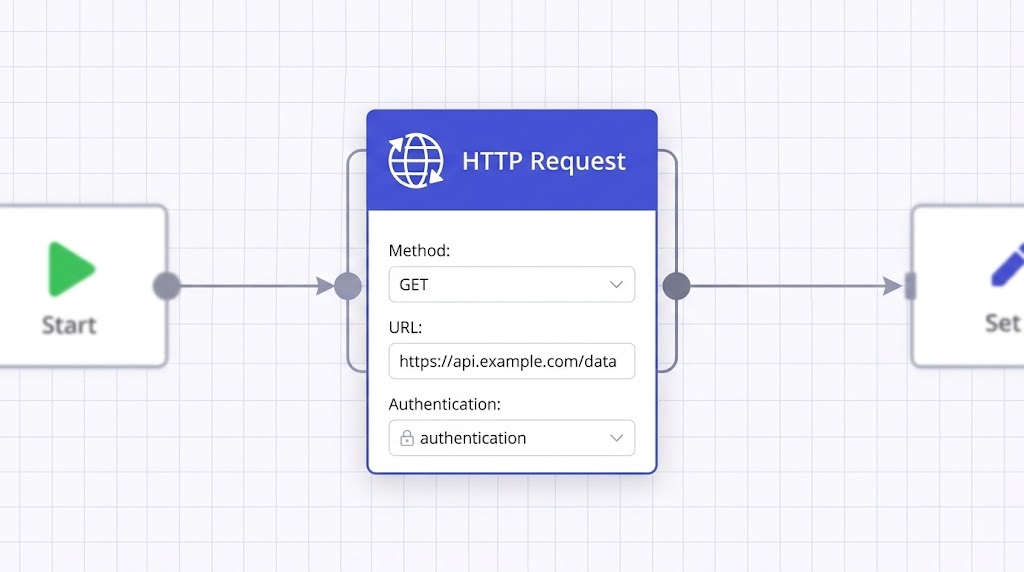
The HTTP Request node is arguably the most powerful and versatile core node in n8n. While n8n has hundreds of dedicated app nodes (like Slack, Google Sheets, or Salesforce), the HTTP Request node acts as a universal connector. As long as a system, software, or custom backend exposes a REST API, you can use this node to interact with it.
Instead of relying on pre-built integrations, you use the HTTP Request node to manually construct API calls by defining the method, endpoint URL, headers, and body payload.
Key Capabilities
- Multiple HTTP Methods:Supports standard methods like GET, POST, PUT, PATCH, and DELETE.
- Built-in Authentication:Natively handles API Keys, Bearer Tokens, Basic Auth, and OAuth2, keeping your credentials secure.
- cURL Import:You can paste a standard cURL command directly into the node, and n8n will automatically configure the headers, body, and method for you, which is a massive time saver.
- Pagination Support: Automatically handles API pagination (e.g., fetching hundreds of records across multiple pages) without needing complex loop logic.
- AI Agent Compatibility:You can attach this node to an AI Agent as a custom tool, allowing the AI to fetch external data or trigger actions dynamically.
Common Real-World Use Cases
1. Fetching External Data (GET Requests)
This is the most common use case. You can use a GET request to pull information from a third-party API or an internal database.
- Example: Querying a weather API to get today’s forecast, fetching the latest exchange rates, or pulling a user’s profile from your custom backend to enrich a customer support ticket.
2. Sending Structured Data (POST Requests)
When you need to create or update a record in another system, you use the HTTP Request node to send a JSON payload.
- Example: Submitting a new order synchronization payload to an ERP, sending a custom formatted message to an internal logging tool, or adding a newly captured lead to an email marketing platform.
3. Webhook Forwarding & API Bridging
In production environments, n8n often acts as a middleman. You can catch a webhook from one system, lightly transform the data, and use the HTTP Request node to forward that payload to another system.
- Example: Catching a “Checkout Completed” webhook from Shopify and passing the raw JSON payload directly to a custom shipping API.
4. Handling Files and Binary Data
The node can be configured to handle file uploads (multipart/form-data) or download files from a URL.
- Example: Downloading an invoice PDF generated by an external billing system and then passing that binary file to an email node to send to a client.
5. Web Scraping for AI Applications
When expecting HTML, the node has specialized options to extract specific content using CSS selectors and strip out HTML tags.
- Example: Scraping the text from a news article URL to feed a clean, token-efficient string of text directly into a Large Language Model for summarization.
n8n లో HTTP Request node అనేది చాలా పవర్ఫుల్ మరియు బహుముఖ (versatile) core node. n8n లో వందలాది dedicated app nodes (Slack, Google Sheets లేదా Salesforce వంటివి) ఉన్నప్పటికీ, ఈ HTTP Request node ఒక universal connector లాగా పనిచేస్తుంది. ఏదైనా సిస్టమ్, సాఫ్ట్వేర్ లేదా custom backend ఒక REST API ని expose చేస్తే చాలు, మీరు వారితో interact అవ్వడానికి ఈ node ని ఉపయోగించవచ్చు.
Pre-built integrations పైన ఆధారపడే బదులు, మీరు method, endpoint URL, headers, మరియు body payload ని define చేయడం ద్వారా manually గా API calls ని construct చేయడానికి HTTP Request node ని ఉపయోగించవచ్చు.
Key Capabilities
- Multiple HTTP Methods: GET, POST, PUT, PATCH, మరియు DELETE వంటి standard methods ని ఇది support చేస్తుంది.
- Built-in Authentication: మీ credentials ని secure గా ఉంచుతూ, API Keys, Bearer Tokens, Basic Auth, మరియు OAuth2 లను ఇది natively గా handle చేస్తుంది.
- cURL Import: మీరు ఒక standard cURL command ని నేరుగా ఈ node లో paste చేయవచ్చు, అప్పుడు n8n ఆటోమేటిక్ గా మీ కోసం headers, body, మరియు method ని configure చేస్తుంది. ఇది మీ సమయాన్ని చాలా వరకు ఆదా చేస్తుంది.
- Pagination Support: Complex loop logic అవసరం లేకుండానే, ఇది API pagination ని (ఉదాహరణకు, multiple pages లో ఉన్న వందలాది రికార్డులను fetch చేయడం) ఆటోమేటిక్ గా handle చేస్తుంది.
- AI Agent Compatibility: మీరు ఈ node ని ఒక custom tool గా AI Agent కి attach చేయవచ్చు. దీని ద్వారా AI external data ని fetch చేయడానికి లేదా dynamic గా actions ని trigger చేయడానికి వీలవుతుంది.
Common Real-World Use Cases
1. Fetching External Data (GET Requests)
ఇది చాలా కామన్ గా వాడే use case. థర్డ్-పార్టీ API లేదా ఇంటర్నల్ డేటాబేస్ నుండి information ని లాగడానికి (pull చేయడానికి) మీరు GET request ని వాడవచ్చు.
- Example: ఈ రోజు వాతావరణం తెలుసుకోవడానికి weather API ని query చేయడం, లేటెస్ట్ exchange rates ని fetch చేయడం, లేదా customer support ticket ని enrich చేయడానికి మీ custom backend నుండి యూజర్ ప్రొఫైల్ ని pull చేయడం.
2. Sending Structured Data (POST Requests)
మీరు వేరే సిస్టమ్ లో ఒక రికార్డ్ ని create లేదా update చేయాలి అనుకున్నప్పుడు, ఒక JSON payload ని పంపడానికి HTTP Request node ని ఉపయోగిస్తారు.
- Example: ERP కి కొత్త order synchronization payload ని submit చేయడం, ఇంటర్నల్ logging tool కి ఒక custom formatted message ని పంపడం, లేదా newly captured lead ని ఒక email marketing platform కి యాడ్ చేయడం.
3. Webhook Forwarding & API Bridging
Production environments లో, n8n తరచుగా ఒక middleman లాగా పనిచేస్తుంది. మీరు ఒక సిస్టమ్ నుండి webhook ని క్యాచ్ చేసి, ఆ డేటాని కొద్దిగా transform చేసి, ఆ payload ని వేరొక సిస్టమ్ కి forward చేయడానికి HTTP Request node ని ఉపయోగించవచ్చు.
- Example: Shopify నుండి “Checkout Completed” webhook ని క్యాచ్ చేసి, ఆ raw JSON payload ని నేరుగా ఒక custom shipping API కి పాస్ చేయడం.
4. Handling Files and Binary Data
File uploads (multipart/form-data) ని handle చేయడానికి లేదా ఒక URL నుండి files ని download చేయడానికి ఈ node ని configure చేయవచ్చు.
- Example: ఎక్స్టర్నల్ billing system జనరేట్ చేసిన invoice PDF ని డౌన్లోడ్ చేయడం మరియు ఆ బైనరీ ఫైల్ ని క్లైంట్ కి పంపడానికి ఒక email node కి పాస్ చేయడం.
5. Web Scraping for AI Applications
HTML ని ఆశిస్తున్నప్పుడు, CSS selectors ని ఉపయోగించి specific content ని extract చేయడానికి మరియు HTML tags ని తొలగించడానికి (strip out) ఈ node లో స్పెషలైజ్డ్ ఆప్షన్స్ ఉంటాయి.
- Example: ఒక న్యూస్ ఆర్టికల్ URL నుండి టెక్స్ట్ని scrape చేసి, ఒక క్లీన్, టోకెన్-ఎఫిషియంట్ string of text ని సమ్మరైజేషన్ కోసం నేరుగా Large Language Model కి ఫీడ్ చేయడం.