In n8n, a workflow is a visual canvas where you connect different applications, APIs, and logic functions to automate a specific process. It represents the step-by-step instructions that tell n8n how to move and manipulate data from one point to another without human intervention.
Core Components of a Workflow
Every workflow in n8n is built using three primary elements:
- Nodes: The building blocks of your automation. Each node performs a specific task. A node can represent a third-party application (like Gmail, Slack, or Salesforce) or a core logic function (like an IF statement, a data formatter, or a custom HTTP request).
- Triggers: The starting point. A trigger is a specialized node that dictates when the workflow should run. Workflows can be triggered by a schedule (e.g., every day at 9 AM), a web event (a Webhook), or an event inside an app (e.g., when a new row is added to a Google Sheet).
- Connections (Edges): The lines that link nodes together. Connections define the execution order and act as the pathway for data. When one node finishes its task, it passes its output data through the connection to become the input data for the next node.
How Data Moves
As the workflow runs from left to right, data is passed between the nodes in JSON format. Each node takes the incoming JSON data, performs its designated action (like extracting an email address or calculating a sum), and outputs a new or modified JSON payload for the subsequent nodes to use.
n8n లో, workflow అనేది ఒక visual canvas. ఇక్కడ మీరు వేర్వేరు applications, APIs, మరియు logic functions ని కనెక్ట్ చేసి ఒక ప్రాసెస్ను ఆటోమేట్ (automate) చేయవచ్చు. మనుషుల ప్రమేయం లేకుండా ఒక పాయింట్ నుండి మరొక పాయింట్కి డేటాను ఎలా మూవ్ చేయాలి మరియు మానిప్యులేట్ చేయాలి అని n8n కి చెప్పే step-by-step instructions నే workflow అంటారు.
Workflow లోని ముఖ్యమైన భాగాలు (Core Components)
n8n లోని ప్రతి వర్క్ఫ్లో ప్రధానంగా మూడు ఎలిమెంట్స్ను ఉపయోగించి బిల్డ్ చేయబడుతుంది:
- Nodes (నోడ్స్): ఇవి మీ ఆటోమేషన్కు బిల్డింగ్ బ్లాక్స్ లాంటివి. ప్రతి నోడ్ ఒక నిర్దిష్టమైన టాస్క్ను (specific task) చేస్తుంది. ఒక నోడ్ అనేది ఒక third-party అప్లికేషన్ (Gmail, Slack, లేదా Salesforce లాంటివి) కావచ్చు లేదా ఒక కోర్ లాజిక్ ఫంక్షన్ (IF statement, డేటా ఫార్మాటర్, లేదా కస్టమ్ HTTP రిక్వెస్ట్) కావచ్చు.
- Triggers (ట్రిగ్గర్స్): ఇది స్టార్టింగ్ పాయింట్. వర్క్ఫ్లో ఎప్పుడు రన్ అవ్వాలి అని ట్రిగ్గర్ అనే ఒక స్పెషల్ నోడ్ నిర్ణయిస్తుంది. ఒక షెడ్యూల్ ద్వారా (ఉదాహరణకు, ప్రతిరోజూ ఉదయం 9 గంటలకు), ఒక వెబ్ ఈవెంట్ (Webhook) ద్వారా, లేదా ఒక యాప్లోని ఈవెంట్ (ఉదాహరణకు, Google Sheet లో కొత్త row యాడ్ అయినప్పుడు) ద్వారా వర్క్ఫ్లోస్ ట్రిగ్గర్ అవుతాయి.
- Connections (కనెక్షన్స్ / ఎడ్జెస్): ఇవి నోడ్స్ను ఒకదానితో ఒకటి కలిపే లైన్స్. కనెక్షన్స్ ఎగ్జిక్యూషన్ ఆర్డర్ను డిసైడ్ చేస్తాయి మరియు డేటా వెళ్లే మార్గంగా (pathway) పనిచేస్తాయి. ఒక నోడ్ తన పనిని పూర్తి చేసిన తర్వాత, తన అవుట్పుట్ డేటాను కనెక్షన్ ద్వారా తర్వాతి నోడ్కు ఇన్పుట్ డేటాగా పాస్ చేస్తుంది.
డేటా ఎలా మూవ్ అవుతుంది (How Data Moves)
వర్క్ఫ్లో లెఫ్ట్ నుండి రైట్కి రన్ అవుతున్నప్పుడు, డేటా నోడ్స్ మధ్య JSON ఫార్మాట్ లో పాస్ అవుతుంది. ప్రతి నోడ్ వెనుక నుండి వచ్చే JSON డేటాను తీసుకుంటుంది, దానికి కేటాయించిన యాక్షన్ను (ఈమెయిల్ అడ్రస్ను బయటకు తీయడం లేదా లెక్కించడం లాంటివి) పూర్తి చేస్తుంది, ఆపై తర్వాతి నోడ్స్ వాడుకోవడానికి ఒక కొత్త లేదా మోడిఫై చేయబడిన JSON పేలోడ్ను అవుట్పుట్గా ఇస్తుంది.
In n8n, nodes are the fundamental building blocks of a workflow. Each node represents a single step or action in your automation, such as waiting for a webhook, fetching data from an external API, transforming JSON, or sending an email. By connecting these nodes on the visual canvas, you define the sequence of events and control how data flows from one step to the next.
Types of Nodes in n8n
Nodes are generally categorized based on their function within the workflow:
1. Trigger Nodes
Trigger nodes are always the starting point of a workflow. They “listen” for specific events and initiate the execution of the workflow when that event occurs. A workflow can have one or multiple trigger nodes.
- App Triggers: Start a workflow when an event happens in a specific app (e.g., Slack Trigger when a new message is posted, or Stripe Trigger when a payment succeeds).
- Core Triggers: Start workflows based on internal or generic web events (e.g., Schedule Trigger to run a job every hour, or Webhook Trigger to listen for incoming HTTP POST requests).
2. Action (App) Nodes
Action nodes perform operations within external applications and services. They use credentials to authenticate with third-party APIs to read, create, update, or delete data.
- Examples: Google Sheets node (to append a row), Salesforce node (to create a lead), GitHub node (to create an issue), or Mailchimp node (to add a subscriber).
3. Core (Logic & Transformation) Nodes
Core nodes are built-in n8n tools used to manipulate the data passing through the workflow or to control the flow of execution. They do not typically interact with external third-party APIs.
- Flow Control Nodes: Determine the path the data takes. Examples include the If node (conditional branching), Switch node (routing based on multiple values), and Merge node (combining data from different branches).
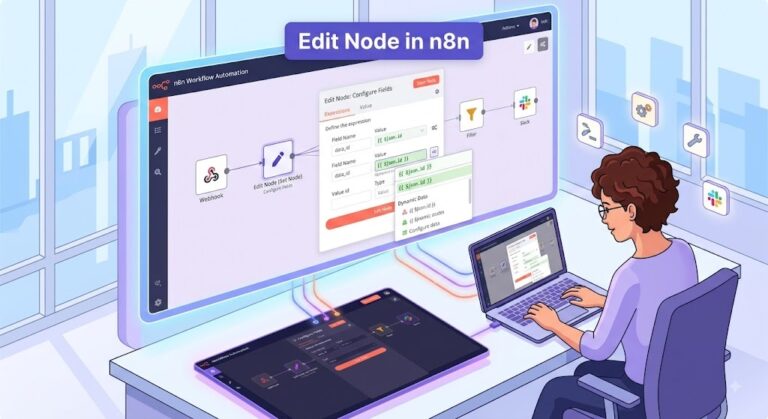
- Data Transformation Nodes: Restructure or modify the data before passing it to the next step. Examples include the Set node (to define or change variables), Edit Fields node, and Item Lists node.
- Code Node: Allows you to write custom JavaScript or Python to execute complex logic, loops, or data parsing that standard nodes might not cover.
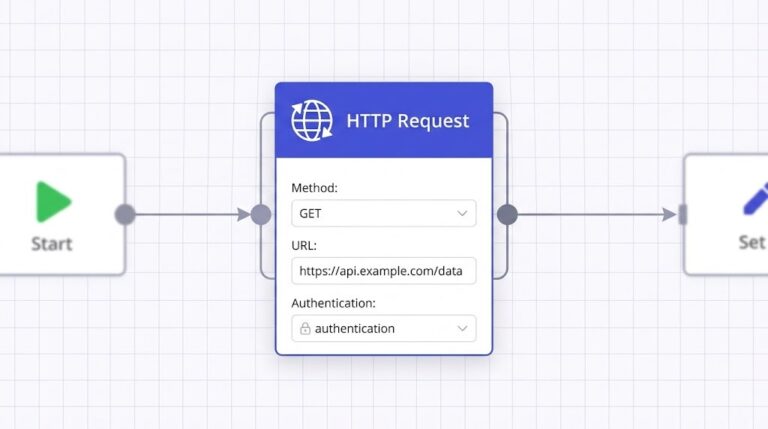
- HTTP Request Node: A highly versatile core node used to make custom API calls (GET, POST, PUT, etc.) to any endpoint, useful when a dedicated App node doesn’t exist.
n8n లో, nodes (నోడ్స్) అనేవి ఒక వర్క్ఫ్లోకి ఫండమెంటల్ బిల్డింగ్ బ్లాక్స్ (fundamental building blocks). మీ ఆటోమేషన్లో జరిగే ప్రతి సింగిల్ స్టెప్ లేదా యాక్షన్ను ఒక నోడ్ సూచిస్తుంది. ఉదాహరణకు, ఒక webhook కోసం వెయిట్ చేయడం, external API నుండి డేటాను ఫెచ్ (fetch) చేయడం, JSON డేటాను మార్చడం (transform) లేదా ఒక ఈమెయిల్ సెండ్ చేయడం లాంటివి. ఈ నోడ్స్ను విజువల్ కాన్వాస్ పైన కనెక్ట్ చేయడం ద్వారా, మీరు ఈవెంట్స్ ఏ ఆర్డర్లో జరగాలో సెట్ చేయవచ్చు మరియు డేటా ఒక స్టెప్ నుండి తర్వాతి స్టెప్కి ఎలా ఫ్లో (flow) అవ్వాలో కంట్రోల్ చేయవచ్చు.
n8n లోని నోడ్స్ రకాలు (Types of Nodes in n8n)
వర్క్ఫ్లోలో అవి చేసే ఫంక్షన్ను బట్టి నోడ్స్ను సాధారణంగా ఈ క్రింది విధంగా కేటగిరైజ్ చేయవచ్చు:
1. ట్రిగ్గర్ నోడ్స్ (Trigger Nodes)
ట్రిగ్గర్ నోడ్స్ ఎప్పుడూ ఒక వర్క్ఫ్లోకి స్టార్టింగ్ పాయింట్. ఇవి నిర్దిష్టమైన ఈవెంట్స్ కోసం వేచిచూస్తూ “లిజన్ (listen)” చేస్తాయి మరియు ఆ ఈవెంట్ జరిగినప్పుడు వర్క్ఫ్లో ఎగ్జిక్యూషన్ను స్టార్ట్ (initiate) చేస్తాయి. ఒక వర్క్ఫ్లోలో ఒకటి లేదా అంతకంటే ఎక్కువ ట్రిగ్గర్ నోడ్స్ ఉండవచ్చు.
- App Triggers: ఏదైనా ఒక స్పెసిఫిక్ యాప్లో ఈవెంట్ జరిగినప్పుడు వర్క్ఫ్లోను స్టార్ట్ చేస్తాయి (ఉదాహరణకు, కొత్త మెసేజ్ వచ్చినప్పుడు Slack Trigger, లేదా పేమెంట్ సక్సెస్ అయినప్పుడు Stripe Trigger).
- Core Triggers: ఇంటర్నల్ లేదా జనరిక్ వెబ్ ఈవెంట్స్ ఆధారంగా వర్క్ఫ్లోలను స్టార్ట్ చేస్తాయి (ఉదాహరణకు, ప్రతి గంటకు ఒక జాబ్ రన్ చేయడానికి Schedule Trigger, లేదా వచ్చే HTTP POST రిక్వెస్ట్లను స్వీకరించడానికి Webhook Trigger).
2. యాక్షన్ లేదా యాప్ నోడ్స్ (Action / App Nodes)
యాక్షన్ నోడ్స్ అనేవి ఎక్స్టర్నల్ అప్లికేషన్స్ మరియు సర్వీసెస్లో ఆపరేషన్స్ చేస్తాయి. ఇవి థర్డ్-పార్టీ APIs తో ఆథెంటికేట్ (authenticate) అవ్వడానికి మీ క్రెడెన్షియల్స్ను ఉపయోగించి డేటాను రీడ్ (read), క్రియేట్ (create), అప్డేట్ (update) లేదా డిలీట్ (delete) చేస్తాయి.
- ఉదాహరణలు: Google Sheets నోడ్ (ఒక row యాడ్ చేయడానికి), Salesforce నోడ్ (ఒక lead క్రియేట్ చేయడానికి), GitHub నోడ్ (ఒక issue క్రియేట్ చేయడానికి), లేదా Mailchimp నోడ్ (సబ్స్క్రైబర్ను యాడ్ చేయడానికి).
3. కోర్ నోడ్స్ (Core – Logic & Transformation Nodes)
కోర్ నోడ్స్ అనేవి n8n లోని ఇన్బిల్ట్ టూల్స్. ఇవి వర్క్ఫ్లో గుండా వెళ్ళే డేటాను మానిప్యులేట్ చేయడానికి లేదా ఎగ్జిక్యూషన్ ఫ్లోను కంట్రోల్ చేయడానికి ఉపయోగపడతాయి. ఇవి సాధారణంగా థర్డ్-పార్టీ ఎక్స్టర్నల్ APIs తో ఇంటరాక్ట్ అవ్వవు.
- Flow Control Nodes: డేటా వెళ్లే మార్గాన్ని (path) నిర్ణయిస్తాయి. ఉదాహరణలకు, If నోడ్ (కండిషనల్ బ్రాంచింగ్ కోసం), Switch నోడ్ (మల్టిపుల్ వాల్యూస్ ఆధారంగా రూట్ చేయడానికి), మరియు Merge నోడ్ (వేర్వేరు బ్రాంచెస్ నుండి డేటాను కలపడానికి).
- Data Transformation Nodes: తర్వాతి స్టెప్కి డేటాను పంపే ముందు దాన్ని రీస్ట్రక్చర్ (restructure) లేదా మోడిఫై (modify) చేస్తాయి. ఉదాహరణలకు Set నోడ్ (వేరియబుల్స్ క్రియేట్ లేదా చేంజ్ చేయడానికి), Edit Fields నోడ్, మరియు Item Lists నోడ్.
- Code Node: స్టాండర్డ్ నోడ్స్ చేయలేని కాంప్లెక్స్ లాజిక్, లూప్స్, లేదా డేటా పార్సింగ్ చేయడానికి కస్టమ్ JavaScript లేదా Python కోడ్ రాసుకోవడానికి ఇది మిమ్మల్ని అనుమతిస్తుంది.
- HTTP Request Node: ఇది చాలా వర్సటైల్ (versatile) కోర్ నోడ్. ఏదైనా స్పెసిఫిక్ యాప్ నోడ్ లేనప్పుడు, కస్టమ్ API కాల్స్ (GET, POST, PUT మొదలైనవి) ఏ ఎండ్పాయింట్కైనా చేయడానికి ఇది అద్భుతంగా ఉపయోగపడుతుంది.
In n8n, a Trigger Node is the starting point of an automated workflow. It acts as a listener that waits for a specific event to occur. When that predetermined event happens, the trigger node captures the initial data and kicks off the execution of the subsequent nodes connected in the workflow.
Every active workflow must have at least one trigger node to run automatically.
Common Types of Trigger Nodes
Here is a list of frequently used trigger nodes in n8n, categorized by how they initiate workflows:
- Webhook Trigger: Listens for incoming HTTP requests (like GET, POST, or PUT) from external applications. This is highly versatile for integrating with apps that don’t have a dedicated n8n node but support sending out webhooks.
- Schedule Trigger: Starts a workflow at specific times or regular intervals. You can set it to run every hour, every Monday at 9 AM, or use custom Cron expressions for precise timing.
- App-Specific Triggers: Dedicated nodes built to listen for events inside third-party applications. These can work via real-time webhooks or by periodically polling the app for changes. Examples include:
- Stripe Trigger: Fires when a specific event happens in Stripe, such as a successful charge or a new subscription.
- Slack Trigger: Starts the workflow when a new message is posted in a channel or when someone uses a slash command.
- Typeform Trigger: Activates as soon as a new form submission is received.
- GitHub Trigger: Listens for repository events like new pull requests, created issues, or code pushes.
- Email Read (IMAP) Trigger: Connects directly to an email inbox and triggers the workflow whenever a new email arrives that matches your specified criteria (like a specific sender or subject line).
- Error Trigger: A specialized trigger used for building error-handling workflows. It automatically runs if another workflow fails, allowing you to log the error details or send an alert to your team.
- Manual Trigger: Allows you to execute the workflow manually by clicking the “Execute Workflow” button in the n8n interface. This is primarily used for testing and debugging while building your automation.
n8n లో, Trigger Node (ట్రిగ్గర్ నోడ్) అనేది ఒక ఆటోమేటెడ్ వర్క్ఫ్లోకి స్టార్టింగ్ పాయింట్. ఇది ఒక నిర్దిష్టమైన ఈవెంట్ జరగడం కోసం ఎదురుచూసే ఒక లిజనర్లా (listener) పనిచేస్తుంది. ఆ ఈవెంట్ జరిగినప్పుడు, ట్రిగ్గర్ నోడ్ ఇనిషియల్ డేటాను క్యాప్చర్ చేసి, వర్క్ఫ్లోలో కనెక్ట్ చేయబడిన తర్వాతి నోడ్స్ ఎగ్జిక్యూషన్ను స్టార్ట్ (kick off) చేస్తుంది.
ఆటోమేటిక్గా రన్ అవ్వడానికి ప్రతి యాక్టివ్ వర్క్ఫ్లోలో కనీసం ఒక ట్రిగ్గర్ నోడ్ అయినా కచ్చితంగా ఉండాలి.
సాధారణ ట్రిగ్గర్ నోడ్స్ రకాలు (Common Types of Trigger Nodes)
వర్క్ఫ్లోలను అవి ఎలా స్టార్ట్ చేస్తాయి అనే దాని ఆధారంగా n8n లో తరచుగా ఉపయోగించే ట్రిగ్గర్ నోడ్స్ లిస్ట్ ఇక్కడ ఉంది:
- Webhook Trigger (వెబ్హుక్ ట్రిగ్గర్): ఎక్స్టర్నల్ అప్లికేషన్స్ నుండి వచ్చే HTTP రిక్వెస్ట్లను (GET, POST, లేదా PUT లాంటివి) ఇది లిజన్ చేస్తుంది. డెడికేటెడ్ n8n నోడ్ లేని, కానీ వెబ్హుక్స్ను పంపగల యాప్స్తో ఇంటిగ్రేట్ చేయడానికి ఇది అద్భుతంగా ఉపయోగపడుతుంది.
- Schedule Trigger (షెడ్యూల్ ట్రిగ్గర్): స్పెసిఫిక్ టైమ్స్ లేదా రెగ్యులర్ ఇంటర్వెల్స్లో వర్క్ఫ్లోను స్టార్ట్ చేస్తుంది. ప్రతి గంటకు లేదా ప్రతి సోమవారం ఉదయం 9 గంటలకు రన్ అయ్యేలా మీరు దీన్ని సెట్ చేయవచ్చు లేదా కచ్చితమైన టైమింగ్ కోసం కస్టమ్ Cron ఎక్స్ప్రెషన్స్ను వాడవచ్చు.
- App-Specific Triggers (యాప్-స్పెసిఫిక్ ట్రిగ్గర్స్): థర్డ్-పార్టీ అప్లికేషన్స్ లోపల జరిగే ఈవెంట్స్ కోసం లిజన్ చేయడానికి ఇవి డెడికేటెడ్ నోడ్స్గా బిల్డ్ చేయబడ్డాయి. ఇవి రియల్-టైమ్ వెబ్హుక్స్ ద్వారా లేదా మార్పుల కోసం పీరియాడిక్గా యాప్ను పోల్ (poll) చేయడం ద్వారా పనిచేస్తాయి. ఉదాహరణలు:
- Stripe Trigger: సక్సెస్ఫుల్ ఛార్జ్ లేదా కొత్త సబ్స్క్రిప్షన్ లాంటి స్పెసిఫిక్ ఈవెంట్ Stripe లో జరిగినప్పుడు ఇది ఫైర్ అవుతుంది.
- Slack Trigger: ఎవరైనా ఒక ఛానెల్లో కొత్త మెసేజ్ పోస్ట్ చేసినప్పుడు లేదా స్లాష్ కమాండ్ను ఉపయోగించినప్పుడు వర్క్ఫ్లోను స్టార్ట్ చేస్తుంది.
- Typeform Trigger: కొత్త ఫామ్ సబ్మిషన్ రాగానే ఇది యాక్టివేట్ అవుతుంది.
- GitHub Trigger: కొత్త pull requests, ఇష్యూస్ క్రియేట్ అవ్వడం లేదా కోడ్ పుష్ లాంటి రిపోజిటరీ ఈవెంట్స్ను ఇది లిజన్ చేస్తుంది.
- Email Read (IMAP) Trigger: డైరెక్ట్గా ఈమెయిల్ ఇన్బాక్స్కి కనెక్ట్ అవుతుంది మరియు మీరు సెట్ చేసిన కండిషన్స్కి (స్పెసిఫిక్ సెండర్ లేదా సబ్జెక్ట్ లైన్ లాంటివి) మ్యాచ్ అయ్యే కొత్త ఈమెయిల్ వచ్చినప్పుడల్లా వర్క్ఫ్లోను ట్రిగ్గర్ చేస్తుంది.
- Error Trigger (ఎర్రర్ ట్రిగ్గర్): ఎర్రర్-హ్యాండ్లింగ్ వర్క్ఫ్లోలను బిల్డ్ చేయడానికి వాడే ఒక స్పెషలైజ్డ్ ట్రిగ్గర్. వేరే ఏదైనా వర్క్ఫ్లో ఫెయిల్ అయితే ఇది ఆటోమేటిక్గా రన్ అవుతుంది, తద్వారా మీరు ఆ ఎర్రర్ డీటెయిల్స్ను లాగ్ చేయవచ్చు లేదా మీ టీమ్కి ఒక అలర్ట్ సెండ్ చేయవచ్చు.
- Manual Trigger (మాన్యువల్ ట్రిగ్గర్): n8n ఇంటర్ఫేస్లోని “Execute Workflow” బటన్ను క్లిక్ చేయడం ద్వారా వర్క్ఫ్లోను మాన్యువల్గా ఎగ్జిక్యూట్ చేయడానికి ఇది మిమ్మల్ని అనుమతిస్తుంది. మీ ఆటోమేషన్ను బిల్డ్ చేస్తున్నప్పుడు టెస్టింగ్ మరియు డీబగ్గింగ్ కోసం ఇది ప్రధానంగా ఉపయోగించబడుతుంది.