🚀 *Gen AI Engineer Telugu (Production Focused)*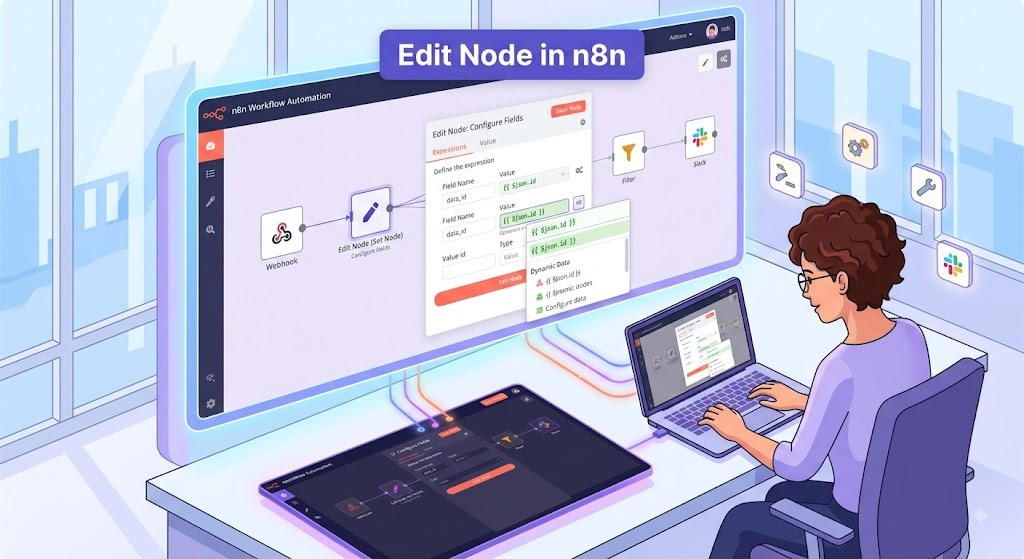
In n8n, the Edit Fields node (formerly known as the “Set” node) is a core data manipulation tool. It allows you to modify the JSON data passing through your workflow before it reaches the next node.
You can think of it as a transformation checkpoint: it takes the incoming data, alters it exactly how you specify, and passes the newly formatted data forward.
Core Capabilities
The Edit Fields node allows you to perform several key actions on your data:
- Add fields: Create entirely new data points using static values or expressions (formulas).
- Update fields: Overwrite the value of an existing field.
- Remove fields: Delete specific data points from the JSON payload.
- Keep only specified fields: A toggle that strips away all incoming data except the exact fields you define in the node.
- Rename fields: Technically achieved by duplicating a field’s value to a new name and removing the old one.
Common Use Cases
1. Flattening Nested Data
APIs often return deeply nested JSON objects, which can be tedious to map in subsequent nodes. You can use the Edit Fields node to extract specific nested values and bring them to the top level.
- Incoming:
{ "user": { "contact": { "email": "john@example.com" } } } - Action: Set a new field called
emailwith the expression{{ $json.user.contact.email }}. - Result:
{ "user": {...}, "email": "john@example.com" }
2. Stripping Down Payloads (Data Privacy & Cleanliness)
When receiving massive payloads from webhooks (like a Shopify order or a GitHub pull request), you often only need two or three fields. Sending the entire payload to downstream apps can cause errors, slow down the workflow, or accidentally leak Personally Identifiable Information (PII).
- Action: Turn on the “Keep Only Set Fields” toggle. Define only the
order_idandtotal_price. - Result: The node discards the 100+ other fields, passing a clean, lightweight JSON object to the next node.
3. Combining and Formatting Data
You can use n8n’s expression engine (JavaScript) inside the Edit Fields node to manipulate strings or do math before passing the data to a CRM or database.
- Use case: Combining
first_nameandlast_nameinto a singlefull_namefield. - Use case: Formatting a raw timestamp (e.g.,
1690891200) into a human-readable date. - Use case: Forcing text to lowercase or capitalizing the first letter of a user’s input.
4. Setting Default or Static Variables
Sometimes you need to inject static data into your workflow that didn’t exist in the trigger.
- Use case: Hardcoding a status value. If a new lead comes in from a form, you can use the Edit Fields node to add a field called
Statusand set its value to"Pending". - Use case: Injecting a specific Slack channel ID or project ID that needs to be referenced multiple times later in the workflow.
5. Type Conversion
If a webhook sends a number as a string (e.g., "150.00"), but your database node requires an actual integer/float, you can use the Edit Fields node to convert the type. By setting the field type to “Number” and passing the string, n8n will cast it correctly for the next step.
n8n లో, Edit Fields (ఎడిట్ ఫీల్డ్స్) నోడ్ (గతంలో దీన్ని “Set” నోడ్ అని పిలిచేవారు) అనేది డేటాను మార్చడానికి (data manipulation) ఉపయోగించే ఒక ముఖ్యమైన సాధనం.
తదుపరి నోడ్కు చేరుకోవడానికి ముందే మీ వర్క్ఫ్లో ద్వారా వెళ్లే JSON డేటాను మార్చడానికి ఇది మిమ్మల్ని అనుమతిస్తుంది.
దీన్ని ఒక మార్పిడి చెక్పాయింట్గా (transformation checkpoint) భావించవచ్చు: ఇది వస్తున్న డేటాను తీసుకుంటుంది, మీరు సూచించిన విధంగా కచ్చితంగా మారుస్తుంది, ఆపై ఆ కొత్త ఫార్మాట్లో ఉన్న డేటాను ముందుకు పంపుతుంది.
ముఖ్యమైన సామర్థ్యాలు (Core Capabilities)
ఈ ఎడిట్ ఫీల్డ్స్ నోడ్ మీ డేటాపై పలు కీలకమైన చర్యలను చేయడానికి అనుమతిస్తుంది:
- కొత్త ఫీల్డ్స్ను జోడించడం (Add fields): స్థిరమైన విలువలు (static values) లేదా ఎక్స్ప్రెషన్స్ (ఫార్ములాలు) ఉపయోగించి పూర్తిగా కొత్త డేటా పాయింట్లను సృష్టించడం.
- ఫీల్డ్స్ను అప్డేట్ చేయడం (Update fields): ఇప్పటికే ఉన్న ఫీల్డ్ యొక్క విలువను మార్చడం.
- ఫీల్డ్స్ను తీసివేయడం (Remove fields): JSON పేలోడ్ నుండి నిర్దిష్ట డేటా పాయింట్లను తొలగించడం.
- సూచించిన ఫీల్డ్స్ను మాత్రమే ఉంచడం (Keep only specified fields): ఈ టోగుల్ ద్వారా మీరు నోడ్లో నిర్వచించిన ఫీల్డ్స్ మినహా మిగతా అంతా డేటాను తొలగించవచ్చు.
- ఫీల్డ్స్ పేరు మార్చడం (Rename fields): సాంకేతికంగా, ఒక ఫీల్డ్ విలువను కొత్త పేరుతో కాపీ చేసి, పాత దాన్ని తీసివేయడం ద్వారా ఇది జరుగుతుంది.
సాధారణ ఉపయోగాలు (Common Use Cases)
1. నెస్టెడ్ డేటాను సరళీకృతం చేయడం (Flattening Nested Data)
APIలు తరచుగా లోతుగా ఉన్న (nested) JSON ఆబ్జెక్ట్లను పంపుతాయి, వీటిని తదుపరి నోడ్లలో మ్యాప్ చేయడం కష్టం. ఎడిట్ ఫీల్డ్స్ నోడ్ను ఉపయోగించి నిర్దిష్ట నెస్టెడ్ విలువలను బయటకు తీసి, వాటిని పై స్థాయికి తీసుకురావచ్చు.
- వస్తున్న డేటా (Incoming):
{ "user": { "contact": { "email": "john@example.com" } } } - చర్య (Action):
{{ $json.user.contact.email }}ఎక్స్ప్రెషన్తోemailఅనే కొత్త ఫీల్డ్ను సెట్ చేయడం. - ఫలితం (Result):
{ "user": {...}, "email": "john@example.com" }
2. పేలోడ్స్ను తగ్గించడం (Stripping Down Payloads)
వెబ్హుక్స్ (Shopify ఆర్డర్ లేదా GitHub పుల్ రిక్వెస్ట్ వంటివి) నుండి భారీ పేలోడ్స్ వచ్చినప్పుడు, మీకు రెండు లేదా మూడు ఫీల్డ్స్ మాత్రమే అవసరం అవుతాయి. మొత్తం పేలోడ్ను తదుపరి యాప్లకు పంపడం వల్ల ఎర్రర్స్ రావచ్చు, వర్క్ఫ్లో నెమ్మదించవచ్చు లేదా సున్నితమైన వ్యక్తిగత సమాచారం (PII) లీక్ కావచ్చు.
- చర్య (Action): “Keep Only Set Fields” ఆప్షన్ను ఆన్ చేయండి. కేవలం
order_idమరియుtotal_priceమాత్రమే ఉంచండి. - ఫలితం (Result): ఈ నోడ్ మిగిలిన వందలాది ఫీల్డ్స్ను వదిలివేసి, తదుపరి నోడ్కు స్వచ్ఛమైన, తక్కువ బరువున్న JSON ఆబ్జెక్ట్ను పంపుతుంది.
3. డేటాను కలపడం మరియు ఫార్మాట్ చేయడం (Combining and Formatting Data)
మీరు డేటాను CRM లేదా డేటాబేస్కు పంపే ముందు n8n యొక్క ఎక్స్ప్రెషన్ ఇంజిన్ (జావాస్క్రిప్ట్) ఉపయోగించి టెక్స్ట్ను మార్చవచ్చు లేదా లెక్కలు చేయవచ్చు.
- ఉపయోగం:
first_nameమరియుlast_nameలను కలిపి ఒకేfull_nameఫీల్డ్గా చేయడం. - ఉపయోగం: ముడి టైమ్స్టాంప్ను (ఉదా:
1690891200) మనం సులభంగా చదివే తేదీ (date) ఫార్మాట్లోకి మార్చడం. - ఉపయోగం: టెక్స్ట్ను పూర్తిగా స్మాల్ లెటర్స్లోకి (lowercase) మార్చడం లేదా మొదటి అక్షరాన్ని క్యాపిటల్ చేయడం.
4. డిఫాల్ట్ లేదా స్టాటిక్ వేరియబుల్స్ను సెట్ చేయడం (Setting Default or Static Variables)
కొన్నిసార్లు ట్రిగ్గర్లో లేని స్థిరమైన (static) డేటాను మీ వర్క్ఫ్లోలో చేర్చాల్సి వస్తుంది.
- ఉపయోగం: ఫారం ద్వారా కొత్త లీడ్ వస్తే, మీరు ఎడిట్ ఫీల్డ్స్ నోడ్ను ఉపయోగించి
Statusఅనే ఫీల్డ్ను జోడించి దానికి"Pending"అనే విలువను ఇవ్వవచ్చు. - ఉపయోగం: వర్క్ఫ్లోలో తర్వాత పలుమార్లు ఉపయోగపడే ఒక నిర్దిష్ట స్లాక్ (Slack) ఛానెల్ ID లేదా ప్రాజెక్ట్ ID ని చేర్చడం.
5. డేటా టైప్ మార్చడం (Type Conversion)
ఒకవేళ వెబ్హుక్ నంబర్ను టెక్స్ట్గా (ఉదా: "150.00") పంపితే, కానీ మీ డేటాబేస్ నోడ్కి అది అసలైన నంబర్గా (integer/float) కావాలంటే, మీరు దాన్ని మార్చడానికి ఈ నోడ్ను వాడవచ్చు. ఫీల్డ్ టైప్ను “Number” గా సెట్ చేయడం ద్వారా n8n తదుపరి దశ కోసం దాన్ని సరిగ్గా మారుస్తుంది.