🚀 *Gen AI Engineer Telugu (Production Focused)*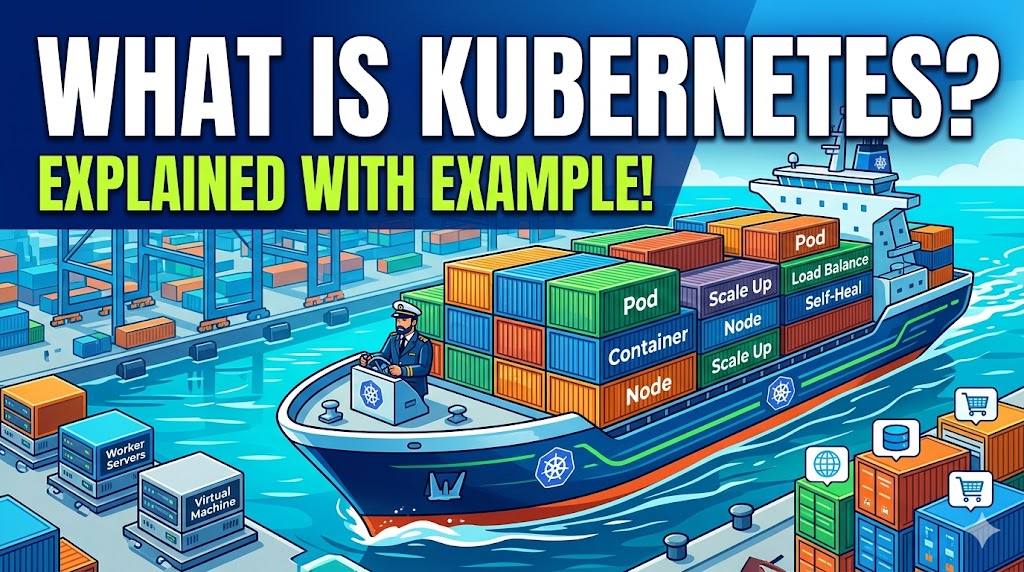
☸️ కుబెర్నెటెస్ (Kubernetes / K8s) అంటే ఏమిటి?
కుబెర్నెటెస్, దీన్ని తరచుగా K8s అని కూడా పిలుస్తారు. ఇది కంటైనరైజ్డ్ అప్లికేషన్ల డిప్లాయ్మెంట్, స్కేలింగ్ మరియు నిర్వహణను ఆటోమేట్ చేయడానికి రూపొందించబడిన ఓపెన్-సోర్స్ ప్లాట్ఫారమ్.
📦 మీ అప్లికేషన్ను ఐసోలేటెడ్ కంటైనర్లో ప్యాక్ చేయడానికి మీరు డాకర్ను (Docker) ఉపయోగిస్తే, బహుళ సర్వర్లలో వందలాది లేదా వేలాది కంటైనర్లను సులభంగా రన్ అయ్యేలా చూసుకుంటూ వాటిని సమర్థవంతంగా నిర్వహించే సిస్టమే ఈ కుబెర్నెటెస్.
🎻 ఒక పోలిక: ఆర్కెస్ట్రా కండక్టర్
దీన్ని సులభంగా అర్థం చేసుకోవడానికి, ఒక ఆర్కెస్ట్రాను ఊహించుకోండి:
- 🎸 వాయిద్యాలు: మీ అప్లికేషన్ కోడ్ మరియు దాని డిపెండెన్సీలు.
- 🧑🎤 సంగీతకారుడు: ఆ వాయిద్యాన్ని వాయించే కంటైనర్ (డాకర్ లాగా).
- 🎼 కండక్టర్ (డైరెక్టర్): కుబెర్నెటెస్.
🎶 వందలాది మంది సంగీతకారులు కలిసి వాయిస్తున్నప్పుడు, వారిని సమన్వయం చేయడానికి ఒక కండక్టర్ అవసరం. వారు ఎప్పుడు ప్రారంభించాలి, ఎంత బిగ్గరగా వాయించాలి అని కండక్టర్ వారికి చెబుతాడు మరియు రిథమ్ సరిగ్గా ఉందో లేదో చూసుకుంటాడు. ఒకవేళ వయోలిన్ వాయించే వ్యక్తి అకస్మాత్తుగా అనారోగ్యానికి గురై వేదిక దిగిపోతే, ప్రేక్షకులు సంగీతం నాణ్యతలో తగ్గుదలని గమనించకుండా కండక్టర్ వెంటనే ఒక బ్యాకప్ వయోలినిస్ట్ను రమ్మని సంకేతం ఇస్తాడు. కుబెర్నెటెస్ కూడా సరిగ్గా ఇదే చేస్తుంది!
📚 ముఖ్యమైన భావనలు (పదజాలం)
ఇది ఎలా పనిచేస్తుందో అర్థం చేసుకోవడానికి, మీరు దీని ప్రాథమిక భాగాలను తెలుసుకోవాలి:
- 🌐 క్లస్టర్ (Cluster): కంట్రోల్ ప్లేన్ (మేనేజర్) మరియు అనేక వర్కర్ నోడ్లను కలిగి ఉండే మొత్తం కుబెర్నెటెస్ సిస్టమ్.
- 🖥️ నోడ్ (Node): మీ క్లస్టర్లోని ఒక భౌతిక సర్వర్ లేదా వర్చువల్ మెషీన్. ఇది CPU మరియు మెమరీని అందిస్తుంది.
- 🧊 పాడ్ (Pod): కుబెర్నెటెస్లో అతిచిన్న యూనిట్. ఒక పాడ్ ఒక (లేదా కొన్నిసార్లు దగ్గరి సంబంధం ఉన్న కొన్ని) కంటైనర్లను రన్ చేస్తుంది. పాడ్ను మీ కంటైనర్ చుట్టూ ఉండే ఒక కవర్గా భావించండి.
- 📜 డిప్లాయ్మెంట్ (Deployment): మీరు కుబెర్నెటెస్కు ఇచ్చే సూచనల సమితి. ఇది మీ “కోరుకున్న స్థితిని (desired state)” ప్రకటిస్తుంది. (ఉదాహరణకు: “నా వెబ్ అప్లికేషన్ యొక్క 3 కాపీలు ఎల్లప్పుడూ రన్ కావాలి”).
- 🔀 సర్వీస్ (Service): స్థిరమైన నెట్వర్క్ ఎండ్పాయింట్ (లోడ్ బ్యాలెన్సర్ లాంటిది), మీ పాడ్లు నిరంతరం తొలగించబడుతూ, తిరిగి సృష్టించబడుతున్నప్పటికీ, ఇది ట్రాఫిక్ను మీ పాడ్లకు మళ్లిస్తుంది.
🛒 ఒక ఉదాహరణ: ఈ-కామర్స్ వెబ్సైట్
మీకు ఒక ఈ-కామర్స్ వెబ్సైట్ ఉందని అనుకుందాం. మీరు మీ వెబ్ సర్వర్ అప్లికేషన్ను డాకర్ కంటైనర్లో ప్యాక్ చేసి కుబెర్నెటెస్కు అప్పగిస్తారు. అప్పుడు ఏం జరుగుతుందంటే:
1️⃣ డిప్లాయ్మెంట్ & షెడ్యూలింగ్ (Deployment & Scheduling) 🗓️
“నా వెబ్ సర్వర్కు చెందిన 3 రెప్లికాలను (పాడ్లను) డిప్లాయ్ చేయండి” అని కుబెర్నెటెస్కు చెబుతూ మీరు ఒక కాన్ఫిగరేషన్ ఫైల్ను వ్రాస్తారు. కుబెర్నెటెస్ మీకు అందుబాటులో ఉన్న సర్వర్లను (నోడ్లను) చూస్తుంది మరియు నోడ్ Aలో ఒక పాడ్ను, నోడ్ Bలో ఒక పాడ్ను మరియు నోడ్ Cలో ఒక పాడ్ను షెడ్యూల్ చేస్తుంది.
2️⃣ లోడ్ బ్యాలెన్సింగ్ (Load Balancing – Service) ⚖️
ఒక కస్టమర్ మీ వెబ్సైట్ను సందర్శిస్తాడు. కుబెర్నెటెస్ సర్వీస్ ఆ రిక్వెస్ట్ను స్వీకరించి, దానిని ఆ 3 పాడ్లలో ఒకదానికి ఫార్వార్డ్ చేస్తుంది. ఏ ఒక్క పాడ్పైనా ఎక్కువ భారం పడకుండా ఇది ట్రాఫిక్ను సమానంగా బ్యాలెన్స్ చేస్తుంది.
3️⃣ ఆటో-స్కేలింగ్ (Auto-Scaling) 📈
ఇది బ్లాక్ ఫ్రైడే అనుకోండి, వెబ్సైట్కి ఒక్కసారిగా ట్రాఫిక్ భారీగా పెరుగుతుంది. మీ 3 పాడ్లలో CPU వినియోగం 95%కి చేరుకుంటుంది. కుబెర్నెటెస్ దీనిని గుర్తించి, మీరు సెట్ చేసిన నియమాల ఆధారంగా మీ అప్లికేషన్ను ఆటోమేటిక్గా స్కేల్ చేస్తుంది. ఇది త్వరగా మరో 7 పాడ్లను సృష్టిస్తుంది, మొత్తాన్ని 10కి పెంచుతుంది. సర్వీస్ వెంటనే ఈ 10 పాడ్లకు ట్రాఫిక్ను మళ్లించడం ప్రారంభించి, మీ వెబ్సైట్ను వేగంగా ఉంచుతుంది. రద్దీ తగ్గిన తర్వాత, సర్వర్ ఖర్చులను ఆదా చేయడానికి కుబెర్నెటెస్ ఆటోమేటిక్గా ఆ 7 పాడ్లను తొలగిస్తుంది.
4️⃣ సెల్ఫ్-హీలింగ్ (Self-Healing) 🛠️
అకస్మాత్తుగా, పవర్ కట్ అవ్వడం వల్ల నోడ్ B పూర్తిగా క్రాష్ అవుతుంది. నోడ్ Bలో రన్ అవుతున్న పాడ్ కూడా దానితో పాటే ఆగిపోతుంది. మీ “కోరుకున్న స్థితి (desired state)” 3 పాడ్లు అని, కానీ ప్రస్తుతం 2 మాత్రమే రన్ అవుతున్నాయని కుబెర్నెటెస్ వెంటనే గుర్తిస్తుంది. ఎవరి ప్రమేయం లేకుండానే, కుబెర్నెటెస్ చనిపోయిన పాడ్ స్థానంలో నోడ్ A లేదా నోడ్ Cలో సరికొత్త పాడ్ను ఆటోమేటిక్గా ప్రారంభించి, మీ క్లస్టర్ను తిరిగి పూర్తి స్థాయికి పునరుద్ధరిస్తుంది.
Here is the content beautifully formatted with an icon-driven style for easy reading:
☸️ What is Kubernetes (K8s)?
Kubernetes, often abbreviated as K8s, is an open-source platform designed to automate the deployment, scaling, and management of containerized applications.
📦 If you use Docker to pack your application into an isolated container, Kubernetes is the system that manages hundreds or thousands of those containers across multiple servers, ensuring they run smoothly.
🎻 The Analogy: The Orchestra Conductor
Imagine an orchestra:
- 🎸 The Instruments: Your application code and its dependencies.
- 🧑🎤 The Musician: A container (like Docker) playing the instrument.
- 🎼 The Conductor: Kubernetes.
🎶 If you have hundreds of musicians playing together, you need a conductor to coordinate them. The conductor tells them when to start, how loud to play, and makes sure the rhythm is right. If a violinist suddenly gets sick and leaves the stage, the conductor immediately signals a backup violinist to step in so the audience doesn’t notice a drop in the music’s quality.
📚 Core Concepts (The Vocabulary)
To understand how it works, you need to know its basic components:
- 🌐 Cluster: The entire Kubernetes system, consisting of the control plane (the manager) and several worker nodes.
- 🖥️ Node: A single physical server or virtual machine in your cluster. It provides the CPU and memory.
- 🧊 Pod: The smallest unit in Kubernetes. A pod runs one (or sometimes a few tightly coupled) containers. Think of a pod as a wrapper around your container.
- 📜 Deployment: A set of instructions you give to Kubernetes. It declares your “desired state,” such as “I want 3 copies of my web application running at all times.”
- 🔀 Service: A consistent network endpoint (like a load balancer) that routes traffic to your pods, even if those pods are constantly being destroyed and recreated.
🛒 A Concrete Example: The E-commerce Website
Let’s say you own an e-commerce website. You pack your web server application into a Docker container and hand it over to Kubernetes.
1️⃣ Deployment & Scheduling 🗓️
You write a configuration file telling Kubernetes: “Deploy 3 replicas (pods) of my web server.”
Kubernetes looks at your available servers (Nodes) and schedules one pod on Node A, one on Node B, and one on Node C.
2️⃣ Load Balancing (Service) ⚖️
A customer visits your website. A Kubernetes Service receives the request and forwards it to one of the 3 pods. It balances the traffic evenly so no single pod is overwhelmed.
3️⃣ Auto-Scaling 📈
It’s Black Friday, and traffic spikes massively. The CPU usage on your 3 pods hits 95%. Kubernetes detects this and automatically scales your application based on rules you set. It quickly creates 7 more pods, bringing the total to 10. The Service instantly starts routing traffic to all 10 pods, keeping your website fast. Once the rush is over, Kubernetes automatically kills 7 pods to save you money on server costs.
4️⃣ Self-Healing 🛠️
Suddenly, a power outage causes Node B to crash entirely. The pod running on Node B dies with it. Kubernetes instantly notices that your “desired state” is 3 pods, but only 2 are currently running. Without any human intervention, Kubernetes automatically starts a brand new pod on Node A or Node C to replace the dead one, restoring your cluster back to full health.