🚀 *Gen AI Engineer Telugu (Production Focused)*
 🚢 To understand containerization and Docker, it helps to start with the real-world analogy they were named after: the shipping industry.
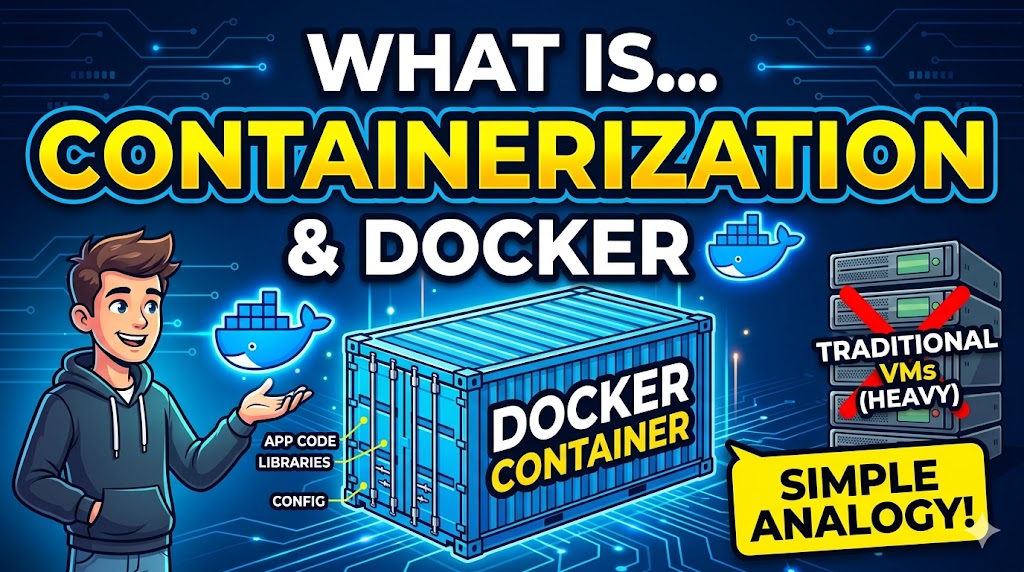
Before the 1950s, cargo was shipped loosely. A ship might carry barrels of oil, sacks of coffee, and wooden crates of machinery all mixed together. Loading and unloading took days, and items often got damaged or lost because they all required different handling. Then came the standardized shipping container. Suddenly, everything—whether it was cars, electronics, or coffee—went into identical steel boxes. Cranes, trucks, and ships only had to know how to handle the box, not what was inside it.
📦 Containerization in software is exactly the same concept.
🧩 What is Containerization?
In software, an application rarely runs on its own. It needs a specific operating system, libraries, configuration files, and dependencies (like a specific version of a database or a programming language runtime).
Containerization is the process of bundling an application and all of its required dependencies into a single, standardized unit called a container. Because everything the app needs to run is locked inside that container, it will run exactly the same way on your laptop, on a coworker’s laptop, or in a massive cloud server.
🐳 What is Docker?
Docker is the most popular platform used to create, deploy, and manage these containers. If containerization is the concept of using standard steel boxes, Docker is the company that provides the cranes, the ships, and the instruction manuals to make using those boxes incredibly easy.
🤦♂️ The Classic Example: “It Works on My Machine!”
Imagine you are a developer building a web application using Node.js and a MongoDB database.
❌ Without Docker (The Old Way):
- 💻 You install Node.js (version 18) and MongoDB on your Mac. You write the code, and everything works perfectly.
- 📤 You send the code to your testing server, which runs Linux.
- 💥 The server tries to run it, but it crashes. Why? The server has Node.js version 14 installed, and it’s missing a specific security library your app needs.
- 😩 You spend hours troubleshooting the classic developer dilemma: “I don’t get it, it works on my machine!”
✅ With Docker (The Container Way):
- 📝 Instead of just writing code, you write a set of instructions (called a
Dockerfile). This file says: “Start with a basic Linux system, install Node.js version 18, copy my code into it, and install my exact database dependencies.” - 🏗️ Docker reads this file and builds a Docker Image (a static, unchangeable blueprint of your app and its environment).
- ▶️ You run that Image, which becomes a live Container on your laptop. It works perfectly.
- 🚀 You send that exact same Docker Image to the testing server.
- 🎯 The server doesn’t need to have Node.js or MongoDB installed. It only needs Docker. Docker spins up the container, and because the container includes its own isolated Node.js version 18 and all dependencies, it runs exactly as it did on your laptop.
🌟 Why is this a game-changer?
- 🌍 Portability: Write once, run anywhere.
- 🛡️ Isolation: You can run an app requiring Python 2 and another requiring Python 3 on the exact same computer without them interfering with each other. They are isolated in their own containers.
- ⚡ Efficiency: Unlike traditional Virtual Machines (VMs) which require booting up an entire, heavy, separate Operating System for every app, containers share the host computer’s OS kernel. This makes them incredibly lightweight, meaning they start in milliseconds and use a fraction of the memory.
🚢 కంటైనరైజేషన్ మరియు డాకర్ (Docker) గురించి అర్థం చేసుకోవడానికి, వాటికి ఆ పేరు రావడానికి కారణమైన ఒక వాస్తవ-ప్రపంచ ఉదాహరణతో ప్రారంభించడం మంచిది: షిప్పింగ్ పరిశ్రమ (shipping industry).
1950ల కంటే ముందు, సరుకులను విడివిడిగా రవాణా చేసేవారు. ఒక ఓడలో నూనె బారెల్స్, కాఫీ బస్తాలు, మరియు యంత్రాల చెక్క పెట్టెలు అన్నీ కలిపి తీసుకెళ్లేవారు. వాటన్నింటికీ వేర్వేరు నిర్వహణ అవసరం కాబట్టి, వాటిని లోడ్ చేయడానికి మరియు అన్లోడ్ చేయడానికి రోజుల సమయం పట్టేది, పైగా వస్తువులు తరచుగా దెబ్బతినడం లేదా కోల్పోవడం జరిగేది. ఆ తర్వాత ‘స్టాండర్డైజ్డ్ షిప్పింగ్ కంటైనర్‘ (ప్రామాణిక షిప్పింగ్ కంటైనర్) వచ్చింది. అకస్మాత్తుగా, అది కార్లు అయినా, ఎలక్ట్రానిక్స్ అయినా లేదా కాఫీ అయినా సరే—అంతా ఒకే రకమైన స్టీల్ బాక్సుల్లోకి (కంటైనర్లలోకి) వెళ్ళిపోయాయి. క్రేన్లు, ట్రక్కులు మరియు ఓడలకు కేవలం ఆ బాక్సును ఎలా నిర్వహించాలో తెలిస్తే చాలు, దాని లోపల ఏముందో వాటికి అవసరం లేదు.
📦 సాఫ్ట్వేర్లో కంటైనరైజేషన్ అనేది సరిగ్గా ఇదే కాన్సెప్ట్.
🧩 కంటైనరైజేషన్ అంటే ఏమిటి?
సాఫ్ట్వేర్ రంగంలో, ఏ అప్లికేషన్ అయినా స్వంతంగా రన్ అవ్వడం చాలా అరుదు. దానికి ఒక నిర్దిష్ట ఆపరేటింగ్ సిస్టమ్, లైబ్రరీలు, కాన్ఫిగరేషన్ ఫైల్లు మరియు డిపెండెన్సీలు (అంటే ఒక డేటాబేస్ యొక్క నిర్దిష్ట వెర్షన్ లేదా ప్రోగ్రామింగ్ లాంగ్వేజ్ రన్టైమ్ లాంటివి) అవసరం.
కంటైనరైజేషన్ అనేది అప్లికేషన్ను మరియు దానికి అవసరమైన అన్ని డిపెండెన్సీలను కలిపి ‘కంటైనర్‘ అని పిలువబడే ఒకే ప్రామాణిక యూనిట్గా బండిల్ (bundling) చేసే ప్రక్రియ. ఆ అప్లికేషన్ రన్ కావడానికి అవసరమైన ప్రతిదీ ఆ కంటైనర్ లోపల లాక్ చేయబడి ఉంటుంది కాబట్టి, అది మీ ల్యాప్టాప్లో, మీ తోటి ఉద్యోగి ల్యాప్టాప్లో లేదా ఒక భారీ క్లౌడ్ సర్వర్లో అయినా ఒకేలా (exactly same way) రన్ అవుతుంది.
🐳 డాకర్ (Docker) అంటే ఏమిటి?
ఈ కంటైనర్లను సృష్టించడానికి, డిప్లాయ్ చేయడానికి మరియు నిర్వహించడానికి ఉపయోగించే అత్యంత ప్రజాదరణ పొందిన ప్లాట్ఫారమ్ పేరు ‘డాకర్‘. కంటైనరైజేషన్ అనేది ప్రామాణిక స్టీల్ బాక్సులను ఉపయోగించే కాన్సెప్ట్ అయితే, ఆ బాక్సులను ఉపయోగించడాన్ని చాలా సులభతరం చేసే క్రేన్లు, ఓడలు మరియు సూచనల మాన్యువల్లను అందించే సంస్థను డాకర్ అనుకోవచ్చు.
🤦♂️ ఒక అద్భుతమైన ఉదాహరణ: “నా మెషీన్లో ఇది పనిచేస్తోంది కదా!”
మీరు Node.js మరియు MongoDB డేటాబేస్ను ఉపయోగించి ఒక వెబ్ అప్లికేషన్ను డెవలప్ చేస్తున్నారని ఊహించుకోండి.
❌ డాకర్ లేకుండా (పాత పద్ధతి):
- 💻 మీరు మీ Mac లో Node.js (వెర్షన్ 18) మరియు MongoDB ఇన్స్టాల్ చేస్తారు. మీరు కోడ్ రాస్తారు, అంతా పర్ఫెక్ట్గా పనిచేస్తుంది.
- 📤 మీరు ఆ కోడ్ను మీ టెస్టింగ్ సర్వర్కు పంపుతారు, ఆ సర్వర్ Linux పైన రన్ అవుతుంటుంది.
- 💥 సర్వర్ దాన్ని రన్ చేయడానికి ప్రయత్నిస్తుంది, కానీ అది క్రాష్ అవుతుంది. ఎందుకు? ఆ సర్వర్లో Node.js వెర్షన్ 14 ఇన్స్టాల్ చేయబడి ఉంటుంది, అలాగే మీ యాప్కి అవసరమైన ఒక నిర్దిష్ట సెక్యూరిటీ లైబ్రరీ అందులో ఉండదు.
- 😩 డెవలపర్లు తరచుగా ఎదుర్కొనే సమస్యను పరిష్కరించేందుకు మీరు గంటల తరబడి సతమతమవుతారు: “నాకేమీ అర్థం కావడం లేదు, ఇది నా మెషీన్లో బాగానే పనిచేస్తోంది కదా!”
✅ డాకర్తో (కంటైనర్ పద్ధతి):
- 📝 కేవలం కోడ్ రాయడానికి బదులుగా, మీరు కొన్ని సూచనలను (దీనిని
Dockerfileఅంటారు) రాస్తారు. ఈ ఫైల్ ఇలా చెబుతుంది: “ఒక బేసిక్ Linux సిస్టమ్తో ప్రారంభించండి, Node.js వెర్షన్ 18ని ఇన్స్టాల్ చేయండి, నా కోడ్ను అందులోకి కాపీ చేయండి మరియు నా డేటాబేస్కు సరిగ్గా కావాల్సిన డిపెండెన్సీలను ఇన్స్టాల్ చేయండి.” - 🏗️ డాకర్ ఈ ఫైల్ను చదివి ఒక డాకర్ ఇమేజ్ (Docker Image) ను నిర్మిస్తుంది (ఇది మీ యాప్ మరియు దాని ఎన్విరాన్మెంట్ యొక్క స్థిరమైన, మార్చలేని బ్లూప్రింట్).
- ▶️ మీరు ఆ ఇమేజ్ను రన్ చేసినప్పుడు, అది మీ ల్యాప్టాప్లో ఒక లైవ్ కంటైనర్ అవుతుంది. ఇది పర్ఫెక్ట్గా పనిచేస్తుంది.
- 🚀 మీరు సరిగ్గా అదే డాకర్ ఇమేజ్ని టెస్టింగ్ సర్వర్కు పంపుతారు.
- 🎯 సర్వర్లో Node.js లేదా MongoDB ఇన్స్టాల్ చేయాల్సిన అవసరం లేదు. దానికి కేవలం డాకర్ ఉంటే చాలు. డాకర్ ఆ కంటైనర్ను స్టార్ట్ చేస్తుంది. ఆ కంటైనర్ తన స్వంత ఐసోలేటెడ్ Node.js వెర్షన్ 18 తో పాటు అన్ని డిపెండెన్సీలను కలిగి ఉంటుంది కాబట్టి, మీ ల్యాప్టాప్లో ఎలాగైతే పనిచేసిందో, సర్వర్లో కూడా సరిగ్గా అలాగే రన్ అవుతుంది.
🌟 ఇది ఎందుకు గేమ్-ఛేంజర్ అయింది?
- 🌍 పోర్టబిలిటీ (Portability): ఒకసారి రాయండి, ఎక్కడైనా రన్ చేయండి.
- 🛡️ ఐసోలేషన్ (Isolation): మీరు పైథాన్ 2 (Python 2) అవసరమైన ఒక యాప్ను మరియు పైథాన్ 3 (Python 3) అవసరమైన మరొక యాప్ను ఒకదానికొకటి అంతరాయం కలిగించకుండా ఒకే కంప్యూటర్లో రన్ చేయవచ్చు. అవి వాటి స్వంత కంటైనర్లలో ఐసోలేట్ (వేరు) చేయబడి ఉంటాయి.
- ⚡ సమర్థత (Efficiency): సాంప్రదాయ వర్చువల్ మెషీన్ల (VMs) విషయానికొస్తే ప్రతి యాప్ కోసం బరువైన ఒక పూర్తిస్థాయి ఆపరేటింగ్ సిస్టమ్ను బూట్ చేయాల్సి ఉంటుంది. కానీ కంటైనర్లు ఆతిథ్య (host) కంప్యూటర్ యొక్క ఆపరేటింగ్ సిస్టమ్ కెర్నల్ను పంచుకుంటాయి. దీని వల్ల అవి చాలా తేలికగా ఉంటాయి, అంటే ఇవి కేవలం మిల్లీసెకన్లలోనే స్టార్ట్ అవుతాయి మరియు అతి తక్కువ మెమరీని మాత్రమే ఉపయోగిస్తాయి.