🚀 *Gen AI Engineer Telugu (Production Focused)*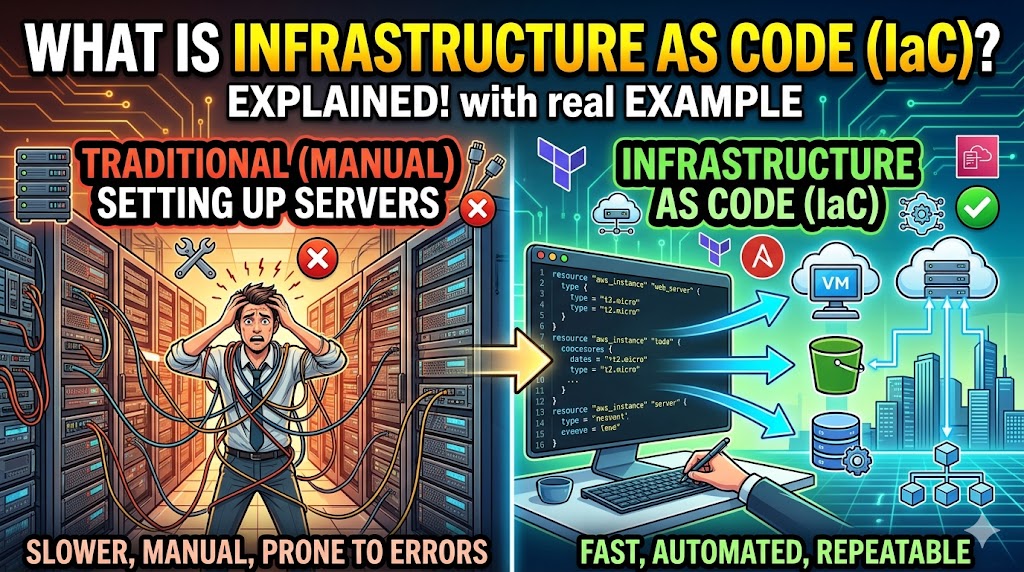
☁️💻 ఇన్ఫ్రాస్ట్రక్చర్ యాజ్ కోడ్ (IaC) అంటే ఏమిటి?
🏗️ ఇన్ఫ్రాస్ట్రక్చర్ యాజ్ కోడ్ (IaC) అనేది సర్వర్లు, స్టోరేజ్, నెట్వర్క్లు మరియు వర్చువల్ మెషీన్ల వంటి కంప్యూటింగ్ వనరులను మాన్యువల్గా కాకుండా, కోడింగ్ (Machine-readable files) ద్వారా నిర్వహించే మరియు సిద్ధం చేసే పద్ధతి.
💡 సరళంగా చెప్పాలంటే, మీ ఇన్ఫ్రాస్ట్రక్చర్ ఎలా ఉండాలో మీరు కోడ్ రాస్తారు. ఒక టూల్ ఆ కోడ్ను ఉపయోగించి ఆటోమేటిక్గా మీ ఎన్విరాన్మెంట్ను నిర్మిస్తుంది. దీనివల్ల మీ సెటప్ స్థిరంగా (Consistent), వేగంగా మరియు పారదర్శకంగా ఉంటుంది.
🌟 ప్రధాన ప్రయోజనాలు
- ⚖️ స్థిరత్వం (Consistency): మాన్యువల్గా మార్పులు చేయడం వల్ల డెవలప్మెంట్ మరియు ప్రొడక్షన్ సర్వర్ల మధ్య వచ్చే తేడాలను ఇది నివారిస్తుంది.
- 🚀 వేగం (Speed): మాన్యువల్గా వారాల సమయం పట్టే పనిని, స్క్రిప్ట్ ద్వారా కేవలం నిమిషాల్లో పూర్తి చేయవచ్చు.
- 🔄 వెర్షన్ కంట్రోల్ (Version Control): ఇన్ఫ్రాస్ట్రక్చర్ అనేది కోడ్ రూపంలో ఉండటం వల్ల, మార్పులను Git వంటి టూల్స్ ద్వారా ట్రాక్ చేయవచ్చు. ఏదైనా తప్పు జరిగితే పాత వెర్షన్కు సులభంగా వెళ్లవచ్చు (Rollback).
⚙️ ఇది ఎలా పనిచేస్తుంది: ఒక ఉదాహరణ
☁️ మీకు AWS వంటి క్లౌడ్ ప్లాట్ఫారమ్లో ఒక వెబ్ సర్వర్ కావాలని అనుకుందాం.
🖱️ 1. మాన్యువల్ పద్ధతి (Click-Ops)
మీరు వెబ్సైట్లోకి లాగిన్ అయ్యి, “Create Instance” పై క్లిక్ చేసి, ఆపరేటింగ్ సిస్టమ్, రామ్ (RAM), ఫైర్వాల్ వంటి వివరాలను మాన్యువల్గా ఎంచుకుంటారు. ఒకవేళ మీకు 10 సర్వర్లు కావాలంటే, ఈ పనిని 10 సార్లు చేయాలి. ఇందులో తప్పులు జరిగే అవకాశం ఎక్కువ.
📜 2. IaC పద్ధతి (Declarative)
మీరు Terraform వంటి టూల్ని ఉపయోగించి ఒక కాన్ఫిగరేషన్ ఫైల్ను రాస్తారు. సర్వర్ను “ఎలా” నిర్మించాలో మీరు చెప్పక్కర్లేదు, మీకు “ఏమి” కావాలో చెబితే సరిపోతుంది.
టెర్రాఫార్మ్ కోడ్ ఉదాహరణ (main.tf):
Terraform
resource "aws_instance" "web_server" {
ami = "ami-0c55b159cbfafe1f0" # ఆపరేటింగ్ సిస్టమ్ ఇమేజ్
instance_type = "t2.micro" # హార్డ్వేర్ పరిమాణం
tags = {
Name = "MyProvisionedServer"
}
}
▶️ 3. అమలు (Execution)
మీరు ఒక కమాండ్ (ఉదాహరణకు terraform apply) ఇస్తే, ఆ టూల్ మీ కోడ్ను చదివి క్లౌడ్ ప్రొవైడర్తో సంప్రదించి మీరు కోరుకున్న సర్వర్ను సృష్టిస్తుంది. మీకు 100 సర్వర్లు కావాలన్నా, కోడ్లో ఒక చిన్న సంఖ్యను మార్చితే సరిపోతుంది.
🛠️ ప్రముఖ IaC టూల్స్
- 🌍 Terraform: ఇది అన్ని రకాల క్లౌడ్స్ (AWS, Azure, Google Cloud) పై పనిచేస్తుంది.
- ☁️ AWS CloudFormation: ఇది కేవలం అమజాన్ వెబ్ సర్వీసెస్ కోసం మాత్రమే.
- ⚙️ Ansible / Chef / Puppet: ఇవి సర్వర్లు క్రియేట్ అయిన తర్వాత వాటిలో సాఫ్ట్వేర్ కాన్ఫిగరేషన్ చేయడానికి వాడతారు.
- 🐍 Pulumi: ఇది పైథాన్ (Python) లేదా టైప్స్క్రిప్ట్ (TypeScript) వంటి ప్రోగ్రామింగ్ భాషల ద్వారా ఇన్ఫ్రాస్ట్రక్చర్ను నిర్మించడానికి అనుమతిస్తుంది.
🏗️ What is Infrastructure as Code (IaC)?
Infrastructure as Code (IaC) is the practice of managing and provisioning computing infrastructure—such as servers, storage, networks, and virtual machines—through machine-readable definition files, rather than physical hardware configuration or interactive configuration tools.
💡 In simpler terms: you write code to define your infrastructure, and a tool uses that code to build the environment automatically. This ensures your setup is consistent, repeatable, and documented.
🌟 Core Benefits
- ⚖️ Consistency: Eliminates “environment drift” where your development, staging, and production setups slowly become different due to manual tweaks.
- 🚀 Speed: Provisioning an entire data center that would take weeks manually can be done in minutes with a script.
- 🔄 Version Control: Since infrastructure is just code, you can track changes in Git, see who changed what, and roll back to a previous version if something breaks.
⚙️ How it Works: An Example
Imagine you need a web server on a cloud platform like AWS.
🖱️ 1. The Manual Way (Click-Ops)
You log into a web console, click “Create Instance,” select the OS, choose the RAM, configure the firewall, and click “Finish.” If you need 10 of these, you repeat the process 10 times, risking a typo or a missed checkbox every time.
📜 2. The IaC Way (Declarative)
You write a configuration file using a tool like Terraform. You don’t tell the computer how to build it; you describe what you want.
Example Terraform Code (main.tf):
Terraform
resource "aws_instance" "web_server" {
  ami           = "ami-0c55b159cbfafe1f0" # The OS image
  instance_type = "t2.micro"             # The hardware size

  tags = {
    Name = "MyProvisionedServer"
  }
}
▶️ 3. Execution
You run a command (like terraform apply). The tool reads your code, communicates with the cloud provider, and builds exactly what you described. If you need 100 servers, you simply change a single number in the code.
🛠️ Common IaC Tools
- 🌍 Terraform: Cloud-agnostic (works with AWS, Azure, Google Cloud).
- ☁️ AWS CloudFormation: Specific to Amazon Web Services.
- ⚙️ Ansible / Chef / Puppet: Often used for configuring the software inside the servers once they are created.
- 🐍 Pulumi: Allows you to use standard programming languages like Python or TypeScript to define infrastructure.