🚀 *Gen AI Engineer (Production Focused)*
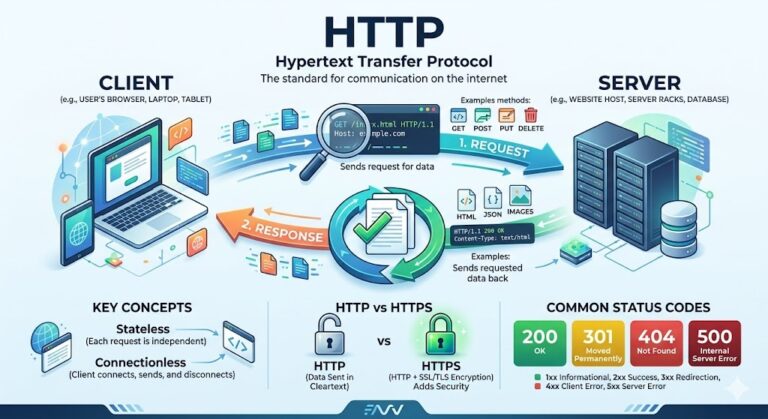
 HTTP headers are key-value pairs sent between a client (such as a web browser) and a server during an HTTP request or response. They transmit critical metadata—such as authentication credentials, caching rules, content types, and client information—allowing both sides of the communication to understand and process the data correctly.
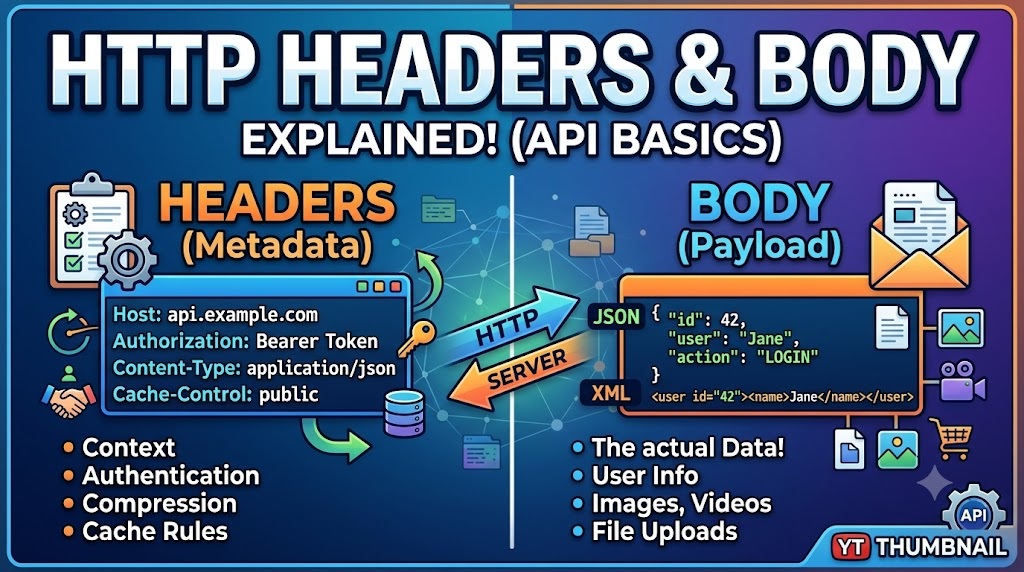
Anatomy of an HTTP Transaction with Headers
1. HTTP Request Example
When a client requests a resource, it sends a request line followed by a series of request headers.
HTTP
GET /api/v1/users/42 HTTP/1.1
Host: api.example.com
User-Agent: Mozilla/5.0 (Windows NT 10.0; Win64; x64) AppleWebKit/537.36
Accept: application/json, text/plain, */*
Accept-Encoding: gzip, deflate, br
Authorization: Bearer eyJhbGciOiJIUzI1NiIsInR5cCI6IkpXVCJ9...
Connection: keep-alive
2. HTTP Response Example
When the server responds, it sends a status line followed by response headers, an empty line, and the response body.
HTTP
HTTP/1.1 200 OK
Date: Fri, 24 Jul 2026 17:30:00 GMT
Content-Type: application/json; charset=utf-8
Content-Length: 142
Server: nginx/1.18.0
Cache-Control: max-age=3600, public
Set-Cookie: session_id=abc123xyz; Secure; HttpOnly; SameSite=Strict

{
  "id": 42,
  "name": "Jane Doe",
  "email": "jane.doe@example.com"
}
Categories of HTTP Headers
Headers are broadly categorized based on their role in the request/response lifecycle:
1. Request Headers
These headers are sent by the client and provide context about the client environment, preferences, or security credentials.
Host- Purpose: Specifies the domain name of the server (and optionally the port number) to which the request is being sent. This is mandatory in HTTP/1.1.
- Example:
Host: api.example.com
User-Agent- Purpose: Identifies the application, operating system, vendor, and version of the client making the request.
- Example:
User-Agent: Mozilla/5.0 (Windows NT 10.0; Win64; x64)
Accept- Purpose: Informs the server about which content types (MIME types) the client is willing to process.
- Example:
Accept: application/json, text/html
Authorization- Purpose: Contains credentials (like tokens or API keys) used to authenticate the client with the server.
- Example:
Authorization: Bearer eyJhbGciOiJIUzI1Ni...
Accept-Encoding- Purpose: Lists the compression algorithms the client understands (e.g., gzip, Brotli).
- Example:
Accept-Encoding: gzip, deflate, br
2. Response Headers
These headers are generated by the server to provide additional information about the server itself or the handling of the request.
Server- Purpose: Contains information about the software used by the origin server to handle the request.
- Example:
Server: nginx/1.18.0
Set-Cookie- Purpose: Sends a cookie from the server to the client so it can be stored and sent back in future requests.
- Example:
Set-Cookie: session_id=abc123xyz; Secure; HttpOnly; SameSite=Strict
Location- Purpose: Used in redirection responses (e.g., 301, 302, 201 Created) to point the client to a different URL.
- Example:
Location: /api/v1/users/43
WWW-Authenticate- Purpose: Sent alongside a
401 Unauthorizedstatus code, defining the authentication method required to access the resource. - Example:
WWW-Authenticate: Bearer realm="Access to API"
- Purpose: Sent alongside a
3. Representation (Entity) Headers
These headers describe the specific body content being transferred (whether in a request or response), such as its size, type, or encoding.
Content-Type- Purpose: Indicates the media type of the resource payload.
- Example:
Content-Type: application/json; charset=utf-8
Content-Length- Purpose: Specifies the size of the message body in bytes.
- Example:
Content-Length: 142
Content-Encoding- Purpose: Indicates what compression transformation has been applied to the body.
- Example:
Content-Encoding: gzip
4. Caching & Conditional Headers
These headers control how client browsers or intermediate proxies store and reuse cached content.
Cache-Control- Purpose: Directives for caching mechanisms in both requests and responses.
- Example:
Cache-Control: max-age=3600, public(indicates the resource can be cached publicly for 1 hour).
ETag- Purpose: An opaque identifier (“entity tag”) assigned by the server to a specific version of a resource. Used for efficient cache validation.
- Example:
ETag: "33a64df5514257cc5e151758f"
If-None-Match- Purpose: Sent by the client to check if the cached resource matches the server’s current version via an ETag. If it matches, the server returns a
304 Not Modifiedwithout transmitting the body. - Example:
If-None-Match: "33a64df5514257cc5e151758f"
- Purpose: Sent by the client to check if the cached resource matches the server’s current version via an ETag. If it matches, the server returns a
HTTP హెడర్లు అనగా క్లయింట్ (వెబ్ బ్రౌజర్ వంటివి) మరియు సర్వర్ మధ్య HTTP అభ్యర్థన (request) లేదా ప్రతిస్పందన (response) సమయంలో పంపబడే కీ-వాల్యూ (key-value) జతలు. ఇవి ప్రామాణీకరణ ఆధారాలు (authentication credentials), కాషింగ్ నియమాలు (caching rules), కంటెంట్ రకాలు మరియు క్లయింట్ సమాచారం వంటి కీలకమైన మెటాడేటాను (metadata) ప్రసారం చేస్తాయి. దీని ద్వారా డేటాను సరిగ్గా అర్థం చేసుకోవడానికి మరియు ప్రాసెస్ చేయడానికి రెండు వైపులా వీలవుతుంది.
హెడర్లతో కూడిన HTTP లావాదేవీ (Transaction)
1. HTTP అభ్యర్థన (Request) ఉదాహరణ
క్లయింట్ ఒక వనరును అభ్యర్థించినప్పుడు, అది రిక్వెస్ట్ లైన్ (request line) తర్వాత రిక్వెస్ట్ హెడర్ల సిరీస్ను పంపుతుంది.
HTTP
GET /api/v1/users/42 HTTP/1.1
Host: api.example.com
User-Agent: Mozilla/5.0 (Windows NT 10.0; Win64; x64) AppleWebKit/537.36
Accept: application/json, text/plain, */*
Accept-Encoding: gzip, deflate, br
Authorization: Bearer eyJhbGciOiJIUzI1NiIsInR5cCI6IkpXVCJ9...
Connection: keep-alive
2. HTTP ప్రతిస్పందన (Response) ఉదాహరణ
సర్వర్ ప్రతిస్పందించినప్పుడు, అది స్టేటస్ లైన్ (status line) తర్వాత రెస్పాన్స్ హెడర్లను పంపుతుంది, ఆపై ఒక ఖాళీ లైన్ మరియు రెస్పాన్స్ బాడీని పంపుతుంది.
HTTP
HTTP/1.1 200 OK
Date: Fri, 24 Jul 2026 17:30:00 GMT
Content-Type: application/json; charset=utf-8
Content-Length: 142
Server: nginx/1.18.0
Cache-Control: max-age=3600, public
Set-Cookie: session_id=abc123xyz; Secure; HttpOnly; SameSite=Strict

{
  "id": 42,
  "name": "Jane Doe",
  "email": "jane.doe@example.com"
}
HTTP హెడర్ల విభాగాలు (Categories)
రిక్వెస్ట్/రెస్పాన్స్ ప్రక్రియలో వాటి పాత్ర ఆధారంగా హెడర్లు విస్తృతంగా వర్గీకరించబడ్డాయి:
1. రిక్వెస్ట్ హెడర్లు (Request Headers)
ఇవి క్లయింట్ పంపే హెడర్లు మరియు ఇవి క్లయింట్ ఎన్విరాన్మెంట్, ప్రాధాన్యతలు లేదా భద్రతా ఆధారాల గురించి సమాచారాన్ని అందిస్తాయి.
Host- ఉపయోగం: అభ్యర్థన పంపబడుతున్న సర్వర్ యొక్క డొమైన్ పేరును (మరియు అవసరమైతే పోర్ట్ నంబర్ను) తెలుపుతుంది. HTTP/1.1లో ఇది తప్పనిసరి.
- ఉదాహరణ:
Host: api.example.com
User-Agent- ఉపయోగం: అభ్యర్థన చేస్తున్న క్లయింట్ యొక్క అప్లికేషన్, ఆపరేటింగ్ సిస్టమ్, విక్రేత (vendor) మరియు వెర్షన్ను గుర్తిస్తుంది.
- ఉదాహరణ:
User-Agent: Mozilla/5.0 (Windows NT 10.0; Win64; x64)
Accept- ఉపయోగం: క్లయింట్ ఏ కంటెంట్ రకాలను (MIME types) ప్రాసెస్ చేయడానికి ఇష్టపడుతుందో సర్వర్కు తెలియజేస్తుంది.
- ఉదాహరణ:
Accept: application/json, text/html
Authorization- ఉపయోగం: సర్వర్తో క్లయింట్ను ప్రామాణీకరించడానికి (authenticate) ఉపయోగించే ఆధారాలను (టోకెన్లు లేదా API కీలు వంటివి) కలిగి ఉంటుంది.
- ఉదాహరణ:
Authorization: Bearer eyJhbGciOiJIUzI1Ni...
Accept-Encoding- ఉపయోగం: క్లయింట్కు అర్థమయ్యే కంప్రెషన్ (compression) అల్గారిథమ్లను (ఉదాహరణకు: gzip, Brotli) సూచిస్తుంది.
- ఉదాహరణ:
Accept-Encoding: gzip, deflate, br
2. రెస్పాన్స్ హెడర్లు (Response Headers)
సర్వర్ గురించి లేదా అభ్యర్థనను నిర్వహించిన విధానం గురించి అదనపు సమాచారాన్ని అందించడానికి సర్వర్ ద్వారా ఈ హెడర్లు ఉత్పత్తి చేయబడతాయి.
Server- ఉపయోగం: అభ్యర్థనను నిర్వహించడానికి సర్వర్ ఉపయోగించే సాఫ్ట్వేర్ గురించి సమాచారాన్ని కలిగి ఉంటుంది.
- ఉదాహరణ:
Server: nginx/1.18.0
Set-Cookie- ఉపయోగం: సర్వర్ నుండి క్లయింట్కు కుకీని పంపుతుంది, తద్వారా అది నిల్వ చేయబడుతుంది మరియు భవిష్యత్ అభ్యర్థనలలో తిరిగి పంపబడుతుంది.
- ఉదాహరణ:
Set-Cookie: session_id=abc123xyz; Secure; HttpOnly; SameSite=Strict
Location- ఉపయోగం: క్లయింట్ను వేరొక URLకి మళ్ళించడానికి దారి మళ్లింపు (redirection) ప్రతిస్పందనలలో (ఉదా. 301, 302, 201 Created) ఉపయోగించబడుతుంది.
- ఉదాహరణ:
Location: /api/v1/users/43
WWW-Authenticate- ఉపయోగం: వనరును యాక్సెస్ చేయడానికి అవసరమైన ప్రామాణీకరణ పద్ధతిని నిర్వచిస్తూ,
401 Unauthorizedస్టేటస్ కోడ్తో పంపబడుతుంది. - ఉదాహరణ:
WWW-Authenticate: Bearer realm="Access to API"
- ఉపయోగం: వనరును యాక్సెస్ చేయడానికి అవసరమైన ప్రామాణీకరణ పద్ధతిని నిర్వచిస్తూ,
3. ప్రాతినిధ్య (Representation/Entity) హెడర్లు
ఈ హెడర్లు బదిలీ చేయబడుతున్న నిర్దిష్ట బాడీ కంటెంట్ను (అది అభ్యర్థనలో లేదా ప్రతిస్పందనలో ఉన్నప్పటికీ) వివరిస్తాయి, వాటి పరిమాణం, రకం లేదా ఎన్కోడింగ్ (encoding) వంటివి.
Content-Type- ఉపయోగం: రిసోర్స్ పేలోడ్ యొక్క మీడియా రకాన్ని (media type) సూచిస్తుంది.
- ఉదాహరణ:
Content-Type: application/json; charset=utf-8
Content-Length- ఉపయోగం: మెసేజ్ బాడీ పరిమాణాన్ని బైట్లలో (bytes) తెలుపుతుంది.
- ఉదాహరణ:
Content-Length: 142
Content-Encoding- ఉపయోగం: బాడీకి ఏ కంప్రెషన్ ట్రాన్స్ఫర్మేషన్ (compression transformation) వర్తించబడిందో సూచిస్తుంది.
- ఉదాహరణ:
Content-Encoding: gzip
4. కాషింగ్ (Caching) & షరతులతో కూడిన (Conditional) హెడర్లు
ఈ హెడర్లు క్లయింట్ బ్రౌజర్లు లేదా ఇంటర్మీడియట్ ప్రాక్సీలు కాష్ చేయబడిన కంటెంట్ను (cached content) ఎలా నిల్వ చేస్తాయో మరియు ఎలా తిరిగి ఉపయోగిస్తాయో నియంత్రిస్తాయి.
Cache-Control- ఉపయోగం: అభ్యర్థనలు మరియు ప్రతిస్పందనలు రెండింటిలోనూ కాషింగ్ యంత్రాంగాల (caching mechanisms) కోసం ఆదేశాలు.
- ఉదాహరణ:
Cache-Control: max-age=3600, public(వనరును 1 గంట పాటు పబ్లిక్గా కాష్ చేయవచ్చని సూచిస్తుంది).
ETag- ఉపయోగం: ఒక వనరు యొక్క నిర్దిష్ట వెర్షన్కు సర్వర్ కేటాయించిన ఐడెంటిఫైయర్ (“entity tag”). సమర్థవంతమైన కాష్ ధృవీకరణ (cache validation) కోసం ఉపయోగించబడుతుంది.
- ఉదాహరణ:
ETag: "33a64df5514257cc5e151758f"
If-None-Match- ఉపయోగం: కాష్ చేయబడిన వనరు, ETag ద్వారా సర్వర్ యొక్క ప్రస్తుత వెర్షన్తో సరిపోలుతుందో లేదో తనిఖీ చేయడానికి క్లయింట్ పంపుతుంది. అది సరిపోలితే, సర్వర్ బాడీని ప్రసారం చేయకుండా
304 Not Modifiedఅని తిరిగి ఇస్తుంది. - ఉదాహరణ:
If-None-Match: "33a64df5514257cc5e151758f"
- ఉపయోగం: కాష్ చేయబడిన వనరు, ETag ద్వారా సర్వర్ యొక్క ప్రస్తుత వెర్షన్తో సరిపోలుతుందో లేదో తనిఖీ చేయడానికి క్లయింట్ పంపుతుంది. అది సరిపోలితే, సర్వర్ బాడీని ప్రసారం చేయకుండా
What is an HTTP Body?
If HTTP headers are the “envelope” and “shipping label” of a letter, the HTTP Body is the actual letter inside. Also known as the payload, the body contains the raw data being transmitted between the client (like a web browser or mobile app) and the server.
In modern API development, the body is where the actual business data lives—such as a new user’s profile information being sent to a database, or the list of products a server returns to a shopping app.
When is the Body Used?
- Requests (Client to Server): Typically used with
POST,PUT, andPATCHmethods to send data (like submitting a form or uploading a file).GETandDELETErequests generally do not have a body, as their intent is captured entirely in the URL and headers. - Responses (Server to Client): Almost all successful API responses (like
200 OKor201 Created) include a body containing the requested data, and error responses (like400 Bad Request) usually include a body explaining what went wrong.
How Headers Control the Body
The receiving side needs to know how to interpret the raw bytes of the body. Two specific HTTP headers dictate this:
Content-Type: Tells the receiver exactly what format the data is in (e.g., JSON, XML, Image).Content-Length: Tells the receiver the exact size of the payload in bytes, so it knows when it has finished reading the data.
Common API Body Formats (with Examples)
1. JSON (JavaScript Object Notation)
This is the undisputed standard for modern REST APIs. It is lightweight, readable by humans, and easily parsed by machines.
- Header:
Content-Type: application/json
Example Payload:
JSON
{
  "username": "api_ninja",
  "email": "ninja@example.com",
  "preferences": {
    "notifications": true,
    "theme": "dark"
  }
}
2. URL-Encoded Form Data
This is the default format used when you submit a standard HTML form. The data is encoded as key-value pairs separated by &, similar to a URL query string.
- Header:
Content-Type: application/x-www-form-urlencoded
Example Payload:
Plaintext
username=api_ninja&email=ninja%40example.com&theme=dark
3. Multipart Form Data
This format is used when the client needs to upload files (like an image or a PDF) alongside text data. It divides the body into distinct “parts,” each with its own mini-headers.
- Header:
Content-Type: multipart/form-data; boundary=---Boundary123
Example Payload:
Plaintext
-----Boundary123
Content-Disposition: form-data; name="username"

api_ninja
-----Boundary123
Content-Disposition: form-data; name="profile_picture"; filename="avatar.jpg"
Content-Type: image/jpeg

[... raw binary image data here ...]
-----Boundary123--
A Complete API Transaction Example
Here is how the headers and the body work together in a real-world API scenario where a client is creating a new user account.
The Request (Sending data to the API)
The client makes a POST request, sending a JSON body with the new user’s details.
HTTP
POST /api/v1/users HTTP/1.1
Host: api.example.com
Authorization: Bearer my_secret_token
Content-Type: application/json
Content-Length: 72

{
  "name": "Jane Doe",
  "role": "Admin"
}
(Notice the blank line between the headers and the body. This blank line is a strict HTTP rule that tells the server: “The headers are done, the body is starting now.”)
The Response (Receiving data from the API)
The server processes the request, creates the user in the database, and sends back a response containing the newly generated user ID and timestamps in its body.
HTTP
HTTP/1.1 201 Created
Date: Fri, 24 Jul 2026 10:33:00 GMT
Content-Type: application/json
Content-Length: 124

{
  "id": "usr_98765",
  "name": "Jane Doe",
  "role": "Admin",
  "created_at": "2026-07-24T10:33:00Z"
}
HTTP బాడీ (Body) అంటే ఏమిటి?
HTTP హెడర్లు ఒక లేఖకు “కవర్” (envelope) మరియు “షిప్పింగ్ లేబుల్” లాంటివి అయితే, HTTP బాడీ అనేది ఆ కవర్లో ఉండే అసలైన లేఖ. దీనినే పేలోడ్ (payload) అని కూడా అంటారు, బాడీలో క్లయింట్ (వెబ్ బ్రౌజర్ లేదా మొబైల్ యాప్ వంటివి) మరియు సర్వర్ మధ్య ప్రసారం చేయబడే అసలైన డేటా (raw data) ఉంటుంది.
ఆధునిక API డెవలప్మెంట్లో, అసలైన బిజినెస్ డేటా ఇక్కడే ఉంటుంది — ఉదాహరణకు కొత్త యూజర్ ప్రొఫైల్ సమాచారాన్ని డేటాబేస్కు పంపడం లేదా సర్వర్ షాపింగ్ యాప్కు తిరిగి ఇచ్చే ఉత్పత్తుల జాబితా.
బాడీని ఎప్పుడు ఉపయోగిస్తారు?
- అభ్యర్థనలు (Requests – క్లయింట్ నుండి సర్వర్కు): డేటాను పంపడానికి (ఫారమ్ను సమర్పించడం లేదా ఫైల్ను అప్లోడ్ చేయడం వంటివి) సాధారణంగా
POST,PUTమరియుPATCHపద్ధతులతో ఉపయోగించబడుతుంది.GETమరియుDELETEఅభ్యర్థనలు సాధారణంగా బాడీని కలిగి ఉండవు, ఎందుకంటే వాటి ఉద్దేశ్యం పూర్తిగా URL మరియు హెడర్లలోనే ఉంటుంది. - ప్రతిస్పందనలు (Responses – సర్వర్ నుండి క్లయింట్కు): దాదాపు అన్ని విజయవంతమైన API ప్రతిస్పందనలు (ఉదాహరణకు
200 OKలేదా201 Created) అభ్యర్థించిన డేటాను కలిగి ఉన్న బాడీని అందిస్తాయి మరియు ఎర్రర్ ప్రతిస్పందనలు (ఉదాహరణకు400 Bad Request) సాధారణంగా ఏమి తప్పు జరిగిందో వివరించే బాడీని కలిగి ఉంటాయి.
హెడర్లు బాడీని ఎలా నియంత్రిస్తాయి
డేటాను స్వీకరించే వారు బాడీలోని బైట్లను ఎలా అర్థం చేసుకోవాలో తెలుసుకోవాలి. దీన్ని రెండు నిర్దిష్ట HTTP హెడర్లు నిర్దేశిస్తాయి:
Content-Type: డేటా ఏ ఫార్మాట్లో ఉందో (ఉదా. JSON, XML, Image) స్వీకరించే వారికి ఖచ్చితంగా చెబుతుంది.Content-Length: పేలోడ్ యొక్క ఖచ్చితమైన పరిమాణాన్ని బైట్లలో స్వీకరించే వారికి చెబుతుంది, తద్వారా డేటాను చదవడం ఎప్పుడు పూర్తి చేయాలో దానికి తెలుస్తుంది.
సాధారణ API బాడీ ఫార్మాట్లు (ఉదాహరణలతో)
1. JSON (JavaScript Object Notation)
ఆధునిక REST APIలకు ఇది తిరుగులేని ప్రమాణం. ఇది తేలికైనది, మానవులు సులభంగా చదవగలిగేది మరియు యంత్రాల ద్వారా సులభంగా విశ్లేషించబడేది (parsed).
- హెడర్ (Header):
Content-Type: application/json
ఉదాహరణ పేలోడ్ (Example Payload):
JSON
{
  "username": "api_ninja",
  "email": "ninja@example.com",
  "preferences": {
    "notifications": true,
    "theme": "dark"
  }
}
2. URL-Encoded Form Data
మీరు ఒక ప్రామాణిక HTML ఫారమ్ను సమర్పించినప్పుడు ఉపయోగించే డిఫాల్ట్ ఫార్మాట్ ఇది. డేటా URL క్వెరీ స్ట్రింగ్ లాగానే, & ద్వారా వేరు చేయబడిన కీ-వాల్యూ (key-value) జతలుగా ఎన్కోడ్ చేయబడుతుంది.
- హెడర్ (Header):
Content-Type: application/x-www-form-urlencoded
ఉదాహరణ పేలోడ్ (Example Payload):
Plaintext
username=api_ninja&email=ninja%40example.com&theme=dark
3. Multipart Form Data
టెక్స్ట్ డేటాతో పాటుగా ఫైల్లను (ఇమేజ్ లేదా PDF వంటివి) క్లయింట్ అప్లోడ్ చేయవలసి వచ్చినప్పుడు ఈ ఫార్మాట్ ఉపయోగించబడుతుంది. ఇది బాడీని విభిన్న “భాగాలు” (parts) గా విభజిస్తుంది, ప్రతి భాగానికి దాని స్వంత మినీ-హెడర్లు ఉంటాయి.
- హెడర్ (Header):
Content-Type: multipart/form-data; boundary=---Boundary123
ఉదాహరణ పేలోడ్ (Example Payload):
Plaintext
-----Boundary123
Content-Disposition: form-data; name="username"

api_ninja
-----Boundary123
Content-Disposition: form-data; name="profile_picture"; filename="avatar.jpg"
Content-Type: image/jpeg

[... ఇక్కడ ముడి బైనరీ ఇమేజ్ డేటా ఉంటుంది ...]
-----Boundary123--
పూర్తి API లావాదేవీ ఉదాహరణ
ఒక క్లయింట్ కొత్త యూజర్ అకౌంట్ను క్రియేట్ చేస్తున్న వాస్తవ-ప్రపంచ API దృష్టాంతంలో హెడర్లు మరియు బాడీ కలిసి ఎలా పని చేస్తాయో ఇక్కడ ఉంది.
అభ్యర్థన (APIకి డేటాను పంపడం)
క్లయింట్ కొత్త యూజర్ వివరాలతో JSON బాడీని పంపుతూ POST అభ్యర్థనను చేస్తుంది.
HTTP
POST /api/v1/users HTTP/1.1
Host: api.example.com
Authorization: Bearer my_secret_token
Content-Type: application/json
Content-Length: 72

{
  "name": "Jane Doe",
  "role": "Admin"
}
(హెడర్లు మరియు బాడీ మధ్య ఉన్న ఖాళీ లైన్ను గమనించండి. ఈ ఖాళీ లైన్ అనేది సర్వర్కు కఠినమైన HTTP నియమం: “హెడర్లు పూర్తయ్యాయి, బాడీ ఇప్పుడు ప్రారంభమవుతుంది” అని చెబుతుంది.)
ప్రతిస్పందన (API నుండి డేటాను స్వీకరించడం)
సర్వర్ అభ్యర్థనను ప్రాసెస్ చేస్తుంది, డేటాబేస్లో యూజర్ను సృష్టిస్తుంది మరియు కొత్తగా రూపొందించబడిన యూజర్ ID మరియు టైమ్స్టాంప్లను (timestamps) దాని బాడీలో కలిగి ఉన్న ప్రతిస్పందనను తిరిగి పంపుతుంది.
HTTP
HTTP/1.1 201 Created
Date: Fri, 24 Jul 2026 10:33:00 GMT
Content-Type: application/json
Content-Length: 124

{
  "id": "usr_98765",
  "name": "Jane Doe",
  "role": "Admin",
  "created_at": "2026-07-24T10:33:00Z"
}