🚀 *Gen AI Engineer (Production Focused)*
 ☁️ What is IaaS?
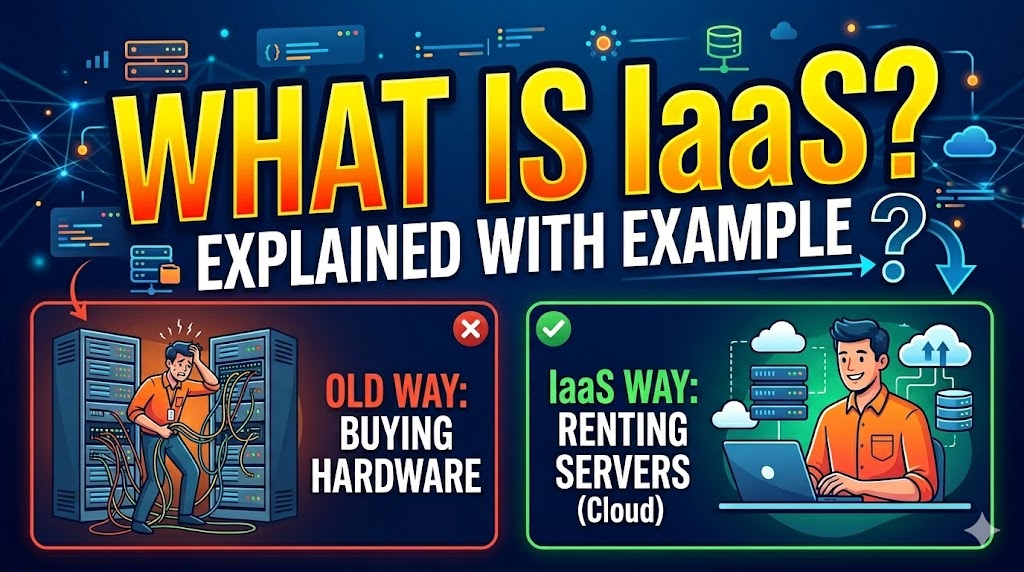
IaaS stands for Infrastructure as a Service. It is a cloud computing model where a third-party provider hosts and manages core computing resources—like servers, storage, and networking hardware—and you rent them over the internet. 🌐
Instead of buying physical hardware 🖥️, finding a place to store it 🏢, and paying for the electricity ⚡ and cooling ❄️ to keep it running, you simply rent virtual versions of these resources on a pay-as-you-go basis. 💳
🏢 The “Renting an Empty Apartment” Analogy
Think of IaaS like renting an unfurnished apartment.
- 👨💼 The Landlord (the IaaS provider): Owns the building, maintains the plumbing, and keeps the power running.
- 🔑 You (the customer): Get the keys to an empty space. It is entirely up to you to bring the furniture 🛋️, paint the walls 🎨, and decide how you want to live in it.
In the tech world, this means the provider manages the physical hardware ⚙️, but you are responsible for installing the operating system 💻, managing the databases 🗄️, and running your own software applications 📱.
🛒 A Real-World Example
Let’s say you are starting a new e-commerce company.
❌ The Traditional Setup: You would have to buy expensive physical servers 💸, put them in a server room, and hire people to maintain the hardware 👷. If your website suddenly goes viral and gets thousands of visitors 📈, your physical servers might crash 💥 because they can’t handle the load. To fix it, you’d have to buy more physical servers, which takes time ⏳.
✅ If you use IaaS instead:
- ☁️ You go to an IaaS provider like Amazon Web Services (AWS), Google Cloud, or Microsoft Azure.
- 🖱️ With a few clicks, you rent virtual servers (like AWS EC2 instances or Google Compute Engine).
- 💾 You install your website’s software onto these virtual servers.
- 🚀 When your website goes viral, you simply click a button to scale up and rent 10 more virtual servers instantly.
- 📉 When the traffic dies down, you spin those extra servers back down and stop paying for them.
⭐ Key Benefits of IaaS
- 💰 Cost-efficiency: You only pay for the exact computing power and storage you use, rather than paying upfront for expensive hardware.
- ⚖️ Scalability: You can scale your resources up or down in minutes depending on demand.
- 🎯 Focus on software: Your IT team doesn’t have to worry about replacing broken hard drives 🔧 or managing physical security 🔒 for a data center; they can just focus on building and running your software 👨💻.
☁️ IaaS అంటే ఏమిటి?
IaaS అంటే Infrastructure as a Service. ఇది ఒక cloud computing model. దీంట్లో third-party provider మనకు అవసరమైన core computing resources—అంటే servers, storage, మరియు networking hardware ని host చేసి మేనేజ్ చేస్తారు, వాటిని మనం internet ద్వారా rent కి తీసుకుంటాము. 🌐
Physical hardware కొనుక్కొని 🖥️, దానికి ఒక స్టోరేజ్ ప్లేస్ వెతుక్కొని 🏢, electricity ⚡ మరియు cooling ❄️ కి డబ్బులు కట్టే బదులు, మీరు సింపుల్ గా ఈ రిసోర్సెస్ యొక్క virtual versions ని pay-as-you-go బేసిస్ లో (అంటే వాడినంత మేరకే డబ్బులు కట్టే పద్ధతిలో) rent కి తీసుకుంటారు. 💳
🏢 The “Renting an Empty Apartment” Analogy (ఖాళీ అపార్ట్మెంట్ అద్దెకు తీసుకోవడం)
IaaS ని ఒక unfurnished apartment ని అద్దెకు తీసుకోవడంతో పోల్చుకోవచ్చు.
- 👨💼 Landlord (ఇక్కడ IaaS provider): కి ఆ building మీద హక్కు ఉంటుంది, వాళ్ళే plumbing మెయింటైన్ చేస్తారు, పవర్ సప్లై చూసుకుంటారు.
- 🔑 మీకు (customer కి): ఒక empty space తాళాలు ఇస్తారు. ఆ ఇంట్లోకి furniture తెచ్చుకోవడం 🛋️, గోడలకు paint వేసుకోవడం 🎨, అందులో ఎలా ఉండాలి అని decide చేసుకోవడం అంతా మీ చేతుల్లోనే ఉంటుంది.
Tech world లో దీని అర్థం ఏంటంటే, provider కేవలం physical hardware ని మేనేజ్ చేస్తాడు ⚙️, కానీ operating system ఇన్స్టాల్ చేసుకోవడం 💻, databases ని మేనేజ్ చేసుకోవడం 🗄️, మరియు మీ సొంత software applications ని రన్ చేసుకోవడం 📱 అంతా మీ responsibility.
🛒 ఒక Real-World Example
మీరు ఒక కొత్త e-commerce company స్టార్ట్ చేస్తున్నారు అనుకుందాం.
❌ ఒకవేళ మీరు traditional setup వాడితే: ఖరీదైన physical servers కొని 💸, వాటిని ఒక server room లో పెట్టి, ఆ hardware ని maintain చేయడానికి మనుషులను hire చేసుకోవాలి 👷. మీ website సడన్ గా viral అయ్యి వేల సంఖ్యలో visitors వస్తే 📈, ఆ load ని తట్టుకోలేక మీ physical servers క్రాష్ (crash) 💥 అయ్యే ఛాన్స్ ఉంది. దాన్ని ఫిక్స్ చేయడానికి మళ్ళీ కొత్త physical servers కొనాలి, దీనికి చాలా టైం పడుతుంది ⏳.
✅ అదే మీరు IaaS వాడితే:
- ☁️ మీరు Amazon Web Services (AWS), Google Cloud, లేదా Microsoft Azure లాంటి ఒక IaaS provider దగ్గరికి వెళ్తారు.
- 🖱️ జస్ట్ కొన్ని clicks తో, మీరు virtual servers ని (అంటే AWS EC2 instances లేదా Google Compute Engine లాగా) rent కి తీసుకుంటారు.
- 💾 ఈ virtual servers లో మీ website కి కావాల్సిన software ని install చేసుకుంటారు.
- 🚀 మీ website viral అయినప్పుడు, సింపుల్ గా ఒక బటన్ క్లిక్ చేసి వెంటనే ఇంకో 10 virtual servers ని scale up చేసి rent కి తీసుకుంటారు.
- 📉 ఆ traffic మళ్ళీ తగ్గాక, ఆ extra servers ని spin down చేసేసి, వాటికి డబ్బులు కట్టడం ఆపేయొచ్చు.
⭐ IaaS వల్ల Key Benefits
- 💰 Cost-efficiency: ఖరీదైన hardware కోసం ముందుగానే డబ్బులు కట్టే బదులు, మీరు ఎంత computing power మరియు storage వాడతారో, ఎగ్జాక్ట్ గా అంతే డబ్బులు కడతారు.
- ⚖️ Scalability: మీ అవసరాన్ని (demand) బట్టి కేవలం నిమిషాల్లో మీ resources ని scale up లేదా scale down చేసుకోవచ్చు.
- 🎯 Focus on software: మీ IT team పాడైపోయిన hard drives ని రిప్లేస్ చేయడం గురించి 🔧 లేదా data center కి physical security మేనేజ్ చేయడం గురించి 🔒 టెన్షన్ పడక్కర్లేదు; వాళ్ళు కేవలం మీ software ని బిల్డ్ చేయడం మరియు రన్ చేయడం 👨💻 మీద మాత్రమే పూర్తిగా ఫోకస్ చేయొచ్చు.