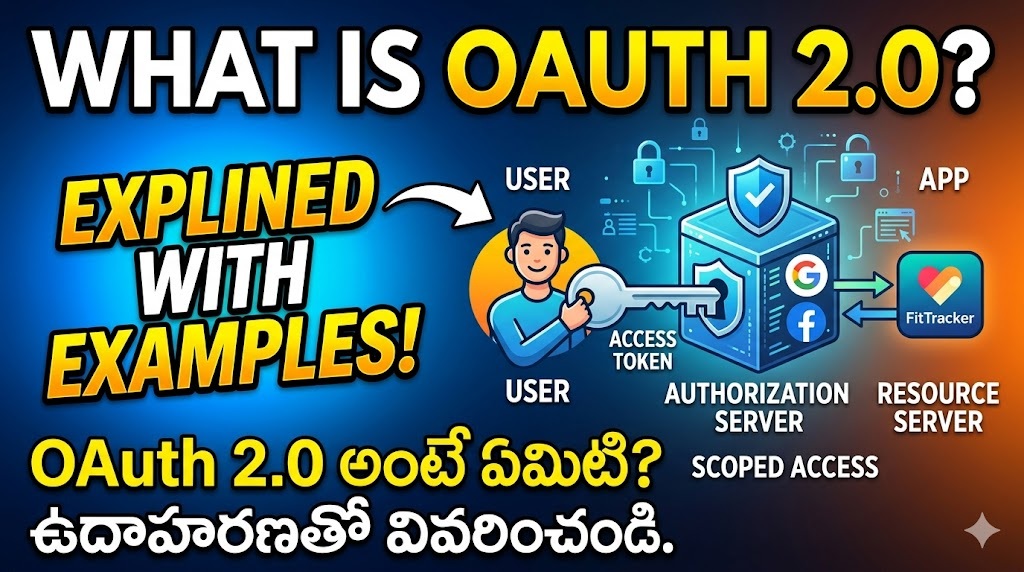
🛡️ OAuth 2.0 is the industry-standard protocol for authorization. It allows a website or application to access resources hosted by other web apps on behalf of a user, without the user ever having to share their username and password with the requesting application.
🚗 🔑 Think of it like giving a valet key to a parking attendant. The valet key allows them to drive and park your car, but it doesn’t give them access to the trunk or the glovebox, and it certainly doesn’t let them keep the car forever.
🎭 The Core Roles in OAuth 2.0
To understand how it works, you need to know the four main “actors” involved:
- 👤 Resource Owner: This is usually you (the user). You own your data.
- 📱 Client: The application requesting access to your data (e.g., a new mobile game, a budgeting app).
- 🔐 Authorization Server: The system that authenticates your identity and issues an “access token” (e.g., Google, Facebook, Apple).
- 🗄️ Resource Server: The system that actually holds your data (e.g., Google Contacts API, Facebook Photos). Often, the Authorization Server and Resource Server are owned by the same company.
🌍 A Real-World Example: “Sign in with Google”
Imagine you just downloaded a new app called “FitTracker.” FitTracker wants to find your friends by looking at your Google Contacts.
Instead of asking for your Gmail password (which would be incredibly unsafe), FitTracker uses OAuth 2.0. Here is how the flow happens:
- 🖱️ The Request: You click a button on FitTracker that says, “Import Contacts from Google.”
- 🔄 The Redirect: FitTracker redirects you away from its own app and sends you directly to Google’s secure login page.
- 📝 The Consent Screen: You log into Google (if you aren’t already). Google then shows you a prompt: “FitTracker wants to access your contacts. Do you allow this?”🔍 Note: Google is clearly defining the scope of the request. FitTracker is only asking for contacts, not your emails or Google Drive files.
- 🎟️ The Authorization Code: You click “Allow.” Google sends you back to the FitTracker app, but secretly passes FitTracker an “Authorization Code” in the background.
- 💱 The Token Exchange: FitTracker takes that code and sends it directly to Google’s servers, saying, “The user gave me this code, please give me the keys to their contacts.” Google verifies the code and issues an Access Token.
- ✅ Access Granted: FitTracker uses that Access Token to ask the Google Contacts API for your friends list. The API sees the valid token and hands over the data.
⭐ Why is OAuth 2.0 Important?
- 🛡️ Security: You never gave FitTracker your Google password. If FitTracker’s database gets hacked, the hackers don’t get your Google credentials.
- 🎯 Scoped Access: You only gave permission for one specific thing (contacts). FitTracker cannot read your emails.
- ❌ Revocability: If you stop using FitTracker, you can go into your Google account settings and revoke its access token at any time. FitTracker immediately loses access, even if they still have the token.
🛡️ OAuth 2.0 అనేది ఆథరైజేషన్ (అనుమతి) కోసం ఉపయోగించే ఇండస్ట్రీ-స్టాండర్డ్ ప్రోటోకాల్. వినియోగదారులు తమ యూజర్నేమ్ మరియు పాస్వర్డ్లను వేరొక అప్లికేషన్తో పంచుకోకుండానే, వారి తరపున ఇతర వెబ్ యాప్లలో ఉన్న సమాచారాన్ని (resources) యాక్సెస్ చేయడానికి ఇది ఒక వెబ్సైట్ లేదా అప్లికేషన్ను అనుమతిస్తుంది.
🚗 🔑 దీన్ని పార్కింగ్ అటెండెంట్కు ‘వాలెట్ కీ’ (valet key) ఇవ్వడంతో పోల్చవచ్చు. వాలెట్ కీ వారికి మీ కారును నడపడానికి మరియు పార్క్ చేయడానికి మాత్రమే అనుమతిస్తుంది, కానీ కారు డిక్కీ లేదా గ్లోవ్బాక్స్ను తెరవడానికి వారికి యాక్సెస్ ఇవ్వదు, మరియు కారును వారు శాశ్వతంగా ఉంచుకోవడానికి ఖచ్చితంగా అనుమతించదు.
🎭 OAuth 2.0 లోని ప్రధాన పాత్రలు (Core Roles)
ఇది ఎలా పనిచేస్తుందో అర్థం చేసుకోవడానికి, ఇందులో పాల్గొనే నాలుగు ప్రధాన “పాత్రల” గురించి మీరు తెలుసుకోవాలి:
- 👤 రిసోర్స్ ఓనర్ (Resource Owner): సాధారణంగా ఇది మీరే (వినియోగదారు). మీ డేటాకు మీరే యజమాని.
- 📱 క్లయింట్ (Client): మీ డేటాను యాక్సెస్ చేయడానికి అనుమతి అడుగుతున్న అప్లికేషన్ (ఉదాహరణకు, ఒక కొత్త మొబైల్ గేమ్, లేదా బడ్జెటింగ్ యాప్).
- 🔐 ఆథరైజేషన్ సర్వర్ (Authorization Server): మీ గుర్తింపును ధృవీకరించి, “యాక్సెస్ టోకెన్”ను (access token) జారీ చేసే సిస్టమ్ (ఉదాహరణకు, Google, Facebook, Apple).
- 🗄️ రిసోర్స్ సర్వర్ (Resource Server): వాస్తవంగా మీ డేటాను కలిగి ఉన్న సిస్టమ్ (ఉదాహరణకు, Google Contacts API, Facebook Photos). చాలా తరచుగా, ఆథరైజేషన్ సర్వర్ మరియు రిసోర్స్ సర్వర్ ఒకే కంపెనీకి చెంది ఉంటాయి.
🌍 వాస్తవ ప్రపంచ ఉదాహరణ: “Sign in with Google”
మీరు “FitTracker” అనే కొత్త యాప్ను డౌన్లోడ్ చేశారని ఊహించుకోండి. మీ Google కాంటాక్ట్స్ చూడటం ద్వారా మీ స్నేహితులను కనుగొనాలని FitTracker కోరుకుంటోంది.
మీ Gmail పాస్వర్డ్ అడగడానికి బదులుగా (అలా అడగడం ఏమాత్రం సురక్షితం కాదు), FitTracker OAuth 2.0 ను ఉపయోగిస్తుంది. ఈ ప్రక్రియ ఇలా జరుగుతుంది:
- 🖱️ అభ్యర్థన (The Request): మీరు FitTracker లో “Import Contacts from Google” అని ఉన్న బటన్ను క్లిక్ చేస్తారు.
- 🔄 దారిమళ్ళింపు (The Redirect): FitTracker మిమ్మల్ని తన స్వంత యాప్ నుండి Google యొక్క సురక్షిత లాగిన్ పేజీకి నేరుగా దారి మళ్లిస్తుంది.
- 📝 అనుమతి స్క్రీన్ (The Consent Screen): మీరు Google లోకి లాగిన్ అవుతారు (ఇదివరకే లాగిన్ అయి ఉండకపోతే). అప్పుడు Google మీకు ఒక ప్రాంప్ట్ను చూపుతుంది: “FitTracker మీ కాంటాక్ట్లను యాక్సెస్ చేయాలనుకుంటోంది. మీరు దీన్ని అనుమతిస్తారా?”.
🔍 గమనిక: అభ్యర్థన యొక్క పరిధిని (scope) Google స్పష్టంగా నిర్దేశిస్తోంది. FitTracker మీ కాంటాక్ట్లను మాత్రమే అడుగుతోంది, మీ ఇమెయిల్లు లేదా Google Drive ఫైల్లను కాదు.
- 🎟️ ఆథరైజేషన్ కోడ్ (The Authorization Code): మీరు “Allow” (అనుమతించు) పై క్లిక్ చేస్తారు. Google మిమ్మల్ని తిరిగి FitTracker యాప్కు పంపుతుంది, కానీ నేపథ్యంలో (background) రహస్యంగా FitTracker కి ఒక “ఆథరైజేషన్ కోడ్” ను పంపుతుంది.
- 💱 టోకెన్ మార్పిడి (The Token Exchange): FitTracker ఆ కోడ్ను తీసుకుని నేరుగా Google సర్వర్లకు పంపుతూ, “వినియోగదారు నాకు ఈ కోడ్ను ఇచ్చారు, దయచేసి వారి కాంటాక్ట్స్ కోసం నాకు కీలు ఇవ్వండి” అని అడుగుతుంది. Google ఆ కోడ్ను ధృవీకరించి ఒక యాక్సెస్ టోకెన్ (Access Token) ను జారీ చేస్తుంది.
- ✅ యాక్సెస్ మంజూరు చేయబడింది (Access Granted): మీ స్నేహితుల జాబితా కోసం Google Contacts API ని అడగడానికి FitTracker ఆ యాక్సెస్ టోకెన్ను ఉపయోగిస్తుంది. చెల్లుబాటు అయ్యే టోకెన్ను చూసి API డేటాను అందజేస్తుంది.
⭐ OAuth 2.0 ఎందుకు ముఖ్యం?
- 🛡️ భద్రత (Security): మీరు మీ Google పాస్వర్డ్ను ఎప్పుడూ FitTracker కి ఇవ్వలేదు. ఒకవేళ FitTracker డేటాబేస్ హ్యాక్ చేయబడినా, హ్యాకర్లకు మీ Google లాగిన్ వివరాలు లభించవు.
- 🎯 పరిమిత యాక్సెస్ (Scoped Access): మీరు కేవలం ఒక నిర్దిష్ట విషయానికి (కాంటాక్ట్స్) మాత్రమే అనుమతి ఇచ్చారు. తద్వారా, FitTracker మీ ఇమెయిల్లను చదవలేదు.
- ❌ ఉపసంహరణ (Revocability): మీరు FitTracker ని ఉపయోగించడం మానేస్తే, మీరు మీ Google ఖాతా సెట్టింగ్లకు వెళ్లి ఎప్పుడైనా దాని యాక్సెస్ టోకెన్ను రద్దు చేయవచ్చు. వారు ఇప్పటికీ టోకెన్ని కలిగి ఉన్నప్పటికీ, యాక్సెస్ రద్దు చేయబడిన వెంటనే FitTracker డేటాను పొందలేకపోతుంది.