🚀 *Gen AI Engineer (Production Focused)*
 🧠 What is a Headless CMS?
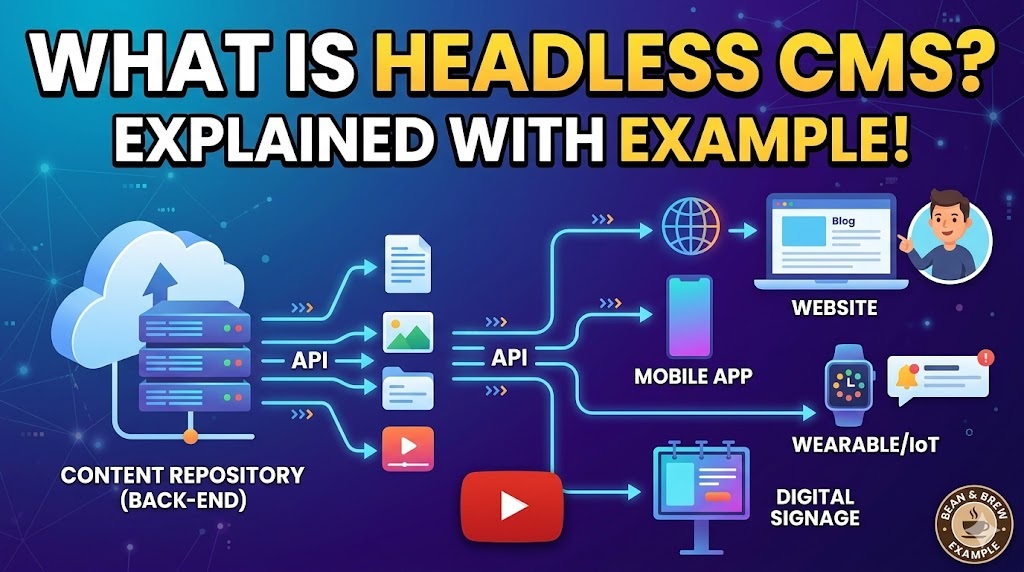
A Headless CMS (Content Management System) is a back-end-only content management system. It acts primarily as a content repository 🗄️, storing your text 📝, images 🖼️, and data 📊, and then makes that content accessible via an API 🔌 (Application Programming Interface) to be displayed on any device 📱 or platform 💻.
The term “headless” comes from the concept of chopping the “head” 🗣️ (the front-end website or presentation layer) off the “body” 🧍 (the back-end content repository).
⚖️ Traditional CMS vs. Headless CMS
To understand it better, it helps to compare it to a Traditional CMS:
- 🧱 Traditional CMS (like standard WordPress): The back-end ⚙️ (where you write and manage content) and the front-end 🎨 (the templates and themes that display the content) are tightly linked 🔗. If you write a blog post ✍️, the traditional CMS pushes it directly to its built-in website 🌐.
- ☁️ Headless CMS (like Contentful, Sanity, or Strapi): There is no built-in front-end 🚫🎨. You write and manage your content in the back-end ⚙️, and developers use APIs 🔌 (like REST or GraphQL) to pull that content and display it wherever they want—whether that’s a website 💻, a mobile app 📱, a smartwatch ⌚, or a digital billboard 🏙️.
☕ An Example Scenario
Imagine a coffee shop brand called “Bean & Brew” that wants to publish a promotional banner 🏷️ for a new seasonal drink 🍹.
📉 Using a Traditional CMS:
The marketing team creates the promotion in their website’s CMS. The promotion goes live on beanandbrew.com 🌐. However, they also want this promotion to appear on:
- 📱 Their iOS and Android mobile apps.
- 📺 The digital menu boards inside their physical cafes.
- ✉️ An automated email newsletter.
Because a traditional CMS is tied only to the website, the developers have to manually recreate 😓 or copy-paste 📋 that content into the mobile app’s code, the digital menu’s software, and the email marketing tool. If the marketing team finds a typo ❌, they have to fix it in four separate places 🤦.
🚀 Using a Headless CMS:
The marketing team logs into their Headless CMS and creates the promotional content just once ☝️.
- 💻 The website (perhaps built with React or Next.js) uses an API to fetch the promotion and display it.
- 📱 The mobile apps (built with Swift and Kotlin) use the same API to fetch and display it.
- 📺 The digital menu boards use the same API.
The Headless CMS doesn’t care how or where the content is displayed 🤷♂️; it just holds the data 💾 and waits for a platform to ask for it. If the marketing team fixes a typo in the Headless CMS ✔️, the correction is instantly pushed to the website, mobile apps, and digital menus simultaneously ⚡.
🌟 Key Benefits
- 🌍 Omnichannel Publishing: Create content once and publish it everywhere (web 💻, mobile 📱, IoT devices ⌚).
- 🛠️ Developer Freedom: Developers can choose their favorite front-end frameworks (like React, Vue, or Angular) 💻 instead of being forced to use the templates of a traditional CMS ⛓️.
- 🔮 Future-Proofing: If you want to redesign your website 🏗️ or launch a new app in a few years 🚀, you don’t have to migrate your content. You simply build the new front-end and connect it to your existing Headless CMS API 🔌.
🧠 Headless CMS అంటే ఏమిటి?
Headless CMS (Content Management System) అనేది కేవలం back-end-only కంటెంట్ మేనేజ్మెంట్ సిస్టమ్. ఇది ప్రధానంగా కంటెంట్ రిపోజిటరీ 🗄️ (content repository) లాగా పనిచేస్తుంది, మీ text 📝, images 🖼️, మరియు data 📊 ని స్టోర్ చేస్తుంది. తర్వాత API 🔌 (Application Programming Interface) ద్వారా ఏ device 📱 లేదా platform 💻 పైన అయినా ఆ కంటెంట్ display అయ్యేలా చేస్తుంది.
“Headless” అనే పదం, “body” 🧍 (back-end content repository) నుండి “head” 🗣️ (front-end website లేదా presentation layer) ని కట్ చేయడం అనే కాన్సెప్ట్ నుండి వచ్చింది.
⚖️ Traditional CMS vs. Headless CMS
దీన్ని ఇంకా బాగా అర్థం చేసుకోవడానికి, Traditional CMS తో compare చేద్దాం:
- 🧱 Traditional CMS (standard WordPress లాగా): Back-end ⚙️ (ఎక్కడైతే మీరు కంటెంట్ రాసి manage చేస్తారో) మరియు front-end 🎨 (కంటెంట్ display చేసే templates మరియు themes) రెండూ ఒకదానితో ఒకటి గట్టిగా లింక్ 🔗 అయి ఉంటాయి. మీరు ఒక blog post ✍️ రాస్తే, traditional CMS దానిని డైరెక్ట్ గా తన built-in website 🌐 కి push చేస్తుంది.
- ☁️ Headless CMS (Contentful, Sanity, లేదా Strapi లాగా): ఇందులో built-in front-end 🚫🎨 ఉండదు. మీరు back-end ⚙️ లో కంటెంట్ రాసి manage చేస్తారు, ఆ కంటెంట్ ని website 💻, mobile app 📱, smartwatch ⌚ లేదా digital billboard 🏙️ ఇలా ఎక్కడ display చేయాలన్నా సరే, developers APIs 🔌 (REST లేదా GraphQL లాంటివి) యూజ్ చేసి ఆ కంటెంట్ ని pull చేసుకుంటారు.
☕ ఒక Example Scenario
“Bean & Brew” అనే ఒక coffee shop brand, వాళ్ళ కొత్త seasonal drink 🍹 కోసం ఒక promotional banner 🏷️ ని publish చేయాలనుకుంటున్నారు అనుకుందాం.
📉 Traditional CMS ని యూజ్ చేస్తే:
Marketing team వాళ్ళ website CMS లో promotion క్రియేట్ చేస్తారు. ఆ promotion beanandbrew.com 🌐 లో live లోకి వస్తుంది. కానీ వాళ్ళు ఆ promotion ని ఇంకా ఎక్కడెక్కడ display చేయాలనుకుంటున్నారంటే:
- 📱 వాళ్ళ iOS మరియు Android mobile apps లో.
- 📺 Physical cafes లో ఉండే digital menu boards లో.
- ✉️ ఒక automated email newsletter లో.
Traditional CMS కేవలం website కి మాత్రమే కనెక్ట్ అయి ఉంటుంది కాబట్టి, developers ఆ కంటెంట్ ని mobile app code లోకి, digital menu software లోకి, మరియు email marketing tool లోకి manually కాపీ-పేస్ట్ 📋 లేదా recreate 😓 చేయాల్సి వస్తుంది. ఒకవేళ marketing team కి అందులో ఏదైనా typo (స్పెల్లింగ్ మిస్టేక్) ❌ కనిపిస్తే, వాళ్ళు దాన్ని నాలుగు వేరు వేరు చోట్ల fix చేయాలి 🤦.
🚀 Headless CMS ని యూజ్ చేస్తే:
Marketing team Headless CMS లోకి లాగిన్ అయ్యి promotional కంటెంట్ ని కేవలం ఒక్కసారి మాత్రమే ☝️ క్రియేట్ చేస్తారు.
- 💻 Website (బహుశా React లేదా Next.js తో బిల్డ్ చేసినది) ఒక API ని యూజ్ చేసి ఆ promotion ని fetch చేసి display చేస్తుంది.
- 📱 Mobile apps (Swift మరియు Kotlin తో బిల్డ్ చేసినవి) కూడా అదే API ని యూజ్ చేసి fetch చేసి display చేస్తాయి.
- 📺 Digital menu boards కూడా అదే API ని యూజ్ చేస్తాయి.
కంటెంట్ ఎక్కడ, ఎలా display అవుతుంది అనే దాని గురించి Headless CMS పట్టించుకోదు 🤷♂️; అది కేవలం data ని hold చేసి 💾, ఏదైనా platform దాన్ని అడిగే వరకు వెయిట్ చేస్తుంది. ఒకవేళ marketing team Headless CMS లో ఆ typo ని fix చేస్తే ✔️, ఆ కరెక్షన్ వెంటనే website, mobile apps, మరియు digital menus అన్నింటిలో ఒకేసారి అప్డేట్ అయిపోతుంది ⚡.
🌟 Key Benefits (ముఖ్యమైన లాభాలు)
- 🌍 Omnichannel Publishing: కంటెంట్ ని ఒక్కసారి క్రియేట్ చేసి ఎక్కడైనా publish చేయవచ్చు (web 💻, mobile 📱, IoT devices ⌚).
- 🛠️ Developer Freedom: Developers వాళ్ళకి ఇష్టమైన front-end frameworks (React, Vue, లేదా Angular లాంటివి) 💻 ని చూజ్ చేసుకోవచ్చు, traditional CMS templates వాడాలని ఎలాంటి రూల్ ఉండదు ⛓️.
- 🔮 Future-Proofing: కొన్ని సంవత్సరాల తర్వాత మీరు మీ website ని redesign చేయాలన్నా 🏗️ లేదా కొత్త app launch చేయాలన్నా 🚀, మీరు మీ కంటెంట్ ని మళ్ళీ migrate చేయాల్సిన అవసరం లేదు. మీరు సింపుల్ గా కొత్త front-end ని బిల్డ్ చేసి మీ existing Headless CMS API కి కనెక్ట్ చేస్తే సరిపోతుంది 🔌.