🚀 *Gen AI Engineer Telugu (Production Focused)*
 🛠️ What is GitOps?
📖 GitOps is an operational framework that takes DevOps best practices—such as version control, collaboration, compliance, and CI/CD—and applies them to infrastructure automation.
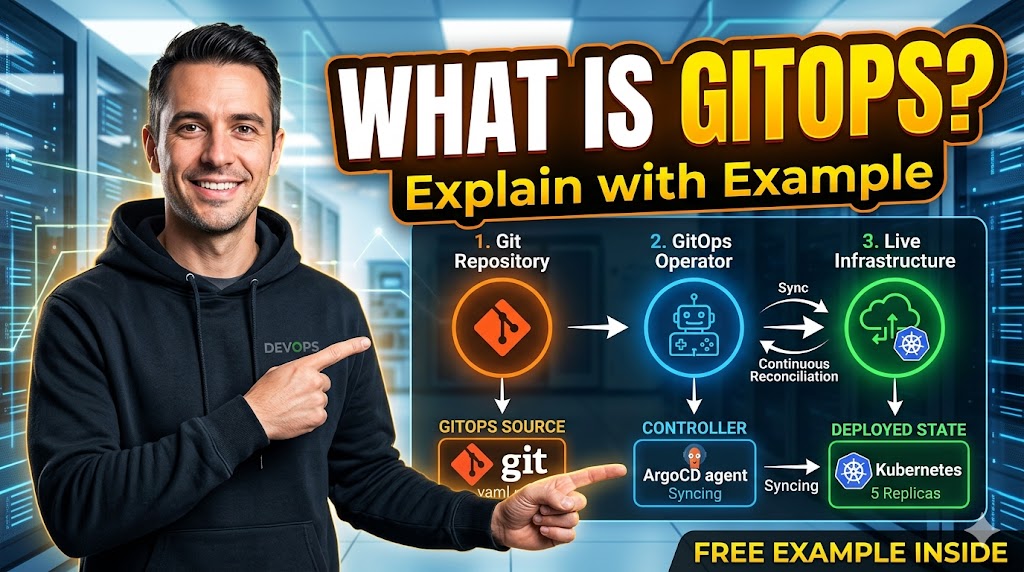
🎯 In a GitOps model, the Git repository is the “single source of truth.” If you want to change how your application is deployed or how your infrastructure is configured, you don’t log into a dashboard or run manual commands; you simply update a file in Git.
📜 The Core Principles
- 📄 Declarative Descriptions: The entire system is described in files (like YAML or Terraform) that define the desired state (e.g., “I want three web servers”), rather than a series of manual commands.
- 📜 Versioned and Immutable: Because your configuration lives in Git, you have a complete history of every change. If a deployment fails, you can
git revertto a previous working state. - 🔄 Automated Pulling: Once the configuration is merged into Git, the system automatically pulls those changes.
- 🤖 Continuous Reconciliation: Software agents (controllers) constantly compare the actual state of the live environment with the desired state in Git. If they don’t match, the agent automatically fixes it.
🚀 A Practical Example: Scaling a Web App
Imagine you are running a web application on a Kubernetes cluster. Currently, you have 2 replicas (instances) running, but traffic is increasing, and you need 5.
⌨️ The Manual Way (Imperative)
You log into your terminal and run a command like:
kubectl scale deployment my-web-app --replicas=5
⚠️ The Issue: There is no record of who changed this or why. If the cluster crashes and restarts, it might revert to the original 2 replicas because the underlying configuration file was never updated.
⚙️ The GitOps Way (Declarative)
- Update: You open the
deployment.yamlfile in your Git repository and changereplicas: 2toreplicas: 5. - Commit & Push: You commit that change and push it to a branch.
- Merge: A teammate reviews your Pull Request, approves it, and merges it into the main branch.
- Detection: A GitOps tool (like ArgoCD or Flux) is “watching” that Git repository. It notices that Git says “5 replicas” while the cluster only has “2.”
- Reconciliation: The tool automatically tells Kubernetes to spin up 3 more instances to match the state defined in Git.
🌟 Why GitOps Matters
| Feature | Benefit |
| ⚡ Speed | Developers can deploy infrastructure and code using the same Git-based workflow they already use. |
| 🛡️ Reliability | If something breaks, you can see exactly what changed in the logs and roll back in seconds. |
| 🔐 Security | You don’t need to give every developer “Admin” access to production servers; they only need permission in Git. |
| 📋 Compliance | The Git history acts as a perfect audit log, showing exactly who authorized what change and when. |
🛠️ GitOps అంటే ఏమిటి?
📖 GitOps (గిట్-ఆప్స్) అనేది ఒక ఆపరేషనల్ ఫ్రేమ్వర్క్. ఇది DevOps పద్ధతులైన వెర్షన్ కంట్రోల్ (Version Control), సహకారం (Collaboration), కంప్లైయన్స్ మరియు CI/CD వంటి వాటిని ఇన్ఫ్రాస్ట్రక్చర్ ఆటోమేషన్ కోసం ఉపయోగిస్తుంది.
🎯 GitOps విధానంలో Git రిపోజిటరీ అనేది “ఏకైక ప్రామాణిక మూలం” (Single source of truth). మీరు మీ అప్లికేషన్ను ఎలా డిప్లాయ్ చేయాలి లేదా మీ ఇన్ఫ్రాస్ట్రక్చర్ను ఎలా కాన్ఫిగర్ చేయాలి అనే మార్పులను మాన్యువల్గా కాకుండా, కేవలం Git లోని ఒక ఫైల్ను అప్డేట్ చేయడం ద్వారా చేస్తారు.
📜 ప్రధాన సూత్రాలు (Core Principles)
- 📄 డిక్లరేటివ్ డిస్క్రిప్షన్: మొత్తం సిస్టమ్ ఎలా ఉండాలో YAML లేదా Terraform వంటి ఫైల్స్ ద్వారా ముందే వివరిస్తాము (ఉదాహరణకు: “నాకు మూడు వెబ్ సర్వర్లు కావాలి”), కమాండ్స్ ద్వారా కాదు.
- 📜 వెర్షన్ మరియు ఇమ్మ్యూటబిలిటీ: మీ కాన్ఫిగరేషన్ Git లో ఉండటం వల్ల ప్రతి మార్పు యొక్క చరిత్ర (History) భద్రంగా ఉంటుంది. ఏదైనా తప్పు జరిగితే, వెంటనే
git revertద్వారా పాత స్థితికి వెళ్లవచ్చు. - 🔄 ఆటోమేటెడ్ పుల్లింగ్: Git లో మార్పులు సేవ్ చేసి మెర్జ్ చేయగానే, సిస్టమ్ ఆటోమేటిక్గా ఆ మార్పులను గ్రహిస్తుంది.
- 🤖 నిరంతర సమన్వయం: సాఫ్ట్వేర్ ఏజెంట్లు (ArgoCD వంటివి) ఎల్లప్పుడూ లైవ్ ఎన్విరాన్మెంట్ను Git లో ఉన్న సమాచారంతో పోల్చి చూస్తాయి. ఒకవేళ తేడా ఉంటే, అవి ఆటోమేటిక్గా దాన్ని సరిచేస్తాయి.
🚀 ఒక ఉదాహరణ: వెబ్ అప్లికేషన్ స్కేలింగ్
మీరు కుబెర్నెటీస్ (Kubernetes) క్లస్టర్లో ఒక వెబ్ యాప్ను రన్ చేస్తున్నారని అనుకుందాం. ప్రస్తుతం 2 రిప్లికాలు (instances) ఉన్నాయి, కానీ ట్రాఫిక్ పెరగడం వల్ల మీకు 5 కావాలి.
⌨️ మాన్యువల్ పద్ధతి (Manual Way)
మీరు టెర్మినల్ ఓపెన్ చేసి ఈ క్రింది కమాండ్ రన్ చేస్తారు:
kubectl scale deployment my-web-app --replicas=5
⚠️ సమస్య: ఈ మార్పు ఎవరు చేశారు, ఎందుకు చేశారు అనే రికార్డ్ ఉండదు. ఒకవేళ క్లస్టర్ రీస్టార్ట్ అయితే, అది మళ్ళీ పాత 2 రిప్లికాలకే వెళ్ళిపోయే అవకాశం ఉంది, ఎందుకంటే మెయిన్ ఫైల్ అప్డేట్ కాలేదు.
⚙️ GitOps పద్ధతి (GitOps Way)
- అప్డేట్: మీరు Git లోని
deployment.yamlఫైల్లోreplicas: 2నిreplicas: 5గా మారుస్తారు. - కమిట్ & పుష్: ఆ మార్పును సేవ్ చేసి Git కి పంపిస్తారు.
- మెర్జ్: మీ టీమ్ మెంబర్ ఆ మార్పును రివ్యూ చేసి అప్రూవ్ చేస్తారు.
- గుర్తించడం: GitOps టూల్ (ArgoCD లేదా Flux) Git లో “5 రిప్లికాలు” ఉండాలని గమనిస్తుంది.
- సమన్వయం: ఆ టూల్ వెంటనే కుబెర్నెటీస్కు సమాచారం ఇచ్చి, ఆటోమేటిక్గా మరో 3 ఇన్స్టాన్సులను పెంచుతుంది.
🌟 GitOps వల్ల ప్రయోజనాలు
| ఫీచర్ | ప్రయోజనం |
| ⚡ వేగం | డెవలపర్లు కోడ్ను ఎలాగైతే Git ద్వారా మేనేజ్ చేస్తారో, ఇన్ఫ్రాస్ట్రక్చర్ను కూడా అలాగే వేగంగా మార్చవచ్చు. |
| 🛡️ విశ్వసనీయత | ఏదైనా సమస్య వస్తే, కేవలం ఒక బటన్ క్లిక్తో పాత వెర్షన్కు (Rollback) వెళ్లవచ్చు. |
| 🔐 భద్రత | ప్రతి డెవలపర్కు ప్రొడక్షన్ సర్వర్ల పాస్వర్డ్ ఇవ్వాల్సిన అవసరం లేదు; Git పర్మిషన్లు ఉంటే సరిపోతుంది. |
| 📋 ఆడిటింగ్ | ఎవరు, ఎప్పుడు, ఏ మార్పు చేశారో Git హిస్టరీ ద్వారా స్పష్టంగా తెలుస్తుంది (Audit Log). |