🔍 What is Optical Character Recognition (OCR)?
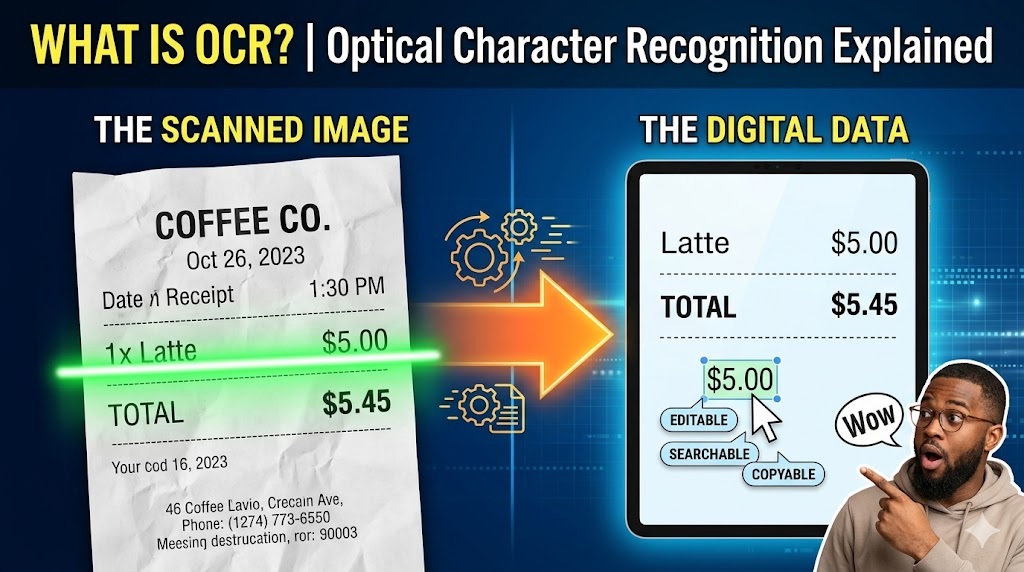
Optical Character Recognition (OCR) is a technology that examines an image (like a scanned document, a photograph, or a screenshot) and extracts the text from it, turning it into digital text that you can edit, search, and copy.
Essentially, it gives a computer the ability to “read” the letters and numbers in a picture just like a human would.
⚙️ How It Works
While the exact algorithms can get complex, the basic process looks like this:
- 📸 Image Acquisition: A scanner or camera captures an image of the physical document.
- 🧹 Preprocessing: The software cleans up the image. It might fix the alignment (deskewing), remove background spots (despeckling), and increase the contrast to make the text stand out clearly.
- 🧠 Recognition: The core OCR engine analyzes the light and dark patterns of the image to identify individual characters (letters, numbers, and symbols). It uses either pattern recognition (comparing shapes to a library of known fonts) or feature extraction (identifying lines, loops, and intersections to figure out the character).
- 📝 Post-processing: The software uses dictionaries and contextual rules to correct errors (e.g., changing “l” to “1” or “O” to “0” depending on the surrounding text).
🌍 Real-World Examples
To make it concrete, here are a few ways OCR is used in everyday life:
- 🌐 Google Translate App: When you point your phone’s camera at a menu in a foreign language and the text magically translates on your screen, OCR is doing the first step. It reads the foreign text from the live image so the translation software can process it.
- 🧾 Digitizing Receipts: If you use an expense tracking app where you snap a photo of your receipt and it automatically pulls the date, total amount, and merchant name, that’s OCR extracting the printed data.
- 🚗 License Plate Scanners: Automated toll booths and parking garages use cameras to take pictures of cars passing through. OCR extracts the license plate numbers from those photos to bill the correct account automatically.
- 📚 Archiving Old Books: Projects like Google Books use OCR to scan millions of physical pages, turning them into searchable text databases so you can find a specific quote in a book written 100 years ago.
🔍 ఆప్టికల్ క్యారెక్టర్ రికగ్నిషన్ (OCR) అంటే ఏమిటి?
ఆప్టికల్ క్యారెక్టర్ రికగ్నిషన్ (OCR) అనేది ఇమేజ్ (స్కాన్ చేసిన డాక్యుమెంట్, ఫోటోగ్రాఫ్ లేదా స్క్రీన్షాట్ వంటివి)ను పరిశీలించి, దాని నుండి వచనాన్ని (టెక్స్ట్) సంగ్రహించి, మీరు ఎడిట్ చేయడానికి, వెతకడానికి మరియు కాపీ చేయడానికి వీలుగా డిజిటల్ టెక్స్ట్గా మార్చే ఒక సాంకేతికత.
ముఖ్యంగా, ఇది మనిషి లాగానే చిత్రంలోని అక్షరాలు మరియు సంఖ్యలను “చదవగల” సామర్థ్యాన్ని కంప్యూటర్కు ఇస్తుంది.
⚙️ ఇది ఎలా పనిచేస్తుంది
కచ్చితమైన అల్గారిథమ్లు సంక్లిష్టంగా ఉన్నప్పటికీ, ప్రాథమిక ప్రక్రియ ఈ విధంగా ఉంటుంది:
- 📸 ఇమేజ్ అక్విజిషన్ (చిత్రాన్ని గ్రహించడం): ఒక స్కానర్ లేదా కెమెరా భౌతిక పత్రం యొక్క చిత్రాన్ని (ఇమేజ్) తీస్తుంది.
- 🧹 ప్రీప్రాసెసింగ్ (ముందస్తు ప్రాసెసింగ్): సాఫ్ట్వేర్ ఇమేజ్ను శుభ్రపరుస్తుంది. ఇది అలైన్మెంట్ను సరిచేయవచ్చు (డెస్క్యూయింగ్), బ్యాక్గ్రౌండ్ మచ్చలను తొలగించవచ్చు (డెస్పెక్లింగ్) మరియు టెక్స్ట్ స్పష్టంగా కనిపించేలా కాంట్రాస్ట్ను పెంచవచ్చు.
- 🧠 రికగ్నిషన్ (గుర్తించడం): ప్రధాన OCR ఇంజిన్ విడివిడి అక్షరాలను (అక్షరాలు, సంఖ్యలు మరియు చిహ్నాలు) గుర్తించడానికి ఇమేజ్ యొక్క కాంతి మరియు చీకటి నమూనాలను విశ్లేషిస్తుంది. అక్షరాన్ని గుర్తించడానికి ఇది ప్యాటర్న్ రికగ్నిషన్ (తెలిసిన ఫాంట్ల లైబ్రరీతో ఆకృతులను పోల్చడం) లేదా ఫీచర్ ఎక్స్ట్రాక్షన్ (గీతలు, వంపులు (లూప్లు) మరియు విభజనలను గుర్తించడం) ఉపయోగిస్తుంది.
- 📝 పోస్ట్-ప్రాసెసింగ్ (ప్రాసెసింగ్ తర్వాత): చుట్టుపక్కల ఉన్న వచనం ఆధారంగా అక్షర దోషాలను సరిచేయడానికి సాఫ్ట్వేర్ డిక్షనరీలు మరియు సందర్భోచిత నియమాలను ఉపయోగిస్తుంది (ఉదాహరణకు, చుట్టుపక్కల ఉన్న టెక్స్ట్ ఆధారంగా “l” ని “1” గా లేదా “O” ని “0” గా మార్చడం).
🌍 వాస్తవ ప్రపంచ ఉదాహరణలు
మరింత స్పష్టంగా చెప్పాలంటే, మన దైనందిన జీవితంలో OCR ఉపయోగించబడే కొన్ని ఉదాహరణలు ఇక్కడ ఉన్నాయి:
- 🌐 Google Translate యాప్: మీరు విదేశీ భాషలో ఉన్న మెను వైపు మీ ఫోన్ కెమెరాను చూపించినప్పుడు, ఆ టెక్స్ట్ అద్భుతంగా మీ స్క్రీన్పై అనువదించబడుతుంది, ఇక్కడ OCR మొదటి దశను చేస్తుంది. అనువాద సాఫ్ట్వేర్ దానిని ప్రాసెస్ చేయడానికి వీలుగా ఇది లైవ్ ఇమేజ్ నుండి విదేశీ టెక్స్ట్ను చదువుతుంది.
- 🧾 రసీదులను డిజిటలైజ్ చేయడం (డిజిటైజింగ్ రిసీట్స్): మీరు ఖర్చులను ట్రాక్ చేసే యాప్ని ఉపయోగిస్తుంటే, మీ రసీదు ఫోటోను తీయగానే అది స్వయంచాలకంగా తేదీ, మొత్తం మరియు వ్యాపారి పేరును తీసుకుంటుంది, దానికి కారణం ప్రింట్ చేయబడిన డేటాను OCR సంగ్రహించడమే.
- 🚗 లైసెన్స్ ప్లేట్ స్కానర్లు: ఆటోమేటెడ్ టోల్ బూత్లు మరియు పార్కింగ్ గ్యారేజీలు తమ గుండా వెళ్లే కార్ల ఫోటోలను తీయడానికి కెమెరాలను ఉపయోగిస్తాయి. సరైన ఖాతాకు స్వయంచాలకంగా బిల్లు చేయడానికి ఆ ఫోటోల నుండి లైసెన్స్ ప్లేట్ నంబర్లను OCR సంగ్రహిస్తుంది.
- 📚 పాత పుస్తకాలను ఆర్కైవ్ చేయడం: Google Books వంటి ప్రాజెక్ట్లు లక్షలాది భౌతిక పేజీలను స్కాన్ చేయడానికి OCRని ఉపయోగిస్తాయి. వాటిని సెర్చ్ చేయడానికి వీలైన టెక్స్ట్ డేటాబేస్లుగా మారుస్తాయి, తద్వారా మీరు 100 సంవత్సరాల క్రితం రాసిన పుస్తకంలో కూడా ఒక నిర్దిష్ట వాక్యాన్ని సులభంగా కనుగొనవచ్చు.