🚀 *Gen AI Engineer (Production Focused)*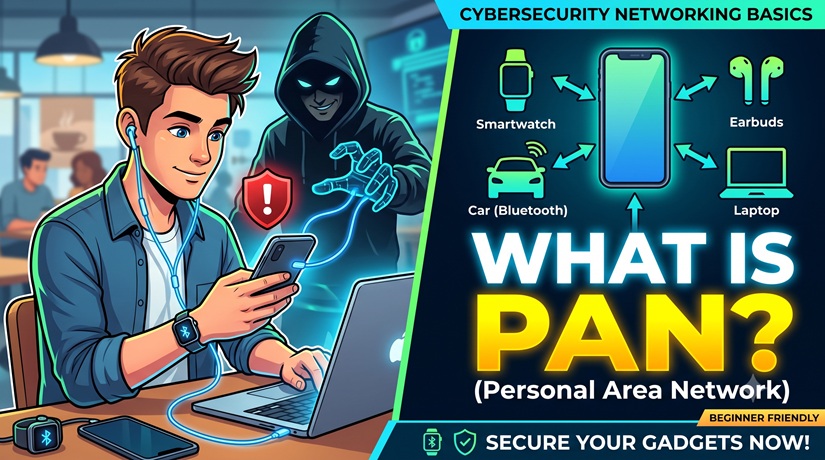
Here is the styled content for your video script or infographic, incorporating icons for visual clarity and a professional, exciting tone.
Cybersecurity: What is a PAN (Personal Area Network)?
1. What is a PAN? 📡
In cybersecurity, a PAN (Personal Area Network) is the smallest and most localized type of network. It connects electronic devices within an individual person’s immediate workspace—typically spanning a range of less than 10 meters (33 feet).
| Feature | Description |
| 🏠 LAN vs. PAN | While your home Wi-Fi creates a Local Area Network (LAN), a PAN is formed by the short-range, direct wireless links between your personal gadgets. |
| ⚙️ How it Connects | Common PAN technologies include Bluetooth, Zigbee, or Near Field Communication (NFC). |
| ⚠️ The Risk | Because PANs are highly dynamic, rely on wireless signals, and are often configured automatically for convenience, they present unique targets for hackers. |
How a Wireless PAN Functions 🔗
Instead of routing data through a massive central server or internet router, devices in a PAN talk directly to one another. The most common centerpiece of a modern PAN is a smartphone or laptop acting as a central hub, communicating simultaneously with peripheral devices like smartwatches, wireless mice, and headphones.
The Top 4 PAN Security Risks 🚨
Because PAN wireless signals radiate out into open space, anyone physically standing within a 30-foot radius can theoretically intercept them if the network isn’t properly secured.
1. Bluesnarfing 🕵️♂️ (Data Theft)
- The Concept: A hacker exploits security flaws in a device’s Bluetooth protocol to gain unauthorized access to the device without the user ever seeing a pairing request.
- Cybersecurity Example: You sit down at a crowded airport terminal wearing Bluetooth headphones connected to your phone. A threat actor sitting two rows over runs an automated attack script from their laptop. They exploit a legacy firmware vulnerability in your phone’s Bluetooth stack, bypassing authentication to silently download your contact list, text messages, and private photos directly from your PAN.
2. Bluejacking 🃏 (Malicious Injection)
- The Concept: Rather than stealing data, a hacker uses a PAN to send unsolicited data, links, or annoying messages to a discoverable device.
- Cybersecurity Example: While riding a subway train, a hacker scans for active Bluetooth connections on the car. They detect your phone because it is set to “discoverable mode.” They send a vCard (a digital business card) that contains a disguised, malicious URL. If you click it thinking it is a legitimate local notification, it takes you to a phishing site designed to steal your credentials.
3. Man-in-the-Middle (MitM) 🗣️ (Eavesdropping Attacks)
- The Concept: A hacker intercepts the communication passing between two devices inside your PAN, allowing them to secretly read or alter the data being sent.
- Cybersecurity Example: You use a wireless Bluetooth keyboard to type a sensitive corporate password into your laptop. If the wireless keyboard uses an outdated, weak encryption standard (or no encryption at all), a bad actor sitting at the next desk can use a cheap, specialized radio antenna to sniff the keystrokes right out of the air, capturing your password in plain text.
4. Smart Home Exploitation 🏠 (IoT Vulnerabilities)
- The Concept: Many smart home devices use low-energy PAN protocols like Zigbee or Z-Wave to talk to a smart hub. If a single smart device is physically accessible, it can compromise the whole network.
- Cybersecurity Example: A homeowner installs a smart lock on their front door that connects via a Zigbee PAN to a central hub inside the house. An attacker stands outside the door and uses a hardware hacking tool to flood the wireless frequency with “noise” (a Denial of Service attack), crashing the PAN connection and causing the lock to default to an open state, or forcing it to send an unencrypted unlock command.
How to Secure a Personal Area Network 🛡️
Securing a PAN requires a balance between seamless convenience and proactive defense:
- 🚫 Turn Off Discoverability: Keep Bluetooth and other wireless connections invisible or turned off when you aren’t actively pairing a new device.
- 🤝 Enforce Strong Pairing: Never accept pairing requests or file transfers from unrecognized devices.
- 🔄 Patch Device Firmware: Regularly update the operating systems of your smartwatches, wireless earbuds, and phones to patch newly discovered Bluetooth vulnerabilities.
- 🔐 Use Up-to-Date Protocols: When buying wireless accessories (like keyboards), verify they use modern, secure wireless standards (like Bluetooth 5.0 or later with AES encryption) rather than unencrypted radio frequencies.
సైబర్ సెక్యూరిటీలో, PAN (Personal Area Network) అనేది అత్యంత చిన్న మరియు ఒక వ్యక్తికి పరిమితమైన నెట్వర్క్. ఇది ఒక వ్యక్తి యొక్క పని ప్రదేశంలో (Workspace) ఉన్న ఎలక్ట్రానిక్ పరికరాలను అనుసంధానిస్తుంది. సాధారణంగా ఇది 10 మీటర్ల (33 అడుగులు) కంటే తక్కువ పరిధిలో పనిచేస్తుంది.
మీ ఇంటి వై-ఫై (Wi-Fi) ఒక లోకల్ ఏరియా నెట్వర్క్ (LAN) ను సృష్టించినట్లుగా కాకుండా, PAN అనేది మీ వ్యక్తిగత గ్యాడ్జెట్ల మధ్య బ్లూటూత్ (Bluetooth), జిగ్బీ (Zigbee) లేదా నియర్ ఫీల్డ్ కమ్యూనికేషన్ (NFC) వంటి తక్కువ-దూర, ప్రత్యక్ష వైర్లెస్ లింక్ల ద్వారా ఏర్పడుతుంది.
PAN నెట్వర్క్లు నిరంతరం మారుతూ ఉంటాయి, వైర్లెస్ సిగ్నల్స్పై ఆధారపడతాయి మరియు సౌకర్యం కోసం ఆటోమేటిక్గా కనెక్ట్ అయ్యేలా (Configured Automatically) ఉంటాయి. అందుకే ఇవి హాకర్లకు సులభమైన లక్ష్యాలుగా (Targets) మారుతుంటాయి.
వైర్లెస్ PAN ఎలా పనిచేస్తుంది? (How a Wireless PAN Functions)
పెద్ద సెంట్రల్ సర్వర్ లేదా ఇంటర్నెట్ రూటర్ ద్వారా డేటాను పంపడానికి బదులుగా, PAN లోని పరికరాలు నేరుగా ఒకదానితో ఒకటి కమ్యూనికేట్ చేసుకుంటాయి. ఆధునిక PAN లో స్మార్ట్ఫోన్ లేదా ల్యాప్టాప్ ఒక ప్రధాన కేంద్రంగా (Central Hub) పనిచేస్తుంది. ఇది స్మార్ట్వాచ్లు, వైర్లెస్ మౌస్ మరియు హెడ్ఫోన్ల వంటి ఇతర పరికరాలతో ఒకే సమయంలో అనుసంధానమై ఉంటుంది.
టాప్ 4 PAN సెక్యూరిటీ రిస్క్లు – ఉదాహరణలతో (The Top 4 PAN Security Risks With Examples)
PAN వైర్లెస్ సిగ్నల్స్ బహిరంగ ప్రదేశంలో ప్రసరిస్తాయి కాబట్టి, నెట్వర్క్ సరిగ్గా సురక్షితంగా లేకపోతే 30 అడుగుల పరిధిలో ఉన్న ఎవరైనా వీటిని హ్యాక్ చేసే అవకాశం ఉంది.
1. బ్లూస్నార్ఫింగ్ – డేటా దొంగతనం 🕵️♂️ (Bluesnarfing – Data Theft)
- కాన్సెప్ట్: యూజర్కు ఎటువంటి పేరింగ్ (Pairing) రిక్వెస్ట్ కనిపించకుండానే, ఒక హాకర్ పరికరం యొక్క బ్లూటూత్ ప్రోటోకాల్లోని లోపాలను ఉపయోగించుకుని ఆ డివైజ్ను అనాథరైజ్డ్గా యాక్సెస్ చేస్తాడు.
- సైబర్ సెక్యూరిటీ ఉదాహరణ: మీరు ఒక రద్దీగా ఉండే ఎయిర్పోర్ట్ టెర్మినల్లో మీ ఫోన్కు బ్లూటూత్ హెడ్ఫోన్లను కనెక్ట్ చేసుకుని కూర్చున్నారు. రెండు వరుసల అవతల కూర్చున్న ఒక హాకర్ తన ల్యాప్టాప్ నుండి ఒక ఆటోమేటెడ్ అటాక్ స్క్రిప్ట్ను రన్ చేస్తాడు. మీ ఫోన్ బ్లూటూత్ సాఫ్ట్వేర్లోని పాత లోపాన్ని ఉపయోగించుకుని, మీ అనుమతి లేకుండానే మీ కాంటాక్ట్ లిస్ట్, మెసేజ్లు మరియు ప్రైవేట్ ఫోటోలను నేరుగా మీ PAN నుండి డౌన్లోడ్ చేసుకుంటాడు.
2. బ్లూజాకింగ్ – హానికరమైన లింకులు పంపడం 🃏 (Bluejacking – Malicious Injection)
- కాన్సెప్ట్: డేటాను దొంగిలించడానికి బదులుగా, ఒక హాకర్ PAN ను ఉపయోగించి వేరొకరి డివైజ్కు అనవసరమైన డేటా, లింకులు లేదా విసిగించే మెసేజ్లను పంపుతాడు.
- సైబర్ సెక్యూరిటీ ఉదాహరణ: మీరు మెట్రో రైలులో ప్రయాణిస్తున్నప్పుడు, ఒక హాకర్ ఆ బగీలో యాక్టివ్గా ఉన్న బ్లూటూత్ కనెక్షన్ల కోసం స్కాన్ చేస్తాడు. మీ ఫోన్ “డిస్కవరీ మోడ్” లో ఉండటం వల్ల వారు దానిని గుర్తిస్తారు. వారు ఒక నకిలీ వికార్డ్ (vCard – డిజిటల్ బిజినెస్ కార్డ్) ను పంపుతారు, అందులో ఒక హానికరమైన లింక్ (URL) దాగి ఉంటుంది. అది ఏదో ముఖ్యమైన నోటిఫికేషన్ అనుకుని మీరు క్లిక్ చేస్తే, అది మీ పాస్వర్డ్లను దొంగిలించే ఫిషింగ్ సైట్కు మిమ్మల్ని తీసుకెళ్తుంది.
3. మ్యాన్-ఇన్-ది-మిడిల్ (MitM) దాడులు – దొంగచాటుగా వినడం 🗣️ (Man-in-the-Middle / Eavesdropping Attacks)
- కాన్సెప్ట్: మీ PAN లోని రెండు పరికరాల మధ్య జరుగుతున్న కమ్యూనికేషన్ను హాకర్ మధ్యలోనే అడ్డుకుంటాడు. దీనివల్ల వారు పంపే డేటాను రహస్యంగా చదవవచ్చు లేదా మార్చవచ్చు.
- సైబర్ సెక్యూరిటీ ఉదాహరణ: మీ ల్యాప్టాప్లో ఆఫీస్ పాస్వర్డ్ను టైప్ చేయడానికి మీరు వైర్లెస్ బ్లూటూత్ కీబోర్డ్ను ఉపయోగిస్తున్నారు. ఆ కీబోర్డ్ పాతదై ఉండి, బలహీనమైన ఎన్క్రిప్షన్ (లేదా అసలు ఎన్క్రిప్షన్ లేకపోవడం) ఉపయోగిస్తుంటే, పక్క టేబుల్పై కూర్చున్న వ్యక్తి ఒక చౌకైన రేడియో యాంటెన్నాను ఉపయోగించి మీరు టైప్ చేస్తున్న అక్షరాలను గాల్లోనే పసిగట్టి, మీ పాస్వర్డ్ను సులభంగా దొంగిలించగలడు.
4. స్మార్ట్ హోమ్ దుర్వినియోగం – IoT లోపాలు 🏠 (Smart Home Exploitation – IoT Vulnerabilities)
- కాన్సెప్ట్: చాలా స్మార్ట్ హోమ్ పరికరాలు స్మార్ట్ హబ్తో మాట్లాడటానికి జిగ్బీ (Zigbee) లేదా జెడ్-వేవ్ (Z-Wave) వంటి తక్కువ-శక్తి PAN ప్రోటోకాల్లను ఉపయోగిస్తాయి. ఇందులో ఒక్క పరికరం హాకర్ చేతికి చిక్కినా, మొత్తం నెట్వర్క్ ప్రమాదంలో పడుతుంది.
- సైబర్ సెక్యూరిటీ ఉదాహరణ: ఒక వ్యక్తి తన ఇంటి సింహద్వారానికి ఒక స్మార్ట్ లాక్ను అమర్చాడు, ఇది ఇంట్లోని సెంట్రల్ హబ్కు జిగ్బీ PAN ద్వారా కనెక్ట్ చేయబడి ఉంటుంది. ఒక దొంగ తలుపు బయట నిలబడి, హార్డ్వేర్ హ్యాకింగ్ టూల్ ఉపయోగించి ఆ వైర్లెస్ ఫ్రీక్వెన్సీపై రేడియో “నాయిస్” (Denial of Service అటాక్) ను సృష్టిస్తాడు. దీనివల్ల PAN కనెక్షన్ క్రాష్ అయి, లాక్ ఆటోమేటిక్గా ఓపెన్ అయిపోతుంది లేదా ఎన్క్రిప్ట్ కాని అన్లాక్ కమాండ్ను పంపేలా చేస్తుంది.
పర్సనల్ ఏరియా నెట్వర్క్ను ఎలా సురక్షితం చేయాలి? (How to Secure a Personal Area Network)
PAN ని సురక్షితంగా ఉంచుకోవడానికి సౌకర్యాన్ని మరియు రక్షణను సమతుల్యం చేసుకోవాలి:
- 🚫 డిస్కవబిలిటీని ఆఫ్ చేయండి (Turn Off Discoverability): మీరు కొత్త పరికరాన్ని కనెక్ట్ చేయనప్పుడు బ్లూటూత్ మరియు ఇతర వైర్లెస్ కనెక్షన్లను ఇతరులకు కనిపించకుండా (Invisible) ఉంచండి లేదా ఆఫ్ చేయండి.
- 🤝 బలమైన పేరింగ్ను అమలు చేయండి (Enforce Strong Pairing): తెలియని పరికరాల నుండి వచ్చే పేరింగ్ రిక్వెస్ట్లను లేదా ఫైల్ ట్రాన్స్ఫర్లను ఎప్పుడూ అంగీకరించవద్దు.
- 🔄 డివైజ్ ఫర్మ్వేర్ను అప్డేట్ చేయండి (Patch Device Firmware): కొత్తగా వచ్చే బ్లూట్రూత్ భద్రతా లోపాలను సరిచేయడానికి మీ స్మార్ట్వాచ్లు, వైర్లెస్ ఇయర్బడ్స్ మరియు ఫోన్ల ఆపరేటింగ్ సిస్టమ్లను క్రమబద్ధంగా అప్డేట్ చేస్తూ ఉండండి.
- 🔐 ఆధునిక ప్రోటోకాల్లను ఉపయోగించండి (Use Up-to-Date Protocols): వైర్లెస్ కీబోర్డ్లు వంటి వస్తువులను కొనుగోలు చేసేటప్పుడు, అవి పాత రేడియో ఫ్రీక్వెన్సీలకు బదులుగా, ఆధునిక మరియు సురక్షితమైన వైర్లెస్ ప్రమాణాలను (AES ఎన్క్రిప్షన్తో కూడిన బ్లూటూత్ 5.0 లేదా అంతకంటే ఎక్కువ) ఉపయోగిస్తున్నాయో లేదో సరిచూసుకోండి.