🚀 *Gen AI Engineer Telugu (Production Focused)*
 🔑 What are Passkeys?
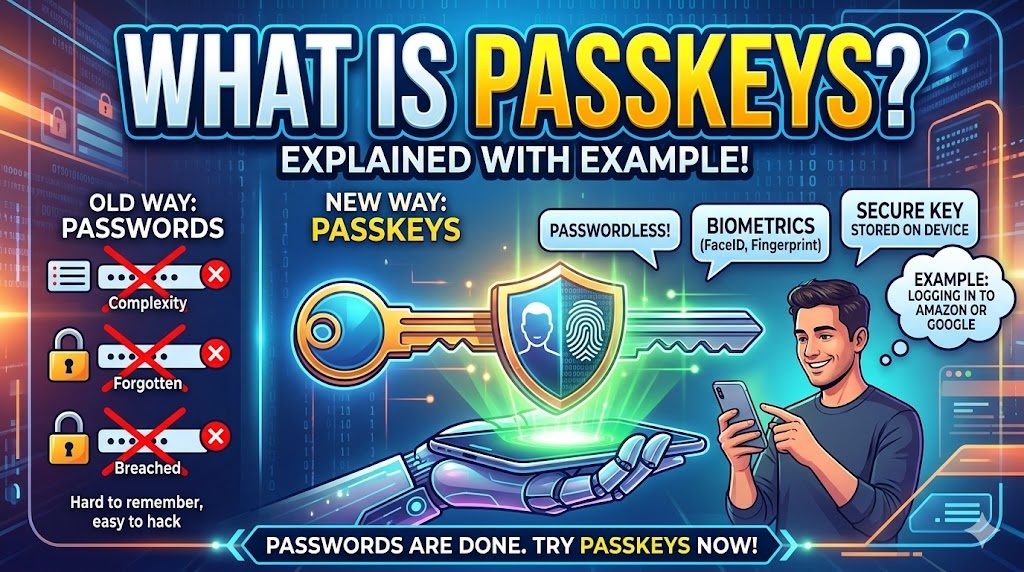
Think of a Passkey as a digital version of a physical key that lives on your device (phone, laptop, or security key). It is a modern replacement for passwords designed to be both faster to use and significantly more secure.
Instead of you memorizing a complex string of characters, your device handles the “handshake” with the website for you. 🤝
⚙️ How They Work: The “Secret Handshake”
Passkeys are built on Public-Key Cryptography. When you create a passkey for a website, two keys are generated:
- 🔒 The Private Key: This stays strictly on your device. It is never shared with the website and is protected by your device’s security (FaceID, fingerprint, or PIN).
- 🌐 The Public Key: This is shared with the website’s server. It is useless to a hacker without the corresponding Private Key.
When you log in, the website sends a digital “challenge.” Your device uses its Private Key to solve that challenge and sends a signature back. The website uses its Public Key to verify it. If it matches, you are in! ✅
🛒 A Practical Example: Logging into a Retail Site
Imagine you want to use a passkey for your account on a site like Amazon or Best Buy:
- 🛠️ The Setup: You go to account settings and click “Create a Passkey.” Your phone or computer will ask for confirmation. You verify using your fingerprint or FaceID.
- 🔙 The Return: The next time you visit the site and click “Sign In,” you won’t see a password box. Instead, a prompt appears: “Sign in using your passkey?”
- 🔓 The Access: You tap the prompt, glance at your phone for FaceID (or touch the sensor), and you are instantly logged in.
There is no “Incorrect Password” error, no “Forgot Password” emails, and—most importantly—nothing for a scammer to “phish” from you. 🙅♂️
🚀 Why Passkeys are a Game Changer
- 🛡️ Immune to Phishing: A passkey is cryptographically tied to the actual website. If you land on a fake “scam” site, your device simply won’t offer the passkey because the domains don’t match.
- 🚫 No Server Leaks: Since the website only stores your Public Key, even if the company’s database is hacked, the hackers gain nothing that can be used to log into your account.
- ☁️ Device Syncing: Most passkeys sync through your cloud account (like iCloud Keychain, Google Password Manager, or 1Password). If you get a new phone, your passkeys are already there waiting for you
🔑 పాస్కీలు (Passkeys) అంటే ఏమిటి?
పాస్కీని మీ ఫోన్, లాప్టాప్ లేదా సెక్యూరిటీ కీలో ఉండే ఒక డిజిటల్ తాళం చెవిగా భావించవచ్చు. ఇది మనం పాతకాలం నుండి వాడుతున్న పాస్వర్డ్లకు బదులుగా వచ్చిన ఒక ఆధునిక సాంకేతికత. 📱💻
దీని వల్ల మీరు సంక్లిష్టమైన పాస్వర్డ్లను గుర్తుంచుకోవాల్సిన అవసరం ఉండదు, పైగా ఇది పాస్వర్డ్ కంటే చాలా రెట్లు ఎక్కువ భద్రతను ఇస్తుంది. మీ పరికరం వెబ్సైట్తో మీ తరపున ఒక డిజిటల్ “హ్యాండ్షేక్” చేస్తుంది. 🤝
⚙️ ఇవి ఎలా పనిచేస్తాయి?
పాస్కీలు పబ్లిక్-కీ క్రిప్టోగ్రఫీ (Public-Key Cryptography) ఆధారంగా పనిచేస్తాయి. మీరు ఏదైనా వెబ్సైట్ కోసం పాస్కీని క్రియేట్ చేసినప్పుడు, రెండు రకాల కీలు తయారవుతాయి:
- 🔒 ప్రైవేట్ కీ (Private Key): ఇది కేవలం మీ ఫోన్ లేదా కంప్యూటర్ లోపల మాత్రమే ఉంటుంది. ఇది ఎప్పుడూ వెబ్సైట్తో పంచుకోబడదు. మీ ఫేస్ ఐడి (FaceID), ఫింగర్ప్రింట్ లేదా పిన్ ద్వారా మాత్రమే ఇది పనిచేస్తుంది.
- 🌐 పబ్లిక్ కీ (Public Key): ఇది వెబ్సైట్ సర్వర్లో స్టోర్ అవుతుంది. మీ దగ్గర ఉన్న ప్రైవేట్ కీ లేకుండా ఈ పబ్లిక్ కీ హ్యాకర్లకు దొరికినా ఎటువంటి ఉపయోగం ఉండదు.
మీరు లాగిన్ అయ్యేటప్పుడు, వెబ్సైట్ ఒక డిజిటల్ “ఛాలెంజ్”ను పంపుతుంది. మీ పరికరం ప్రైవేట్ కీ సాయంతో ఆ ఛాలెంజ్ను పూర్తి చేసి, లాగిన్ ప్రక్రియను పూర్తి చేస్తుంది. ✅
🛒 ఒక ఉదాహరణ: అమెజాన్ (Amazon) సైట్లో లాగిన్ అవ్వడం
మీరు అమెజాన్ లేదా ఏదైనా షాపింగ్ సైట్లో పాస్కీని ఎలా వాడుతారో ఇక్కడ చూడండి:
- 🛠️ సెటప్ (Setup): మీరు అకౌంట్ సెట్టింగ్స్లోకి వెళ్లి “Create a Passkey” క్లిక్ చేస్తారు. మీ ఫోన్ మీ ఫింగర్ప్రింట్ లేదా ఫేస్ ఐడి అడుగుతుంది. అది ఇవ్వగానే పాస్కీ క్రియేట్ అవుతుంది.
- 🔙 మళ్ళీ వచ్చినప్పుడు: తదుపరిసారి మీరు సైట్లోకి వెళ్లి “Sign In” క్లిక్ చేసినప్పుడు, పాస్వర్డ్ బాక్స్ రాదు. దానికి బదులుగా “పాస్కీతో లాగిన్ అవ్వాలా?” అని మీ ఫోన్ అడుగుతుంది.
- 🔓 యాక్సెస్: మీరు మీ వేలిముద్ర లేదా ఫేస్ ఐడి చూపించగానే వెంటనే లాగిన్ అయిపోతారు.
ఇక్కడ పాస్వర్డ్ తప్పు అని రావడం గానీ, “Forgot Password” కొట్టి ఈమెయిల్ చెక్ చేసుకోవడం వంటి ఇబ్బందులు ఉండవు. 🙅♂️
🚀 పాస్కీల వల్ల ఉపయోగాలు
- 🛡️ ఫిషింగ్ (Phishing) నుండి రక్షణ: పాస్కీలు కేవలం అసలైన వెబ్సైట్తోనే పనిచేస్తాయి. ఒకవేళ మీరు పొరపాటున ఏదైనా నకిలీ (Scam) వెబ్సైట్లోకి వెళ్లినా, అక్కడ మీ పాస్కీ పనిచేయదు. కాబట్టి మీ అకౌంట్ హ్యాక్ అవ్వదు.
- 🚫 డేటా లీక్ భయం లేదు: వెబ్సైట్ సర్వర్ కేవలం మీ పబ్లిక్ కీని మాత్రమే స్టోర్ చేస్తుంది. ఒకవేళ కంపెనీ డేటాబేస్ హ్యాక్ అయినా, హ్యాకర్లకు మీ అకౌంట్ ఓపెన్ చేసే అవకాశం ఉండదు.
- ☁️ సులభంగా సింక్ అవ్వడం: చాలా పాస్కీలు మీ క్లౌడ్ అకౌంట్ (iCloud Keychain లేదా Google Password Manager) ద్వారా సింక్ అవుతాయి. మీరు కొత్త ఫోన్ కొన్నా, మీ పాస్కీలు ఆటోమేటిక్గా అందుబాటులోకి వస్తాయి.