🚀 *Gen AI Engineer (Production Focused)*
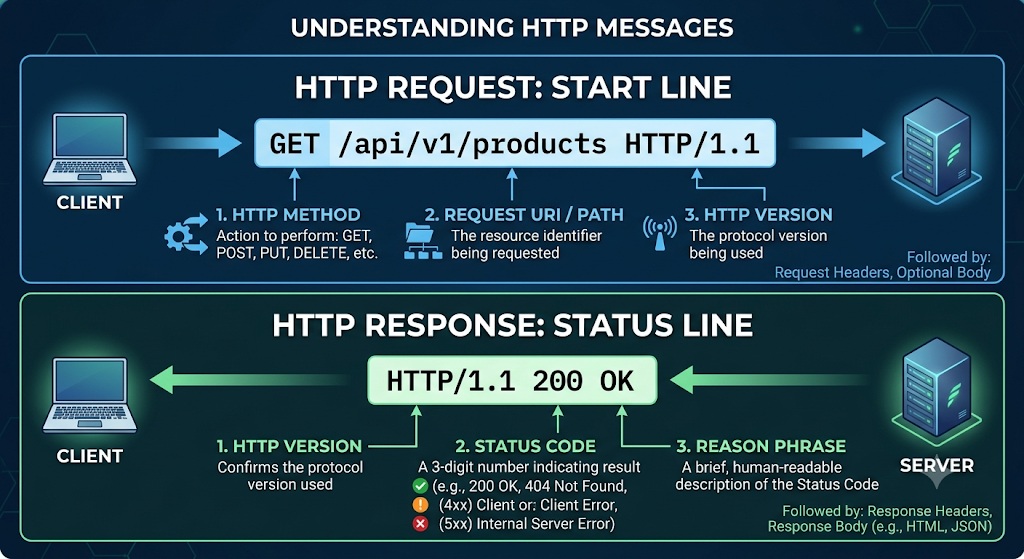
 When you interact with an API, your application (the client) sends an HTTP message to a server. The very first line of that message is the Request Start Line (often just called the “request line”).
If you are learning about APIs, this line is crucial because it contains the core instructions for the server: what action to take, what data to act on, and how to understand the message.
The Anatomy of the Start Line
The start line is remarkably simple. It always consists of exactly three elements separated by spaces, followed by a carriage return and a line feed (the invisible characters that create a new line).
Here is the basic formula:
[HTTP Method] [Request Target] [HTTP Version]
The Three Components
Each part of the start line serves a distinct purpose in API communication.
| Component | Description | Example |
| HTTP Method | A verb indicating the specific action you want the server to perform. | GET, POST, DELETE |
| Request Target | The path to the specific resource on the server, including any query parameters. | /api/v1/users/123 |
| HTTP Version | The version of the HTTP protocol your client is using to format the message. | HTTP/1.1, HTTP/2 |
1. The HTTP Method
In RESTful APIs, the method tells the server what kind of operation you are trying to execute.
- GET: Retrieve data (e.g., fetch a user profile).
- POST: Create new data (e.g., register a new user).
- PUT/PATCH: Update existing data.
- DELETE: Remove data.
2. The Request Target
This is the URL path (often called the URI) of the resource you are interacting with. Notice that it does not include the domain name (like [www.example.com](https://www.example.com)). The domain goes in the Host header on the next line. The request target only includes the path and any search queries.
3. The HTTP Version
This tells the server how to parse the rest of the message. HTTP/1.1 is the most common version you will see in plain text when debugging APIs, though modern clients often negotiate up to HTTP/2 or HTTP/3 behind the scenes.
Real-World API Examples
Here is what the start line looks like in various API scenarios.
Example 1: Fetching a Resource
Imagine you want to get a list of all active products from an e-commerce API.
HTTP
GET /api/products?status=active HTTP/1.1
- Method:
GET(Give me data). - Target:
/api/products?status=active(The products endpoint, filtered by active status). - Version:
HTTP/1.1
Example 2: Creating a Resource
You are submitting a form to create a new customer account.
HTTP
POST /v1/customers HTTP/1.1
- Method:
POST(Take the data I’m about to send and create something). - Target:
/v1/customers(The customers endpoint). - Version:
HTTP/1.1
Example 3: Deleting a Resource
You want to delete a specific blog post where the ID is 849.
HTTP
DELETE /api/posts/849 HTTP/1.1
- Method:
DELETE(Remove this data). - Target:
/api/posts/849(The exact path to post #849). - Version:
HTTP/1.1
When debugging APIs using tools like Postman, cURL, or your browser’s network tab, looking directly at the Request Start Line is the fastest way to verify that your client is asking the server for exactly what you intended.
When your client application sends an HTTP request to an API, the server processes it and sends back an HTTP response. Just as the request starts with a Request Line, the very first line of the server’s reply is the HTTP Status Line (also called the Response Line).
For API learning, the Status Line is the most important part of the server’s response. It instantly tells your application whether the request succeeded, failed, or requires further action, before you even look at the response data.
The Anatomy of the Status Line
Like the request line, the status line is simple and strictly formatted. It consists of three elements separated by spaces, ending with a carriage return and line feed.
Here is the basic formula:
[HTTP Version] [Status Code] [Reason Phrase]
The Three Components
| Component | Description | Example |
| HTTP Version | The HTTP protocol version the server is using to respond. | HTTP/1.1, HTTP/2 |
| Status Code | A three-digit number indicating the result of the request. | 200, 404, 500 |
| Reason Phrase | A short, human-readable text explanation of the status code. | OK, Not Found |
1. The HTTP Version
This simply confirms the protocol version. Usually, the server responds with the highest version both it and the client support (most commonly HTTP/1.1 in raw text logs).
2. The Status Code
This is the core of the Status Line. In APIs, your code will look at this three-digit number to decide what to do next. Status codes are grouped into five classes based on their first digit:
- 1xx (Informational): The request was received, continuing process (rarely seen in typical REST API usage).
- 2xx (Success): The action was successfully received, understood, and accepted (e.g.,
200,201). - 3xx (Redirection): Further action must be taken in order to complete the request (e.g.,
301,302). - 4xx (Client Error): The request contains bad syntax or cannot be fulfilled—essentially, the client made a mistake (e.g.,
400,401,404). - 5xx (Server Error): The server failed to fulfill an apparently valid request—essentially, the server made a mistake or crashed (e.g.,
500,502).
3. The Reason Phrase
This is meant for human developers reading the logs, not for the client application to parse. It gives a quick text context to the number. (Note: In HTTP/2 and HTTP/3, the reason phrase is actually omitted to save bandwidth, but it is always present in HTTP/1.1).
Real-World API Examples
Here is what the Status Line looks like in various API scenarios.
Example 1: A Successful Data Fetch (GET)
You requested a list of users, and the server successfully found and returned them.
HTTP
HTTP/1.1 200 OK
- Version:
HTTP/1.1 - Code:
200(The standard success code). - Phrase:
OK
Example 2: Successfully Creating Data (POST)
You submitted a request to create a new user profile, and the server successfully saved it to the database.
HTTP
HTTP/1.1 201 Created
- Version:
HTTP/1.1 - Code:
201(Specifically means a new resource was created). - Phrase:
Created
Example 3: Client Error – Missing Resource
You tried to fetch a product using an ID (/api/products/999), but that product does not exist in the database.
HTTP
HTTP/1.1 404 Not Found
- Version:
HTTP/1.1 - Code:
404(The server cannot find the requested resource). - Phrase:
Not Found
Example 4: Client Error – Bad Authentication
You tried to access a protected endpoint (like /api/my-billing), but you either didn’t send an API key or the key was invalid.
HTTP
HTTP/1.1 401 Unauthorized
- Version:
HTTP/1.1 - Code:
401(Authentication is required and has failed or has not yet been provided). - Phrase:
Unauthorized
Example 5: Server Crash
You sent a perfectly valid request, but the API’s database crashed while trying to process it.
HTTP
HTTP/1.1 500 Internal Server Error
- Version:
HTTP/1.1 - Code:
500(A generic error message when the server encounters an unexpected condition). - Phrase:
Internal Server Error
మీరు APIతో ఇంటరాక్ట్ అయినప్పుడు, మీ అప్లికేషన్ (క్లయింట్) సర్వర్కు HTTP సందేశాన్ని పంపుతుంది. ఆ సందేశం యొక్క మొదటి పంక్తిని రిక్వెస్ట్ స్టార్ట్ లైన్ (Request Start Line – తరచుగా దీన్ని “request line” అని పిలుస్తారు) అంటారు.
మీరు APIల గురించి నేర్చుకుంటున్నట్లయితే, ఈ పంక్తి చాలా ముఖ్యమైనది ఎందుకంటే ఇది సర్వర్ కోసం ప్రధాన సూచనలను కలిగి ఉంటుంది: ఏ చర్య తీసుకోవాలి, ఏ డేటాపై పని చేయాలి మరియు సందేశాన్ని ఎలా అర్థం చేసుకోవాలి.
స్టార్ట్ లైన్ యొక్క నిర్మాణం (The Anatomy of the Start Line)
స్టార్ట్ లైన్ చాలా సులభంగా ఉంటుంది. ఇది ఎల్లప్పుడూ ఖాళీలతో (spaces) వేరు చేయబడిన సరిగ్గా మూడు అంశాలను కలిగి ఉంటుంది, ఆ తర్వాత క్యారేజ్ రిటర్న్ (carriage return) మరియు లైన్ ఫీడ్ (line feed) (కొత్త పంక్తిని సృష్టించే అదృశ్య అక్షరాలు) ఉంటాయి.
దీని ప్రాథమిక ఫార్ములా ఇక్కడ ఉంది:
[HTTP Method] [Request Target] [HTTP Version]
మూడు భాగాలు (The Three Components)
API కమ్యూనికేషన్లో స్టార్ట్ లైన్ యొక్క ప్రతి భాగం ఒక ప్రత్యేక ప్రయోజనాన్ని అందిస్తుంది.
| భాగం (Component) | వివరణ (Description) | ఉదాహరణ (Example) |
| HTTP Method | సర్వర్ చేయాలని మీరు కోరుకునే నిర్దిష్ట చర్యను సూచించే పదం. | GET, POST, DELETE |
| Request Target | ఏవైనా క్వెరీ పారామితులతో (query parameters) సహా సర్వర్లోని నిర్దిష్ట రిసోర్స్ యొక్క మార్గం (path). | /api/v1/users/123 |
| HTTP Version | సందేశాన్ని ఫార్మాట్ చేయడానికి మీ క్లయింట్ ఉపయోగిస్తున్న HTTP ప్రోటోకాల్ యొక్క వెర్షన్. | HTTP/1.1, HTTP/2 |
1. HTTP Method
RESTful APIలలో, మీరు ఎలాంటి ఆపరేషన్ చేయాలనుకుంటున్నారో ఈ పద్ధతి (method) సర్వర్కు చెబుతుంది.
- GET: డేటాను తిరిగి పొందడానికి (ఉదా., యూజర్ ప్రొఫైల్ను తీసుకురావడానికి).
- POST: కొత్త డేటాను సృష్టించడానికి (ఉదా., కొత్త యూజర్ను రిజిస్టర్ చేయడానికి).
- PUT/PATCH: ఇప్పటికే ఉన్న డేటాను అప్డేట్ చేయడానికి.
- DELETE: డేటాను తీసివేయడానికి (తొలగించడానికి).
2. Request Target
ఇది మీరు పరస్పర చర్య చేస్తున్న రిసోర్స్ యొక్క URL పాత్ (తరచుగా URI అని పిలుస్తారు). ఇందులో డొమైన్ పేరు (www.example.com లాంటివి) ఉండదని గమనించండి. డొమైన్ తదుపరి పంక్తిలో ఉండే Host హెడర్లోకి వెళుతుంది. రిక్వెస్ట్ టార్గెట్లో కేవలం పాత్ (path) మరియు ఏవైనా సెర్చ్ క్వెరీలు (search queries) మాత్రమే ఉంటాయి.
3. HTTP Version
మిగిలిన సందేశాన్ని ఎలా విశ్లేషించాలో (parse చేయాలో) ఇది సర్వర్కు చెబుతుంది. APIలను డీబగ్గింగ్ చేస్తున్నప్పుడు సాధారణ టెక్స్ట్లో మీరు చూసే అత్యంత సాధారణ వెర్షన్ HTTP/1.1, అయినప్పటికీ ఆధునిక క్లయింట్లు తరచుగా తెరవెనుక HTTP/2 లేదా HTTP/3 వరకు చర్చలు (negotiate) జరుపుతాయి.
వాస్తవ-ప్రపంచ API ఉదాహరణలు (Real-World API Examples)
వివిధ API దృశ్యాలలో (scenarios) స్టార్ట్ లైన్ ఎలా ఉంటుందో ఇక్కడ చూడవచ్చు.
ఉదాహరణ 1: రిసోర్స్ను పొందడం (Fetching a Resource)
ఇ-కామర్స్ API నుండి అన్ని యాక్టివ్ ఉత్పత్తుల (active products) జాబితాను మీరు పొందాలనుకుంటున్నారని ఊహించుకోండి.
HTTP
GET /api/products?status=active HTTP/1.1
- పద్ధతి (Method):
GET(నాకు డేటా ఇవ్వండి). - టార్గెట్ (Target):
/api/products?status=active(ఉత్పత్తుల ఎండ్పాయింట్, యాక్టివ్ స్టేటస్ ఆధారంగా ఫిల్టర్ చేయబడింది). - వెర్షన్ (Version):
HTTP/1.1
ఉదాహరణ 2: రిసోర్స్ను సృష్టించడం (Creating a Resource)
కొత్త కస్టమర్ ఖాతాను సృష్టించడానికి మీరు ఫారమ్ను సమర్పిస్తున్నారు.
HTTP
POST /v1/customers HTTP/1.1
- పద్ధతి (Method):
POST(నేను పంపబోయే డేటాను తీసుకుని ఏదైనా సృష్టించండి). - టార్గెట్ (Target):
/v1/customers(కస్టమర్ల ఎండ్పాయింట్). - వెర్షన్ (Version):
HTTP/1.1
ఉదాహరణ 3: రిసోర్స్ను తొలగించడం (Deleting a Resource)
ID నంబర్ 849 ఉన్న నిర్దిష్ట బ్లాగ్ పోస్ట్ను మీరు తొలగించాలనుకుంటున్నారు.
HTTP
DELETE /api/posts/849 HTTP/1.1
- పద్ధతి (Method):
DELETE(ఈ డేటాను తీసివేయండి). - టార్గెట్ (Target):
/api/posts/849(పోస్ట్ #849కి ఖచ్చితమైన పాత్). - వెర్షన్ (Version):
HTTP/1.1
Postman, cURL లేదా మీ బ్రౌజర్ యొక్క నెట్వర్క్ ట్యాబ్ వంటి సాధనాలను ఉపయోగించి APIలను డీబగ్ చేస్తున్నప్పుడు, మీరు ఉద్దేశించిన దాన్ని మీ క్లయింట్ సరిగ్గా సర్వర్ను అడుగుతోందని ధృవీకరించడానికి నేరుగా రిక్వెస్ట్ స్టార్ట్ లైన్ (Request Start Line) ని చూడటం అత్యంత వేగవంతమైన మార్గం.
మీ క్లయింట్ అప్లికేషన్ APIకి HTTP రిక్వెస్ట్ను పంపినప్పుడు, సర్వర్ దానిని ప్రాసెస్ చేసి, HTTP రెస్పాన్స్ను తిరిగి పంపుతుంది. రిక్వెస్ట్ ఎలాగైతే ‘రిక్వెస్ట్ లైన్’ (Request Line) తో మొదలవుతుందో, అదే విధంగా సర్వర్ ఇచ్చే సమాధానం యొక్క మొదటి లైన్ను HTTP స్టేటస్ లైన్ (HTTP Status Line – దీనిని రెస్పాన్స్ లైన్ అని కూడా అంటారు) అంటారు.
API నేర్చుకోవడానికి, సర్వర్ రెస్పాన్స్లో స్టేటస్ లైన్ అనేది అత్యంత ముఖ్యమైన భాగం. మీరు రెస్పాన్స్ డేటాను చూడకముందే, రిక్వెస్ట్ విజయవంతమైందా, విఫలమైందా లేదా తదుపరి చర్య ఏమైనా అవసరమా అనేది ఇది తక్షణమే మీ అప్లికేషన్కు చెబుతుంది.
స్టేటస్ లైన్ యొక్క నిర్మాణం (The Anatomy of the Status Line)
రిక్వెస్ట్ లైన్ లాగానే, స్టేటస్ లైన్ కూడా చాలా సులభంగా మరియు ఖచ్చితమైన ఫార్మాట్తో ఉంటుంది. ఇది ఖాళీలతో (spaces) వేరు చేయబడిన మూడు అంశాలను కలిగి ఉంటుంది, ఆ తర్వాత క్యారేజ్ రిటర్న్ (carriage return) మరియు లైన్ ఫీడ్ (line feed) ఉంటాయి.
దీని ప్రాథమిక ఫార్ములా ఇక్కడ ఉంది:
[HTTP Version] [Status Code] [Reason Phrase]
మూడు భాగాలు (The Three Components)
| భాగం (Component) | వివరణ (Description) | ఉదాహరణ (Example) |
| HTTP Version | ప్రతిస్పందించడానికి సర్వర్ ఉపయోగిస్తున్న HTTP ప్రోటోకాల్ యొక్క వెర్షన్. | HTTP/1.1, HTTP/2 |
| Status Code | రిక్వెస్ట్ యొక్క ఫలితాన్ని సూచించే మూడంకెల సంఖ్య. | 200, 404, 500 |
| Reason Phrase | స్టేటస్ కోడ్ గురించి మనుషులు చదివి అర్థం చేసుకోగలిగే చిన్న వివరణ (టెక్స్ట్). | OK, Not Found |
1. HTTP వెర్షన్ (The HTTP Version)
ఇది కేవలం ప్రోటోకాల్ వెర్షన్ను నిర్ధారిస్తుంది. సాధారణంగా, క్లయింట్ మరియు సర్వర్ రెండూ సపోర్ట్ చేసే అత్యధిక వెర్షన్తో సర్వర్ ప్రతిస్పందిస్తుంది (రా టెక్స్ట్ లాగ్లలో సర్వసాధారణంగా HTTP/1.1 ఉంటుంది).
2. స్టేటస్ కోడ్ (The Status Code)
ఇది స్టేటస్ లైన్ యొక్క ముఖ్యమైన భాగం. APIలలో, తర్వాత ఏమి చేయాలనేది నిర్ణయించడానికి మీ కోడ్ ఈ మూడంకెల సంఖ్యను చూస్తుంది. స్టేటస్ కోడ్లు వాటి మొదటి అంకె ఆధారంగా ఐదు తరగతులుగా (classes) వర్గీకరించబడ్డాయి:
- 1xx (సమాచారం – Informational): రిక్వెస్ట్ స్వీకరించబడింది, ప్రాసెస్ కొనసాగుతోంది (సాధారణ REST API వినియోగంలో ఇది చాలా అరుదుగా కనిపిస్తుంది).
- 2xx (విజయం – Success): చర్య విజయవంతంగా స్వీకరించబడింది, అర్థం చేసుకోబడింది మరియు ఆమోదించబడింది (ఉదా.,
200,201). - 3xx (దారి మళ్లింపు – Redirection): రిక్వెస్ట్ను పూర్తి చేయడానికి తదుపరి చర్య తీసుకోవాలి (ఉదా.,
301,302). - 4xx (క్లయింట్ ఎర్రర్ – Client Error): రిక్వెస్ట్లో తప్పు సింటాక్స్ (bad syntax) ఉంది లేదా నెరవేర్చబడలేదు—ముఖ్యంగా చెప్పాలంటే, క్లయింట్ తప్పు చేసింది (ఉదా.,
400,401,404). - 5xx (సర్వర్ ఎర్రర్ – Server Error): సరిగ్గా ఉన్నట్లు కనిపించే రిక్వెస్ట్ను సర్వర్ నెరవేర్చడంలో విఫలమైంది—అంటే, సర్వర్ తప్పు చేసింది లేదా క్రాష్ అయింది (ఉదా.,
500,502).
3. రీజన్ ఫ్రేజ్ (The Reason Phrase)
ఇది లాగ్లను చదివే డెవలపర్ల (మనుషుల) కోసం ఉద్దేశించబడింది, క్లయింట్ అప్లికేషన్ విశ్లేషించడానికి కాదు. ఇది ఆ సంఖ్యకు సంబంధించి శీఘ్ర టెక్స్ట్ సందర్భాన్ని ఇస్తుంది. (గమనిక: బ్యాండ్విడ్త్ను ఆదా చేయడానికి HTTP/2 మరియు HTTP/3లలో ఈ రీజన్ ఫ్రేజ్ వదిలివేయబడుతుంది, కానీ HTTP/1.1లో ఎల్లప్పుడూ ఉంటుంది).
వాస్తవ-ప్రపంచ API ఉదాహరణలు (Real-World API Examples)
వివిధ API దృశ్యాలలో (scenarios) స్టేటస్ లైన్ ఎలా ఉంటుందో ఇక్కడ చూడవచ్చు.
ఉదాహరణ 1: డేటాను విజయవంతంగా పొందడం (GET)
మీరు యూజర్ల జాబితాను అభ్యర్థించారు, మరియు సర్వర్ వారిని విజయవంతంగా కనుగొని తిరిగి ఇచ్చింది.
HTTP
HTTP/1.1 200 OK
- వెర్షన్ (Version):
HTTP/1.1 - కోడ్ (Code):
200(ప్రామాణిక విజయవంతమైన కోడ్). - ఫ్రేజ్ (Phrase):
OK
ఉదాహరణ 2: డేటాను విజయవంతంగా సృష్టించడం (POST)
మీరు కొత్త యూజర్ ప్రొఫైల్ను సృష్టించడానికి రిక్వెస్ట్ పంపారు, మరియు సర్వర్ దాన్ని డేటాబేస్లో విజయవంతంగా సేవ్ చేసింది.
HTTP
HTTP/1.1 201 Created
- వెర్షన్ (Version):
HTTP/1.1 - కోడ్ (Code):
201(కొత్త రిసోర్స్ సృష్టించబడిందని దీని అర్థం). - ఫ్రేజ్ (Phrase):
Created
ఉదాహరణ 3: క్లయింట్ ఎర్రర్ – రిసోర్స్ లేదు (Missing Resource)
మీరు ID (/api/products/999) ఉపయోగించి ఒక ఉత్పత్తిని తీసుకురావడానికి ప్రయత్నించారు, కానీ ఆ ఉత్పత్తి డేటాబేస్లో లేదు.
HTTP
HTTP/1.1 404 Not Found
- వెర్షన్ (Version):
HTTP/1.1 - కోడ్ (Code):
404(మీరు అడిగిన రిసోర్స్ను సర్వర్ కనుగొనలేకపోయింది). - ఫ్రేజ్ (Phrase):
Not Found
ఉదాహరణ 4: క్లయింట్ ఎర్రర్ – సరైన అథెంటికేషన్ లేదు (Bad Authentication)
మీరు ఒక సురక్షితమైన ఎండ్పాయింట్ను (ఉదాహరణకు /api/my-billing) యాక్సెస్ చేయడానికి ప్రయత్నించారు, కానీ మీరు API కీని పంపలేదు లేదా పంపిన కీ చెల్లనిది (invalid).
HTTP
HTTP/1.1 401 Unauthorized
- వెర్షన్ (Version):
HTTP/1.1 - కోడ్ (Code):
401(అథెంటికేషన్ అవసరం మరియు అది విఫలమైంది లేదా ఇంకా అందించబడలేదు). - ఫ్రేజ్ (Phrase):
Unauthorized
ఉదాహరణ 5: సర్వర్ క్రాష్ (Server Crash)
మీరు ఖచ్చితమైన రిక్వెస్ట్ పంపారు, కానీ దాన్ని ప్రాసెస్ చేయడానికి ప్రయత్నిస్తున్నప్పుడు API యొక్క డేటాబేస్ క్రాష్ అయింది.
HTTP
HTTP/1.1 500 Internal Server Error
- వెర్షన్ (Version):
HTTP/1.1 - కోడ్ (Code):
500(సర్వర్ ఊహించని సమస్యను ఎదుర్కొన్నప్పుడు వచ్చే సాధారణ ఎర్రర్ మెసేజ్). - ఫ్రేజ్ (Phrase):
Internal Server Error