🚀 *Gen AI Engineer (Production Focused)*
 ❓ What is CI/CD?
CI/CD stands for Continuous Integration and Continuous Deployment (or Continuous Delivery). 💡 It is a method software engineering teams use to frequently and reliably deliver code changes to users.
⚙️ Instead of writing a massive amount of code over several months and releasing it all at once (which is risky and hard to fix if something breaks), CI/CD automates the process of building, testing, and deploying software in small, continuous batches.
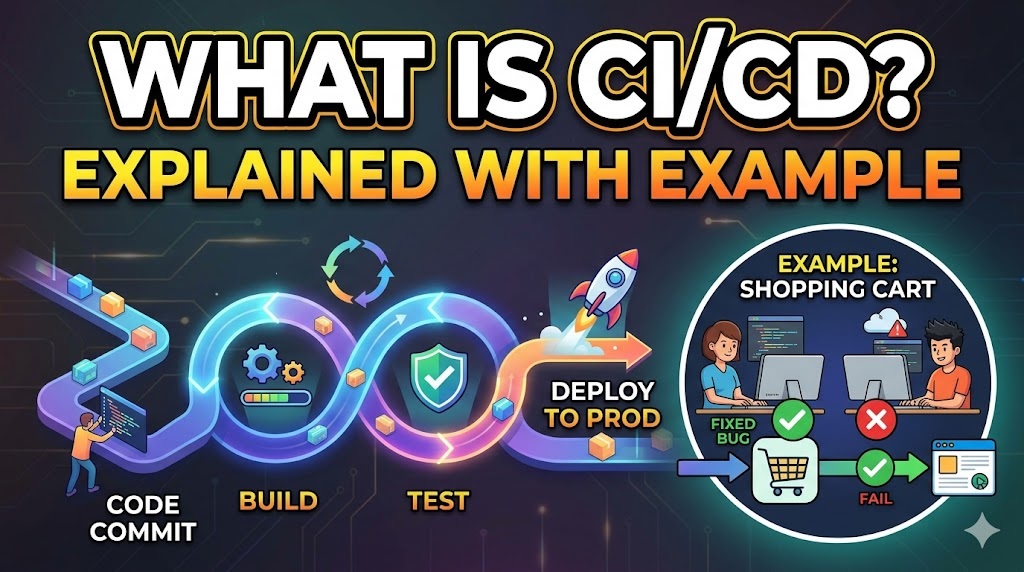
🔄 Here is the breakdown of the two phases:
- 🛠️ Continuous Integration (CI): The practice of developers frequently merging their code changes into a central repository (like GitHub). Every time code is merged, an automated system immediately builds the application and runs tests to ensure the new code hasn’t broken anything.
- 🚀 Continuous Deployment (CD): Once the code passes all the automated tests in the CI phase, CD automatically releases that code to a live production environment where customers can use it. (Note: Continuous Delivery is a variation where the code is automatically prepped for release, but a human must click a button to finalize the live deployment).
🌍 A Real-World Example
🛒 Imagine a team of developers building an online shopping website.
- 👩💻 The Change: Developer Alice is assigned to fix a bug in the shopping cart, while Developer Bob is adding a new “Wishlist” button.
- 🔄 Continuous Integration: Alice finishes her bug fix and “pushes” her code to the main system. The CI server immediately detects the new code. It compiles the website and automatically runs hundreds of tests. The system verifies that users can still add items to the cart and check out successfully.
- 🛑 The Catch: Bob pushes his Wishlist code a few minutes later. The CI server runs the tests again, but Bob’s code accidentally broke the login page. The automated tests fail. The CI system immediately blocks Bob’s code from moving forward and sends him an alert. This prevents a broken website from ever reaching the customers.
- ✅ Continuous Deployment: Because Alice’s shopping cart fix passed all tests perfectly, the CD pipeline automatically takes her code and deploys it to the live web servers. Within minutes of her writing the code, the bug is fixed for actual shoppers, without any manual intervention.
🕹️ To help visualize how this automated assembly line works, try experimenting with the pipeline simulator below:
❓ CI/CD అంటే ఏమిటి?
CI/CD అంటే కంటిన్యూయస్ ఇంటిగ్రేషన్ (Continuous Integration) మరియు కంటిన్యూయస్ డిప్లాయ్మెంట్ (Continuous Deployment – లేదా కంటిన్యూయస్ డెలివరీ). 💡 సాఫ్ట్వేర్ డెవలప్మెంట్ బృందాలు యూజర్లకు తరచుగా మరియు నమ్మకమైన రీతిలో కోడ్ మార్పులను అందించడానికి ఉపయోగించే పద్ధతి ఇది.
⚙️ చాలా నెలల పాటు భారీ మొత్తంలో కోడ్ రాసి, ఒకేసారి రిలీజ్ చేయడానికి బదులుగా (ఏదైనా లోపం జరిగితే ఇది రిస్క్ మరియు సరిదిద్దడం కష్టం), CI/CD సాఫ్ట్వేర్ను చిన్న, నిరంతర బ్యాచ్లలో నిర్మించడం (building), పరీక్షించడం (testing) మరియు డిప్లాయ్ (deploying) చేసే ప్రక్రియను ఆటోమేట్ చేస్తుంది.
🔄 ఈ రెండు దశల వివరాలు ఇక్కడ ఉన్నాయి:
- 🛠️ కంటిన్యూయస్ ఇంటిగ్రేషన్ (CI): డెవలపర్లు తమ కోడ్ మార్పులను తరచుగా ఒక సెంట్రల్ రిపోజిటరీకి (GitHub లాంటిది) మెర్జ్ చేసే (కలిపే) పద్ధతి. కోడ్ మెర్జ్ అయిన ప్రతిసారీ, ఒక ఆటోమేటెడ్ సిస్టమ్ వెంటనే అప్లికేషన్ను బిల్డ్ చేసి, కొత్త కోడ్ వల్ల ఎక్కడైనా బ్రేక్ అయిందా అని నిర్ధారించుకునేందుకు టెస్టులను రన్ చేస్తుంది.
- 🚀 కంటిన్యూయస్ డిప్లాయ్మెంట్ (CD): CI దశలో కోడ్ అన్ని ఆటోమేటెడ్ టెస్టులను పాస్ అయిన తర్వాత, CD ఆటోమేటిక్గా ఆ కోడ్ను కస్టమర్లు ఉపయోగించగలిగే లైవ్ ప్రొడక్షన్ వాతావరణంలోకి రిలీజ్ చేస్తుంది. (గమనిక: కంటిన్యూయస్ డెలివరీ అనేది మరొక పద్ధతి, ఇందులో కోడ్ రిలీజ్ చేయడానికి ఆటోమేటిక్గా సిద్ధం అవుతుంది, కానీ లైవ్ డిప్లాయ్మెంట్ను పూర్తి చేయడానికి ఒక మనిషి మాన్యువల్గా బటన్ను క్లిక్ చేయాల్సి ఉంటుంది).
🌍 వాస్తవిక ఉదాహరణ (A Real-World Example)
🛒 ఒక డెవలపర్ల బృందం ఆన్లైన్ షాపింగ్ వెబ్సైట్ను తయారు చేస్తోందని ఊహించుకోండి.
- 👩💻 మార్పు (The Change): డెవలపర్ ఆలిస్కు షాపింగ్ కార్ట్లోని బగ్ను ఫిక్స్ చేసే పని అప్పగించారు, అలాగే డెవలపర్ బాబ్ కొత్తగా “విష్లిస్ట్ (Wishlist)” బటన్ను యాడ్ చేస్తున్నాడు.
- 🔄 కంటిన్యూయస్ ఇంటిగ్రేషన్: ఆలిస్ తన బగ్ ఫిక్స్ను పూర్తి చేసి, తన కోడ్ను మెయిన్ సిస్టమ్కు “పుష్ (pushes)” చేసింది. CI సర్వర్ వెంటనే కొత్త కోడ్ను గుర్తిస్తుంది. అది వెబ్సైట్ను కంపైల్ చేసి ఆటోమేటిక్గా వందల కొద్దీ టెస్టులను రన్ చేస్తుంది. యూజర్లు ఇప్పటికీ కార్ట్కి వస్తువులను యాడ్ చేయగలరా మరియు విజయవంతంగా చెక్ అవుట్ చేయగలరా అని సిస్టమ్ నిర్ధారిస్తుంది.
- 🛑 సమస్య (The Catch): కొన్ని నిమిషాల తర్వాత బాబ్ తన విష్లిస్ట్ కోడ్ను పుష్ చేశాడు. CI సర్వర్ మళ్లీ టెస్టులను రన్ చేస్తుంది, కానీ బాబ్ కోడ్ పొరపాటున లాగిన్ పేజీని బ్రేక్ చేసింది. ఆటోమేటెడ్ టెస్టులు ఫెయిల్ అయ్యాయి. CI సిస్టమ్ వెంటనే బాబ్ కోడ్ను ముందుకు వెళ్లకుండా బ్లాక్ చేసి, అతనికి ఒక అలెర్ట్ పంపుతుంది. దీనివల్ల పాడైపోయిన వెబ్సైట్ కస్టమర్ల దగ్గరికి చేరకుండా నిరోధించబడుతుంది.
- ✅ కంటిన్యూయస్ డిప్లాయ్మెంట్: ఆలిస్ చేసిన షాపింగ్ కార్ట్ ఫిక్స్ అన్ని టెస్టులను పర్ఫెక్ట్గా పాస్ అయినందున, CD పైప్లైన్ ఆటోమేటిక్గా ఆమె కోడ్ను తీసుకుని లైవ్ వెబ్ సర్వర్లలో డిప్లాయ్ చేస్తుంది. ఆమె కోడ్ రాసిన కొన్ని నిమిషాల్లోనే, ఎలాంటి మాన్యువల్ ప్రమేయం లేకుండా అసలైన షాపర్ల కోసం బగ్ ఫిక్స్ చేయబడుతుంది.
🕹️ ఈ ఆటోమేటెడ్ అసెంబ్లీ లైన్ ఎలా పనిచేస్తుందో స్పష్టంగా అర్థం చేసుకోవడానికి, కింద ఉన్న పైప్లైన్ సిమ్యులేటర్తో ప్రయోగం చేసి చూడండి: